
Important Safety Instructions
Please read these safety instructions carefully before installing, operating, or performing maintenance on your washing machine. Keep this manual for future reference.
- Electrical Safety: Ensure the appliance is connected to a properly grounded outlet. Do not use extension cords or multiple socket adapters.
- Water Connection: Connect the water inlet hose securely to a cold water tap. Check for leaks before first use.
- Child Safety: Keep children and pets away from the appliance during operation. Activate the child lock function to prevent accidental program changes.
- Appliance Stability: Ensure the washing machine is level and stable on a solid floor to prevent vibrations and noise during operation.
- Maintenance: Disconnect the appliance from the power supply before cleaning or performing any maintenance.
- Damage: Do not operate the appliance if it is damaged, especially the power cord or water hoses. Contact customer service immediately.
Product Overview
The Bosch WGG244Z6IT is a high-performance, freestanding front-load washing machine designed for efficient and gentle laundry care. With a 9 kg capacity and an A energy efficiency rating, it offers advanced features for optimal washing results.
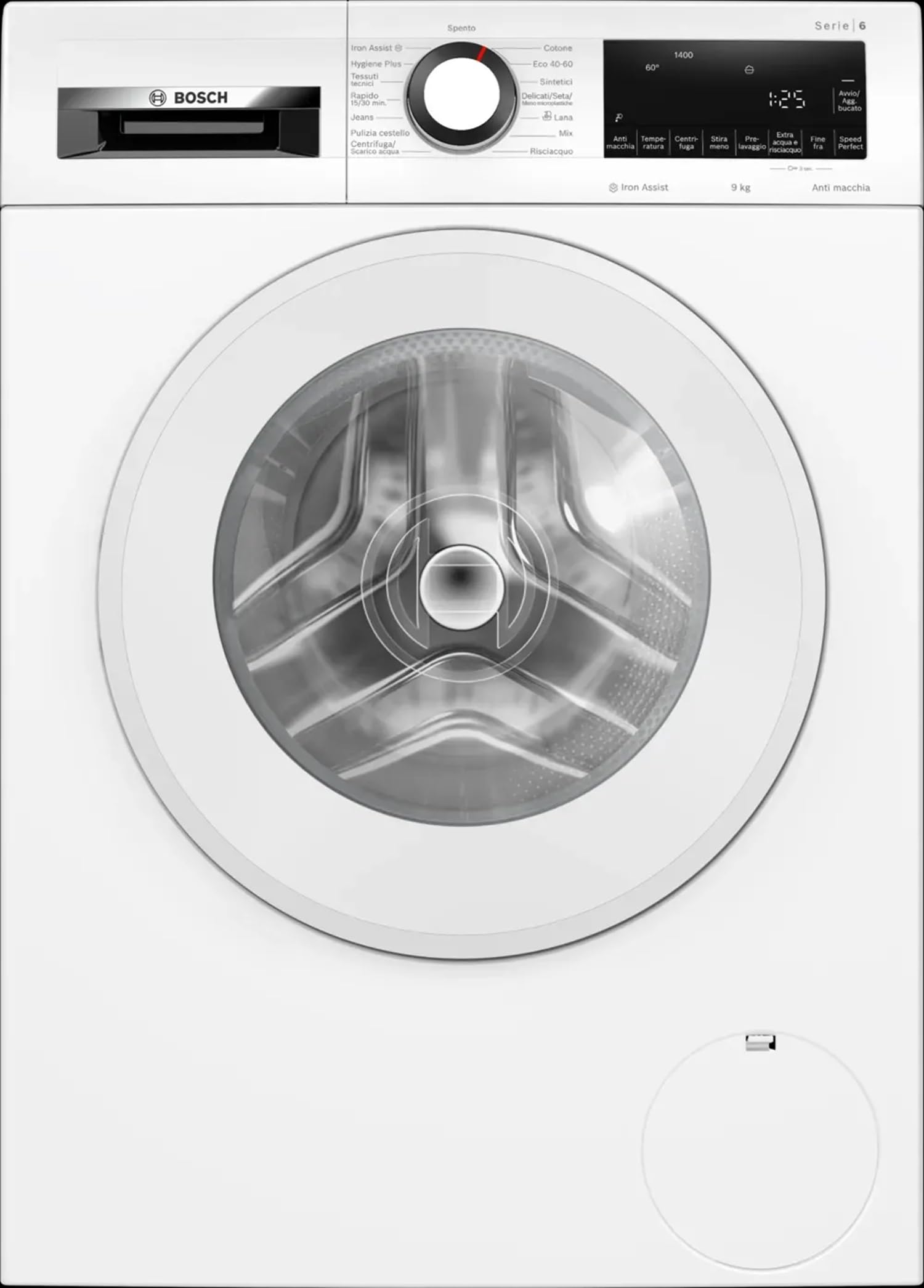
Key features include the EcoSilence Drive for quiet operation, SpeedPerfect for reduced wash times, and an Add Laundry function for convenience. The WaveDrum design ensures gentle yet thorough cleaning for all fabric types.
Setup and Installation
1. Unpacking
- Remove all packaging materials, including the polystyrene base and any protective film.
- Remove the transport bolts from the rear of the machine. Keep them for future transport.
- Cover the holes with the provided caps.
2. Positioning
- Place the washing machine on a firm, level surface.
- Adjust the feet using a spanner until the machine is perfectly level. Use a spirit level to verify. Maximum foot adjustment is 12 mm.
- Ensure there is adequate space around the machine for ventilation and maintenance.
3. Water Connection
- Connect the supplied inlet hose to the cold water tap (3/4" thread). Tighten by hand, then with a wrench, but do not overtighten.
- Place the drain hose into a standpipe or securely over the edge of a sink, ensuring it is not kinked or submerged in water.
4. Electrical Connection
- Plug the power cord into a grounded electrical outlet. The power cord length is 160 cm.
- Ensure the voltage and frequency match the specifications on the rating plate of the appliance.
Operating Instructions
1. Control Panel Overview
The washing machine features a touch control panel with an LED display for easy program selection and monitoring. The display shows remaining time, program status, and selected options.
2. First Use
- Before washing laundry for the first time, run an empty wash cycle at 60°C without detergent to clean the drum.
3. Loading Laundry
- Sort laundry by fabric type, color, and degree of soiling.
- Open the door and load the laundry loosely into the drum. Do not overload the machine; the maximum capacity is 9 kg.
- Close the door firmly until it clicks.
4. Adding Detergent
- Pull out the detergent dispenser drawer.
- Add the appropriate amount of detergent and fabric softener to the designated compartments. Refer to the detergent manufacturer's instructions.
- Push the dispenser drawer back in completely.
5. Selecting a Program
- Turn the program selector dial to choose the desired wash program (e.g., Delicates, Cottons, Wool, Eco 40-60).
- Adjust temperature and spin speed settings if necessary using the touch controls. Max spin speed is 1400 rpm.
6. Starting a Wash Cycle
- Press the Start/Pause button to begin the wash cycle.
- The digital display will show the remaining time.
7. Special Functions
- SpeedPerfect: Reduces wash time by up to 65% without compromising wash quality.
- Add Laundry Function: Allows you to add forgotten items even after the wash cycle has started, provided the water level and temperature are safe.
- Anti-stain Function: Targets specific stain types for effective removal.
- WaterPlus: Provides an extra rinse for sensitive skin.
Maintenance and Care
1. Cleaning the Exterior
- Wipe the exterior of the machine with a soft, damp cloth.
- Do not use abrasive cleaners or solvents.
2. Cleaning the Detergent Dispenser
- Pull out the dispenser drawer completely.
- Remove all inserts and wash them under running water.
- Clean the drawer housing with a brush.
- Reassemble and reinsert the drawer.
3. Cleaning the Drain Pump Filter
- Open the service flap at the bottom front of the machine.
- Place a shallow container underneath to collect residual water.
- Carefully unscrew the filter cover counter-clockwise and remove any lint or foreign objects.
- Clean the filter and screw it back in securely. Close the service flap.
4. Descaling
- Depending on water hardness and frequency of use, descale the machine every few months.
- Use a suitable descaling agent specifically designed for washing machines and follow the product instructions.
Troubleshooting
If you encounter any issues with your washing machine, please refer to the table below for common problems and solutions. If the problem persists, contact customer service.
| Problem | Possible Cause | Solution |
|---|---|---|
| Machine does not start | Power cord not plugged in; Door not closed properly; Program not selected; Start button not pressed. | Check power connection; Close door firmly; Select a program; Press Start button. |
| No water intake | Water tap closed; Inlet hose kinked; Water filter blocked. | Open water tap; Straighten hose; Clean water inlet filter. |
| Water not draining | Drain hose kinked or blocked; Drain pump filter blocked. | Check and clear drain hose; Clean drain pump filter. |
| Excessive vibration/noise | Transport bolts not removed; Machine not level; Overloaded drum. | Remove transport bolts; Adjust feet to level machine; Reduce laundry load. |
| Poor wash results | Incorrect program selection; Insufficient detergent; Overloaded drum. | Select appropriate program; Use correct detergent amount; Do not overload. |
Technical Specifications
| Feature | Value |
|---|---|
| Brand | Bosch |
| Model Number | WGG244Z6IT |
| Installation Type | Freestanding |
| Capacity | 9 kg |
| Energy Efficiency Class | A |
| Max Spin Speed | 1400 rpm |
| Noise Emission (Airborne) | 71 dB(A) re 1pW |
| Control Type | Touch |
| Motor Type | EcoSilence Drive |
| Anti-flood Protection | Aqua Vigil |
| Child Lock | Yes |
| Product Dimensions (HxWxD) | 845 x 598 x 588 mm |
| Depth with Door Open (90°) | 1049 mm |
| Drum Volume | 65 l |
| Net Weight | 71.3 kg |
| Power Cord Length | 160 cm |
Warranty and Support
This Bosch washing machine comes with a standard manufacturer's warranty. Please refer to the warranty card included with your appliance for specific terms and conditions, including the duration and coverage details.
For technical assistance, spare parts, or to schedule a service appointment, please contact Bosch customer support. You can find contact information on the Bosch official website or in the documentation provided with your appliance.
When contacting support, please have your appliance's model number (WGG244Z6IT) and serial number ready. The serial number is typically located on a label inside the door frame or on the back of the appliance.