
1. Introduction
Thank you for choosing the CREATE Warm Towel Advance Electric Towel Warmer with Heater and WiFi. This device is designed to provide both warm towels and supplemental heating for your bathroom or other suitable rooms. It features advanced PTC heating technology, app control, and an LCD display for convenient operation. Please read this manual thoroughly before installation and use to ensure safe and efficient operation.
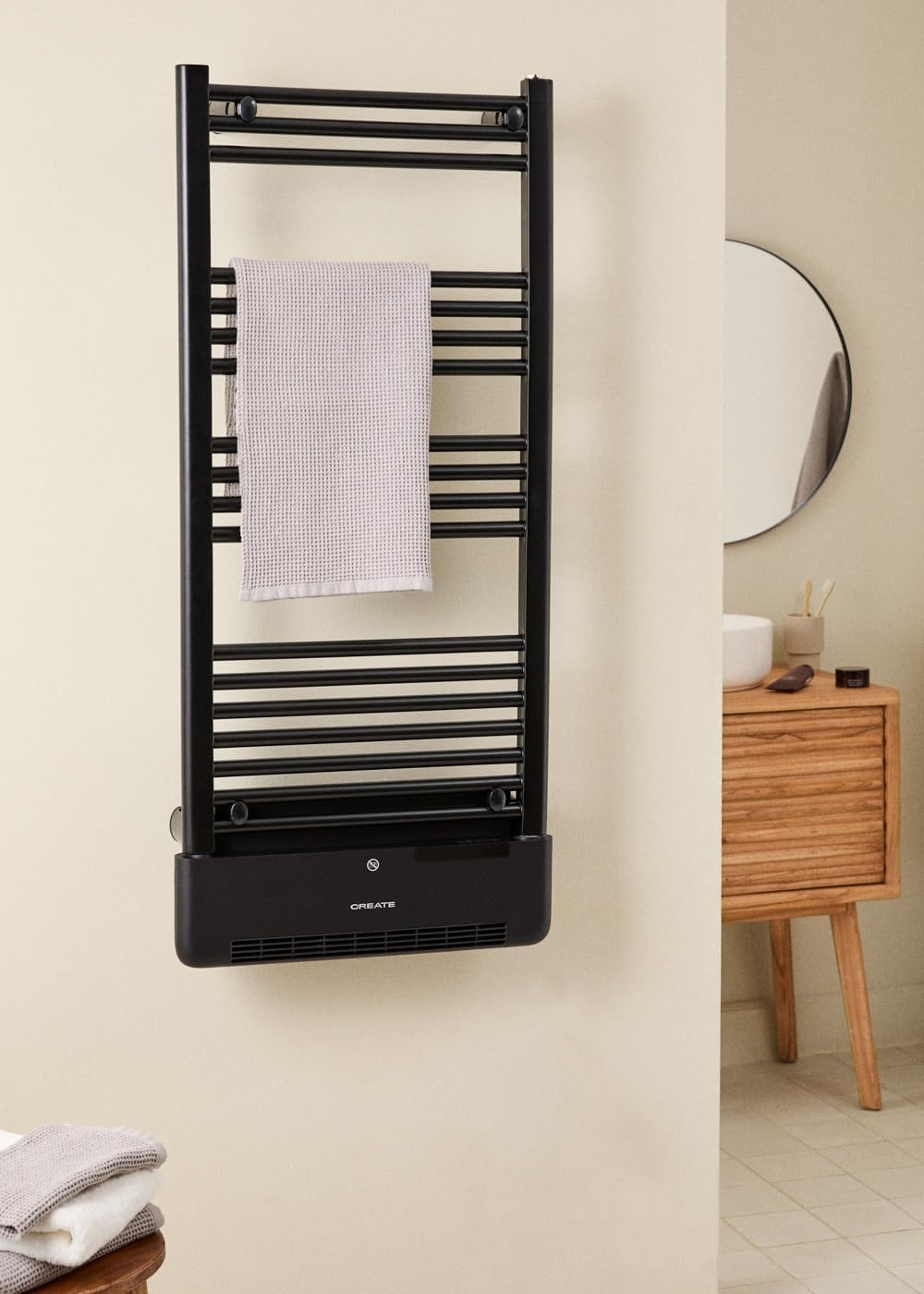
Image 1.1: The CREATE Warm Towel Advance electric towel warmer installed in a bathroom setting.
2. Safety Information
Before using the appliance, please read these safety instructions carefully and keep them for future reference. Incorrect use may result in electric shock, fire, or injury.
- Ensure the power supply voltage matches the rating label on the appliance.
- Do not immerse the appliance, cord, or plug in water or other liquids.
- This appliance is intended for domestic use only. Do not use it outdoors.
- Keep the appliance away from children and pets.
- Do not operate the appliance with a damaged cord or plug.
- Always unplug the appliance when not in use and before cleaning.
- Do not cover the appliance during operation to prevent overheating.
- Ensure proper ventilation around the unit.
- The appliance has an IP24 protection rating, making it splash-proof. However, avoid direct water jets.
- Do not install the appliance directly below a socket outlet.
3. Product Overview and Features
The CREATE Warm Towel Advance combines a towel warmer with a ceramic heater, offering versatile functionality for your home.
Key Features:
- Dual Power Output: 750W for towel warming bars and 1000W for the ceramic heater.
- WiFi Connectivity: Control and program the device remotely via the CREATE app.
- LCD Display: Intuitive on-device control and temperature display.
- PTC Technology: Self-regulating ceramic heating element for energy efficiency and consistent heat.
- Open Window Detection: Automatically switches off heating if a sudden temperature drop is detected, saving energy.
- Overheating Protection: Built-in safety mechanism to prevent overheating.
- IP24 Protection: Splash-proof design suitable for bathroom environments.
- Coverage: Effective heating for rooms up to 20m².

Image 3.1: Detailed view of the integrated LCD control panel.

Image 3.2: Remote control via the CREATE mobile application.
4. Installation and Setup
Proper installation is crucial for the safe and efficient operation of your towel warmer. It is recommended that installation be performed by a qualified professional.
4.1. Mounting the Unit
The towel warmer is designed for wall mounting. Ensure the mounting surface is sturdy and capable of supporting the unit's weight (approximately 17.2 kg). Refer to the dimensions diagram for precise measurements and mounting points.
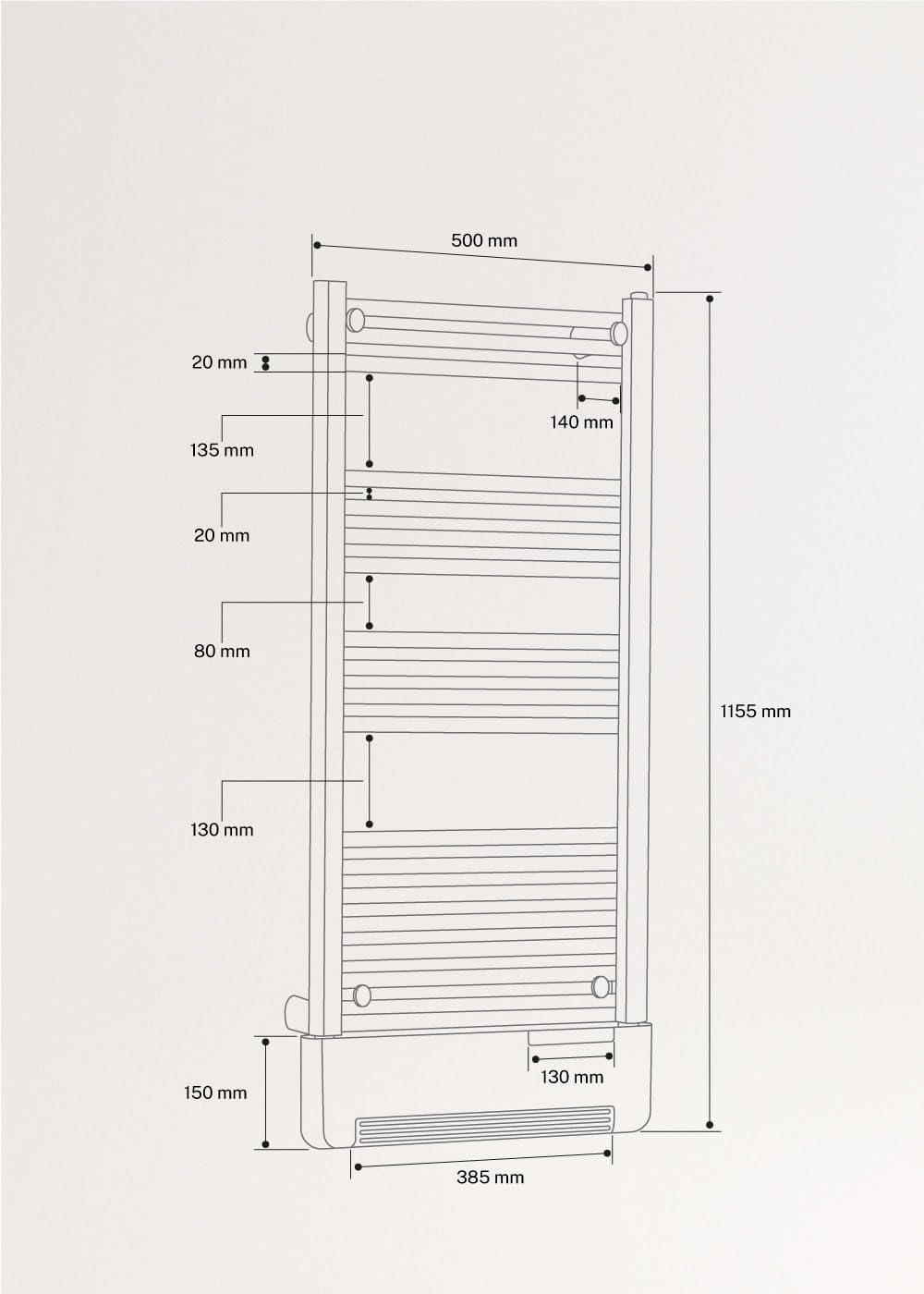
Image 4.1: Product dimensions for installation planning.
- Mark the drilling points on the wall according to the provided template or dimensions.
- Drill holes and insert appropriate wall plugs.
- Secure the mounting brackets to the wall.
- Carefully attach the towel warmer to the mounting brackets.
- Ensure the unit is level and securely fastened.
4.2. Electrical Connection
Connect the appliance to a suitable grounded power outlet. Ensure the outlet is easily accessible for disconnection if needed. Do not use extension cords or adapters.
4.3. WiFi Connection (App Control)
To utilize the smart features, connect your device to the CREATE app.
- Download the CREATE app from your smartphone's app store.
- Register or log in to your CREATE account.
- Ensure your smartphone is connected to a 2.4 GHz WiFi network. The device may not connect to 5 GHz networks.
- Follow the in-app instructions to add a new device. This typically involves putting the towel warmer into pairing mode (refer to the device's LCD display or manual for specific button presses).
- Once connected, you can control and program the towel warmer remotely.
5. Operating Instructions
The CREATE Warm Towel Advance can be operated via its integrated LCD display or through the CREATE mobile app.
5.1. Using the LCD Display
The LCD display and control buttons are located on the front of the unit's base.
Image 5.1: Control panel for manual operation.
- Power Button: Press to turn the unit ON/OFF.
- Mode Button: Cycle through different operating modes (e.g., Towel Warming, Heater, Auto).
- Temperature Adjustment: Use '+' and '-' buttons to set the desired temperature (up to 35°C).
- Timer/Schedule: Access timer or scheduling functions (refer to specific icons on the display).
- WiFi Indicator: Shows the status of the WiFi connection.
5.2. Using the CREATE App
The CREATE app provides comprehensive control and scheduling features.
Image 5.2: App interface for remote control.
- Remote ON/OFF: Turn the unit on or off from anywhere.
- Temperature Control: Adjust the target temperature.
- Mode Selection: Choose between towel warming (750W) and ceramic heating (1000W) modes.
- Scheduling: Create custom heating schedules for different days and times.
- Open Window Detection: Enable or disable this energy-saving feature.
- Anti-Frost Function: Maintain a minimum temperature to prevent freezing.
6. Maintenance
Regular maintenance ensures the longevity and optimal performance of your towel warmer.
6.1. Cleaning
- Always unplug the appliance before cleaning.
- Wipe the exterior surfaces with a soft, damp cloth.
- Do not use abrasive cleaners, solvents, or harsh chemicals, as these can damage the finish.
- Ensure no water enters the control panel or ventilation openings.
- Clean the air intake and outlet vents periodically to prevent dust buildup, which can affect heating efficiency.
6.2. Storage
If storing the unit for an extended period, ensure it is clean and dry. Store it in a cool, dry place, protected from dust and direct sunlight.
7. Troubleshooting
If you encounter issues with your CREATE Warm Towel Advance, refer to the following common problems and solutions.
| Problem | Possible Cause | Solution |
|---|---|---|
| Unit does not turn on. | No power supply. | Check if the power cord is securely plugged in and the wall outlet is functional. |
| No heat output. | Temperature setting too low; Overheating protection activated. | Increase the target temperature. Unplug the unit, wait 30 minutes, and plug it back in. Ensure vents are not blocked. |
| WiFi connection fails. | Incorrect WiFi band (5GHz); Incorrect password; Router too far. | Ensure your router is set to 2.4 GHz. Re-enter the WiFi password carefully. Move the unit closer to the router or use a WiFi extender. |
| Open Window Detection activates unexpectedly. | Sudden draft or temperature drop. | This is normal operation. If persistent, check for drafts or disable the feature via the app if not desired. |
| LCD display not working. | Power issue; Internal fault. | Check power supply. If the problem persists, contact customer support. |
If the problem persists after attempting these solutions, please contact CREATE customer support for assistance.
8. Specifications
| Feature | Specification |
|---|---|
| Brand | CREATE |
| Model | Warm Towel Advance |
| Color | Black |
| Dimensions (L x W x H) | 51.5 x 11 x 115.5 cm |
| Weight | 17.2 kg |
| Power (Towel Bars) | 750 W |
| Power (Ceramic Heater) | 1000 W |
| Material | Steel / ABS |
| Max. Temperature | 35°C |
| Protection Rating | IP24 |
| Connectivity | WiFi (2.4 GHz) |
| Control | LCD Display, Mobile App |
9. Warranty and Support
CREATE products are manufactured to high-quality standards. This product comes with a standard manufacturer's warranty against defects in materials and workmanship. Please refer to the warranty card included with your purchase for specific terms and conditions.
For technical support, troubleshooting assistance, or warranty claims, please contact CREATE customer service. Contact details can typically be found on the CREATE website or on your purchase documentation.
