
1. Introduction and Overview
The ENONEO Outdoor Secure Key Box (Model G21) provides a robust and convenient solution for secure key storage and access. Constructed from high-strength aluminum alloy and featuring a customizable 4-12 digit code, this key box is designed to withstand harsh conditions and unauthorized access. Its large internal capacity accommodates multiple keys, car keys, bank cards, and access cards, making it ideal for various applications from residential use to commercial settings.

This image shows the ENONEO Outdoor Secure Key Box in both closed and open states, highlighting its keypad and the spacious interior designed to hold keys and cards.
2. Product Features
- High Security and Durability: Manufactured from high-strength aluminum alloy, resistant to hammering, sawing, and prying. An ABS protective cover shields the dial from dust, rain, snow, and ice, extending the product's lifespan. The code can be set from 4 to 12 digits, offering thousands of reliable combinations.
- Large Storage Capacity: External dimensions: 11.5 x 8.5 x 6.2 cm (L x W x D); Internal dimensions: 10 x 8 x 4.5 cm (L x W x D). Capable of holding 7-15 standard keys, 3-4 car keys, bank cards, and access control cards.
- Wide Applications: Waterproof, rust-resistant, and corrosion-resistant, making it suitable for both indoor and outdoor installation. Ideal for homes, fences, offices, garages, dormitories, gyms, hospitals, schools, apartments, and more.
- Easy Key Sharing: Provides maximum security and convenience for emergency entry, family members, friends, doctors, cleaners, real estate agents, and tenants.

This image illustrates the robust construction of the ENONEO Key Safe, demonstrating its resistance to prying with a drill and its reinforced lock body against hammering.

This image visually represents the internal capacity of the key box, showing that it can securely store various items such as keychains, bank cards, access cards, and car keys.

This image demonstrates the versatility of the key box, showing its utility in different settings such as apartments, shared housing, neighborhoods, for emergency medical access, courier services, and real estate agents.
3. Package Contents
Please verify that all components are present in the package:
- 1 x ENONEO Key Box
- 4 x Wall Plugs (Expansion Screws)
- 4 x Screws
- 1 x User Manual
- 1 x Screwdriver
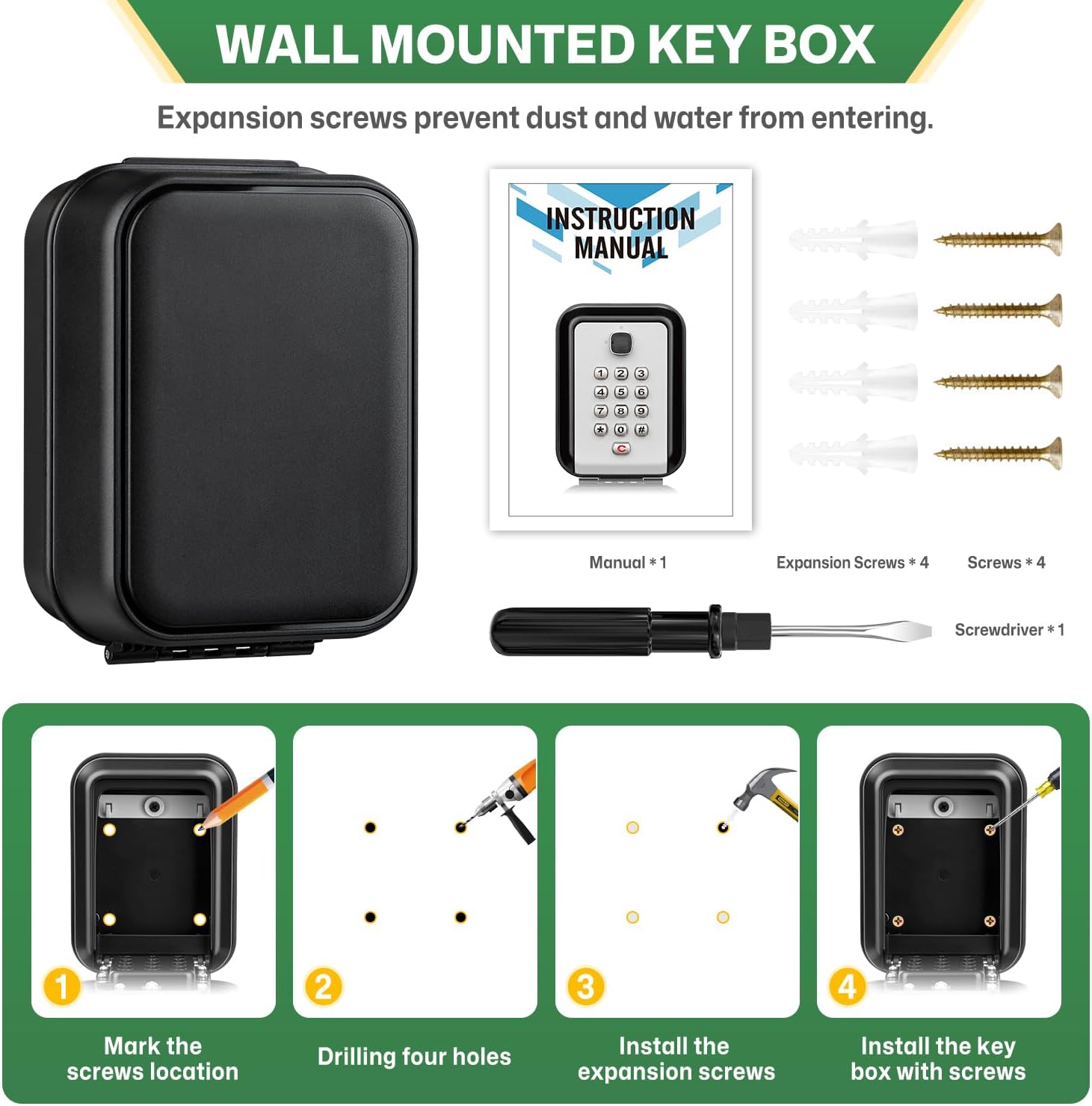
This image displays the ENONEO Key Box along with all the items included in the package: the key box itself, the user manual, four expansion screws, four standard screws, and a screwdriver.
4. Setup and Installation
The ENONEO Key Box is designed for wall-mounted installation. Follow these steps for secure mounting:
- Mark the Screw Locations: Hold the key box against the desired installation surface and use a pencil to mark the four drilling points.
- Drill Four Holes: Use an appropriate drill bit to drill holes at the marked locations. Ensure the depth is sufficient for the expansion screws.
- Install the Expansion Screws: Insert the wall plugs (expansion screws) into the drilled holes. Use a hammer to gently tap them flush with the surface if necessary.
- Install the Key Box with Screws: Align the key box with the installed wall plugs and secure it firmly using the provided screws and screwdriver.

This image provides a visual step-by-step guide for installing the key box, from marking the wall to securing the box with screws.
5. Operating Instructions: Setting Your Code
The initial code for the key box is 0-0-0-0. You can quickly reset it to a new code with these simple steps. The new code can be 4 to 12 digits long and cannot contain repeating digits.
- Open the Key Box: Rotate the switch located on the top of the keypad to the open position to unlock the key box.
- Prepare for Code Setting: Rotate the switch again to the code setting position.
- Rotate the Code Mechanism: Use the provided screwdriver to rotate the code setting mechanism 180 degrees, located inside the key box.
- Record Your New Password: It is crucial to write down your new password or take a photo of it. If you forget the code, you will not be able to open the box.
- Enter the New Password: After setting the internal mechanism, enter your desired new password on the keypad.
- Verify Setting: If you can open the key box with the newly entered password, the setting process is complete and successful.

This image illustrates the six steps required to set a new password for the key box, including opening the box, rotating the internal switch, using a screwdriver, recording the code, entering it, and verifying.
6. Maintenance
To ensure the longevity and optimal performance of your ENONEO Key Box, consider the following maintenance tips:
- Regular Cleaning: Periodically wipe the exterior of the key box with a soft, damp cloth to remove dust and dirt. Avoid abrasive cleaners.
- Protect the Dial: Always ensure the ABS protective cover is properly closed when the key box is not in use to prevent dust, rain, snow, or ice from affecting the keypad mechanism.
- Check Mounting: Periodically inspect the mounting screws to ensure they remain tight and secure, especially if the box is exposed to vibrations or extreme weather conditions.
- Lubrication (Optional): If the opening mechanism feels stiff over time, a small amount of silicone-based lubricant can be applied to the moving parts, avoiding the keypad.
7. Troubleshooting
If you encounter any issues with your ENONEO Key Box, please refer to the following common troubleshooting steps:
| Problem | Possible Cause | Solution |
|---|---|---|
| Key box does not open. | Incorrect code entered. Switch not fully rotated. | Ensure the correct 4-12 digit code is entered. Make sure the internal switch is fully rotated to the open position. |
| Code forgotten. | The code was not recorded or remembered. | Important: There is no master reset or override for a forgotten code. It is crucial to write down your code and keep it in a safe place. If the code is forgotten, the box cannot be opened without the correct combination. |
| Buttons are stiff or unresponsive. | Accumulation of dirt or debris. Lack of lubrication. | Clean the keypad surface and around the buttons. Apply a small amount of silicone-based lubricant if necessary. |
| Key box feels loose on the wall. | Mounting screws have loosened. | Tighten the mounting screws. If the wall plugs are damaged, consider re-drilling and using new ones. |
8. Specifications
| Feature | Detail |
|---|---|
| Brand | ENONEO |
| Model Number | G21 |
| Color | Black |
| Material | Metal (High-strength aluminum alloy) |
| Product Dimensions (L x W x H) | 8.5 x 6.2 x 11.5 cm (3.35 x 2.44 x 4.53 inches) |
| Internal Dimensions (L x W x D) | 10 x 8 x 4.5 cm (3.94 x 3.15 x 1.77 inches) |
| Item Weight | 620 grams (1.37 lbs) |
| Special Features | Internal hook, High capacity, High security, Waterproof, Retractable |
| Recommended Uses | Outdoor key box, secure key storage, emergency key safe, combination lockbox |
| Mounting Type | Wall Mount |
| Included Components | Key box, 4 wall plugs, 4 screws, user manual, screwdriver |
9. Warranty and Support
ENONEO is committed to providing high-quality products and excellent service. For any questions, concerns, or support needs regarding your ENONEO Key Box, please contact our customer service team.
Customer Support Email: enoneou@outlook.com
Please include your product model (G21) and a detailed description of your issue when contacting support to help us assist you more efficiently.

This image shows a customer service representative, symbolizing the availability of support for product inquiries.


