1. Introduction
This manual provides comprehensive instructions for the assembly, operation, and maintenance of your suptek Dual Monitor Mount (Model ML8SP). Please read this manual thoroughly before installation and use to ensure proper setup and safe operation. This monitor mount is designed to enhance your workspace ergonomics by allowing flexible positioning of two monitors.
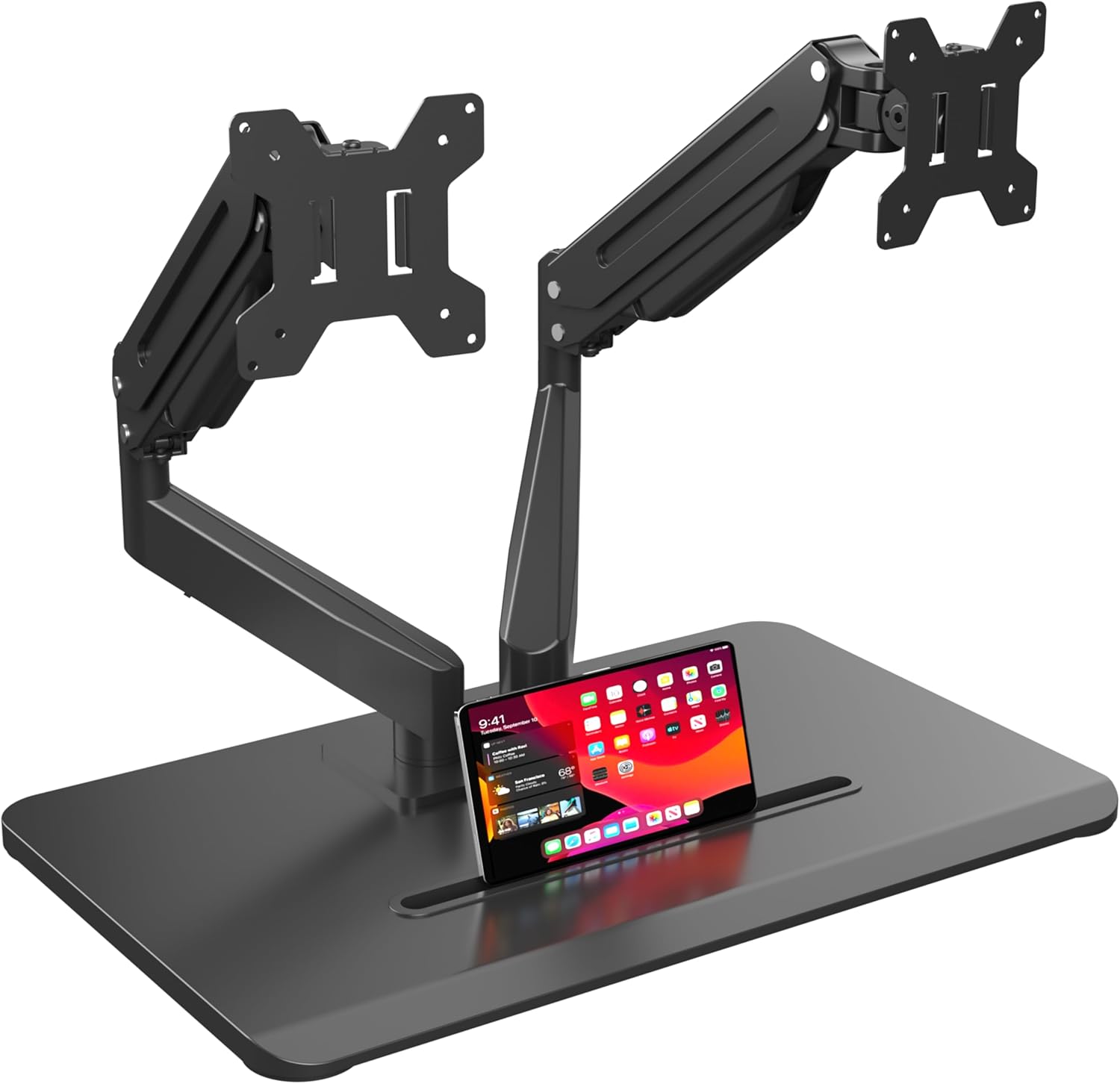
Figure 1: suptek Dual Monitor Mount ML8SP
2. Safety Information
- Ensure all components are present and undamaged before assembly. Do not use if any parts are missing or defective.
- Verify that your monitors meet the weight and size specifications (up to 32 inches and 22 lbs per arm) and have compatible VESA mounting patterns (75x75mm or 100x100mm).
- Do not overtighten screws during assembly to prevent damage to the product or your monitors.
- Keep small parts away from children.
- Adjust gas spring tension carefully according to monitor weight to prevent monitors from rising or falling unexpectedly.
3. Package Contents
The package includes all necessary hardware and tools for assembly. Refer to the step-by-step user manual included in the package for a detailed list of components.

Figure 2: Product Compatibility and Dimensions
4. Setup Instructions
Follow these steps to assemble your dual monitor mount:
- Base Assembly: Connect the pole to the freestanding base using the provided bolts and hex wrench. Ensure it is securely tightened.
- Monitor Arm Preparation: Attach the VESA plates to the back of your monitors using the appropriate screws. Do not overtighten.
- Mounting Monitors: Slide the monitors (with attached VESA plates) onto the monitor arms. Secure them in place with the provided knobs and bolts.
- Attach Arms to Pole: Slide the assembled monitor arms onto the central pole. Adjust to your desired height and tighten the bolt at the rear of the arm using the hex wrench.
- Cable Management: Route all monitor cables through the integrated cable management clips on the arms and down the central pole to maintain a tidy workspace.
For a visual guide, please refer to the installation video below:
Video 1: Freestanding Dual Monitor Mount Installation Guide

Figure 3: Integrated Cable Management
5. Operating Instructions
The suptek Dual Monitor Mount offers extensive adjustability for an ergonomic viewing experience:
- Height Adjustment: The gas spring mechanism allows for smooth, one-touch height adjustment. Simply push or pull the monitor to your desired vertical position.
- Tilt, Swivel, and Rotation: Monitors can be rotated 360° (for landscape or portrait orientation), tilted ±80° up and down, and swiveled ±180° left and right. Adjust the screen to the most comfortable position to reduce strain on your neck and shoulders.
- Storage Slot: The base features a unique storage slot designed to hold tablets, phones, pens, sticky notes, and other small office supplies, helping to keep your desk organized.
Video 2: Freestanding Dual Monitor Mount Overview and Adjustments

Figure 4: Flexible Monitor Arm Adjustments

Figure 5: Multi-purpose Storage Slot
6. Maintenance
To ensure the longevity and optimal performance of your monitor mount, regularly inspect all screws and connections to ensure they remain tight. Clean the surfaces with a soft, dry cloth. Avoid using abrasive cleaners or solvents.
7. Troubleshooting
- Monitor raises up unexpectedly: Turn the gas spring adjustment screw clockwise ("-" direction) to reduce tension for lighter monitors.
- Monitor falls down unexpectedly: Turn the gas spring adjustment screw counterclockwise ("+" direction) to increase tension for heavier monitors.
- Monitors are not level: Adjust the bolt on the VESA plate to raise or lower the monitor until both screens are aligned.

Figure 6: Easy Gas Spring Adjustment
8. Specifications
| Feature | Detail |
|---|---|
| Brand | suptek |
| Model | ML8SP |
| Compatible Screen Size | 17 to 32 inches |
| Max Load Capacity | 22 lbs per arm |
| VESA Compatibility | 75x75mm, 100x100mm |
| Mounting Type | Tabletop Mount (Freestanding) |
| Movement Type | Rotate, Swivel, Tilt, Articulating |
| Rotation | 360° |
| Tilt Angle | ±80° |
| Swivel Angle | ±180° |
| Base Dimensions | 53.5 cm (L) x 33 cm (W) |
| Material | Alloy Steel |
| Color | Black |
9. Warranty and Support
This product comes with a standard manufacturer's warranty. For specific warranty details, please refer to the product packaging or contact customer service. If you encounter any problems during the installation process or product usage, please contact our customer service team for timely assistance.
Contact information for customer service can typically be found on the product packaging or the manufacturer's official website.


