
EXOTON S-1503
EXOTON S-1503 Portable Line Array Column PA/DJ System Instruction Manual
Model: S-1503
1. Introduction
This manual provides essential information for the safe and effective operation of your EXOTON S-1503 Portable Line Array Column PA/DJ System. Please read this manual thoroughly before using the product to ensure proper setup, optimal performance, and to prevent damage.
The EXOTON S-1503 is a high-powered, compact sound system designed for professional audio applications. It features a 15-inch powered subwoofer and a column array with eight 3.5-inch neodymium drivers, delivering 2000 watts peak power and 125dB SPL. The system includes integrated DSP presets, Bluetooth connectivity, and multiple input options for versatile use.
2. Package Contents
Verify that all items listed below are included in your package:
- 15" Powered Subwoofer (x1)
- Long Array Extension (x1)
- Short Array Extension (x1)
- Column Array Speaker (x1)
- Travel Bag (x1)
- Power Cable (x1)
- User Manual (x1)

Image: All components of the EXOTON S-1503 system, including the subwoofer, column array, extension poles, and carry bag.
3. Setup Instructions
3.1. System Assembly
- Position the Subwoofer: Place the 15" powered subwoofer on a stable, flat surface in your desired location. Ensure adequate ventilation around the unit.
- Attach Extension Poles: Insert either the long or short array extension pole into the pole mount on top of the subwoofer. For taller setups, use both extension poles.
- Mount the Column Array: Carefully place the column array speaker onto the top of the extension pole(s). Ensure it is securely seated.

Image: Close-up view of the secure connection point for the column array pole on the subwoofer.
3.2. Power Connection
- Ensure the system's power switch is in the OFF position.
- Connect the provided power cable to the AC inlet on the rear panel of the subwoofer.
- Plug the other end of the power cable into a suitable AC power outlet.
4. Operating Instructions
4.1. Control Panel Overview
The rear panel of the subwoofer houses all input connections, controls, and indicators.

Image: Detailed view of the EXOTON S-1503 subwoofer's rear control panel, showing various inputs, volume controls, and DSP settings.
- DSP Mode Switching Indicator: Lights indicate the active DSP preset.
- Bluetooth Switch Button: Activates Bluetooth pairing mode.
- RCA Signal Input Interface: For connecting devices via RCA cables.
- 6.35mm XLR Linear Composite Input Interface: Versatile input for various audio sources.
- 6.35mm Microphone Input B Interface: Dedicated input for microphones.
- XLR Line Output: For connecting to additional PA systems or recording devices.
- Bluetooth, Power, Signal, Overload Indicator Lights: Provide status feedback.
- DSP Mode Switching Controller: Button to cycle through DSP presets.
- Controller for Channel A: Volume control for Channel A inputs.
- Switch for Mic/LINE Input: Toggles input sensitivity for connected devices.
- Controller for Channel B: Volume control for Channel B inputs.
4.2. Audio Input Modes
The S-1503 supports multiple audio input methods:
- Bluetooth: For wireless streaming from smartphones, tablets, and other Bluetooth-enabled devices.
- USB: For connecting USB audio sources.
- XLR: Professional audio input for microphones, mixers, and other XLR-compatible equipment.
- RCA: Standard audio input for consumer-grade audio devices.

Image: Illustration of the EXOTON S-1503 connected to a computer, mobile phone, guitar, mixer, and wired microphone, demonstrating its versatile connectivity.
4.3. Bluetooth Pairing
- Power on the EXOTON S-1503 system.
- Press the Bluetooth Switch Button on the rear panel. The Bluetooth indicator light will flash, indicating pairing mode.
- On your Bluetooth-enabled device (smartphone, tablet, etc.), navigate to the Bluetooth settings and search for available devices.
- Select "EXOTON S-1503" from the list. Once connected, the Bluetooth indicator light will become solid.
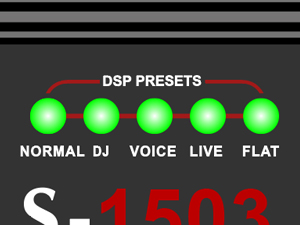
Image: A finger pressing the Bluetooth switch button on the control panel.
4.4. DSP Presets
The S-1503 features five Digital Signal Processing (DSP) presets optimized for different scenarios. Use the DSP Mode Switching Controller to cycle through them:
- NORMAL: General purpose sound profile.
- DJ: Enhanced bass and treble for DJ performances.
- VOICE: Optimized for vocal clarity.
- LIVE: Suitable for live music performances.
- FLAT: A neutral frequency response for precise sound engineering or when using external equalizers.

Image: Indicator lights for the five DSP presets: NORMAL, DJ, VOICE, LIVE, FLAT.
4.5. True Wireless Stereo (TWS) Function
The S-1503 supports TWS for connecting two S-1503 units wirelessly for a stereo sound experience. Refer to the full TWS pairing instructions in the detailed user manual for specific steps.
5. Maintenance
5.1. Cleaning
- Always disconnect the power cable before cleaning.
- Use a soft, dry cloth to wipe down the exterior surfaces.
- For stubborn dirt, a slightly damp cloth can be used, followed by a dry cloth.
- Do not use abrasive cleaners, solvents, or harsh chemicals, as these can damage the finish.
5.2. Storage
- When not in use, store the system in a cool, dry place, away from direct sunlight and extreme temperatures.
- Utilize the provided travel bag for the column array and extension poles to protect them during transport and storage.

Image: The black travel bag designed to store and protect the column array and extension poles of the EXOTON S-1503 system.
6. Troubleshooting
If you encounter issues with your EXOTON S-1503 system, refer to the following common problems and solutions:
| Problem | Possible Cause | Solution |
|---|---|---|
| No power | Power cable not connected; Power switch off; Outlet not functioning. | Ensure power cable is securely connected. Turn power switch ON. Test outlet with another device. |
| No sound output | Volume too low; Incorrect input selected; Source device not playing; Cables loose/faulty. | Increase master and channel volumes. Verify correct input mode. Check source device. Securely connect all audio cables. |
| Distorted sound | Input signal too high (clipping); Volume too high; Faulty cable/source. | Reduce input gain or source volume. Lower system volume. Test with different cables/source. Check for "Overload" indicator. |
| Bluetooth not connecting | Not in pairing mode; Device too far; Interference. | Press Bluetooth button to enter pairing mode (flashing light). Move device closer. Reduce interference from other wireless devices. |
| Subwoofer not working | Internal fault; Connection issue. | Ensure all components are correctly assembled. If the issue persists after checking power and connections, contact customer support. |
If the problem persists after attempting these solutions, please contact EXOTON customer support for further assistance.
7. Specifications
Below are the technical specifications for the EXOTON S-1503 Portable Line Array Column PA/DJ System:

Image: Table detailing the technical specifications of the EXOTON S-1503 system, including power, frequency response, and dimensions.
| Feature | Detail |
|---|---|
| System Type | 15" Active Column System |
| Frequency Response | 45Hz-20KHz |
| Sensitivity (1W/1M) | 97dB |
| Max SPL | 125 dB |
| Power Rating (MAX) | 2000W |
| Nominal Impedance | 4 Ohm |
| LF Driver | 1x15" Woofer 3"VC |
| HF Driver | 8x3.5" Neodymium Woofer |
| Cabinet Material | Plywood |
| Box Appearance | Polyurea painting |
| Line Array Size | 37.60" × 9.45" × 9.45" |
| Subwoofer Size | 24.41" × 20.08" × 27.09" |
| Line Array Weight | 18.63 lb |
| Subwoofer Weight | 69.34 lb |
| Power Source | AC |
| Connector Type | RCA, XLR |
| Audio Input | USB, Bluetooth, XLR, RCA |
| Connectivity Technology | Wired, Wireless (Bluetooth) |
| Color | Black |
| Mounting Type | Floor Standing |
8. Warranty and Support
8.1. Warranty Information
EXOTON provides a 2-year after-sales service for its products, ensuring quality and customer satisfaction. Additionally, a 90-day refund and exchange policy is offered from the date of purchase.
Please retain your proof of purchase for any warranty claims.
8.2. Customer Support
Should you encounter any issues or have questions regarding your EXOTON S-1503 system, please contact our customer support team. We are committed to providing the best possible solution and ensuring your satisfaction.
For support, please visit the official EXOTON website or contact the retailer where you purchased the product.
Related documentsS-1503

Ask a question about this manual
Ask about setup, troubleshooting, compatibility, parts, safety, or missing instructions. Manuals+ will review the question and use this page’s manual context to help answer it.