1. Introduction
The Boartechs DSO152 is a compact, handheld digital oscilloscope designed for electronics repair, learning, and general signal analysis. It features a 200KHz bandwidth and a 2.5MSa/s real-time sampling rate, making it suitable for a variety of applications. This manual provides detailed instructions for the proper setup, operation, and maintenance of your DSO152 oscilloscope.
2. Product Features
- Portable Design: Thin and light, designed for easy carrying and field use.
- Intelligent Anti-Burn Protection: Built-in high voltage protection module can withstand up to 400V continuous voltage.
- Efficient and Precise Measurements: Offers accurate waveform display and measurement capabilities.
- Integrated Battery: Equipped with a 1000mAh lithium battery for portable operation.
- 1KHz Calibration Square Wave: Provides a reference signal for probe compensation and calibration.
- Multiple Parameter Measurement: Supports 8 kinds of parameter measurements.
- Automatic Adjustment: One-button automatic function for quick waveform display without tedious manual adjustments.
- Firmware Upgrade Support: Allows for future software enhancements.
- Cursor Measurement Function: Convenient for manual measurement of period, frequency, and voltage.
- Waveform Storage: Built-in 1GB storage space for screen capture and waveform saving.
- USB Connectivity: Equipped with a USB interface for connection to a computer for secondary analysis.
- FFT Display Function: Analyze signal spectrum characteristics.

Image: Key features of the DSO152 oscilloscope, including portability, anti-burn protection, and battery capacity.
3. Package Contents
Please check the package contents upon receipt. If any items are missing or damaged, contact your vendor.
- DSO152 Portable Digital Oscilloscope Unit
- USB Charging Cable
- Test Probe (e.g., P6100 or similar)
- User Manual (this document)
4. Setup
4.1 Charging the Device
Before initial use, fully charge the DSO152. Connect the provided USB charging cable to the device's USB port and a 5V/1A USB power adapter (not included). The charging indicator will show the charging status.
4.2 Powering On/Off
To power on the device, press and hold the power button located on the side or front panel until the screen illuminates. To power off, press and hold the power button again until the screen turns off.
4.3 Probe Connection
Connect the test probe to the input BNC connector on the DSO152. Ensure a secure connection. For accurate measurements, perform probe compensation if necessary, using the built-in 1KHz square wave calibration signal.
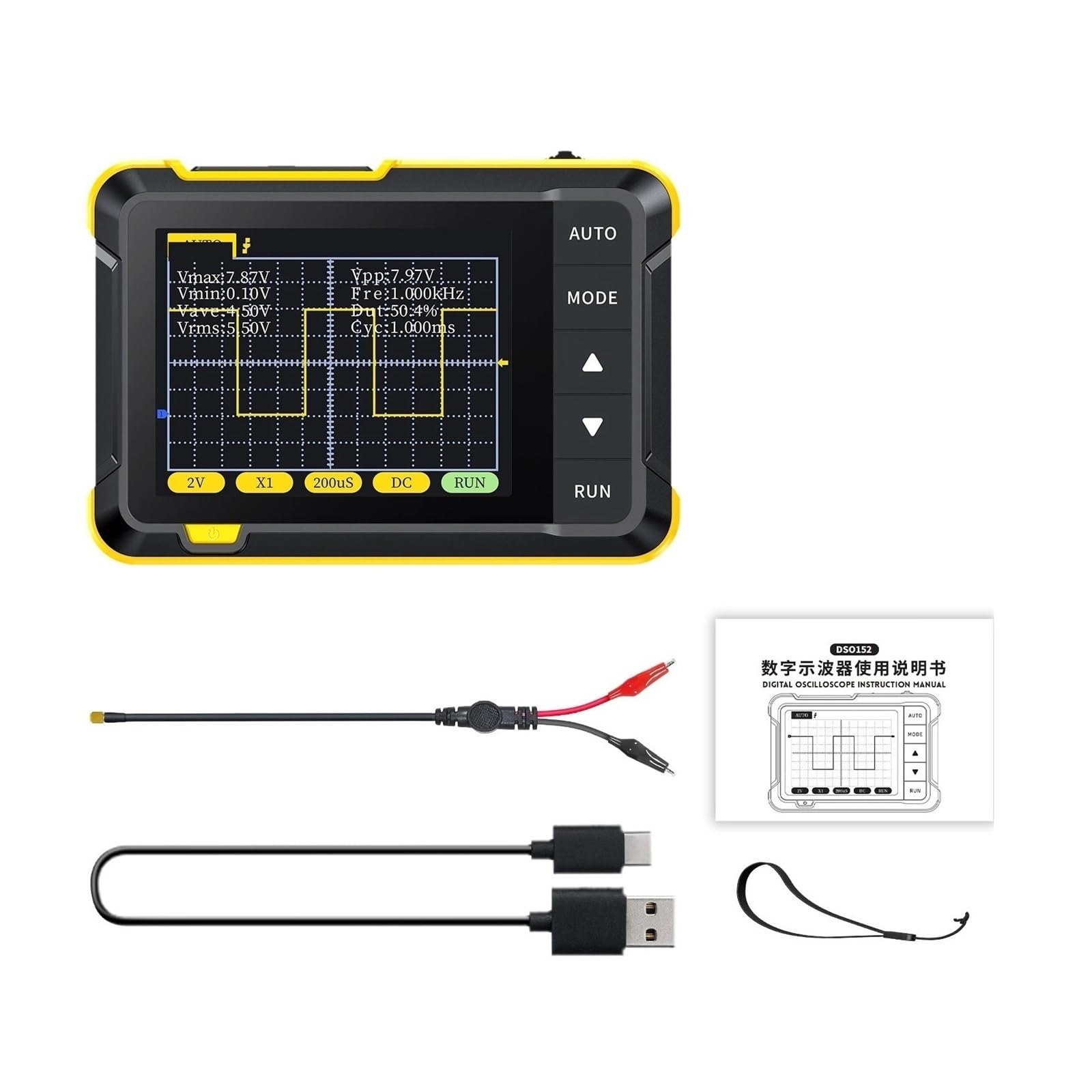
Image: Front view of the DSO152 oscilloscope, showing the display, control buttons, and input connector.
5. Operating Instructions
5.1 Basic Controls
- AUTO Button: Press this button for automatic waveform adjustment. The oscilloscope will automatically set the vertical scale, horizontal time base, and trigger level to display a stable waveform.
- MODE Button: Used to cycle through different measurement modes or menu options.
- Up/Down Buttons (▲/▼): Navigate through menus, adjust parameters, or move the waveform vertically.
- RUN Button: Toggles between Run (live waveform display) and Hold (frozen waveform) modes.
- Input Connector: Connect your test probe here.
5.2 Waveform Display and Measurement
The 2.8-inch display shows the waveform and various measurement parameters. You can adjust the screen brightness and background grid brightness via the settings menu.
- Vertical Sensitivity: Adjusts the voltage scale (V/Div).
- Time Base: Adjusts the horizontal time scale (s/Div).
- Trigger Method: Select Auto, Normal, or Single trigger modes.
- Coupling Method: Choose between AC and DC coupling.
- Cursor Measurement: Use the cursor function to manually measure specific points on the waveform for period, frequency, and voltage values.
- FFT Display: Access the FFT function to analyze the frequency spectrum of the input signal.
5.3 Signal Generator
The DSO152 includes a built-in DDS signal generator. Refer to the on-screen menu for selecting waveform types (e.g., square wave) and adjusting parameters like frequency and amplitude. The square wave calibration signal has a frequency of 1KHz and a 50% duty cycle.
5.4 Saving Waveforms and Screenshots
The device features 1GB of internal storage. You can save displayed waveforms or take screenshots of the screen. Use the designated menu options to perform these actions. Saved data can be retrieved for later review.
5.5 Connecting to a Computer
Connect the DSO152 to a computer using the USB cable. This allows for secondary analysis of saved waveforms and potentially firmware updates. Follow the on-screen prompts or refer to specific software instructions for data transfer.
6. Maintenance
6.1 Cleaning
Wipe the device with a soft, dry cloth. Do not use abrasive cleaners or solvents, as they may damage the casing or screen. Ensure the device is powered off before cleaning.
6.2 Battery Care
To prolong battery life, avoid fully discharging the device frequently. If storing for an extended period, charge the battery to approximately 50% and store in a cool, dry place. Recharge every few months to prevent deep discharge.
6.3 Storage
Store the oscilloscope in a clean, dry environment, away from direct sunlight, extreme temperatures, and high humidity. Keep it protected from dust and physical impact.
7. Troubleshooting
- Device does not power on: Ensure the battery is charged. Connect to a USB power source and try again.
- No waveform displayed: Check probe connection. Ensure the input signal is within the oscilloscope's voltage range. Try the AUTO button to automatically adjust settings. Verify trigger settings.
- Unstable waveform: Adjust the trigger level and trigger mode. Ensure proper grounding.
- Screen is dim or unreadable: Adjust screen brightness in the settings menu.
- Cannot connect to PC: Ensure the USB cable is properly connected. Check if the computer recognizes the device. Try a different USB port or cable.
8. Specifications
| Parameter | Value |
|---|---|
| Model Number | DSO152 |
| Real Time Sampling Rate | 2.5MSa/s |
| Bandwidth | 200KHz |
| Digital Channels | 1 |
| Display | 2.8 inches, 320*240 Pixels |
| Vertical Sensitivity | 10mV/Div - 20V/Div (1-2-5 sequence) |
| Time Base Range | 10s/Div - 50s/Div (1-2-5 sequence) |
| Voltage Range | 1X: 400VPP, 10X: 800VPP |
| Trigger Method | Auto/Normal/Single |
| Coupling Method | AC/DC |
| USB Charging | 5V/1A |
| Lithium Battery Capacity | 1000mAh |
| Square Wave Calibration | Frequency: 1KHz, Duty Cycle: 50% |
| Dimensions | 99mm x 68.3mm x 19.5mm (3.9 x 2.69 x 0.77 inches) |
| Weight | 100g (3.53 ounces) |
9. Warranty and Support
This product comes with a standard manufacturer's warranty. Please refer to the warranty card included in your package or contact your retailer for specific warranty terms and conditions. For technical support or inquiries, please contact Boartechs customer service through their official channels.


