
1. Introduction
This manual provides essential information for the safe and efficient use of your Candy Smart Pro Inverter Washer Dryer. Please read it thoroughly before installation and first use, and keep it for future reference.
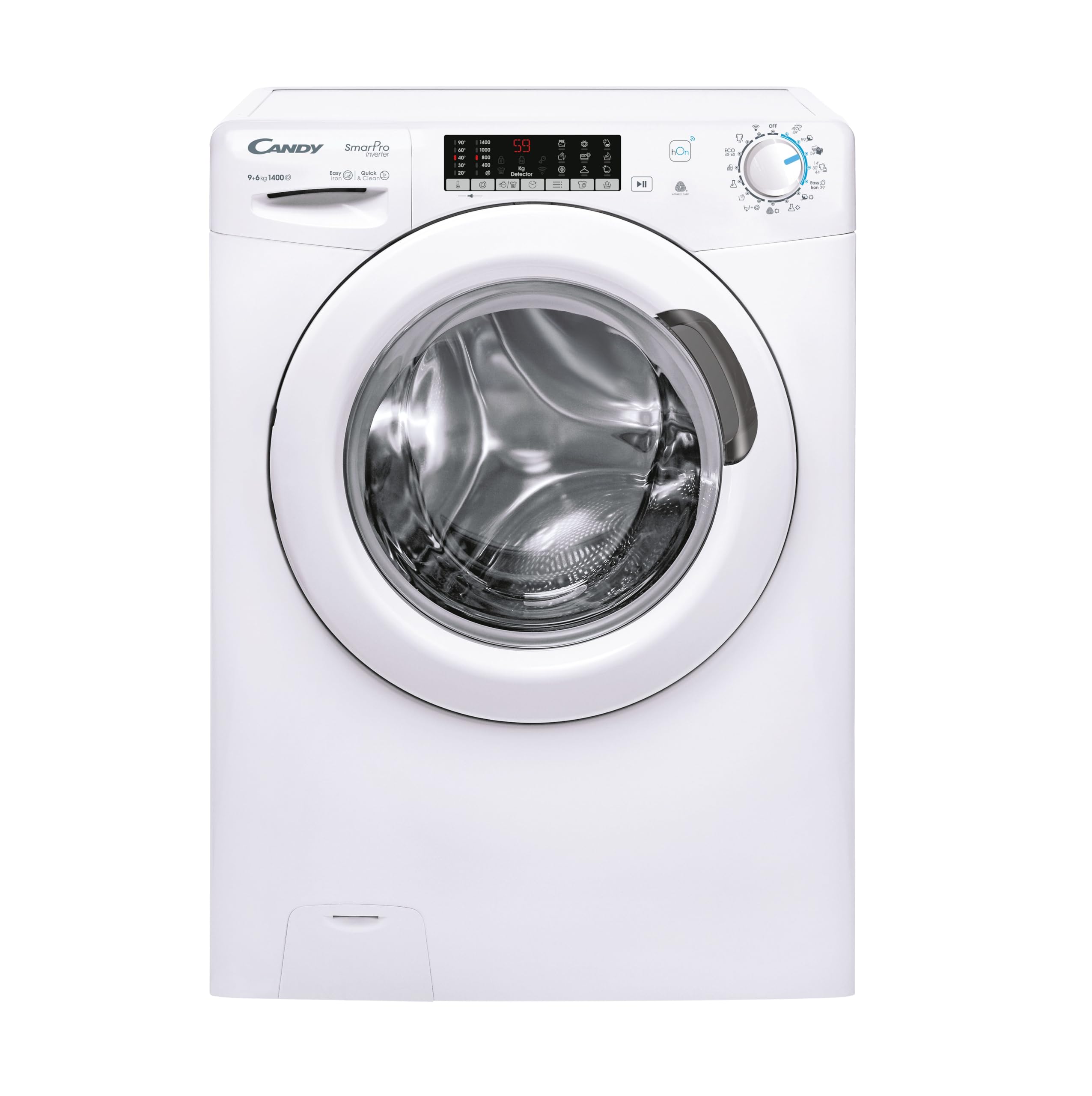
Front view of the Candy Smart Pro Inverter Washer Dryer.
2. Safety Information
- Ensure the appliance is properly grounded.
- Do not allow children to play with or operate the appliance.
- Keep packaging materials out of reach of children.
- Do not install the appliance in areas exposed to extreme temperatures or humidity.
- Always unplug the appliance before cleaning or maintenance.
- Do not overload the washer dryer. Refer to load capacities for washing (9 kg) and drying (6 kg).
- Never attempt to repair the appliance yourself. Contact qualified service personnel.
3. Product Overview
The Candy Smart Pro Inverter Washer Dryer combines washing and drying functions in a single unit, designed for efficiency and convenience.
Key Features:
- 9 kg Washing Capacity / 6 kg Drying Capacity: Ideal for daily laundry needs.
- Speed-Drive Inverter Motor: Ensures high performance, reliability, optimized consumption, and spin speeds up to 1400 RPM.
- Rapid Programs & Snap&Wash: Offers various quick wash cycles and an app-based function to suggest the ideal cycle.
- hOn App Connectivity (Wi-Fi + Bluetooth): Control and manage the washer dryer via smartphone, access extra content, washing tips, and advanced smart functions.
- Steam Function & Quick&Clean: Steam helps reduce wrinkles and odors, while Quick&Clean technology enhances detergent effectiveness.
- Easy Iron Plus 39’ Program: A dedicated cycle to reduce creases and simplify ironing.

The stainless steel drum interior, designed for efficient washing and drying.

The Speed-Drive Inverter motor ensures quiet and efficient operation.
4. Setup and Installation
Proper installation is crucial for the performance and longevity of your appliance. It is recommended to have the installation performed by a qualified technician.
Dimensions:
- Height: 85 cm
- Width: 60 cm
- Depth: 58 cm

Diagram showing the height, width, and depth of the washer dryer.
Installation Steps:
- Unpacking: Carefully remove all packaging materials. Check for any transport damage.
- Remove Transit Bolts: Locate and remove all transit bolts from the rear of the machine. Keep them for future transport. Failure to remove these bolts will cause severe vibration and damage.
- Leveling: Adjust the feet of the appliance to ensure it is perfectly level and stable on the floor.
- Water Connection: Connect the water inlet hose to a cold water tap. Ensure connections are tight to prevent leaks.
- Drainage: Position the drain hose correctly into a standpipe or sink, ensuring it is not kinked or obstructed.
- Electrical Connection: Plug the appliance into a grounded electrical outlet. Ensure the voltage matches the appliance's requirements (230V AC).
5. Operating Instructions
Your Candy washer dryer offers a variety of programs and functions for optimal laundry care.
Control Panel:

The main control dial for program selection.
Program Selection:
Turn the program selector dial to choose the desired wash or wash&dry cycle. The display will show the default settings for the selected program.
Special Functions:
- Rapid Programs: Select from various quick cycles (e.g., 14, 30, 44 minutes) for lightly soiled items.
- Steam Function: Activates steam during the cycle to reduce wrinkles and refresh garments.
- Quick&Clean: Enhances detergent penetration for deeper cleaning.
- Easy Iron Plus 39’: A specific program designed to minimize creasing, making ironing easier.

The steam function helps reduce wrinkles and refresh clothes.
hOn App Connectivity:
Connect your washer dryer to the hOn app via Wi-Fi or Bluetooth for enhanced control and smart features.
- Remote Control: Start, pause, or stop cycles from your smartphone.
- Snap&Wash: Take a photo of your laundry load, and the app will suggest the optimal program.
- Program Customization: Access additional programs and personalize settings.
- Monitoring: Track cycle progress and receive notifications.

Control your washer dryer remotely using the hOn app on your smartphone.

The Snap&Wash feature in the hOn app helps select the best program.

The hOn app logo, indicating smart connectivity.
6. Maintenance
Regular maintenance ensures optimal performance and extends the lifespan of your appliance.
Cleaning the Filter:
The drain filter should be cleaned regularly to prevent blockages and ensure efficient drainage.
- Open the small access panel at the bottom front of the appliance.
- Place a shallow container beneath the filter to catch any residual water.
- Slowly unscrew the filter counter-clockwise until water starts to drain.
- Once all water has drained, remove the filter completely and clean it under running water.
- Reinsert the filter and screw it clockwise until tight. Close the access panel.

The drain filter access panel and the removable filter for cleaning.
Cleaning the Detergent Dispenser:
Remove the detergent dispenser drawer and rinse it under warm water to remove any detergent residue. Ensure all compartments are clear before reinserting.
Cleaning the Drum:
Run a maintenance wash cycle (e.g., a hot wash with no laundry and a descaling agent) periodically to clean the drum and remove any buildup.
7. Troubleshooting
Here are solutions to common issues you might encounter:
| Problem | Possible Cause | Solution |
|---|---|---|
| Appliance does not start | No power; door not closed; program not selected. | Check power supply; ensure door is firmly closed; select a program and press start. |
| Water not filling | Water tap closed; inlet hose kinked; water pressure too low. | Open water tap; straighten hose; check household water pressure. |
| Water not draining | Drain hose kinked or blocked; drain filter clogged. | Straighten or clear drain hose; clean the drain filter (see Maintenance). |
| Excessive vibration/noise | Transit bolts not removed; appliance not level; uneven load. | Remove transit bolts; adjust leveling feet; redistribute laundry in the drum. |
| Clothes not drying properly | Overloaded; wrong drying program; lint filter clogged. | Reduce load size; select appropriate drying program; clean the lint filter. |
If the problem persists after attempting these solutions, please contact customer support.
8. Specifications
Technical details for the Candy Smart Pro Inverter Washer Dryer CSOW4966TWM/1-S.
- Model Number: CSOW4966TWM/1-S (31019280)
- Brand: CANDY
- Type: Front-loading Washer Dryer
- Washing Capacity: 9 kg
- Drying Capacity: 6 kg
- Maximum Spin Speed: 1400 RPM
- Energy Class (Washing): A
- Noise Level (Spin): 76 dB
- Dimensions (H x W x D): 85 cm x 60 cm x 58 cm
- Color: White
- Drum Material: Stainless Steel
- Voltage: 230 Volt (AC)
- Special Features: hOn App, Rapid Cycles, Snap&Wash, Quick&Clean Technology, Easy Iron Plus 39’ Program, Speed Drive Inverter Motor, Steam Function.
- Components Included: Main unit
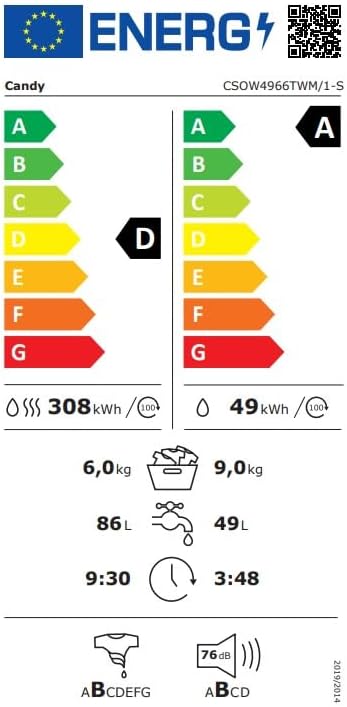
Energy label indicating efficiency ratings and consumption data.

Detailed product data sheet with comprehensive technical information.
9. Warranty and Support
Your Candy Smart Pro Inverter Washer Dryer comes with a standard warranty and dedicated customer support.
Warranty:
This product is covered by a 2-year warranty from the date of purchase. Please retain your proof of purchase for warranty claims.
Customer Support:
For technical assistance, service requests, or inquiries, please contact Candy Customer Service:
- Manufacturer: Candy Hoover Group
- Phone: +3903920861
- Email: info@candy.it
- Website: www.candy.it


