Introduction
This manual provides comprehensive instructions for the setup, operation, and maintenance of your TFA Dostmann Wireless Weather Station TFA.me ID-04. This device offers professional weather forecasts from wetter.com, local temperature and humidity measurements, and global monitoring via the TFA.me online portal.
Package Contents
- TFA.me ID-04 Base Station
- Thermo-hygro Outdoor Transmitter (1x 30.3900.02)
- Power Adapter (EU plug)
- Instruction Manual
Note: 3x 1.5V AA batteries for the base station and 2x 1.5V AA batteries for the transmitter are required and sold separately.
Product Overview

Figure 1: TFA Dostmann Wireless Weather Station TFA.me ID-04 main unit and outdoor sensor. The main unit features a large, colorful display, while the white outdoor sensor measures external temperature and humidity.

Figure 2: Side view of the TFA Dostmann Wireless Weather Station TFA.me ID-04, showing its slim profile and integrated stand.

Figure 3: Rear view of the TFA Dostmann Wireless Weather Station TFA.me ID-04, showing the battery compartment, wall-mounting holes, and control buttons.
The TFA.me ID-04 consists of a main display unit and a wireless outdoor sensor. The main unit displays professional weather forecasts, indoor/outdoor temperature and humidity, time, and date. The outdoor sensor transmits external environmental data to the main unit.
Setup
1. Powering the Devices
- Outdoor Transmitter: Insert 2x 1.5V AA batteries into the outdoor transmitter, observing correct polarity.
- Base Station: Insert 3x 1.5V AA batteries into the base station, observing correct polarity. Alternatively, connect the provided power adapter to the base station and a power outlet.
- Ensure the outdoor transmitter is placed within 100m of the base station, away from direct sunlight and rain, for accurate readings.
2. Wi-Fi Connection and TFA.me Portal Registration
The station requires a Wi-Fi connection to receive professional weather forecasts and to enable access via the TFA.me online portal.
- Follow the on-screen prompts on the base station to connect to your local Wi-Fi network.
- Visit the TFA.me online portal on your smartphone, tablet, or PC.
- Create an account and register your weather station and transmitter using their individual identification numbers.
- Select your location within the TFA.me portal to receive localized weather forecasts.

Figure 4: The TFA.me online portal interface, accessible on various devices, showing weather data and monitoring options.
Operating Instructions
1. Display Features
The station's inverted display shows various information:
- Professional Weather Forecast: Provided by wetter.com for your selected location, updated hourly. Displays 40 different weather symbols.
- Temperature and Humidity: Indoor and outdoor readings, including maximum and minimum values.
- Time and Date: Automatically synchronized via Wi-Fi.
- Weather Alerts: A warning triangle appears for severe weather conditions (e.g., storm, extreme rain/heat, black ice, high UV).

Figure 5: The station display showing current time, date, indoor/outdoor temperature, humidity, and a weather forecast symbol.
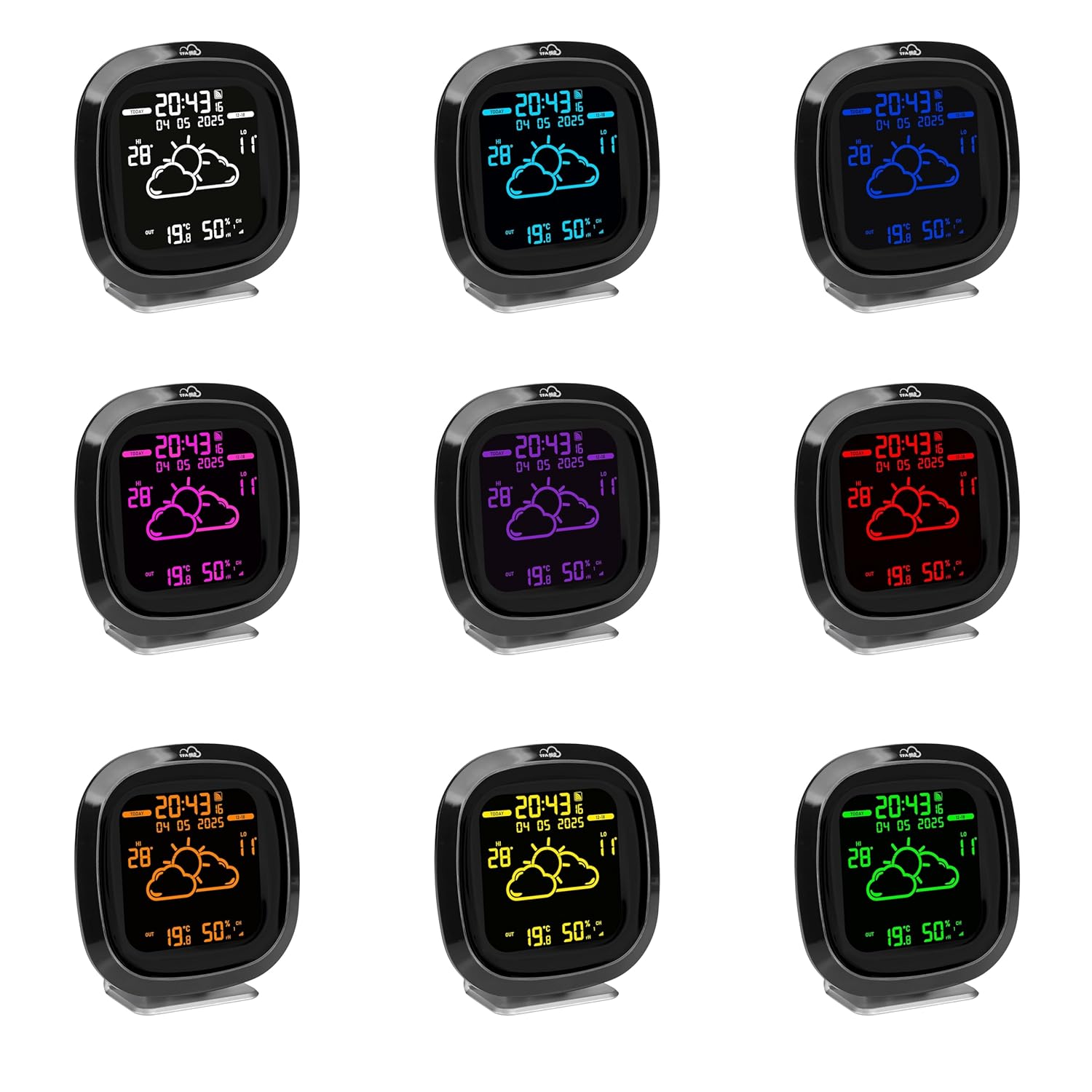
Figure 6: The station display showing a winter weather forecast with snow symbols and lower temperatures.
2. Display Color Adjustment
The display features colored, illuminated segments with four brightness levels. You can adjust the display color to one of nine options:
- Green, White, Light Blue, Blue, Purple, Pink, Red, Orange, or Yellow.
- Refer to the physical buttons on the back of the unit (e.g., "LIGHT" or "COLOR" button, if present) for specific adjustment instructions.

Figure 7: Multiple TFA.me ID-04 units demonstrating the various display color options available.
3. Forecast Display Modes
The station can display forecasts in different modes:
- Today/Tomorrow: Alternates between four day segments for the current day or the next day.
- 4-Day Forecast: Displays four full-day forecast symbols in alternation.
- Use the "SWITCH" or "MODE" button (refer to the unit's physical buttons) to cycle through these display modes.
4. TFA.me Online Portal
The TFA.me portal allows you to:
- View local measurements from your home or garden remotely, anywhere in the world.
- Access detailed views with historical data graphs.
- Set up alarm messages or receive data manually/automatically via email.
- Manage up to 50 connected devices on the online portal.
Maintenance
- Cleaning: Clean the display and unit with a soft, dry cloth. Do not use abrasive cleaners or solvents.
- Battery Replacement: Replace batteries in both the base station and outdoor transmitter when the low battery indicator appears on the display. Ensure correct polarity.
- Outdoor Sensor Placement: Periodically check the outdoor sensor's placement to ensure it remains protected from direct weather elements and is within range of the base station.
Troubleshooting
| Problem | Possible Cause | Solution |
|---|---|---|
| No display on base station | No power or flat batteries. | Check power adapter connection or replace batteries. |
| Outdoor temperature/humidity not displayed | Sensor out of range, flat sensor batteries, or interference. | Move sensor closer to base station, replace sensor batteries, or check for sources of interference (e.g., other wireless devices). |
| Inaccurate outdoor readings | Sensor exposed to direct sunlight or rain. | Relocate sensor to a shaded, protected area. |
| No weather forecast or Wi-Fi symbol blinking | No Wi-Fi connection or incorrect location setting. | Check Wi-Fi router, re-establish connection, or verify location settings on TFA.me portal. |
| Cannot access TFA.me portal | No internet connection, incorrect login details, or station not registered. | Check internet connection, verify login credentials, or register your station on the TFA.me portal. |
Specifications
| Model Number | 35.8102.01 |
| Outdoor Temperature Range | -40°C to +60°C |
| Indoor Temperature Range | 0°C to +50°C |
| Indoor Humidity Range | 10% to 99% RH |
| Transmission Range (Outdoor Sensor) | Up to 100m (open field) |
| Transmission Frequency | 868 MHz |
| Material | Plastic |
| Dimensions (L x W x H) | 132 x 32 (47) x 132 (137) mm |
| Weight | 199 g |
| Power Supply (Base Station) | 3 x 1.5V AA batteries or AC adapter |
| Power Supply (Transmitter) | 2 x 1.5V AA batteries |
| Connectivity Technology | 868 MHz, Wi-Fi |
| Mounting Options | Wall-mountable or Freestanding |
Warranty and Support
This product comes with a 1-year availability of spare parts. For technical support, warranty claims, or further assistance, please refer to the contact information provided in your product packaging or visit the official TFA Dostmann website.
You can also find additional information and support on the TFA.me online portal.


