
Introduction
This manual provides essential information for the safe and effective use of your FUNMILY Walking Pad Treadmill. Please read all instructions carefully before assembly and operation. Retain this manual for future reference.
Safety Information
Always prioritize safety when using any exercise equipment. Failure to follow safety guidelines may result in injury or damage to the product.
- Ensure the treadmill is placed on a flat, stable surface.
- Keep children and pets away from the treadmill during operation.
- Wear appropriate athletic footwear.
- Do not operate the treadmill if it is damaged or malfunctioning.
- Consult a physician before starting any new exercise program.
- The maximum user weight capacity for this treadmill is 500 pounds.
Setup
The FUNMILY Walking Pad Treadmill is designed for quick and easy setup, requiring no complex installation.
- Unpacking: Carefully remove the treadmill from its packaging. Inspect for any shipping damage.
- Placement: Position the treadmill on a level, clear surface, ensuring adequate space around it for safe operation.
- Power Connection: Plug the power cord into a grounded electrical outlet.
- Remote Control Activation: Remove the protective sleeve from the remote control (if applicable) to activate its battery.

Operating Instructions
Your FUNMILY Walking Pad Treadmill offers versatile exercise modes and features.
Powering On/Off
- To power on, ensure the treadmill is plugged in and press the power button on the unit or remote control.
- To power off, press the power button again.
Adjusting Speed and Modes
The treadmill features two primary modes with adjustable speed ranges:
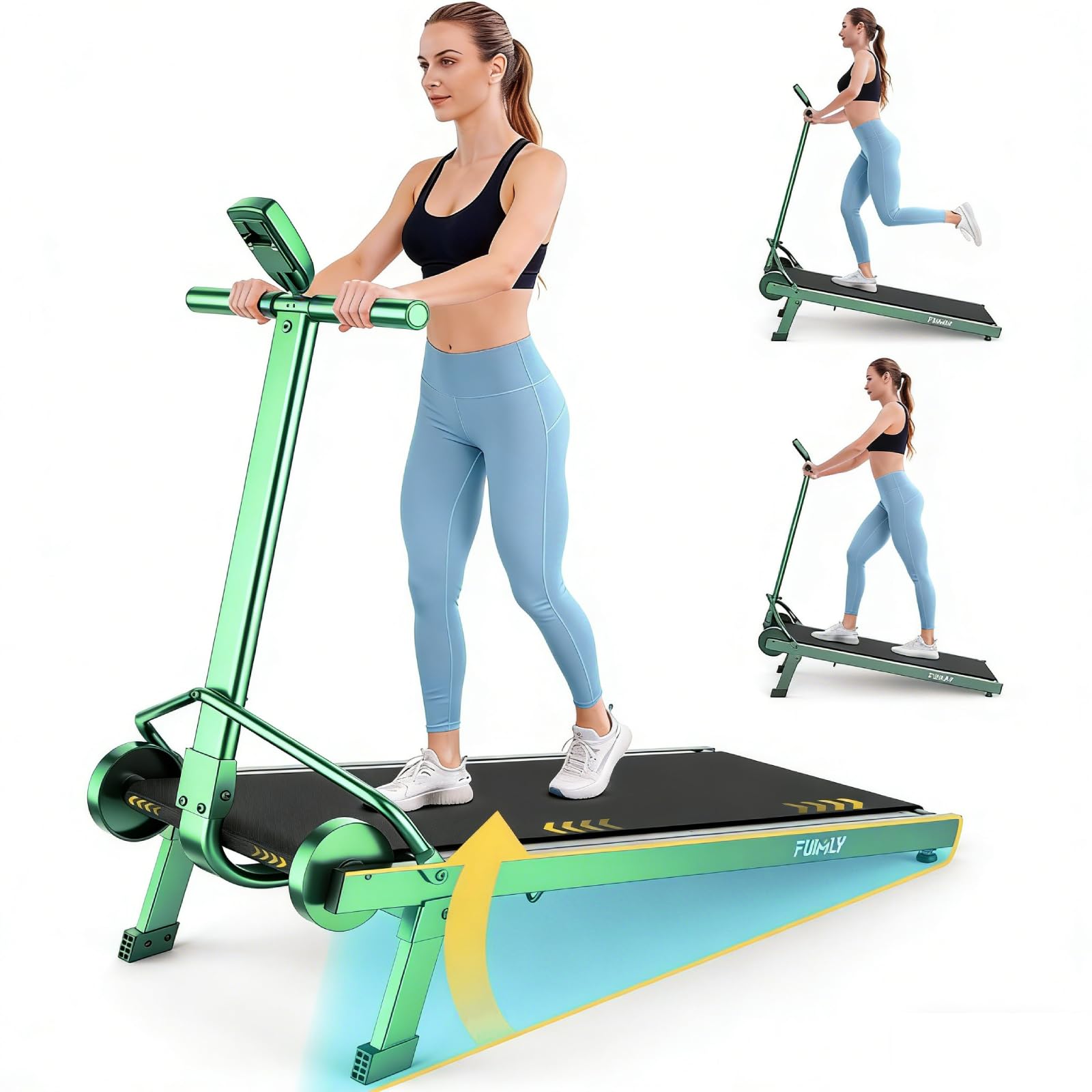
- Walking Mode (0.3-2.4 MHP): Ideal for under-desk use or light walking.
- Running Mode (2.4-3.9 MHP): Suitable for faster walking or light jogging.
Use the remote control to adjust the speed within these ranges. The LED display will show your current speed, distance, and time.
Manual Incline Adjustment
This treadmill includes a fixed manual incline of 20%. To engage the incline, adjust the feet on the bottom of the unit as instructed in the quick start guide or product packaging. This feature allows for a more challenging workout.

Motor Performance
The treadmill is equipped with a 2.5HP motor, providing consistent power for both walking and light running activities.
Maintenance
Regular maintenance ensures the longevity and optimal performance of your treadmill.
- Cleaning: Wipe down the treadmill surface with a damp cloth after each use. Avoid abrasive cleaners.
- Belt Lubrication: Periodically lubricate the running belt according to the instructions provided with your treadmill's lubrication kit (if included) or manufacturer recommendations. This typically involves applying silicone lubricant under the belt.
- Belt Tension and Alignment: Check the running belt for proper tension and alignment. Adjust if necessary, following specific instructions in the full product manual or manufacturer's website.
- Storage: When not in use, the compact design allows for easy storage under a sofa, bed, or against a wall.
Troubleshooting
If you encounter issues with your treadmill, refer to the following common solutions:
| Problem | Possible Cause | Solution |
|---|---|---|
| Treadmill does not power on | Power cord not fully plugged in; power outlet issue; main power switch off. | Ensure power cord is securely plugged into both the treadmill and a working outlet. Check the main power switch on the treadmill. |
| Running belt slips or stops | Belt too loose; insufficient lubrication; motor overload. | Adjust belt tension (refer to full manual); lubricate the belt; reduce user weight or speed. |
| Unusual noise during operation | Loose components; belt rubbing; motor issue. | Check for loose screws; ensure belt is centered and lubricated. If noise persists, contact customer support. |
| Inaccurate display readings | Sensor issue; calibration needed. | Ensure all connections are secure. Refer to the full manual for calibration steps or contact support. |
For issues not listed here, please contact FUNMILY customer support.
Specifications
Key technical specifications for the FUNMILY Walking Pad Treadmill (Model: B0DK74L92N):
- Brand: FUNMILY
- Color: Black Green
- Product Dimensions (D x W x H): 40.55" x 21.65" x 6.89"
- Material: Alloy Steel
- Maximum Weight Recommendation: 500 Pounds
- Motor Power: 2.5 HP
- Speed Range: 0.3-3.9 MHP (adjustable)
- Incline: Fixed 20% Manual Incline
Warranty and Support
Your FUNMILY Walking Pad Treadmill comes with a manufacturer's warranty. Please refer to the warranty card included with your product for specific terms and conditions. For technical support, parts, or warranty claims, please contact FUNMILY customer service through their official website or the retailer where the product was purchased.
Contact Information: Refer to your purchase documentation or the FUNMILY official website for the most current support contact details.