
Introduction
This manual provides comprehensive instructions for the assembly, operation, and maintenance of your KOMFOTTEU Record Player Stand. Designed for organizing vinyl records and audio equipment, this stand also features an integrated charging station for electronic devices. Please read this manual thoroughly before assembly and use to ensure safe and efficient operation.
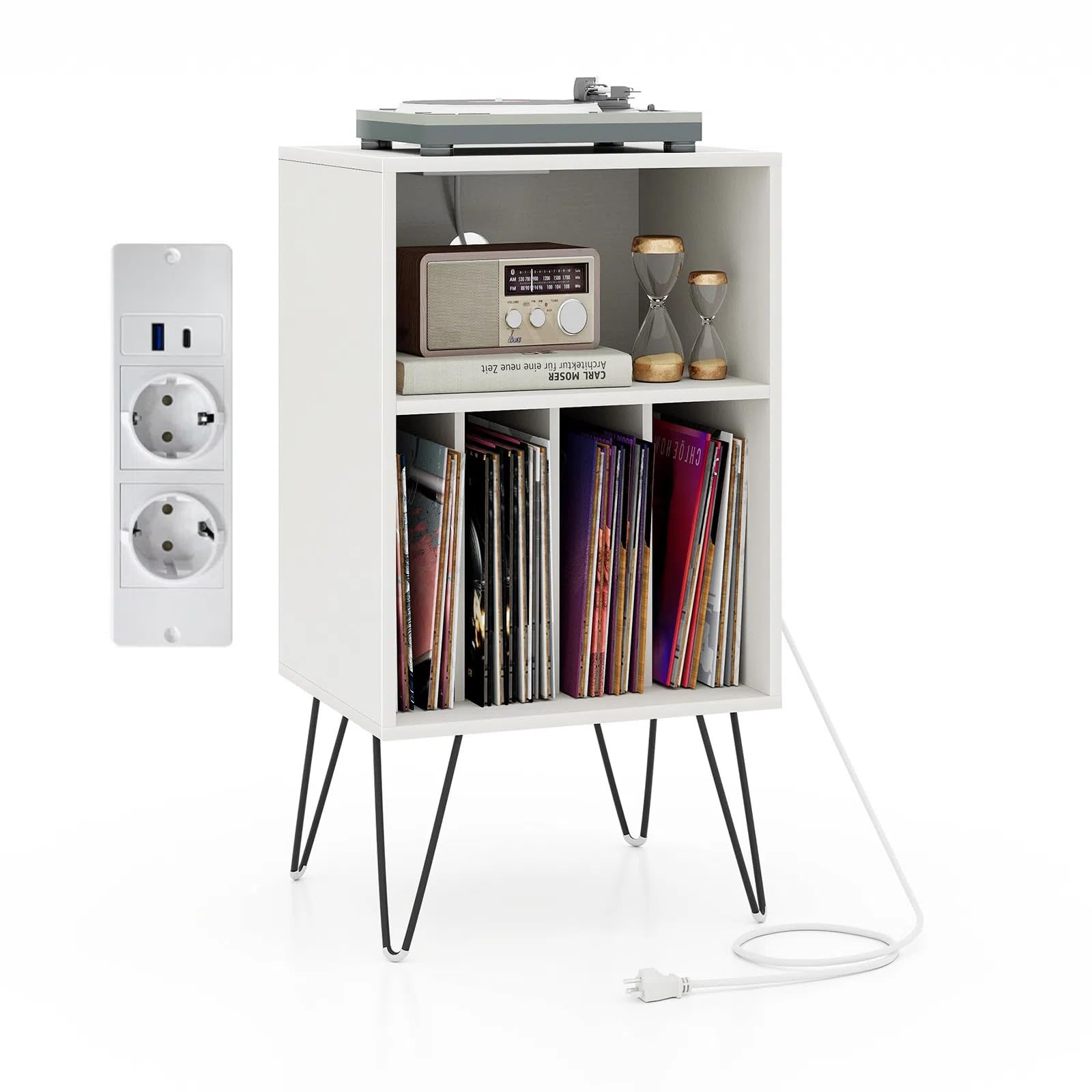
Image: The KOMFOTTEU Record Player Stand, white with black metal legs, shown in a living room with a record player, radio, and vinyl records.
Safety Information
Please observe the following safety warnings to prevent injury or damage to the product:
- This product includes a power cable. Handle the cable with care and ensure it is positioned away from walkways to prevent tripping hazards and accidents.
- Do not place excessively heavy objects on the shelves. Exceeding the specified load capacities can cause damage to the furniture and potential injury.
- Always follow the provided assembly instructions carefully to avoid injuries during installation.
- Be aware of sharp corners and small parts during assembly and use, as these could cause injury.
- Keep the furniture away from sources of excessive heat and high humidity to prevent material damage and degradation.
Package Contents
Verify that all components are present before beginning assembly:
- 1 x Record Player Stand
- 1 x User Manual
- All necessary assembly hardware (screws, bolts, tools if included)
- Anti-toppling kits
Specifications
| Feature | Detail |
|---|---|
| Model Number | SE00479MN-LODE-KF |
| Color | White |
| Material | Engineered Wood, MDF, Metal |
| Overall Dimensions (L x W x H) | 48 x 40 x 88 cm (18.9 x 15.7 x 34.6 inches) |
| Open Shelf Dimensions (L x W x H) | 44.5 x 30 x 25.5 cm (17.5 x 11.8 x 10 inches) |
| Each Compartment Dimensions (L x W x H) | 10 x 30 x 33 cm (3.9 x 11.8 x 13 inches) |
| Height from Floor to Partition | 25 cm (9.8 inches) |
| Power Cord Length | 150 cm (59 inches) |
| AC Outlets | 2 (250V/16A) |
| USB Ports | 1 USB, 1 Type-C (15.5W total) |
| Top Shelf Load Capacity | 50 kg (110 lbs) |
| Open Shelf Load Capacity | 30 kg (66 lbs) |
| Total Box Load Capacity | 40 kg (88 lbs) |
| Net Weight | 16 kg (35.3 lbs) |
| Number of Shelves/Compartments | 5 |
| Number of Levels | 3 |
| Assembly Required | Yes |
| Mounting Type | Floor Mount |

Image: Detailed product dimensions, including overall size and internal compartment measurements.
Setup
Assembly Instructions
The record player stand requires assembly. Please refer to the included assembly instructions for a step-by-step guide. Ensure all parts are accounted for before starting. It is recommended to assemble the unit on a soft, clean surface to prevent scratches.
- Unpack all components and verify against the parts list in the assembly manual.
- Attach the metal support legs to the base of the stand using the provided hardware. Ensure all bolts are firmly tightened.
- Assemble the main body of the stand, connecting the shelves and partitions as indicated in the manual.
- Install the anti-toppling kits to secure the stand to a wall, especially if placing heavy items on upper shelves or in households with children or pets.
- Connect the power cable for the charging station.

Image: Illustrative diagrams of assembly steps for a similar modular shelving unit.
Placement
Choose a stable, level surface for the stand. Ensure there is adequate space around the unit for proper ventilation and access to the charging ports. Avoid placing the stand in direct sunlight or near heat sources.

Image: Details of the stand's construction, highlighting anti-toppling kits, metal legs, and secure bolt connections.
Operating Instructions
Using the Charging Station
The integrated charging station provides convenient power access for your electronic devices.
- Plug the stand's main power cord into a standard wall outlet.
- Use the two AC outlets (250V/16A) for devices requiring standard power, such as your record player or a radio.
- Utilize the USB-A and Type-C ports (15.5W total) to charge smartphones, tablets, or other compatible USB-powered devices.
- Ensure devices are compatible with the provided power specifications to prevent damage.

Image: The integrated charging station with AC outlets, USB-A, and USB-C ports in use.
Storage Features
The stand offers multiple storage options to organize your collection and accessories:
- Top Layer: Ideal for placing your record player or turntable.
- Open Shelf: Suitable for audio accessories, books, or decorative items.
- Divided Compartments: Four dedicated compartments are designed to store vinyl records, albums, CDs, and other media upright and organized.
- The rear cable management hole helps keep power cords tidy and out of sight.

Image: Visual representation of the stand's storage capabilities for a record player, accessories, and vinyl records.
Maintenance
To ensure the longevity and appearance of your record player stand, follow these maintenance guidelines:
- Cleaning: Wipe surfaces with a soft, dry cloth. For stubborn marks, use a slightly damp cloth with a mild, non-abrasive cleaner, then dry immediately.
- Avoid Harsh Chemicals: Do not use abrasive cleaners, solvents, or polishes that may damage the finish.
- Liquid Spills: Immediately wipe up any liquid spills to prevent water damage or staining.
- Regular Checks: Periodically check all screws and bolts to ensure they remain tight. Retighten if necessary.
- Environmental Conditions: Maintain a stable room temperature and humidity level. Extreme fluctuations can affect wood-based materials.
Troubleshooting
If you encounter any issues with your record player stand, consider the following common solutions:
- Stand is Wobbly: Ensure all assembly bolts are securely tightened. Check that the stand is placed on a flat, level surface. Adjust protective pads if necessary.
- Charging Station Not Working: Verify that the main power cord is securely plugged into a functional wall outlet. Check if the outlet itself is receiving power. Ensure devices are correctly connected to the ports.
- Damage During Assembly: If any part is damaged during assembly, stop and contact customer support for replacement parts. Do not force components.
- Missing Parts: If any parts are missing from the package, refer to the parts list in your assembly manual and contact customer support for assistance.
Warranty and Support
For any questions, concerns, or issues not covered in this manual, please contact the seller, Komfort GmbH, or KOMFOTTEU customer service. Please have your model number (SE00479MN-LODE-KF) and purchase information ready when contacting support.
Specific warranty details may vary by region and retailer. Please refer to your purchase documentation or contact the seller for information regarding warranty coverage and claims.