
1. Introduction
The Alomejor 60A Brushed Electronic Speed Controller (ESC) model 6860 RTR is designed for use in various remote-controlled vehicles, including RC cars, boats, and tanks. It is compatible with 540, 550, and 750 motors. This ESC features robust performance, multiple operating modes, and integrated protection mechanisms for reliable operation.
2. Safety Precautions
- Always disconnect the battery from the ESC when not in use to prevent accidental operation.
- Ensure all connections are secure and correctly polarized (positive to positive, negative to negative). Incorrect connections can damage the ESC and battery.
- Avoid operating the ESC in wet conditions unless explicitly stated as waterproof.
- Keep the ESC away from heat sources and ensure adequate ventilation during operation.
- Do not attempt to modify the ESC. Unauthorized modifications can lead to malfunction and void the warranty.
- Always use batteries within the specified voltage range (2-3S Lipo or 5-9 Cell NiMH).
3. Product Features
- Superior Performance: Utilizes 8 low internal resistance, high-current MOS tubes for strong resistance to shock and efficient heat dissipation.
- Parameter Setting: Easy parameter adjustment via a dedicated bubble mechanism.
- Integrated Design: Waterproof and dustproof, suitable for various operating environments.
- Multiple Modes: Features 3 selectable operating modes:
- Forward, Brake, Backward
- Forward, Brake
- Forward, Backward (with intermediate brake)
- Voltage Protection: Automatically reduces speed when battery voltage approaches a critical low level, indicated by a slow red light flash.
- Temperature Control: Reduces output power by 50% if internal temperature reaches 100°C, restoring full power when temperature drops to 80°C.

Image: The Alomejor 60A Brushed ESC, highlighting its compact design and wiring.

Image: The ESC with text indicating its waterproof and dustproof integrated design, and the three built-in modes.
4. Package Contents
Verify that all items are present in the package:
- 1 x Alomejor 60A Brushed ESC
- 1 x Instruction Manual
5. Specifications
| Parameter | Value |
|---|---|
| Model | 6860 RTR |
| Continuous Current | 60A |
| Burst Current | 480A |
| BEC Output | 6V / 3A |
| Voltage Range | 2-3S Lipo Battery, 5-9 Cell NiMH Battery |
| Supported Motors | 540, 550, 750 Motor |
| Dimensions (L x W x H) | Approx. 37.5 x 31.5 x 20mm (1.48 x 1.24 x 0.79in) |
| Color | Black Red |
| Weight | Approx. 1.52 ounces (43g) |
| Suitable For | 1/10 Car, Boat, Tanks, etc. |
6. Setup and Installation
Follow these steps to correctly connect your ESC to the motor, battery, receiver, and servo.
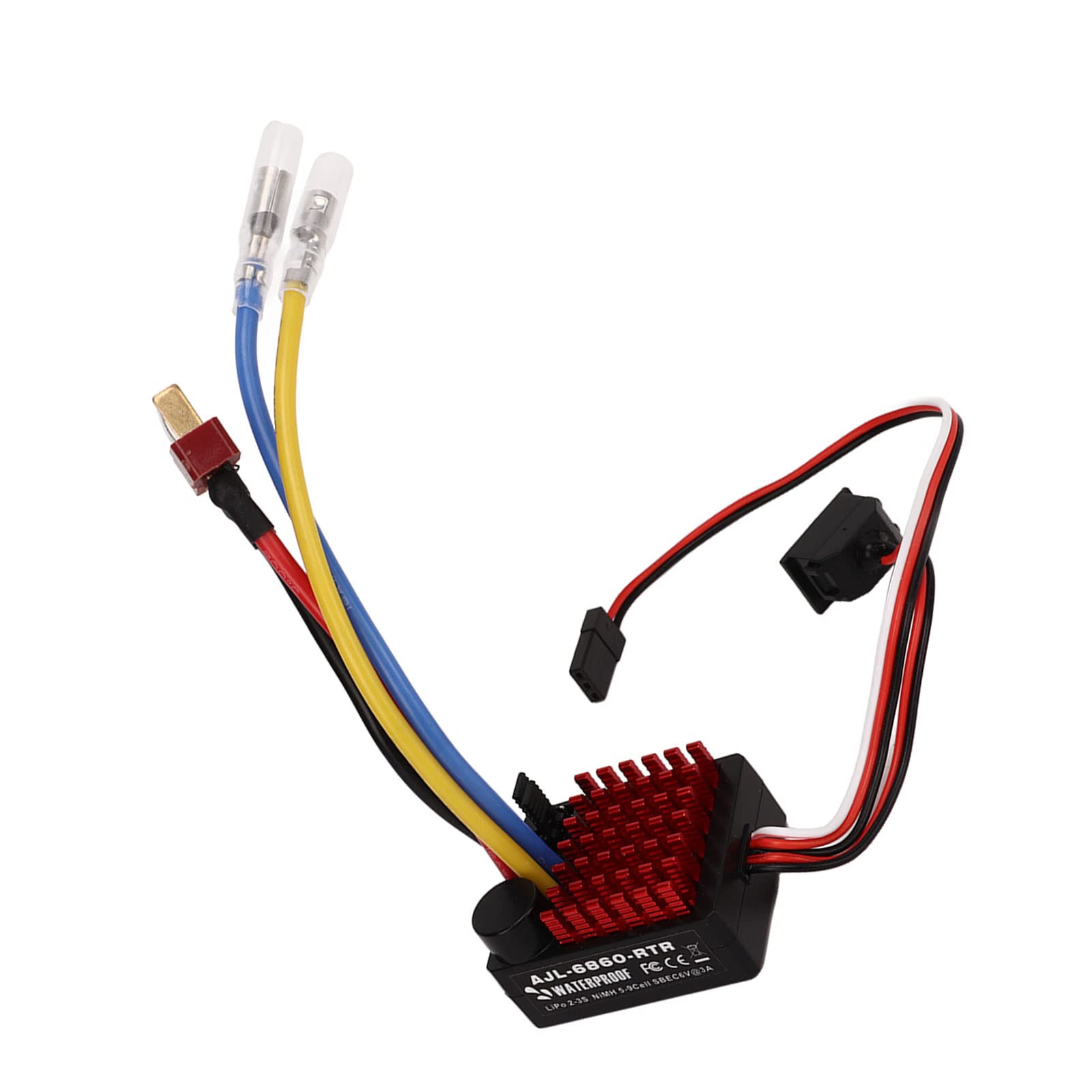
Image: Detailed wiring diagram showing connections between the ESC, motor, battery, receiver, and servo. It also illustrates the mode and battery type selection jumpers.
- Connect the Motor: Connect the two motor wires to the corresponding output terminals on the ESC. Ensure a secure connection. The diagram shows yellow and blue wires from the ESC connecting to the motor.
- Connect the Battery: Connect the battery's positive (red) and negative (black) terminals to the corresponding input terminals on the ESC. The diagram shows a red and black wire from the battery connecting to the ESC.
- Connect to Receiver: Plug the ESC's signal cable (typically a three-wire connector: red, white, black) into the CH2 port of your RC receiver. The diagram shows the ESC's signal cable connecting to CH2 on the receiver.
- Connect Servo (if applicable): If your setup includes a servo, connect its signal cable to the CH1 port of your RC receiver. The diagram shows a servo connected to CH1.
- Power Switch: Ensure the power switch on the ESC is in the "OFF" position before connecting the battery.
- Mounting: Securely mount the ESC in your RC vehicle, ensuring good airflow for cooling.
7. Operating Modes and Parameter Setting
The ESC features three operating modes and allows for battery type selection using jumpers (adjustment bubbles).
7.1. Selecting Operating Mode
Refer to the diagram in Section 6. The "Mode" section on the ESC shows jumper positions for different modes:
- F/B/R (Forward/Brake/Reverse): This is the standard mode for most applications, allowing forward, braking, and reverse movement.
- F/B (Forward/Brake): This mode allows only forward movement and braking, without reverse. Often used in racing.
- F/R (Forward/Reverse with Intermediate Brake): This mode allows forward and reverse, but requires a brief stop (intermediate brake) before switching from forward to reverse.
To change the mode, power off the ESC, adjust the jumper cap on the "Mode" pins according to your desired setting, then power on.
7.2. Selecting Battery Type
The ESC supports both LiPo and NiMH battery types. It is crucial to select the correct battery type for proper voltage cutoff and protection.
- LiPo: Select this setting if you are using a Lithium Polymer battery.
- NiMH: Select this setting if you are using a Nickel-Metal Hydride battery.
To change the battery type, power off the ESC, adjust the jumper cap on the "LiPo/NiMH" pins according to your battery, then power on.
8. Maintenance
- Cleaning: Regularly clean the ESC to remove dust, dirt, and debris. Use a soft brush or compressed air. Avoid using liquids.
- Inspections: Periodically inspect all wires and connectors for signs of wear, damage, or loose connections.
- Storage: Store the ESC in a dry, cool place away from direct sunlight and extreme temperatures.
- Heat Sink: Ensure the heat sink is free from obstructions to allow for efficient cooling.
9. Troubleshooting
| Problem | Possible Cause | Solution |
|---|---|---|
| Motor stops or slows down unexpectedly. | Low battery voltage protection activated. | Recharge or replace the battery. Check battery type jumper setting. |
| ESC feels very hot, output power reduced. | Over-temperature protection activated. | Allow the ESC to cool down. Ensure adequate ventilation and check for obstructions around the heat sink. Reduce load if possible. |
| Motor does not respond or behaves erratically. | Incorrect wiring, loose connections, or incorrect mode setting. | Verify all connections (motor, battery, receiver). Check the selected operating mode jumper. Ensure the receiver is powered and bound to the transmitter. |
| ESC does not power on. | Battery not connected, battery discharged, or power switch off. | Ensure battery is connected and charged. Check power switch position. |
10. Warranty and Support
For warranty information or technical support, please refer to the contact details provided by your retailer or visit the official Alomejor website. Keep your purchase receipt as proof of purchase.