
1. Product Overview
Lumino 100% Blackout Cordless Roller Shades are designed to provide advanced light blockage and privacy. Featuring a dual-layer fabric, these shades offer thermal insulation, protecting interiors from UV rays and improving energy efficiency. The cordless design ensures safety and a clean aesthetic. Each shade includes a color-coordinated valance to conceal the fabric roller and mounting hardware.

This image displays several Lumino 100% Blackout Roller Shades, showcasing the range of available colors and the sleek design with a concealed roller mechanism.
2. Measuring Your Window
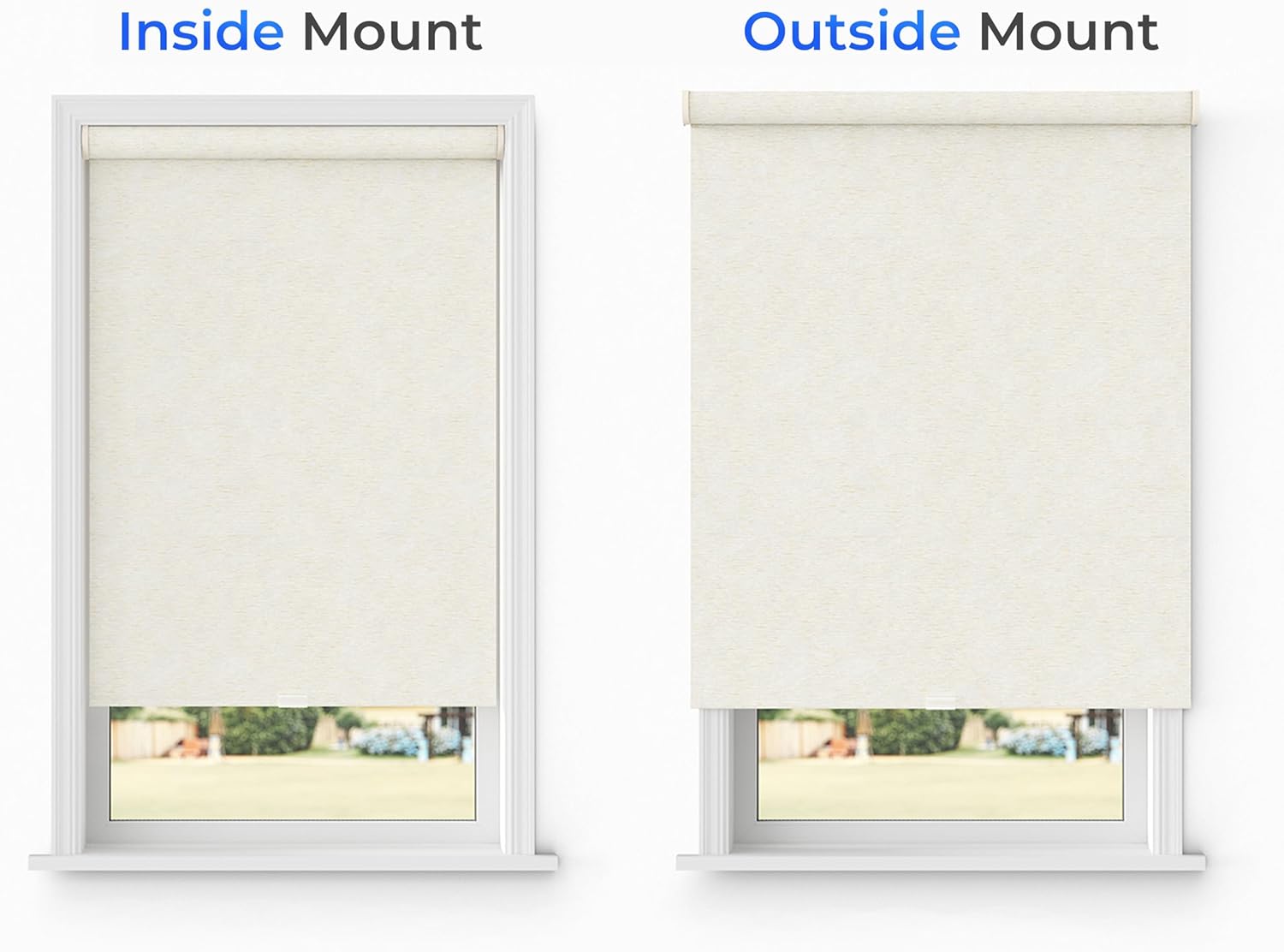
Accurate measurements are crucial for a perfect fit. Lumino offers shades for both inside and outside mount installations. Please follow the instructions carefully for your chosen mounting type.
2.1. Inside Mount Measurement
For an inside mount, the shade will fit within the window frame. Measure the exact width of your window frame at the top, middle, and bottom. Record the smallest of these three measurements. For height, measure at the left, center, and right, and record the largest measurement. Lumino blinds are precision-cut to be ½" narrower than the ordered width to ensure an ideal inside mount.

This diagram illustrates the process of measuring window width and height for an inside mount installation, emphasizing measuring at three points and recording the smallest width and largest height.
2.2. Outside Mount Measurement
For an outside mount, the shade will cover the window opening and overlap the frame. To determine the width, measure the area you want to cover and add at least 4 inches to your window width to ensure full coverage and prevent light gaps. For height, add at least 1.5 inches above the window to avoid light gaps. Use the longest height measurement.

This diagram details how to measure for an outside mount installation, including adding extra width and height for full coverage and light gap prevention.
2.3. Measurement Video Guide
For a visual guide on measuring for inside mounted blinds, please watch the video below:
This video provides a step-by-step guide on accurately measuring your window for inside-mounted Lumino roller shades, ensuring a precise fit.
3. Setup and Installation
Lumino roller shades are designed for easy installation. Detailed step-by-step instructions are included with your product. Below is a general overview of the installation process.
3.1. Tools Required
- Drill
- Screwdriver
- Measuring Tape
- Pencil
3.2. Installation Steps
- Mark Bracket Locations: Position the mounting brackets inside or outside the window frame according to your chosen mount type. Use a pencil to mark the screw holes.
- Drill Pilot Holes: Drill pilot holes at the marked locations.
- Secure Brackets: Attach the mounting brackets using the provided screws. Ensure they are level and securely fastened.
- Install Shade: Carefully insert the roller shade into the installed brackets. Listen for a click to confirm it is securely in place.
- Test Operation: Gently pull down and push up the shade to ensure smooth operation.
This image depicts a Lumino roller shade neatly installed within a window frame, highlighting its integrated valance.
4. Operating Instructions
The Lumino roller shades feature a cordless design for ease of use and child safety. To operate:
- To Lower: Gently pull the bottom rail of the shade downwards to the desired position.
- To Raise: Gently push the bottom rail of the shade upwards. The shade will hold its position once released.

This close-up image shows the color-matched valance, which conceals the roller mechanism for a clean appearance.
5. Maintenance and Care
To maintain the appearance and functionality of your Lumino roller shades:
- Cleaning: Wipe the fabric with a dry or slightly damp cloth to remove dust and light stains. Avoid harsh chemicals or abrasive cleaners.
- Spot Cleaning: For stubborn spots, use a mild soap solution on a damp cloth and gently blot the affected area. Do not saturate the fabric.
- Cordless Mechanism: The cordless mechanism is designed for durability. Avoid forcing the shade up or down, as this can damage the internal spring.

A close-up view of the premium dual-layer fabric, illustrating its texture and light-blocking capability.
6. Troubleshooting
If you encounter issues with your Lumino roller shades, refer to the following common solutions:
- Shade Does Not Stay Up/Down:
- Ensure the shade is fully engaged in the mounting brackets.
- Gently pull the shade all the way down, then quickly release it to allow the spring mechanism to reset. Repeat if necessary.
- Shade Rolls Up Unevenly:
- Check if the mounting brackets are level. Adjust if needed.
- Ensure the fabric is not snagged or obstructed by the window frame.
- Difficulty Raising/Lowering:
- Verify that no objects are obstructing the shade's movement.
- Clean any dust or debris from the roller mechanism area.
7. Specifications
| Feature | Detail |
|---|---|
| Brand | Lumino |
| Model Number | 72-0100-131 |
| Product Dimensions | 23"W x 72"L |
| Material | Polyester Blend |
| Color | Haven Sand |
| Opacity | Blackout |
| Operation Mode | Manual |
| Control Type | Cordless |
| Special Features | Fade Resistant, Glare Control, Lightweight, Thermal Insulation, UV Protection |
| Item Weight | 3.42 Pounds |
| UPC | 198008092650 |
8. Warranty and Support
Lumino products are manufactured to high-quality standards. For any questions, concerns, or warranty inquiries, please contact Lumino's dedicated customer support team.
- Email: support@luminodecor.com
- Please retain your proof of purchase for warranty claims.