
1. Introduction
This manual provides comprehensive instructions for the installation, operation, and maintenance of the Acouto HF020-7X1T1M Motor Motion Control Module. This module is designed for precise control of stepper and servo motors in various industrial automation applications. Please read this manual thoroughly before use to ensure proper functionality and safety.
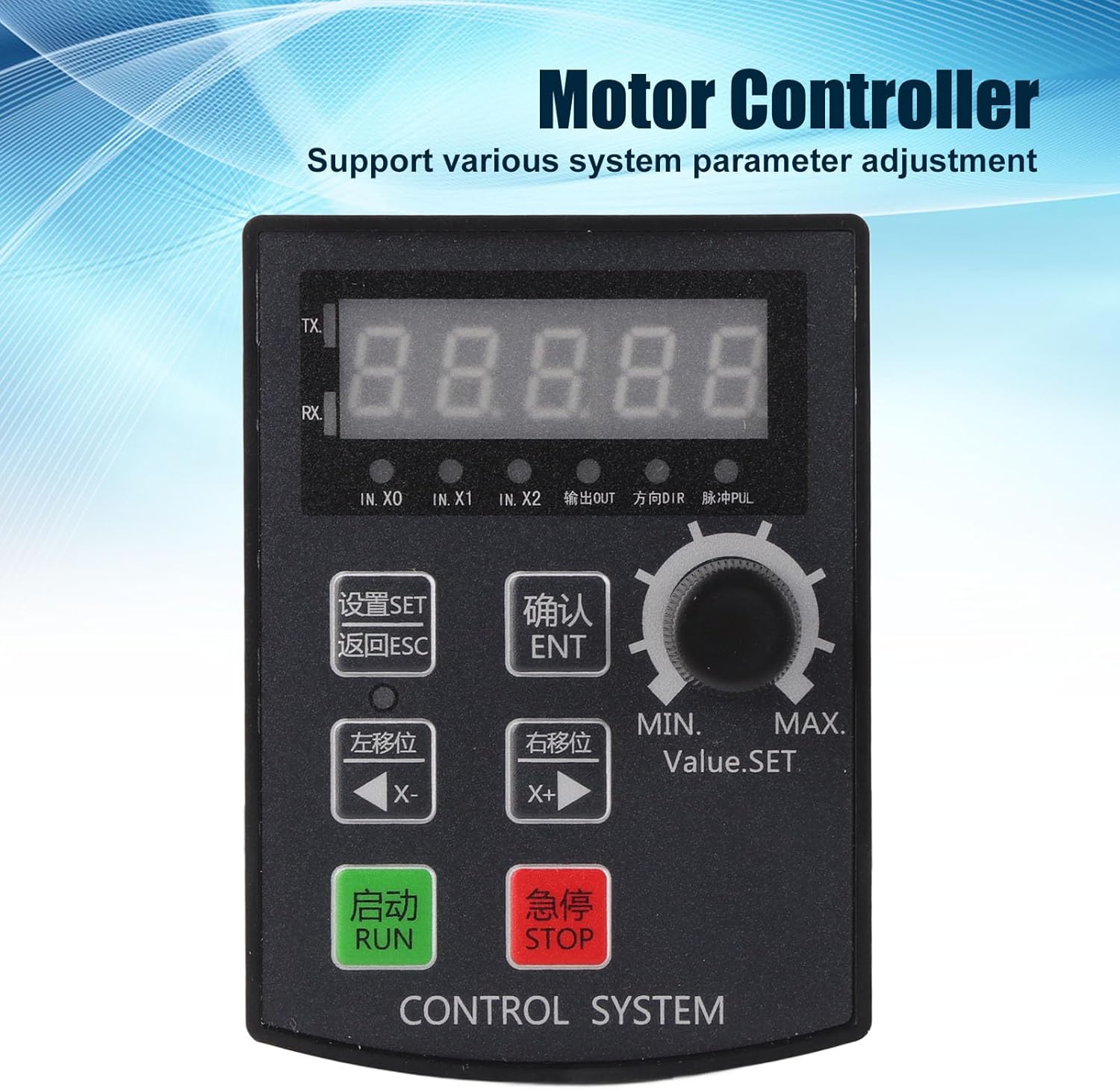
Figure 1: Acouto HF020-7X1T1M Motor Motion Control Module
The Acouto HF020-7X1T1M is a motor motion control module featuring a 5-digit high-brightness digital tube display. It supports various system parameter adjustments and is suitable for industrial automation, small machinery, automatic painting, and indexing tooling control.
2. Product Features
- 5-Digit Digital Display: High brightness digital tube for clear parameter visibility.
- Versatile Control: Supports angle and lap control for precise motor movement.
- Parameter Adjustment: Allows adjustment of various system parameters.
- Manual Movement Support: Facilitates easy debugging and setup.
- Wide Application: Ideal for industrial automation, small machinery, automatic painting, and indexing tooling control.
- Pulse Frequency: Motor pulse frequency up to 85K Hz.
- Pulse Voltage: Collector 24V, compatible with 5-24V drivers.
- Limit Functionality: Provides positive and negative limit control.
3. Specifications
| Parameter | Value |
|---|---|
| Product Material | ABS |
| Product Model | HF020-7X1T1M |
| Voltage | 12-24V |
| Hole Size | Approx. 92 x 69.8mm / 3.62 x 2.75in |
| Use Environment | -5℃ - 60℃ (non-condensing) |
| Motor Pulse Frequency | 85K Hz |
| Motor Pulse Voltage | Collector 24V (directly connectable to 5-24V driver) |
| Screen Structure | 5 Digits, high brightness digital tube |
| Output | 2 Outputs (0V output voltage) |
| Input | 7 Inputs (0V as valid signal) |
4. Setup
4.1 Mounting
The module is designed for panel mounting. Ensure the mounting hole size is approximately 92 x 69.8mm (3.62 x 2.75in). Secure the module using appropriate fasteners (not included) to prevent vibration and ensure stable operation.
4.2 Wiring Connections
Refer to the wiring diagram below for proper connection of power, inputs, and outputs. Ensure all connections are secure and correctly polarized to prevent damage to the module or connected equipment.

Figure 2: Rear view with wiring terminals
The rear of the module features terminal blocks for power input (12-24V), 7 input signals (IN.X0, IN.X1, IN.X2, etc.), and 2 output signals (OUT). The motor pulse (PUL) and direction (DIR) outputs are also located here. Ensure 0V is used as the valid signal for inputs.
- Power Supply: Connect a 12-24V DC power source to the designated terminals.
- Motor Connection: Connect the stepper/servo motor driver to the PUL (pulse) and DIR (direction) output terminals. The motor pulse voltage is 24V (collector output), compatible with 5-24V drivers.
- Inputs: Connect external control signals (e.g., limit switches, start/stop buttons) to the 7 input terminals (IN.X0 to IN.X6). A 0V signal is considered valid for inputs.
- Outputs: Utilize the 2 output terminals for external device control. Output voltage is 0V.
5. Operating Instructions
The Acouto HF020-7X1T1M module features a user-friendly interface with a 5-digit display and control buttons for easy operation.

Figure 3: Control Panel Overview
The control panel includes a 5-digit display, a rotary encoder for value adjustment, and several buttons for control and navigation.
5.1 Button Functions
- RUN (Green Button): Initiates the motor motion program.
- STOP (Red Button): Halts the motor motion program.
- SET (设置): Enters the parameter setting mode.
- ESC (返回): Exits the current menu or cancels an operation.
- ENT (确认): Confirms a selection or parameter value.
- X- (左移位): Moves the cursor or decrements a value.
- X+ (右移位): Moves the cursor or increments a value.
- Rotary Encoder (MIN. Value.SET MAX.): Adjusts numerical values or navigates through options.
5.2 Basic Operation
- Power On: Connect the 12-24V power supply. The 5-digit display will illuminate.
- Parameter Setting: Press the SET button to enter the parameter setting menu. Use the rotary encoder or X- / X+ buttons to navigate and adjust values. Press ENT to confirm each setting. Press ESC to exit the setting mode.
- Manual Movement: The module supports manual motor movement for debugging. Specific steps for manual control will be detailed in the programming guide (not included in this manual).
- Start Operation: Once parameters are set, press the RUN button to start the motor motion sequence.
- Stop Operation: Press the STOP button to immediately halt any ongoing motor motion.
6. Maintenance
- Cleaning: Keep the module clean and free from dust and debris. Use a soft, dry cloth for cleaning. Avoid using harsh chemicals or abrasive materials.
- Environmental Conditions: Operate the module within the specified temperature range of -5℃ to 60℃ (non-condensing). Avoid exposure to excessive moisture, direct sunlight, or corrosive environments.
- Connection Checks: Periodically inspect all wiring connections to ensure they are secure and free from corrosion or damage.
- Firmware Updates: Check the manufacturer's website for any available firmware updates. Follow the provided instructions carefully if performing an update.
7. Troubleshooting
This section provides solutions to common issues you might encounter with the Acouto HF020-7X1T1M module.
| Problem | Possible Cause | Solution |
|---|---|---|
| Module does not power on. | No power supply or incorrect voltage. | Check power connections and ensure a 12-24V DC supply. |
| Motor does not move. | Incorrect wiring to motor driver; incorrect parameters; motor driver issue. | Verify PUL/DIR wiring. Check motor parameters in settings. Ensure motor driver is functional. |
| Display is blank or erratic. | Power fluctuation; internal fault. | Check power supply stability. If problem persists, contact support. |
| Buttons are unresponsive. | Module frozen; physical damage. | Power cycle the module. If still unresponsive, contact support. |
If you encounter issues not listed here or if the suggested solutions do not resolve the problem, please contact Acouto customer support for further assistance.
8. Warranty and Support
8.1 Warranty Information
This Acouto product is covered by a manufacturer's warranty for 90 days from the date of purchase. This warranty covers defects in materials and workmanship under normal use. It does not cover damage caused by misuse, accident, unauthorized modification, or improper installation.
8.2 Customer Support
For technical support, warranty claims, or any questions regarding your Acouto HF020-7X1T1M Motor Motion Control Module, please contact Acouto customer service. Refer to your purchase documentation or the Acouto official website for contact details.