
1. Introduction
Thank you for choosing the NEOHIPO SA20 Home Stereo Receiver and Audio Amplifier. This compact yet powerful 2.1 channel amplifier is designed to deliver clear and robust sound for your home audio needs. It supports a variety of input sources, including Bluetooth 5.0, USB, SD card, RCA, and FM radio, making it versatile for various entertainment setups. This manual will guide you through the setup, operation, and maintenance of your new amplifier.
2. Safety Instructions
- Read all instructions carefully before operating the device.
- Keep the unit away from water, moisture, and direct sunlight.
- Ensure proper ventilation to prevent overheating. Do not block any ventilation openings.
- Use only the specified power supply.
- Do not attempt to open or repair the unit yourself. Refer all servicing to qualified personnel.
- Keep out of reach of children.
3. Package Contents
Verify that all items are present in your package:
- 1 x NEOHIPO SA20 Amplifier
- 1 x Remote Control
- 1 x User Manual
- 1 x Power Cable

Image: Contents of the NEOHIPO SA20 package, including the amplifier, remote control, and user manual.
4. Product Overview
Front Panel Controls
The front panel provides easy access to all essential controls and input ports:
- Power Switch: Turns the unit on or off.
- USB/SD Socket: For playing audio files from USB drives or SD cards.
- Player Control Buttons: AUTO, CH-, CH+, MODE for media playback and source selection.
- Master Volume: Adjusts the overall output volume.
- Microphone Inputs (MIC INPUT-1, MIC INPUT-2): Connect microphones for karaoke or announcements.
- MIC Volume: Adjusts the volume of the connected microphones.
- Echo: Controls the echo effect for microphones.
- Balance: Adjusts the left/right channel balance.
- Bass: Adjusts the low-frequency audio levels.
- Treble: Adjusts the high-frequency audio levels.
Rear Panel Connections
The rear panel houses all the necessary connections for your speakers and audio sources:
- FM Antenna: Connect the included FM antenna for radio reception.
- Speaker Output (L+R 4-8Ω Horns-Speakers): Connect your passive speakers here.
- Line In (RCA): Connect external audio sources like CD players, TVs, or other devices.
- Line Out (RCA): Connect to an active subwoofer or another amplifier.
- AC 110-240V Power Switch: Selects the appropriate voltage for your region.
- Power Cable Input: Connect the power cable here.

Image: Detailed view of the NEOHIPO SA20 amplifier's front and rear panels, showing all controls, inputs, and outputs.
5. Setup
5.1 Connecting Speakers
The SA20 amplifier supports a 2.1 channel setup, allowing connection of two passive speakers and one active subwoofer or speaker.
- Passive Speakers: Connect your passive speakers to the "SPEAKER OUTPUT" terminals on the rear panel. Ensure correct polarity (+ to + and - to -) for both Left and Right channels. The amplifier supports 4-8Ω speakers.
- Active Subwoofer/Speaker: Connect an active subwoofer or active speaker to the "LINE OUT" RCA ports on the rear panel.
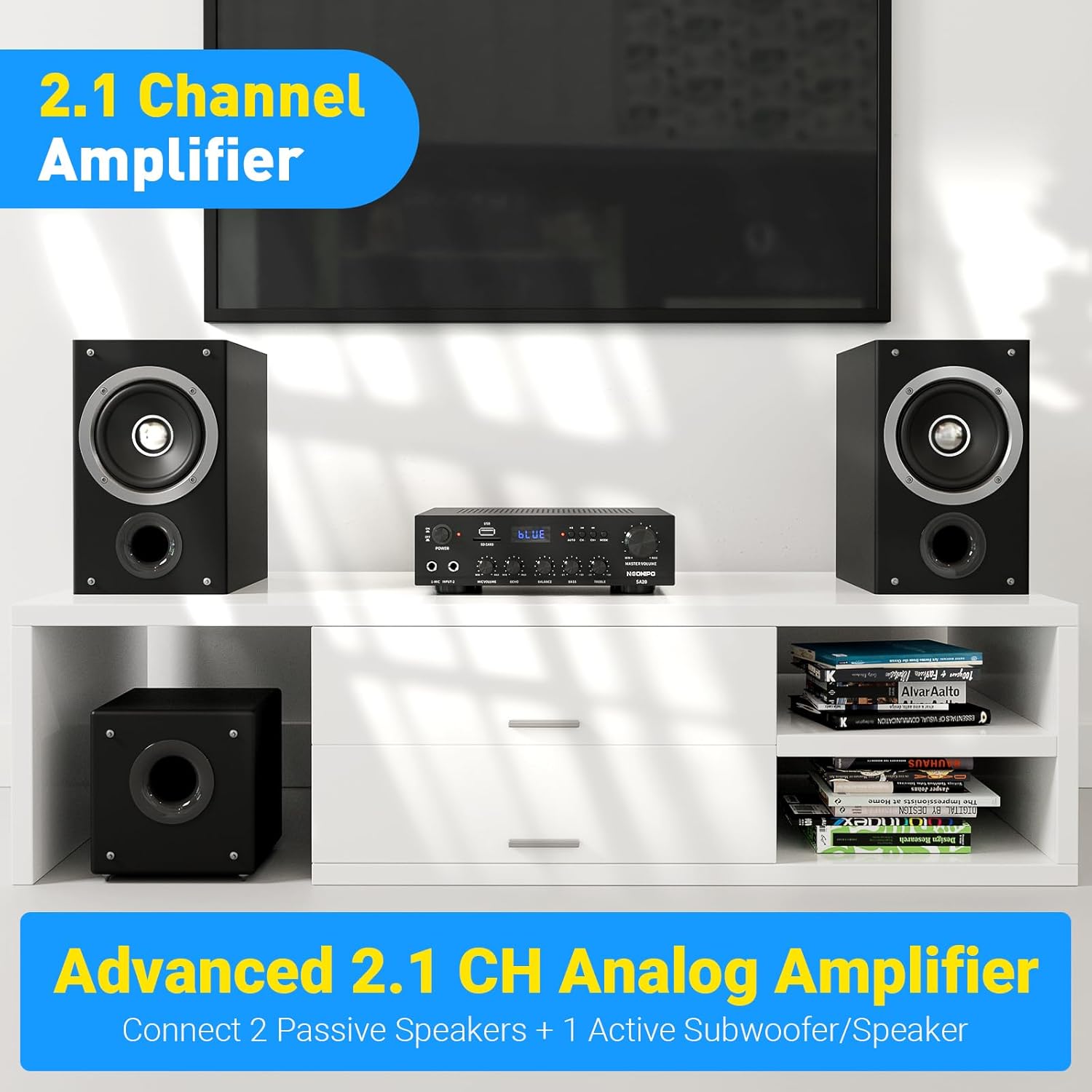
Image: The NEOHIPO SA20 amplifier set up with two passive speakers and an active subwoofer, demonstrating a 2.1 channel configuration.
5.2 Connecting Audio Sources
The SA20 offers multiple ways to connect your audio devices:
- RCA Input: Use RCA cables to connect devices like CD players, DVD players, or TVs to the "LINE IN" ports.
- USB/SD Card: Insert a USB flash drive or SD card into the respective slots on the front panel.
- Microphones: Plug up to two microphones into the "MIC INPUT-1" and "MIC INPUT-2" jacks on the front panel.
- FM Antenna: Connect the provided FM antenna to the FM antenna port on the rear panel for radio reception.

Image: A diagram illustrating the wide range of applications and connections for the NEOHIPO SA20 amplifier, including smartphones, USB drives, SD cards, TVs, CD players, subwoofers, and passive speakers.
5.3 Power Connection
After connecting all audio sources and speakers:
- Ensure the AC 110-240V Power Switch on the rear panel is set to the correct voltage for your region.
- Connect the power cable to the amplifier's power input and then to a wall outlet.
- Press the Power Switch on the front panel to turn on the amplifier.
6. Operating Instructions
6.1 Bluetooth Connection
The SA20 features Bluetooth 5.0 for wireless audio streaming:
- Turn on the amplifier and select Bluetooth mode using the MODE button on the front panel or remote control. The display will show "BLUE".
- On your smartphone, tablet, or computer, enable Bluetooth and search for available devices.
- Select "SA20" from the list of devices to pair.
- Once paired, you can stream audio wirelessly from your device to the amplifier. The connection is stable within a range of 10 meters (40 feet).

Image: The NEOHIPO SA20 amplifier demonstrating its Bluetooth 5.0 wireless connectivity, with a smartphone nearby.
6.2 USB/SD Playback
To play audio from a USB drive or SD card:
- Insert your USB drive or SD card into the corresponding slot on the front panel.
- The amplifier should automatically switch to USB/SD mode. If not, press the MODE button to select it.
- Use the Player Control buttons (CH-, CH+) to navigate tracks and AUTO to play/pause.
6.3 FM Radio
To listen to FM radio:
- Ensure the FM antenna is properly connected to the rear panel.
- Press the MODE button to select FM radio mode.
- Press the AUTO button to automatically scan and save available FM stations.
- Use the CH- and CH+ buttons to switch between saved stations.
6.4 Microphone Usage
For karaoke or public address:
- Connect your microphones to the "MIC INPUT-1" or "MIC INPUT-2" jacks on the front panel.
- Adjust the "MIC VOLUME" knob to control the microphone's loudness.
- Use the "ECHO" knob to add an echo effect to the microphone sound.

Image: The NEOHIPO SA20 amplifier with two microphones connected, highlighting the dedicated controls for microphone volume, echo, bass, and treble adjustments.
6.5 Audio Adjustments
Fine-tune your audio experience using the dedicated knobs:
- Master Volume: Controls the overall sound level. Turn clockwise to increase, counter-clockwise to decrease.
- Bass: Adjusts the intensity of low-frequency sounds. Increase for more powerful bass, decrease for less.
- Treble: Adjusts the intensity of high-frequency sounds. Increase for brighter sound, decrease for softer highs.
- Balance: Adjusts the relative volume between the left and right channels. Use to center the soundstage.
7. Maintenance
- Cleaning: Use a soft, dry cloth to clean the exterior of the amplifier. Do not use liquid cleaners or aerosols.
- Ventilation: Ensure the ventilation openings are clear of dust and debris to prevent overheating.
- Storage: When not in use for extended periods, store the amplifier in a cool, dry place.
8. Troubleshooting
| Problem | Possible Cause | Solution |
|---|---|---|
| No power | Power cable not connected; Power switch off; Outlet malfunction | Check power cable connection; Ensure power switch is ON; Try a different outlet |
| No sound output | Incorrect input source selected; Speaker wires loose; Volume too low; Mute activated | Select correct input (MODE button); Check speaker connections; Increase Master Volume; Deactivate mute (if applicable) |
| Bluetooth connection unstable | Device too far; Interference; Low battery on source device | Move device closer to amplifier (within 10m); Reduce interference from other wireless devices; Charge source device |
| Microphone not working | Microphone not connected; MIC Volume too low; Microphone faulty | Ensure microphone is fully plugged in; Increase MIC Volume; Test with another microphone |
9. Specifications
- Brand: NEOHIPO
- Model: SA20
- Connectivity Technology: Bluetooth 5.0
- Controller Type: Push Button, Rotary Knobs, Remote Control
- Compatible Devices: Smartphones, Tablets, Computers, CD Players, TVs
- Connector Type: RCA, USB, SD, Microphone (6.35mm Jack)
- Audio Output Mode: Stereo
- Surround Sound Channel Configuration: 2.1
- Output Power (Max): 500 Watts x 2
- Rated Power: 76 Watts x 2
- Electrical Power: 500 Watts
- Number of Channels: 3 (2 for speakers, 1 for subwoofer)
- Audio Output Type: Speakers
- Included Components: Amplifier, Remote Control, User Manual, Power Cable

Image: The NEOHIPO SA20 amplifier showcasing its maximum output power of 500W x 2, emphasizing its capability to deliver natural, strong, and delicate sound.
10. Warranty & Support
The NEOHIPO SA20 amplifier comes with a 30-day money-back guarantee and a one-year replacement warranty. For any product inquiries, technical support, or warranty claims, please contact our customer service. We are committed to providing serious service support to ensure your satisfaction.
For support, please refer to the contact information provided in your purchase documentation or visit the official NEOHIPO website.