
FTX FTX5491BK
FTX EVO30 1/10 BRUSHED STREET CAR RTR - BLACK User Manual
Model: FTX5491BK
Product Overview
The FTX EVO30 is a 1/10 scale brushed street car designed for both speed runs and drifting. It features a 4WD shaft-driven system with sealed, metal-geared differentials throughout for maximum durability. The wide aero-inspired main chassis provides stability at speed, coupled with a rear diffuser. This model comes ready-to-run with an Etronix 2.4GHz 5-channel radio system, Etronix 9kg metal-geared steering servo, Hobbywing WP1040 ESC, and a 17T 550 brushed motor, all powered by a Voltz 2000mAH Ni-MH battery. It includes both hard drift tyres and soft treaded rubber tyres, allowing for versatile driving experiences.

Image: The FTX EVO30 1/10 Brushed Street Car, showcasing its sleek black body and overall design.
Safety Information
Important Safety Precautions:
- Adult supervision is required during operation.
- This product is not waterproof. Avoid exposure to water or moisture.
- Always turn the vehicle and transmitter OFF when not in use to prevent battery damage.
- The product uses a rechargeable battery. Incorrect handling of the battery may lead to puncture, leaking battery acid, or potential fire.
- Dispose of batteries in accordance with local laws and regulations.
- Connect the charger strictly according to instructions. Incorrect charger connection may result in short-circuit or other damage.
What's in the Box
Upon opening the package, verify that all components are present:
- FTX EVO30 Vehicle
- Product Manual
- 2.4GHz Handset (Transmitter)
- Voltz 2000mAH Ni-MH Battery Pack
- Battery Charger
- Set of Rubber Street Tyres
- Set of Hard Slick Drift Tyres
Setup Guide
1. Charging the Battery
Before first use, fully charge the included Voltz 2000mAH Ni-MH battery. Connect the battery to the charger and plug the charger into a suitable power outlet. Refer to the charger's specific instructions for charging indicators and estimated charging time. Always ensure the battery is cool before charging.
2. Installing Transmitter Batteries
The handset requires 4 x AA batteries (not included). Open the battery compartment on the back of the transmitter and insert the batteries, observing the correct polarity (+/-) as indicated. Close the compartment securely.
3. Installing Vehicle Battery
Carefully remove the body shell of the EVO30. Locate the battery compartment on the chassis. Insert the fully charged Ni-MH battery into the compartment and secure it if a strap or clip is provided. Connect the battery connector to the ESC (Electronic Speed Controller) connector, ensuring a firm connection.
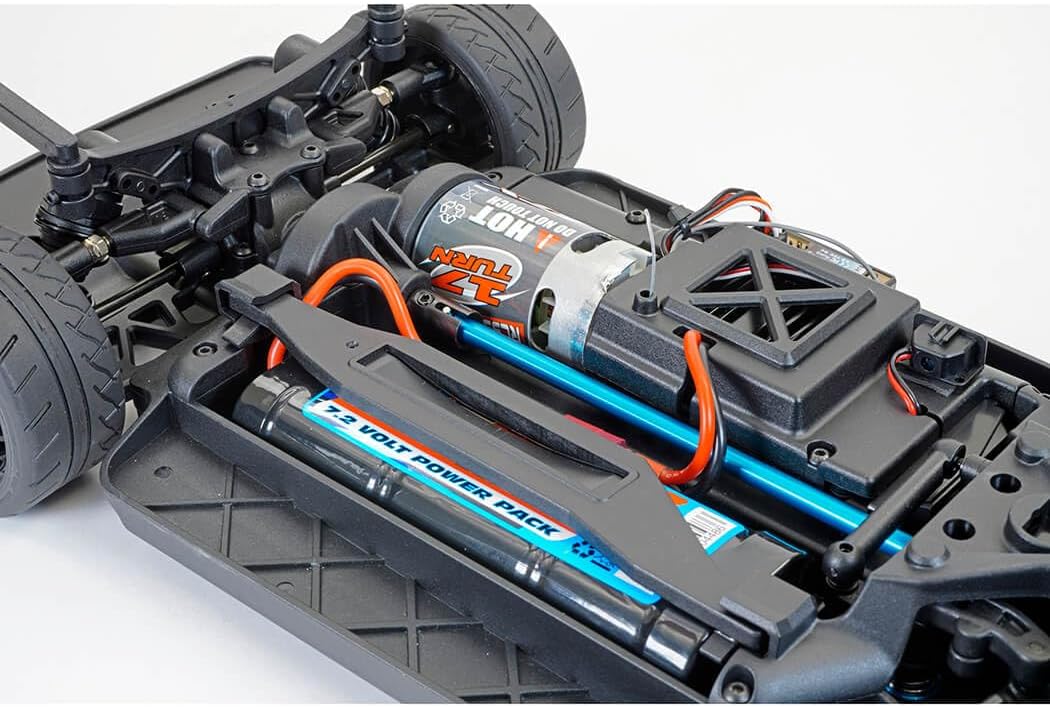
Image: View of the FTX EVO30 chassis showing the battery compartment and motor installation.
4. Tyre Selection
The EVO30 comes with two sets of tyres: soft treaded rubber tyres for street driving and hard slick drift tyres for drifting. Choose the appropriate set based on your desired driving style and surface. To change tyres, carefully remove the wheel nuts and swap the wheel assemblies.

Image: The two included tyre sets: left shows the soft treaded street tyres, right shows the hard slick drift tyres.
Operating Instructions
1. Powering On
- First, turn on the transmitter. The power indicator light should illuminate.
- Next, turn on the vehicle by pressing the power button on the ESC. The vehicle's LED lights (if equipped) should activate, and the ESC may emit a series of beeps indicating successful power-up and connection to the transmitter.
2. Basic Controls
- Steering: Use the steering wheel on the transmitter to control the direction of the vehicle (left/right).
- Throttle: Pull the trigger on the transmitter to move forward. Push the trigger forward to engage reverse or brake.
3. Driving Tips
- Start in an open, clear area free from obstacles, people, or pets.
- Familiarize yourself with the controls at low speeds before attempting high-speed maneuvers.
- When driving on different surfaces, adjust your driving style accordingly. The included drift tyres are specifically designed for controlled slides on smooth surfaces.
- Avoid driving in wet conditions as the product is not waterproof.
Maintenance
Regular maintenance will extend the life and performance of your FTX EVO30.
- Cleaning: After each use, especially if driven in dusty or dirty conditions, clean the vehicle using a soft brush or compressed air. Avoid using water or harsh chemicals.
- Inspecting Components: Periodically check all screws, nuts, and linkages for looseness. Tighten as necessary. Inspect the suspension components, drive shafts, and gears for any signs of wear or damage.
- Motor Care: The 17T 550 brushed motor may require occasional cleaning and brush inspection. Refer to specific brushed motor maintenance guides if performance degrades.
- Battery Storage: When storing the Ni-MH battery for extended periods, ensure it is charged to approximately 50% capacity. Store in a cool, dry place away from direct sunlight.
- Differential Maintenance: The sealed, metal-geared differentials are designed for durability. If you notice unusual noises or performance issues from the differentials, they may require inspection and lubrication.

Image: Components of the metal-geared differentials, highlighting their robust construction.
Troubleshooting
| Problem | Possible Cause | Solution |
|---|---|---|
| Vehicle does not respond to transmitter. |
|
|
| Vehicle moves slowly or lacks power. |
|
|
| Steering is erratic or unresponsive. |
|
|
Specifications
| Feature | Detail |
|---|---|
| Model Number | FTX5491BK |
| Scale | 1:10 |
| Dimensions (L x W x H) | 43.8 x 20 x 13 cm |
| Weight | 4 kg |
| Motor Type | 17T 550 Sized Brushed Motor |
| ESC | Hobbywing WP1040 Brushed ESC |
| Servo | Etronix 9kg Metal Geared Steering Servo |
| Battery | Voltz 2000mAH Ni-MH Battery Pack |
| Radio System | Etronix 2.4GHz 5-channel |
| Drive System | Shaft-driven 4WD with metal-geared differentials |
| Tyres Included | Rubber Street Tyres, Hard Slick Drift Tyres |
| Transmitter Batteries | 4 x AA (not included) |
| Recommended Age | 14 years and up |
| Material | Plastic, Aluminium, Metal, Rubber |
Warranty and Support
For warranty information and technical support, please refer to the official FTX website or contact your retailer. Keep your proof of purchase for any warranty claims.
For further assistance or to purchase replacement parts, visit the FTX RC website or contact their customer service.
Related documentsFTX5491BK


Ask a question about this manual
Ask about setup, troubleshooting, compatibility, parts, safety, or missing instructions. Manuals+ will review the question and use this page’s manual context to help answer it.