
Introduction
This manual provides comprehensive instructions for the safe and efficient operation of your Retevis C62 Dual Band Two-Way Radio. Please read this manual thoroughly before using the device to ensure proper functionality and to prevent damage. Keep this manual for future reference.
Package Contents
Upon unpacking, please verify that all items listed below are present and in good condition. If any items are missing or damaged, contact your retailer.
- 2 × Retevis C62 Radio
- 2 × Antenna
- 2 × Battery (Lithium-ion, 2000 mAh)
- 2 × Charging Base
- 2 × Adapter
- 2 × Belt Clip
- 2 × Type-C Charging Cable
- 2 × Hand Strap
- 2 × User Manual
- 2 × Earpiece

Product Overview
The Retevis C62 is a high-power, dual-band two-way radio designed for reliable communication over long distances. It features a robust design and user-friendly interface.
Key Features:
- High Power Output: 5W output with a long antenna for extended range, covering up to 30,000 sq.m or 30 floors in buildings.
- Group Call Function: One-touch group call for efficient team communication.
- Full Keypad Operation: Allows direct modification of function settings without requiring computer software.
- Easy Pairing: Simple pairing with other dual-band walkie-talkies.
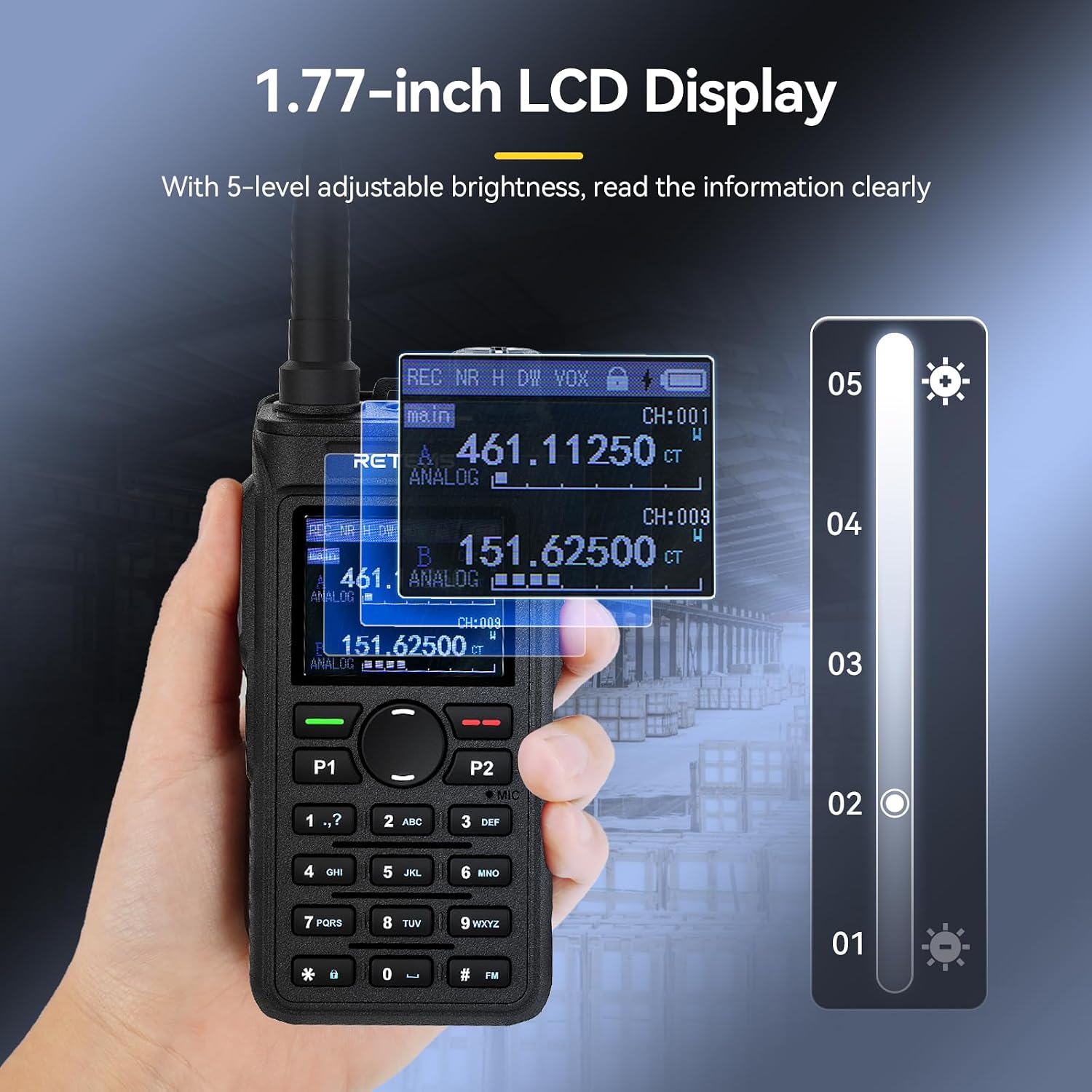
- 1.77-inch LCD Display: Clear display with 5-level adjustable brightness for easy viewing of battery and channel information.
- AI Noise Reduction: Filters environmental noise for clear voice transmission in noisy environments.
- 2000 mAh Rechargeable Battery: Provides approximately 17 hours of continuous use and 100 hours of standby time.
- Dual Charging Methods: Supports Type-C direct charging and desktop charging.
- Durable Construction: Made from PC/ABS material, designed to be anti-drop and shock-resistant.
- VOX Hands-free: Allows transmission without pressing the PTT button, with 9 adjustable levels.
- Emergency Alarm: For critical situations.
- Key Lock: Prevents accidental changes to settings.
- Powerful Flashlight: Integrated for convenience in low-light conditions.


Setup
1. Battery Installation and Charging
- Align the battery with the back of the radio and slide it into place until it clicks securely.
- To charge, connect the Type-C cable directly to the radio or place the radio in the charging base.
- Connect the adapter to the charging base or Type-C cable, then plug it into a power outlet.
- The charging indicator will show the charging status. Ensure the battery is fully charged before first use.


2. Antenna Attachment
Screw the antenna clockwise into the connector on the top of the radio until it is finger-tight. Do not overtighten.
3. Belt Clip and Hand Strap
Attach the belt clip to the back of the radio using the provided screws. Secure the hand strap to the designated loop on the radio for added security.
Operating Instructions
1. Power On/Off and Volume Adjustment
- To power on, rotate the Power/Volume knob clockwise.
- To power off, rotate the Power/Volume knob counter-clockwise until it clicks.
- Adjust the volume by rotating the Power/Volume knob.
2. Channel Selection and Frequency Input (VFO Mode)
- Use the Up/Down arrow keys or the keypad to select a channel.
- In VFO (Variable Frequency Oscillator) mode, you can directly input desired frequencies using the numeric keypad. Refer to the display for current frequency.

3. Transmitting and Receiving
- To transmit, press and hold the PTT (Push-To-Talk) button on the side of the radio. Speak clearly into the microphone.
- Release the PTT button to receive.
4. Group Call Function
The radio supports a one-touch group call feature. Consult the full user manual for specific button assignments and setup procedures for group calls. This feature allows all team members to be contacted simultaneously.

5. AI Noise Reduction
The integrated AI noise reduction chip automatically filters out ambient noise, ensuring clear voice communication even in loud environments. This feature is typically active by default.

6. VOX (Voice Operated Exchange) Function
VOX allows you to transmit by speaking into the microphone without pressing the PTT button. This is useful for hands-free operation.
- To activate/deactivate VOX, navigate through the radio's menu settings.
- Adjust the VOX sensitivity level (9 levels available) to prevent accidental transmissions or missed voice activations.

7. LCD Display and Brightness
The 1.77-inch LCD display shows channel information, battery status, and other settings. You can adjust the brightness to one of 5 levels for optimal visibility in various lighting conditions.

8. Key Lock Function
To prevent accidental key presses, activate the key lock feature. Refer to the radio's menu for instructions on how to enable and disable this function.

9. Flashlight
The radio includes a powerful flashlight. Activate it via the designated function key or menu option for use in dark environments.

10. Emergency Alarm
In an emergency, activate the alarm function. Refer to the full user manual for details on how to trigger and configure the emergency alarm.

Maintenance
- Cleaning: Use a soft, damp cloth to clean the radio's exterior. Do not use harsh chemicals or solvents.
- Battery Care:
- Avoid overcharging or completely discharging the battery.
- Store the battery in a cool, dry place when not in use for extended periods.
- Replace the battery if its performance significantly degrades.
- Antenna: Ensure the antenna is securely attached. Do not bend or force the antenna, as this can damage the radio's connector.
- Storage: Store the radio in a dry, dust-free environment away from extreme temperatures.
Troubleshooting
| Problem | Possible Cause | Solution |
|---|---|---|
| Radio does not power on. | Battery is low or not installed correctly. | Charge the battery or re-install it securely. |
| Cannot transmit or receive. | Incorrect channel/frequency, out of range, or antenna not attached. | Verify channel/frequency, move closer to other radios, ensure antenna is secure. |
| Poor audio quality. | Low battery, interference, or AI Noise Reduction settings. | Charge battery, move away from interference sources, check AI Noise Reduction levels. |
| Keys are unresponsive. | Key lock function is active. | Deactivate the key lock function. |
Specifications
| Feature | Detail |
|---|---|
| Brand | Retevis |
| Model Number | C62 |
| Color | Black |
| Number of Channels | 16 |
| Special Features | 50 CTCSS codes / 210 DCS codes, NOAA, VOX |
| Voltage | 7.4 Volts |
| Water Resistance Level | Not waterproof |
| Product Dimensions (D x W x H) | 121 x 35 x 58 millimeters |
| Item Weight | 251 Grams |
| Battery Type | 2 Lithium-ion (included) |
| Battery Capacity | 2000 mAh |
| Compatible Devices | Audio devices |
| Tuner Type | FM, UHF |
| Country of Origin | China |
Warranty and Support
Warranty Information:
Retevis provides a 2-year warranty for the radio body and a 1-year warranty for accessories. Additionally, there is a 30-day no-reason return policy.
Beyond the warranty period, maintenance services are still offered, with buyers responsible for corresponding costs.
Customer Support:
For any questions, issues, or support needs, please contact Retevis customer service on Amazon. They aim to reply within 12 hours.


