
1. Product Overview
Thank you for choosing the Olucia Cyril Amber Design Ceiling Lamp. This manual provides essential information for the safe and correct installation, operation, and maintenance of your new lighting fixture. Please read this manual thoroughly before installation and retain it for future reference.
The Cyril series features multiple oval-shaped glass spheres, attached at the base with springs, creating a distinctive and elegant design. When illuminated with G9 light sources, it produces a beautiful play of light, enhancing any room's ambiance.

Figure 1: Olucia Cyril Amber Design Ceiling Lamp. This image shows the complete lamp assembly with its multiple amber-colored glass spheres and black mounting base.
2. Safety Information
Please observe the following safety precautions to prevent injury or damage:
- Electrical Safety: Always disconnect power at the main circuit breaker before installing, servicing, or cleaning the fixture.
- Qualified Electrician: Installation should be performed by a qualified electrician or competent person in accordance with local electrical codes.
- Voltage: Ensure the supply voltage (220-240V) matches the fixture's requirements.
- Bulb Type: Use only G9 bulbs with a maximum wattage of 3W per bulb. Do not exceed the specified wattage.
- Handling: Handle glass components with care to prevent breakage.
- Environment: This fixture is rated IP20, meaning it is protected against solid objects larger than 12.5mm but has no protection against water. Do not install in damp or wet locations.
- Dimming: If using a dimmer, ensure it is compatible with G9 LED bulbs and installed correctly (dimmer not included).
3. Package Contents
Carefully unpack the box and ensure all components are present and undamaged. If any parts are missing or damaged, do not attempt to assemble or install the fixture. Contact customer support immediately.
- Cyril Ceiling Lamp fixture (main body with glass spheres)
- Mounting bracket
- Mounting screws and wall plugs
- Instruction Manual (this document)
Note: G9 light bulbs are not included and must be purchased separately.
4. Installation Instructions
Before beginning installation, ensure you have the necessary tools:
- Screwdriver (Phillips head)
- Drill (if required for wall plugs)
- Wire strippers
- Voltage tester
- Ladder
Step-by-Step Installation:
- Turn Off Power: Locate the main circuit breaker for the area where you are installing the lamp and turn off the power. Verify that the power is off using a voltage tester.
- Prepare Mounting Surface: Remove any existing light fixture. Ensure the ceiling surface is clean and stable.
- Attach Mounting Bracket: Position the mounting bracket (Figure 2) over the junction box on the ceiling. Mark the screw holes. Drill pilot holes if necessary and insert wall plugs. Secure the mounting bracket to the ceiling using the provided screws.
- Wire Connections: Connect the electrical wires from the ceiling to the lamp's wires. Typically:
- Live (brown or red) to Live (brown or red)
- Neutral (blue or black) to Neutral (blue or black)
- Earth/Ground (green/yellow) to Earth/Ground (green/yellow)
- Secure the Fixture: Carefully lift the lamp fixture and align the holes in the lamp base with the screws on the mounting bracket. Secure the lamp to the bracket using the provided nuts or screws.
- Install G9 Bulbs: Insert the G9 light bulbs (not included) into their respective sockets. Ensure they are seated firmly.
- Restore Power: Once installation is complete and all connections are secure, restore power at the main circuit breaker.
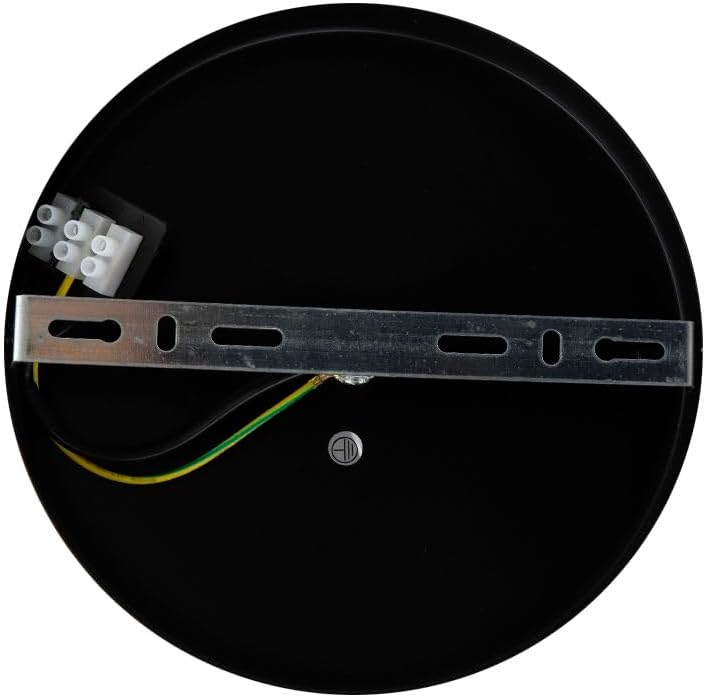
Figure 2: Mounting plate with wiring terminals. This image shows the circular black mounting plate with the metal crossbar bracket and electrical connectors for installation.
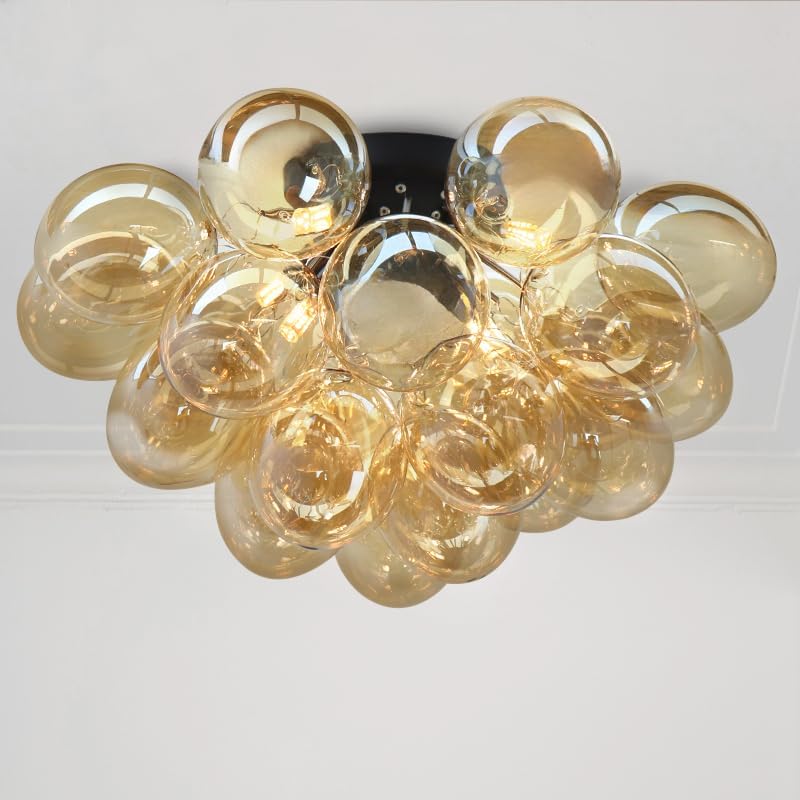
Figure 3: Olucia Cyril Amber Design Ceiling Lamp installed. This image displays the lamp mounted on a ceiling, showcasing its aesthetic appeal in a room setting.
5. Operating Instructions
Once installed and power is restored, the Olucia Cyril Ceiling Lamp operates like any standard lighting fixture.
- Turning On/Off: Use your standard wall switch to turn the lamp on or off.
- Dimming Function: If you have installed compatible dimmable G9 bulbs and a suitable dimmer switch (not included), you can adjust the light intensity using the dimmer control.
6. Maintenance
Regular cleaning will help maintain the appearance and performance of your lamp.
- Cleaning: Ensure the power is off before cleaning. Use a soft, dry, or slightly damp cloth to wipe the glass spheres and metal base. Do not use abrasive cleaners, solvents, or polishes, as these can damage the finish.
- Bulb Replacement: Always turn off the power before replacing bulbs. Allow old bulbs to cool completely before removal. Replace with G9 bulbs, maximum 3W.
7. Troubleshooting
| Problem | Possible Cause | Solution |
|---|---|---|
| Lamp does not light up. |
|
|
| Light flickers. |
|
|
| Dimming does not work. |
|
|
8. Product Specifications
| Brand | Olucia |
| Model Number | 1010234 |
| Product Dimensions (L x W x H) | 50 cm x 50 cm x 35 cm |
| Mounting Plate Dimensions (L x W x H) | 15 cm x 15 cm x 2.5 cm |
| Shade Dimensions (Diameter x Height) | 10 cm x 12 cm |
| Weight | 1 kg |
| Color | Amber |
| Material | Glass |
| Number of Light Sources | 6 |
| Lamp Holder Type | G9 (max. 3 Watt per bulb) |
| Bulbs Included | No |
| IP Rating | IP20 |
| Dimmable | Yes (dimmer not included) |
| Connection Voltage | 220-240V |
| Energy Label | A to G (depending on light source) |
| EAN Number | 8719933061089 |
9. Warranty and Support
The Olucia Cyril Amber Design Ceiling Lamp (Model 1010234) comes with a two-year warranty from the date of purchase, covering manufacturing defects. This warranty does not cover damage caused by improper installation, misuse, accidents, or normal wear and tear.
For warranty claims, technical support, or any questions regarding your product, please contact Olucia customer service through your retailer or the official Olucia website. Please have your proof of purchase and model number ready when contacting support.


