
Introduction
This manual provides detailed instructions for the safe and effective use of your KAER 5-6 Gun Safe. Please read all instructions carefully before setup and operation to ensure optimal performance and security. This gun cabinet is designed for large capacity storage of firearms and other valuable items, featuring robust construction and multiple security measures.
Setup
Unpacking
Carefully remove the gun safe from its packaging. The safe is designed with double boxing and metal corner protectors to ensure safe transit. Inspect the safe for any signs of damage during shipping. The safe arrives fully assembled.
Placement
Choose a suitable location for your gun safe, such as a home office or garage. Ensure the surface is level and capable of supporting the safe's weight (approximately 83.8 pounds).
Mounting (Optional but Recommended)
For enhanced security, it is highly recommended to secure the gun safe to a wall or floor using the provided 4 expansion bolts. The safe features pre-drilled holes in the back and bottom for this purpose.
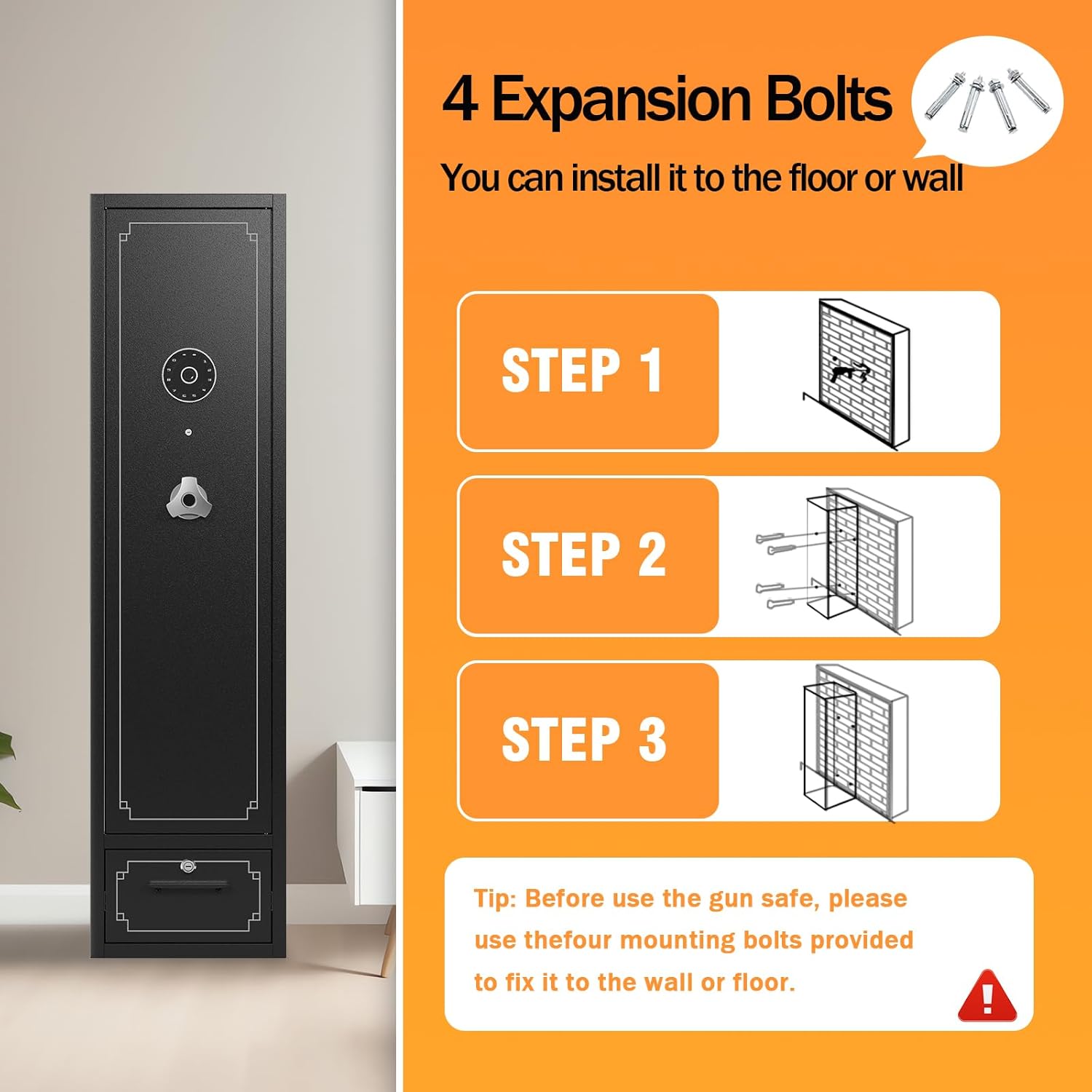
Figure 1: Wall or Floor Mounting Steps
Step 1: Identify the desired mounting location on a solid wall or floor.
Step 2: Mark the positions for drilling through the pre-drilled holes in the safe's back or bottom.
Step 3: Drill pilot holes and insert the expansion bolts, securing the safe firmly.
Operating Instructions
Unlocking Methods
Your KAER Gun Safe offers three methods for access:
- Emergency Key: Use one of the two provided emergency keys to manually open the safe. This is useful for initial access or if the digital password system is not functioning.
- Digital Password: Program a 3-12 digit password for quick and convenient access. Refer to the programming section for detailed steps.
- Emergency Power Box: If the internal batteries are depleted, connect the emergency power box to the external port to power the digital keypad and enter your password.

Figure 2: Unlocking Options
Programming the Digital Password
Detailed instructions for setting and changing your digital password are included in the separate quick start guide. Ensure you choose a strong, memorable password and test it with the door open before closing.
Silent Mode Operation
To switch between silent and non-silent modes for keypad operation, press "11#" on the digital keypad. This feature allows for discreet access without audible beeps.
Password Error Prompt
If an incorrect password is entered four times consecutively, the keypad will sound an alarm. To eliminate the alarm, enter the correct password.

Figure 3: Silent Mode and Alarm Features
Internal Features and Storage
The gun safe is designed for versatile storage:
- Removable Shelf: An upper shelf provides space for smaller items like ammunition or accessories. This shelf can be removed to accommodate longer firearms.
- Movable Indoor Gun Rack: The interior features a movable gun rack, allowing you to adjust the position to fit various gun sizes and lengths, ensuring organized storage.
- LED Lights: Integrated LED lights illuminate the interior, making it easier to locate items in low-light conditions.
- Locking Drawer: A separate drawer at the bottom provides additional secure storage for tools, personal belongings, or documents, accessible with a different key.
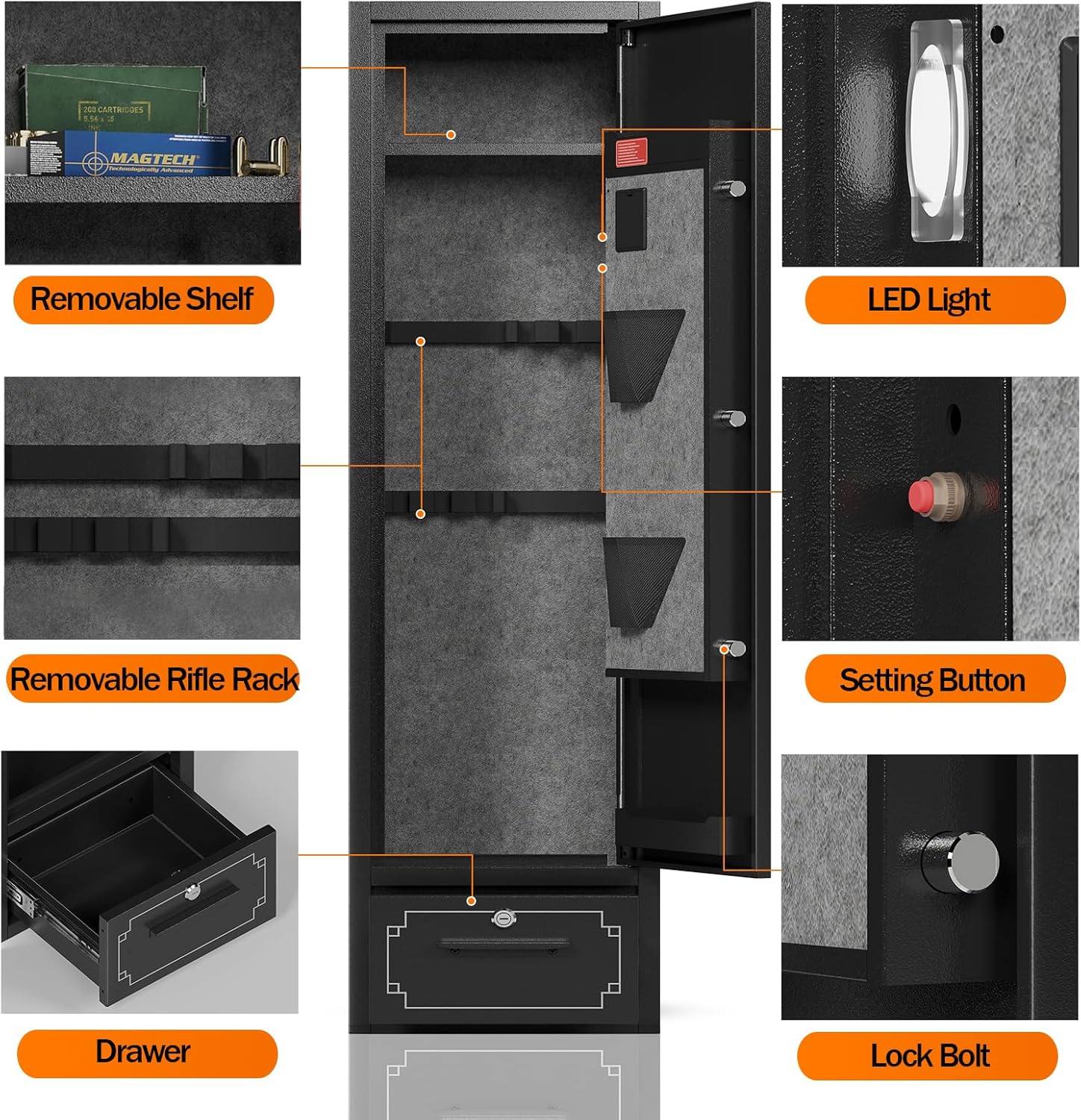
Figure 4: Internal Components

Figure 5: Locking Drawer

Figure 6: Removable Rifle Rack

Figure 7: Removable Shelf

Figure 8: Interior LED Light
Capacity Overview
The safe is designed to hold 5-6 guns, including rifles and pistols. Its dimensions are 55.12" (H) x 14.17" (W) x 11" (D). The internal drawer dimensions are 3.93" (H) x 11" (W) x 10" (D).

Figure 9: Dimensions and Capacity

Figure 10: Product Overview

Figure 11: Detailed Specifications Overview
Maintenance
To ensure the longevity and optimal performance of your KAER Gun Safe, follow these maintenance guidelines:
- Cleaning: Wipe the exterior and interior surfaces with a soft, dry cloth. Avoid abrasive cleaners that could damage the finish.
- Battery Replacement: The digital keypad requires batteries for operation. Replace batteries promptly when the low battery indicator appears to avoid reliance on the emergency power box. Ensure to use the correct type and brand of batteries as specified in the quick start guide.
- Rust Prevention: To prevent rust on firearms and other metal items stored inside, consider using moisture-absorbing packets (e.g., silicone packets) and ensure the safe is placed in a low-humidity environment.
- Lock Mechanism: Periodically check the lock bolts and hinges for smooth operation. Do not force the handle if the door does not open easily.
Troubleshooting
| Problem | Possible Cause | Solution |
|---|---|---|
| Safe does not open with digital password. | Incorrect password entered; Batteries are low or dead. | Re-enter the correct password. Replace batteries or use the emergency power box. |
| Lock bolts are lodged and door won't open. | Possible internal mechanism issue or obstruction. | Do not force the handle. Use the emergency key. If issue persists, contact customer support. |
| Keypad alarm sounds repeatedly. | Incorrect password entered multiple times. | Enter the correct password to silence the alarm. |
| LED lights not working. | Batteries are low or dead; LED connection issue. | Check and replace batteries. If problem persists, contact customer support. |
Specifications
| Feature | Detail |
|---|---|
| Brand | KAER |
| Model Number | KR1400 |
| Color | Black |
| Product Dimensions (H x W x D) | 55.12 x 14.17 x 11 inches |
| Item Weight | 83.8 pounds |
| Material | Alloy Steel |
| Gun Capacity | 5-6 Guns (Rifles and Pistols) |
| Unlocking Methods | Digital Password, Emergency Key, Emergency Power Box |
| Special Features | Removable Shelf, Movable Gun Rack, LED Lights, Locking Drawer, Silent Mode |
| Mounting Type | Floor Mount (Wall mountable) |
| Assembly Required | No (Ships fully assembled) |

Figure 12: All Steel Construction
Warranty and Support
KAER provides a professional after-sales service team dedicated to offering comprehensive technical support and after-sales guarantee. For any issues regarding installation, debugging, maintenance, or general inquiries, please contact our support team. We are committed to providing prompt and satisfactory solutions to ensure your peace of mind.
Please refer to your purchase documentation or the KAER official website for specific warranty terms and contact information.