
1. Introduction
The Nobsound Mini VOL-3 is a passive volume controller designed to provide precise audio level adjustment for your power amplifiers and active speakers. This device operates without the need for an external power supply, ensuring a pure and uncolored audio signal path. It is ideal for integrating into various audio setups, offering a simple yet effective solution for volume management.

Figure 1: Nobsound Mini VOL-3 Passive Volume Controller
2. Key Features
- High-Quality Sound Reproduction: Suitable for high-output signals from HiFi PC sound cards, DACs, and CD players. It transmits signals to back-end devices without gain, minimizing audio rendering. Equipped with a high-quality ALPS potentiometer for smooth and precise volume control.
- Lossless Audio Performance: This volume controller features only standard RCA inputs and outputs, consisting of a simple volume dial. It focuses on providing the purest sound by eliminating unnecessary functions. There is no audio coloration or distortion.
- High-Quality ALPS Potentiometer: Utilizes an ALPS A50K dual potentiometer, allowing for stepless and smooth volume adjustment. Ensures an optimal listening experience.
- Superior RCA Terminals: Employs USC CMC-816U RCA connectors made with oxygen-free copper and plated with 24K gold. This ensures signal clarity and durability, minimizing audio quality loss.
- Elegant and Portable Design: Features a CNC machined all-aluminum alloy housing, offering a stylish and compact design that enhances aesthetics and easily integrates into any audio system.
3. Package Contents
Please check the package for the following items:
- 1 x Nobsound Mini VOL-3 Passive Volume Controller

Figure 2: Package contents and dimensions of the VOL-3
4. Setup Instructions
Follow these steps to connect your Nobsound Mini VOL-3 to your audio system:
- Identify Inputs and Outputs: The VOL-3 has two RCA input channels (L/R) and two RCA output channels (L/R) on the rear panel.
- Connect Audio Source: Use high-quality RCA cables to connect your audio source (e.g., PC sound card, DAC, CD player) to the "IN" RCA ports on the VOL-3. Ensure left and right channels are correctly matched (white for left, red for right).
- Connect Output Device: Use another set of RCA cables to connect the "OUT" RCA ports on the VOL-3 to your power amplifier or active speakers. Again, ensure left and right channels are correctly matched.
- Placement: Place the VOL-3 on a stable, flat surface near your audio source and output device for easy access to the volume knob.
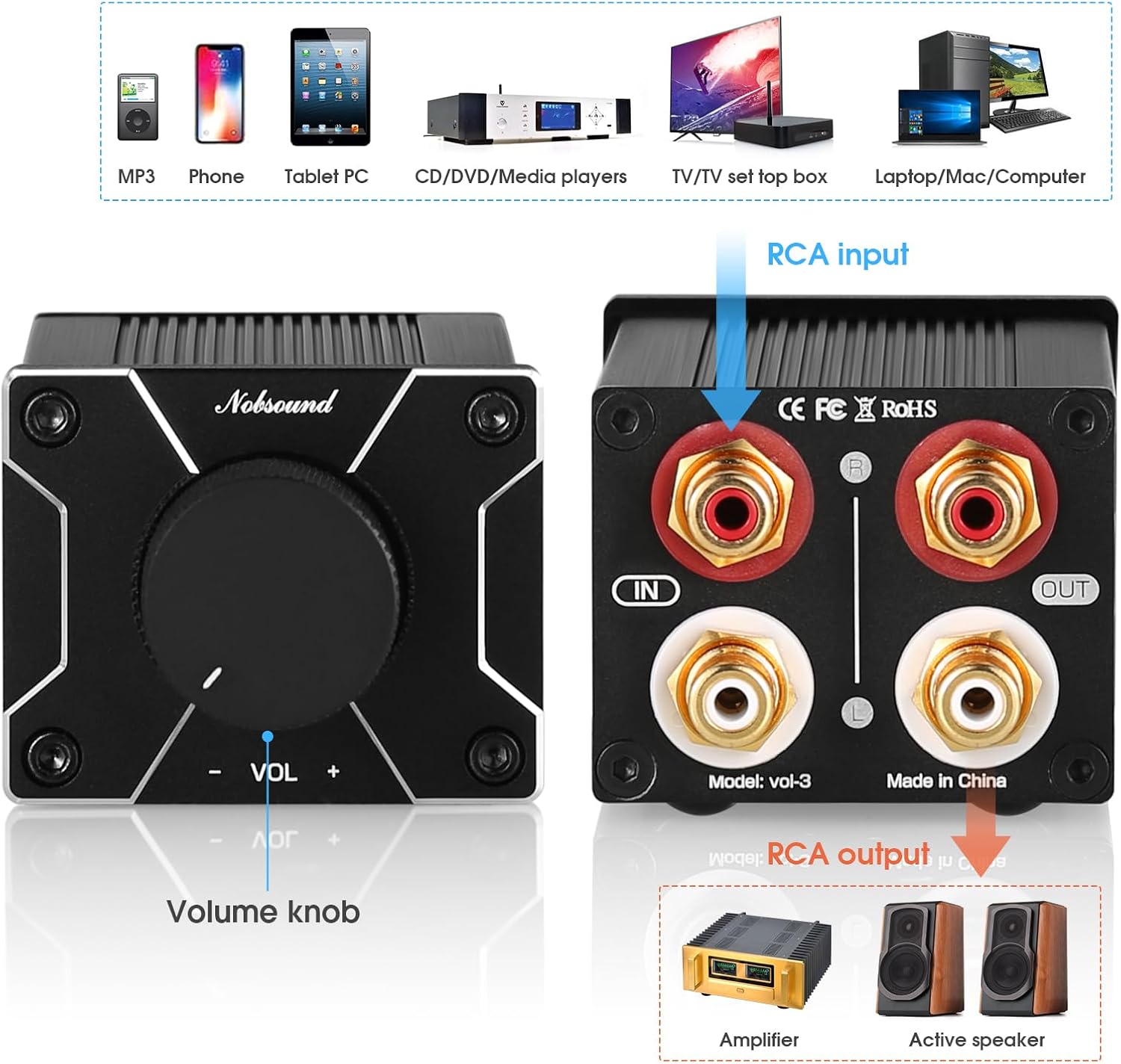
Figure 3: Connection diagram for the Nobsound Mini VOL-3

Figure 4: Example setup with a laptop and active speakers

Figure 5: Example setup with a CD player and amplifier
5. Operating Instructions
The Nobsound Mini VOL-3 is designed for straightforward operation:
- Volume Control: Use the large rotary knob on the front panel to adjust the audio volume. Turn clockwise to increase volume and counter-clockwise to decrease volume. The passive design ensures that the volume is controlled purely by attenuating the signal, maintaining audio fidelity.
- No Power Required: Since the device is passive, it does not require any external power supply. Simply connect your audio source and output devices, and it is ready to use.

Figure 6: Front panel with volume knob
6. Maintenance
To ensure the longevity and optimal performance of your Nobsound Mini VOL-3, follow these maintenance guidelines:
- Cleaning: Use a soft, dry cloth to clean the exterior of the device. Avoid using liquid cleaners or solvents, as they may damage the finish or internal components.
- Placement: Keep the device in a cool, dry place away from direct sunlight, heat sources, and excessive moisture. Ensure adequate ventilation around the unit.
- Handling: Handle the device with care. Avoid dropping it or subjecting it to strong impacts.
- Cable Connections: Periodically check all RCA cable connections to ensure they are secure and free from corrosion. Loose connections can lead to signal degradation.
7. Troubleshooting
If you encounter any issues with your Nobsound Mini VOL-3, refer to the following troubleshooting tips:
| Problem | Possible Cause | Solution |
|---|---|---|
| No sound output | Incorrect cable connections | Ensure all RCA cables are securely connected to the correct input and output ports. Check that left and right channels are matched. |
| Low volume or distorted sound | Volume knob set too low; faulty cables; issue with source/output device | Turn the volume knob clockwise. Try different RCA cables. Test your audio source and output device directly to rule out issues with them. |
| Intermittent sound | Loose cable connections | Check and re-secure all RCA cable connections. |
If the problem persists after trying these solutions, please contact Nobsound customer support for further assistance.
8. Specifications
| Feature | Description |
|---|---|
| Brand | Nobsound |
| Model Number | VOL-3 |
| Color | Black |
| Input/Output | RCA Stereo L/R |
| Volume Control | ALPS A50K Dual Potentiometer |
| Power Requirement | None (Passive Device) |
| Housing Material | CNC Machined Aluminum Alloy |
| Dimensions (L x W x H) | Approximately 94mm x 52mm x 43mm (3.70in x 2.05in x 1.69in) |
| Item Weight | 0.22 Kilograms |
| Package Size | 8.8 x 7.5 x 6.3 cm |
| ASIN | B0DK53X2HH |
9. Warranty and Support
Nobsound products are designed for reliability and performance. For warranty information, technical support, or any inquiries regarding your Mini VOL-3 Passive Volume Controller, please refer to the official Nobsound website or contact your local distributor.
You can typically find support contact details on the product packaging or the manufacturer's official website. Please have your product model number (VOL-3) and purchase details ready when contacting support.
10. Product Overview Video
Video 1: A brief overview of the Nobsound Mini VOL-3 Passive Volume Controller, showcasing its design and features.

