
Introduction
Thank you for choosing the AWEI T77 Wireless Earbuds. This manual provides detailed instructions on how to set up, operate, and maintain your earbuds to ensure optimal performance and longevity. Please read this manual carefully before using the product and retain it for future reference.
Package Contents
Please check the package for the following items:
- AWEI T77 Wireless Earbuds (Left and Right)
- Charging Case
- USB Type-C Charging Cable
- Eartips (various sizes)
- User Manual
Product Overview
The AWEI T77 Wireless Earbuds feature a compact design with a transparent rotating charging case. Each earbud is equipped with a 13mm driver for high-fidelity audio and multiple microphones for clear calls.

Image: AWEI T77 Wireless Earbuds securely placed within their transparent charging case, showcasing the sleek design and charging indicators.

Image: The AWEI T77 ENC Bluetooth Earbuds displayed in three color variations (white, black, gold), highlighting their noise-cancelling and 4-mic features.
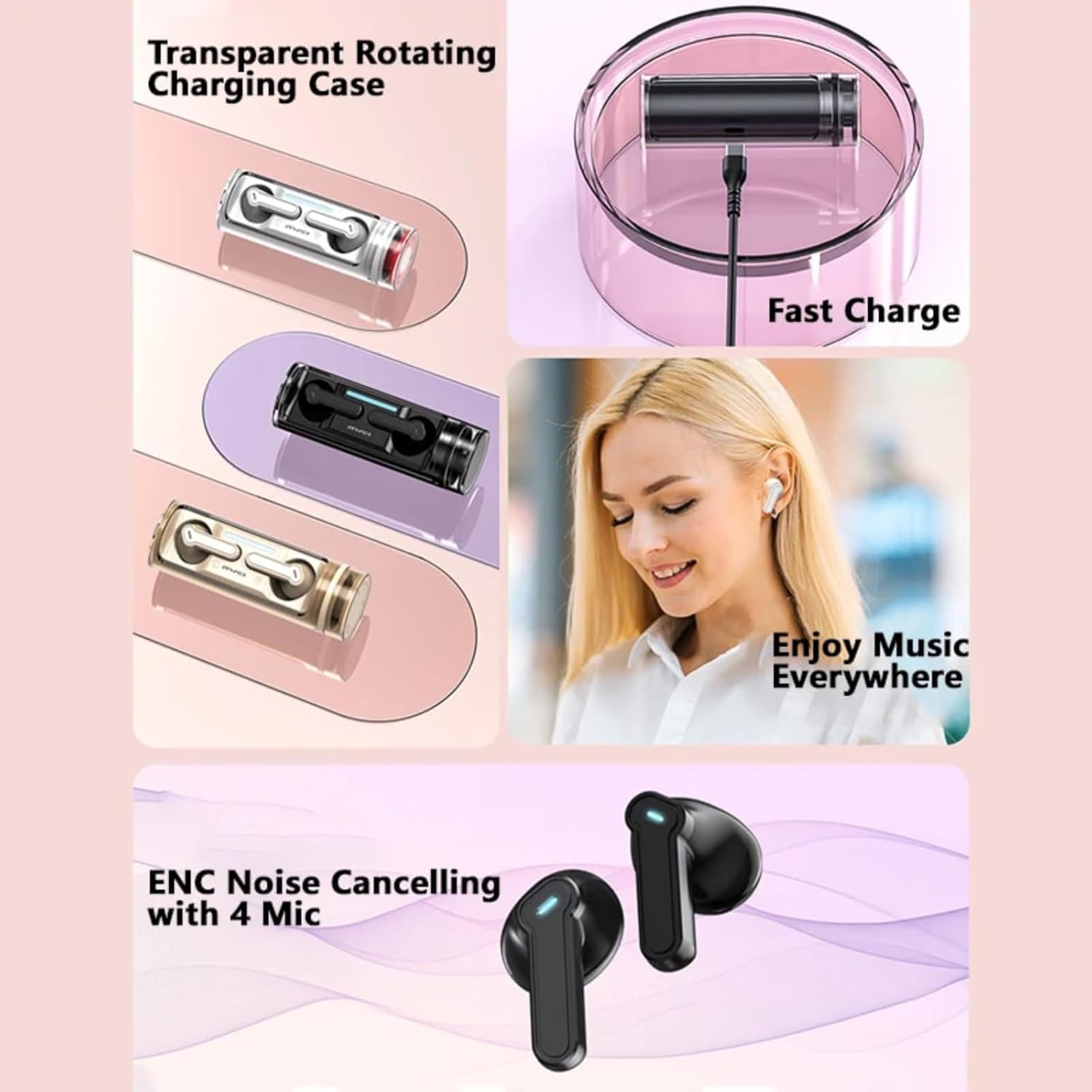
Image: Visual representation of the transparent rotating charging case, the fast charging capability, a user enjoying music, and the ENC noise cancelling technology with 4 microphones.

Image: An intricate diagram illustrating the internal structure of the 13mm Copper Ring Dynamic Horn, emphasizing its role in delivering high-quality audio.
Setup
1. Charging the Earbuds and Case
Before first use, fully charge the charging case and earbuds.
- Connect the provided USB Type-C cable to the charging port on the case and to a USB power source.
- The charging indicator on the case will illuminate to show charging status.
- Place the earbuds into the charging case. They will automatically begin charging.
A full charge for the charging case takes approximately 1.5 hours. The earbuds charge automatically when placed in the powered case.

Image: The AWEI T77 charging case with a USB Type-C cable inserted, demonstrating the fast charging capability.
2. Bluetooth Pairing
The AWEI T77 earbuds utilize Bluetooth 5.3 for a fast and stable connection.
- Initial Pairing: Open the charging case. The earbuds will automatically enter pairing mode.
- On your device (smartphone, tablet, laptop), enable Bluetooth and search for available devices.
- Select "AWEI T77" from the list of devices. Once connected, you will hear a confirmation tone.
- Automatic Reconnection: After the initial pairing, the earbuds will automatically connect to the last paired device when taken out of the case, provided Bluetooth is enabled on the device.
The Bluetooth range is up to 10 meters (33 feet).
Operating Instructions
1. Wearing the Earbuds
Choose the eartips that provide the most comfortable and secure fit for optimal sound quality and noise isolation. Gently insert the earbuds into your ears and rotate them slightly to ensure a snug fit.
2. Smart Touch Controls
The AWEI T77 earbuds feature intuitive touch controls on each earbud:
| Function | Action |
|---|---|
| Play/Pause Music | Single tap on either earbud |
| Next Song | Double tap on the right earbud |
| Previous Song | Double tap on the left earbud |
| Volume Up | Triple tap on the right earbud |
| Volume Down | Triple tap on the left earbud |
| Answer/End Call | Single tap on either earbud |
| Reject Call | Press and hold either earbud for 2 seconds |
| Activate Voice Assistant | Press and hold either earbud for 3 seconds |
3. Single and Dual Earbud Mode
The earbuds can be used individually (single-ear mode) or together (dual-ear mode).
- Dual-Ear Mode: Take both earbuds out of the charging case. They will automatically connect to each other and then to your device.
- Single-Ear Mode: Take only one earbud out of the charging case. It will connect to your device independently. The other earbud can remain in the case or be used by another person.
4. Call Functionality
The built-in ENC (Environmental Noise Cancellation) technology with multiple microphones ensures clear call quality by reducing background noise.
- Answering/Ending Calls: Use the touch controls as described above.
- Rejecting Calls: Use the touch controls as described above.
Battery Life and Charging Indicators
The AWEI T77 earbuds offer extended playtime with their charging case.
- Earbud Playtime: Approximately 5 hours of continuous use per charge.
- Total Playtime (with charging case): Up to 25 hours in dual-ear mode.
- Extended Single-Ear Playtime: By alternating between left and right earbuds and the charging case, you can achieve up to 50 hours of music time.
- Charging Case Charge Time: Approximately 1.5 hours via Type-C.
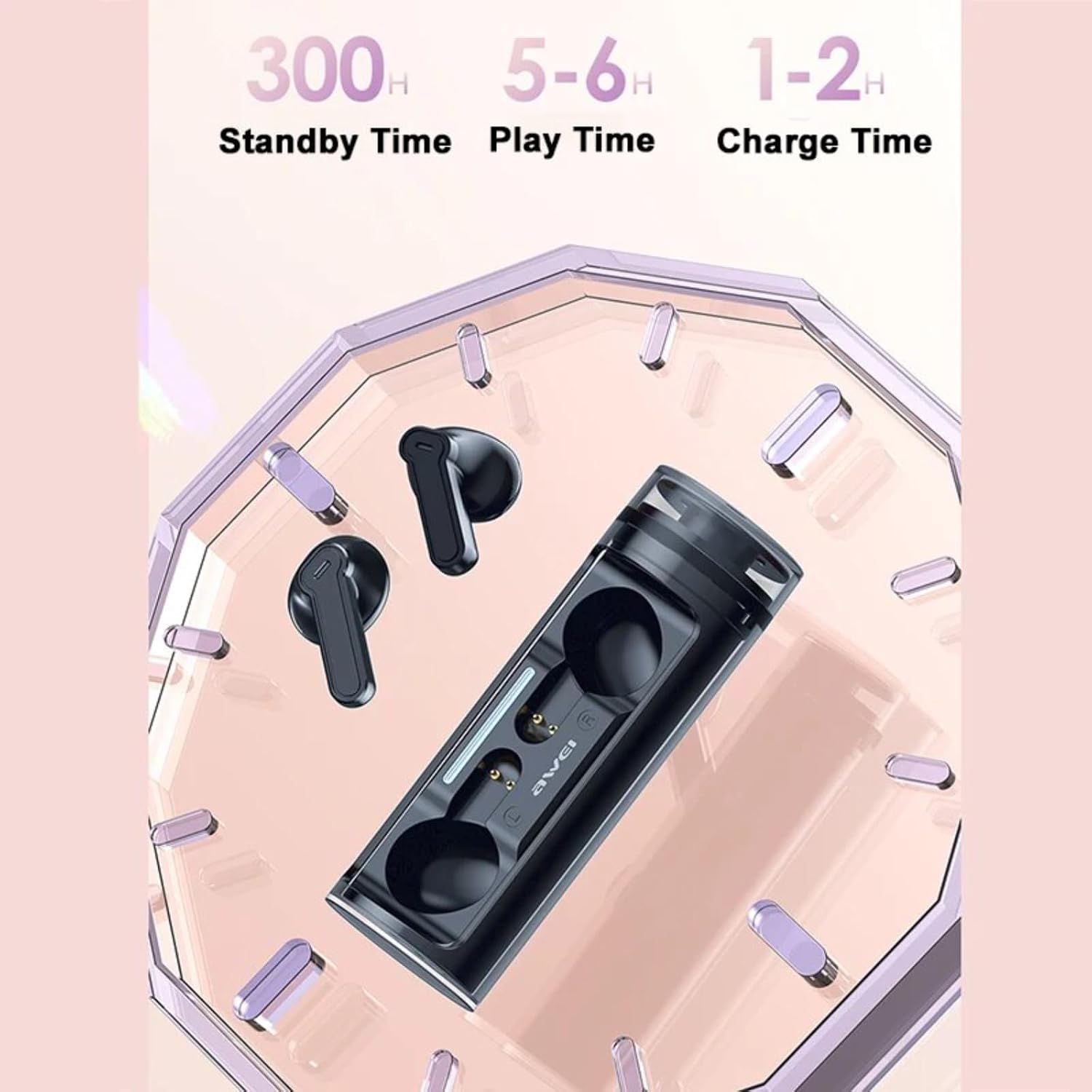
Image: A visual summary of the earbud's battery performance, indicating 300 hours of standby time, 5-6 hours of play time, and 1-2 hours of charge time.
Maintenance
1. Cleaning
- Regularly clean the earbuds and charging case with a soft, dry, lint-free cloth.
- Remove eartips and clean them with mild soap and water, then dry thoroughly before reattaching.
- Ensure charging contacts on both earbuds and case are free from dust and debris.
2. Storage
When not in use, store the earbuds in their charging case to protect them and keep them charged. Store in a cool, dry place away from extreme temperatures.
3. Water Resistance (IPX5)
The AWEI T77 earbuds are rated IPX5 waterproof, meaning they are protected against low-pressure water jets from any direction. This makes them suitable for workouts and light rain. However, they are not designed for submersion in water or for use during swimming. Do not expose them to saltwater or other liquids.
Troubleshooting
If you encounter any issues with your AWEI T77 earbuds, please refer to the following common solutions:
- No Sound from One Earbud:
- Ensure both earbuds are charged.
- Place both earbuds back into the charging case, close the lid, wait a few seconds, then take them out again to re-establish connection.
- Try resetting the earbuds (refer to manufacturer's website for specific reset instructions if needed).
- Earbuds Not Pairing:
- Ensure Bluetooth is enabled on your device.
- Make sure the earbuds are fully charged.
- Turn off Bluetooth on other nearby devices to avoid interference.
- Forget "AWEI T77" from your device's Bluetooth list and try pairing again.
- Charging Issues:
- Check if the charging cable is securely connected to both the case and the power source.
- Try a different USB Type-C cable and power adapter.
- Ensure the charging contacts on the earbuds and inside the case are clean and free of debris.
- Poor Sound Quality:
- Ensure the eartips provide a good seal in your ear.
- Clean any earwax or debris from the earbud nozzles.
- Move closer to your connected device to avoid signal interference.
Specifications
| Feature | Detail |
|---|---|
| Model Name | T77 |
| Brand | AWEI |
| Connectivity Technology | Wireless (Bluetooth) |
| Bluetooth Version | 5.3 |
| Bluetooth Range | Up to 10 meters (33 feet) |
| Ear Placement | In Ear |
| Form Factor | In Ear |
| Driver Size | 13mm |
| Noise Cancellation | ENC (Environmental Noise Cancellation) for calls |
| Water Resistance Level | IPX5 |
| Control Type | Touch Control |
| Earbud Playtime | Approx. 5 hours |
| Total Playtime (with case) | Up to 25 hours (dual-ear), 50 hours (single-ear alternating) |
| Charging Port | USB Type-C |
| Charging Case Charge Time | Approx. 1.5 hours |
| Compatible Devices | Laptops, Tablets, Mobile Phones (iOS, Android, PC) |
Safety Information
- Do not disassemble or modify the product.
- Keep away from extreme temperatures, direct sunlight, and open flames.
- Avoid exposing the product to corrosive liquids.
- Do not use the earbuds at excessively high volumes for prolonged periods to prevent hearing damage.
- Exercise caution when using earbuds in situations requiring awareness of your surroundings.
Warranty and Support
For warranty information and technical support, please refer to the warranty card included in your package or visit the official AWEI website. If you have any questions or require assistance, please contact AWEI customer service.


