
TOPDON ArtiDiag EU-US
TOPDON ArtiDiag EU Bi-Directional Scanner User Manual
Model: ArtiDiag EU-US
Brand: TOPDON
1. Introduction
The TOPDON ArtiDiag EU is a specialized full-system diagnostic tool designed for European vehicle brands, offering comprehensive diagnostic capabilities for car owners and professional mechanics. This device provides advanced functions such as ECU online coding, bi-directional control, and a full suite of service functions, ensuring thorough vehicle maintenance and customization.

Figure 1: The TOPDON ArtiDiag EU diagnostic scanner, showcasing its display and key features like Online Coding, Bi-Directional Control, All Service Functions, Full System Diagnostics, and Lifetime Free Updates.
Product Overview Video
Video 1: An overview of the ArtiDiag EU, highlighting its capabilities as a one-stop solution for European vehicles, including full-system diagnostics, comprehensive service functions, ECU coding, and active tests.
2. Setup
2.1 Unpacking and Initial Inspection
Carefully unpack all components from the packaging. Verify that all items listed below are present and in good condition:
- 1 x ArtiDiag EU Diagnostic Tool
- 1 x Diagnostic Cable
- 1 x Charging Cable
- 1 x Carrying Case
- 1 x Quick User Guide
- 1 x User Manual (this document)
2.2 Connecting to Vehicle
To begin diagnostics, connect the ArtiDiag EU to your vehicle's OBD-II port using the provided diagnostic cable. The OBD-II port is typically located under the dashboard on the driver's side.

Figure 2: The ArtiDiag EU connected to a vehicle's OBD-II port, ready for diagnostic operations.
2.3 Powering On and Initial Configuration
Once connected, the device will power on automatically. Follow the on-screen prompts to complete the initial setup, including language selection and Wi-Fi connection for updates.
3. Operating Instructions
3.1 Specialized Diagnostics for European Models
The ArtiDiag EU is specifically designed for 15 European brands, including Mercedes-Benz (Maybach, Sprinter), BMW (Mini, Rolls-Royce), and VAG Group (VW, Audi, VW_CV, Skoda, Seat, Bugatti, Bentley, MAN TGE, Lamborghini). Select the appropriate vehicle brand from the main menu to access specialized diagnostic functions.

Figure 3: The ArtiDiag EU demonstrating its compatibility with various European vehicle brands, including Mercedes-Benz, BMW, and VAG Group models.
The device features an extensive and up-to-date vehicle database, ensuring accurate and detailed diagnostics across a wide range of models. If you are uncertain about compatibility, consult the official website or customer service for expert guidance.

Figure 4: The ArtiDiag EU displaying its extensive vehicle database, allowing users to select specific brands like BMW, Audi, Mercedes-Benz, and more for diagnostics.
3.2 Bi-directional Control (Active Test)
Bi-directional control allows you to send commands to the vehicle's ECU to test specific components without disassembling the vehicle. This function is crucial for quickly pinpointing issues and verifying repairs.
- Modulate Throttle: Test throttle body response.
- Open/Close Windows: Verify window motor and switch functionality.
- Fuel Pump: Activate the fuel pump to check its operation.
- AC Clutch On/Off: Test the air conditioning compressor clutch.

Figure 5: Examples of bi-directional control functions on the ArtiDiag EU, including modulating throttle, opening/closing windows, testing the fuel pump, and activating/deactivating the AC clutch.
Accessing BMW Service Functions Video
Video 2: A demonstration of how to navigate the ArtiDiag EU to access and utilize service functions specifically for BMW vehicles, including steps for turning off the ignition switch and processing data.
3.3 ECU Online Coding
The ECU Online Coding feature allows for advanced customization of your vehicle's performance and functions. This includes flashing hidden features, disabling unwanted functions, customizing OE settings, and performing component matching for optimal efficiency.

Figure 6: The ArtiDiag EU's ECU Coding capabilities, illustrating how to flash hidden features, disable unwanted functions, customize OE settings, and perform component matching.
3.4 Comprehensive Diagnostics with Full OBD2 Support
The ArtiDiag EU provides full-system diagnostics, covering all major vehicle systems such as Engine (ECM), Transmission (TCM), Anti-lock Braking System (ABS), Supplemental Restraint System (SRS), and Tire Pressure Monitoring System (TPMS). It also supports all 10 OBD2 test modes:
- Read and Clear Diagnostic Trouble Codes (DTCs)
- Monitor Live Data Stream
- Check I/M Readiness Status
- Read Freeze Frame Data
- O2 Sensor Test
- On-Board Monitor Test
- EVAP System Test
- Read Vehicle Information (VIN, CIN, CVN)
- Component Test
- Request Control of On-Board System, Test or Component
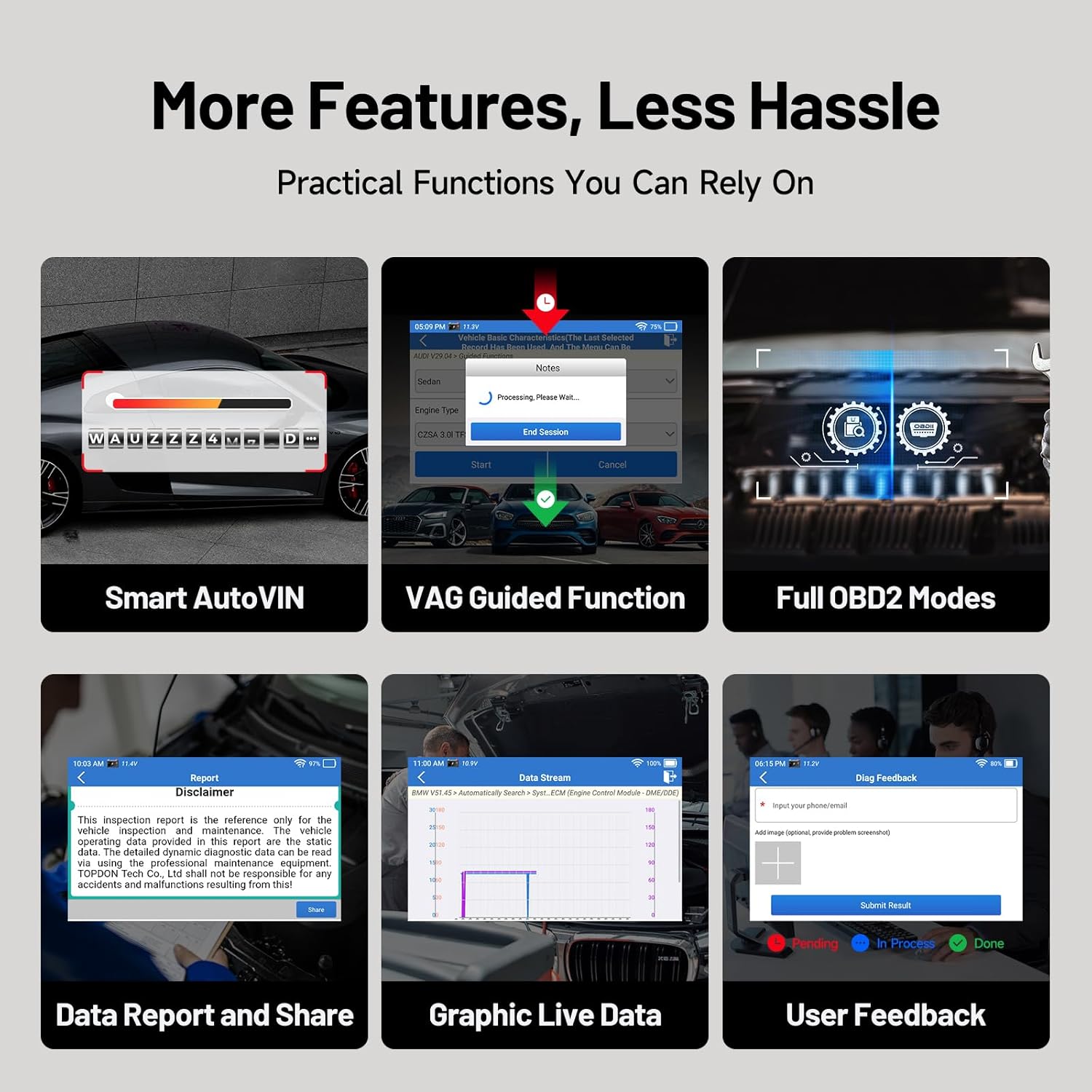
Figure 7: An illustration of the ArtiDiag EU performing full-system diagnostics, scanning various vehicle components like Engine, Transmission, Airbag, ABS, and TPMS for issues.
3.5 VAG Guided Function
For VAG Group vehicles, the ArtiDiag EU includes a VAG Guided function that simplifies complex diagnostic and service tasks with step-by-step instructions. This feature guides you through intricate procedures, reducing guesswork and improving efficiency.
4. Maintenance Functions
The ArtiDiag EU offers a comprehensive range of service functions for complete vehicle maintenance. These functions allow you to reset and initialize various vehicle systems after repairs or routine servicing.
- Oil Reset: Reset the oil life reminder after an oil change.
- EPB Reset: Reset the electronic parking brake after brake pad replacement.
- BMS Reset: Register new battery and clear fault information.
- Throttle Learning: Relearn throttle body position.
- Headlamp Adjustments: Adjust headlight settings.
- Power Window Normalization: Initialize power windows after battery disconnection.
- TPMS Reset: Reset tire pressure monitoring system.
- SAS Reset: Reset steering angle sensor.
- DPF Regeneration: Perform diesel particulate filter regeneration.
- ABS Bleeding: Bleed the ABS system.
- Injector Coding: Code new injector values.
- Gearbox Matching: Adapt transmission components.
- And many more, depending on vehicle model.

Figure 8: The ArtiDiag EU providing a range of complete maintenance services, including Oil Reset, EPB Reset, BMS Reset, Throttle Learning, TPMS Reset, SAS Reset, D.P.F Regeneration, ABS Bleeding, and Gearbox Matching.
5. Troubleshooting
If you encounter issues while using the ArtiDiag EU, consider the following common troubleshooting steps:
- No Power: Ensure the diagnostic cable is securely connected to both the device and the vehicle's OBD-II port. Check the vehicle's battery status.
- Communication Error: Verify that the vehicle's ignition is on. Ensure the diagnostic cable is not damaged. Try restarting the device and the vehicle.
- Software Glitches: Perform a software update to ensure you have the latest version.
- Incorrect Readings: Ensure the correct vehicle model and year are selected.
The ArtiDiag EU includes features to assist with troubleshooting and feedback:
- Data Report and Share: Generate and share diagnostic reports for further analysis or technical support.
- Graphic Live Data: Visualize live data streams to identify abnormal parameters.
- User Feedback: Submit feedback directly through the device for technical assistance.

Figure 9: The ArtiDiag EU's additional features for troubleshooting and user convenience, including Smart AutoVIN, VAG Guided Function, Full OBD2 Modes, Data Report and Share, Graphic Live Data, and User Feedback.
6. Specifications
| Feature | Specification |
|---|---|
| Brand | TOPDON |
| Model | ArtiDiag EU-US |
| Operating System | Android 8.1 |
| Display Resolution | 800x480 |
| Processor | 1.3 GHz Quad-Core |
| RAM | 2GB |
| ROM | 32GB |
| Battery | 3000mAh Lithium Ion (included) |
| Item Weight | 1.96 pounds |
| Product Dimensions | 9.84 x 3.15 x 7.09 inches |
| UPC | 850050886662 |

Figure 10: Visual representation of the ArtiDiag EU's compact design and powerful internal components, including its 4-inch display, 2GB RAM, 32GB ROM, 1.3GHz 4-Core CPU, and Android 8.1 operating system.
7. Warranty and Support
7.1 Warranty Information
The TOPDON ArtiDiag EU comes with a 1-year warranty, covering manufacturing defects and ensuring your investment is protected. Please retain your proof of purchase for warranty claims.
7.2 Lifetime Free Updates
Enjoy lifetime free software updates for your ArtiDiag EU. Updates can be performed with a single click via Wi-Fi, ensuring your device always has the latest features and vehicle compatibility without any subscription fees.
7.3 Multilingual Support
The ArtiDiag EU supports 11 language options, making it accessible to a global user base. You can select your preferred language in the device settings.

Figure 11: The ArtiDiag EU's commitment to continuous improvement with lifetime free updates and support for 11 languages, ensuring global accessibility and up-to-date functionality.
7.4 Contact Support
For technical assistance, warranty claims, or any inquiries, please contact TOPDON customer support through their official website or the feedback function on the device.
Related documentsArtiDiag EU-US


Ask a question about this manual
Ask about setup, troubleshooting, compatibility, parts, safety, or missing instructions. Manuals+ will review the question and use this page’s manual context to help answer it.