1. Introduction
The NOYAFA NF-518S is a versatile 5-in-1 multifunction device designed for various detection and measurement tasks. It combines an electronic wall scanner for detecting wood studs, metal objects, and live AC wires with a precise laser distance meter. This tool is ideal for home renovation, construction projects, and DIY tasks, providing accurate and reliable information about hidden elements within walls and precise distance measurements.
Key features include:
- Electronic Wall Scanner: Accurately detects wood, magnetic metal (rebar, copper pipes), and electrical wires concealed in walls, floors, and ceilings.
- Laser Distance Meter: Offers a measurement range of up to 196 feet (approximately 60 meters) with high precision, supporting various measurement modes including single, area, volume, and Pythagoras.
- Digital Level & Angle Sensor: Provides real-time angle measurements for precise leveling tasks.
- Vivid Color LCD Screen: Features a graphical color display with backlight for clear visibility in various lighting conditions, showing detected objects and battery level.
- Rechargeable Battery: Equipped with a built-in 390mAh 3.7V lithium battery, offering up to 10 hours of operation and convenient Type-C charging.
2. Safety Information
Please read and understand all safety instructions before operating the device. Failure to follow these instructions may result in injury or damage to the device.
2.1 General Safety
- Always keep the device dry and clean.
- Do not expose the device to extreme temperatures or humidity.
- Do not attempt to open or modify the device. Repairs should only be performed by qualified personnel.
- Keep the device out of reach of children.
2.2 Laser Safety
This product is a Class II laser product with an output of < 1mW. Observe the following precautions:
- DO NOT stare directly into the laser beam.
- DO NOT aim the laser beam at people or animals.
- Avoid direct eye exposure to the laser beam.
- Use caution when operating the laser in areas where reflective surfaces may be present.
2.3 Electrical Safety
- Always turn off power to the area you are working on if possible, especially when detecting live AC wires.
- Do not rely solely on the device for determining the presence of live wires. Always use additional safety measures.
3. Product Overview
The NOYAFA NF-518S features a robust design with an intuitive interface. Familiarize yourself with the components and controls before use.

Figure 1: Front and side view of the NOYAFA NF-518S, showing the display, control buttons, and laser emitter.
3.1 Device Components
- LCD Color Display: Shows detection results, measurement data, battery status, and mode indicators.
- Laser Emitter/Receiver: Located at the top for distance measurements.
- Detection Sensors: Integrated into the back of the device for wall scanning.
- Type-C Charging Port: For recharging the internal battery.
3.2 Control Buttons
- Power Button (⑂): Turns the device on/off.
- DIST Button: Initiates laser distance measurement.
- MEAS Button: Confirms measurements or selections.
- SURVEY Button: Switches between wall scanning modes (Stud, Metal, AC).
- Back Button: Returns to the previous screen or cancels an operation.
- Directional Buttons (▲, ▼, ◄, ►): Navigate menus and adjust settings.
4. Setup
4.1 Charging the Battery
The NF-518S is equipped with a built-in 390mAh 3.7V lithium battery. Before first use, fully charge the device.
- Connect the provided Type-C USB cable to the charging port on the device.
- Connect the other end of the cable to a standard USB power adapter (not included) or a computer USB port.
- The battery indicator on the LCD screen will show charging status. A full charge typically takes a few hours.
- Once fully charged, disconnect the charging cable. The device offers approximately 10 hours of continuous operation on a full charge.

Figure 2: The NF-518S connected via USB-C for charging, illustrating its rechargeable lithium battery.
4.2 Powering On/Off
- To Power On: Press and hold the Power button (⑂) for a few seconds until the LCD screen illuminates.
- To Power Off: Press and hold the Power button (⑂) again for a few seconds until the screen turns off.
5. Operating Instructions
5.1 Wall Scanning (Stud, Metal, AC Wire Detection)
The wall scanner function allows you to locate hidden objects within walls. Press the SURVEY button to cycle through the detection modes: Stud Scan, Metal Scan, and AC Wire Scan.

Figure 3: Overview of the NF-518S's multi-functional capabilities, including wall detection.
5.1.1 General Scanning Procedure
- Place the device flat against the wall surface.
- Press the SURVEY button to select the desired detection mode.
- Slowly slide the device horizontally across the surface. Keep it flat and avoid tilting.
- The LCD screen will display graphical indicators and depth information when an object is detected.
- Mark the edges of the detected object for precise location.
5.1.2 Detection Depths and Modes
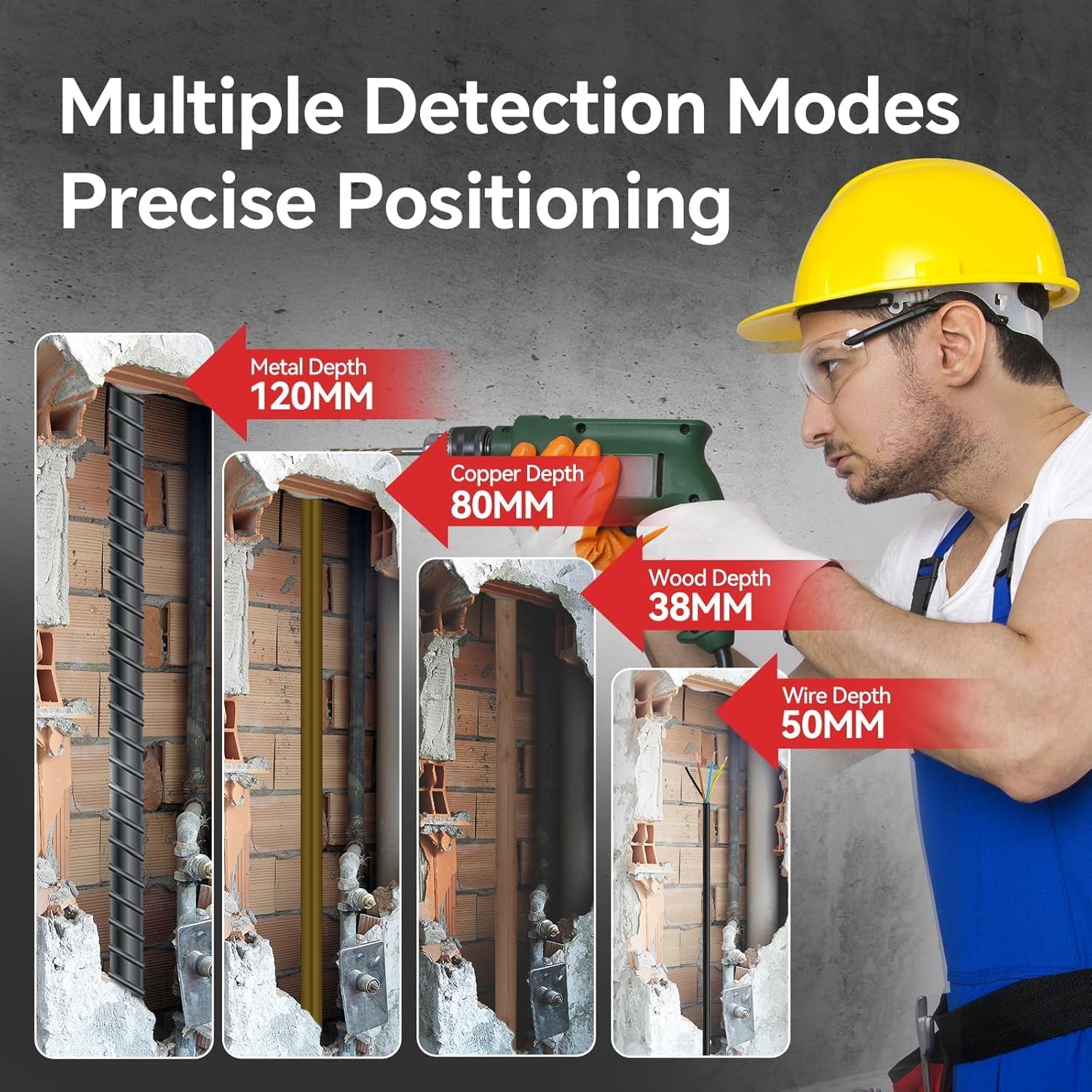
Figure 4: Visual representation of detection depths for various materials.
- Wood Detection: Up to 38mm (1.5 inches). Ideal for locating wooden studs.
- Magnetic Metal Detection: Up to 120mm (4.7 inches). For rebar and other magnetic metals.
- Non-magnetic Metal Detection: Up to 100mm (3.9 inches). For copper pipes and other non-magnetic metals.
- AC Wire Detection: Up to 50mm (2 inches). For live electrical wires.
- In-Depth Probe: The device can detect objects within a regular depth range of 30-60mm.

Figure 5: Wood stud detection in progress.

Figure 6: Metal detection in progress.

Figure 7: AC voltage detection in progress.

Figure 8: The NF-518S demonstrating its in-depth probing capability.
5.2 Laser Distance Measurement
The laser distance meter provides quick and accurate measurements of distances, areas, and volumes.

Figure 9: Illustration of the 12 testing modes available for laser measurement.
5.2.1 Basic Measurement
- Point the laser emitter towards the target surface.
- Press the DIST button to activate the laser.
- Press DIST again to take a single measurement. The result will be displayed on the screen.
5.2.2 Advanced Measurement Modes
Use the directional buttons to navigate through the 12 available measurement modes, which include:
- Single Measurement: Measures the distance between two points.
- Area Measurement: Calculates the area by measuring two sides.
- Volume Measurement: Calculates the volume by measuring three dimensions.
- Pythagoras Measurement: Indirectly measures height or distance using the Pythagorean theorem.
The device stores up to 50 sets of measurement data. Use the directional buttons to review stored data.

Figure 10: The device's ability to store and display multiple measurement data points.
5.2.3 Measurement Accuracy
The laser distance meter provides an accuracy of approximately ±1/16 inch (±1.5mm).

Figure 11: Visual representation of the laser measurement deviation.
5.3 Digital Level & Angle Sensor
The integrated digital level provides real-time angle measurements, useful for ensuring surfaces are level or plumb.

Figure 12: The NF-518S displaying its digital level and angle sensor function.
- Place the device on the surface you wish to measure the angle of.
- The LCD screen will automatically display the current angle.
- The angle accuracy is ±0.1°.

Figure 13: Close-up of the screen showing angle measurement with ±0.1° accuracy.
6. Maintenance
Proper maintenance ensures the longevity and accuracy of your NOYAFA NF-518S.
- Cleaning: Wipe the device with a soft, dry cloth. Do not use abrasive cleaners or solvents. Ensure the detection sensors and laser lens are clean and free of dust.
- Storage: Store the device in a cool, dry place, away from direct sunlight and extreme temperatures. If storing for extended periods, ensure the battery is partially charged (around 50%) to prolong its lifespan.
- Battery Care: Recharge the battery regularly, even if the device is not in frequent use, to prevent deep discharge. Avoid completely draining the battery before recharging.
- Water Resistance: The device has an IP54 rating, meaning it is protected against dust ingress and splashing water. However, it is not fully waterproof; avoid submerging it in water.

Figure 14: The NF-518S demonstrating its IP54 water resistance.
7. Troubleshooting
If you encounter issues with your NF-518S, refer to the following common problems and solutions:
| Problem | Possible Cause | Solution |
|---|---|---|
| Device does not turn on | Low or depleted battery | Charge the device fully using the Type-C cable. |
| Inaccurate wall scanning results | Improper scanning technique; thick or dense wall materials; interference | Ensure the device is held flat against the wall and moved slowly. Re-scan the area. Be aware that detection depth can be affected by material density (e.g., thick OSB or insulation may reduce detection range for AC wires). |
| Laser distance measurement is inconsistent | Laser lens is dirty; unstable surface; environmental factors | Clean the laser lens with a soft cloth. Ensure the device and target surface are stable. Avoid measuring in direct sunlight or through highly reflective surfaces if possible. |
| Metal detection incorrectly identifies AC voltage | Proximity of live wires to metal objects | Exercise caution and cross-reference with AC wire detection mode. Always verify with additional safety measures before drilling or cutting. |
If the problem persists after trying these solutions, please contact customer support.
8. Specifications
Detailed technical specifications for the NOYAFA NF-518S:
| Feature | Specification |
|---|---|
| Manufacturer | NOYAFA |
| Model Number | NF-518S |
| Dimensions | 16.4 x 10.7 x 5.2 cm |
| Weight | 260 g |
| Battery Type | 1 Lithium Polymer (included) |
| Battery Capacity | 390mAh 3.7V |
| Operating Time | Approx. 10 hours |
| Power Source (Charging) | AC (via Type-C USB) |
| Wood Detection Depth | Up to 38mm |
| AC Cable Detection Depth | Up to 50mm |
| Non-magnetic Metal Detection Depth | Up to 100mm |
| Magnetic Metal Detection Depth | Up to 120mm |
| Laser Distance Measurement Range | Up to 196 feet (approx. 60m) |
| Laser Distance Measurement Accuracy | ±1/16 inch (±1.5mm) |
| Laser Class | Class II, <1mW |
| Angle Accuracy | ±0.1° |
| IP Rating | IP54 |
9. Warranty and Support
For warranty information and customer support, please refer to the documentation included with your purchase or contact NOYAFA customer service directly. Keep your purchase receipt as proof of purchase.
For further assistance, please visit the official NOYAFA website or contact their support team.


