
1. Product Overview
The Lenovo IdeaPad 2025 Slim Laptop is designed for everyday productivity and entertainment. It features a dual-core Intel processor, a 15.6-inch anti-glare display, and comes with Windows 11 Home in S mode. This manual provides essential information for setting up, operating, maintaining, and troubleshooting your device.

Image 1.1: The Lenovo IdeaPad 2025 Slim Laptop with its display showing Windows 11, accompanied by a Microsoft 365 box, a USB-C docking station, a wireless mouse, and an external drive.
2. Setup
2.1 Initial Power On and Charging
- Connect the provided charger to the laptop's power connector and a power outlet.
- Open the laptop lid. The laptop is designed with a 'Flip to Start' feature, which may power on the device automatically upon opening.
- Follow the on-screen instructions to complete the initial Windows 11 setup.
2.2 Windows 11 Home in S Mode
Your laptop comes with Windows 11 Home in S mode, which is optimized for security and performance by exclusively running apps from the Microsoft Store. If you need to install apps from outside the Microsoft Store, you can switch out of S mode.
- To switch out of S mode:
- Open the Microsoft Store.
- Search for "Switch out of S Mode" and select the option.
- Click "Get" to confirm the switch. This process is irreversible.
2.3 Connecting Accessories
The laptop includes a MarxsolAccessory bundle to enhance your experience.
- 6-in-1 USB-C Docking Station Hub: Connect this hub to the laptop's USB-C port to expand connectivity with additional USB ports, HDMI, and a card reader.
- Wireless Mouse: Insert the USB receiver for the wireless mouse into an available USB port on the laptop or the docking station.
- External Drive: Connect the external drive via a USB port for additional storage.

Image 2.1: The Marxsol Accessory bundle, featuring a USB-C docking station, cables, a mouse pad, and a wireless mouse, designed to expand the laptop's functionality.
3. Operating Instructions
3.1 Display and Audio
- The 15.6-inch HD anti-glare display provides clear visuals.
- Experience enhanced audio with Dolby Audio stereo speakers.
3.2 Webcam and Privacy
- The integrated HD 720p webcam includes a physical privacy shutter. Slide the shutter to cover the camera lens when not in use to ensure privacy.
- Smart Noise Canceling technology helps reduce background noise during video calls for clearer communication.

Image 3.1: A Lenovo IdeaPad laptop screen showing a video conference with multiple participants, illustrating its communication capabilities.
3.3 Connectivity
- Wi-Fi 6: Connect to wireless networks for high-speed internet access.
- Bluetooth 5.2: Pair with compatible Bluetooth devices such as headphones, speakers, or other peripherals.
3.4 Ports and Interfaces
The laptop is equipped with various ports for connecting external devices:
- 1x USB 2.0 Port
- 1x USB-A 3.2 Gen 1 Port
- 1x USB-C 3.2 Gen 1 Port (supports data transfer only)
- 1x HDMI 1.4b Port
- 1x Headphone / Microphone Combo Jack (3.5mm)
- 1x Card Reader
- 1x Power Connector
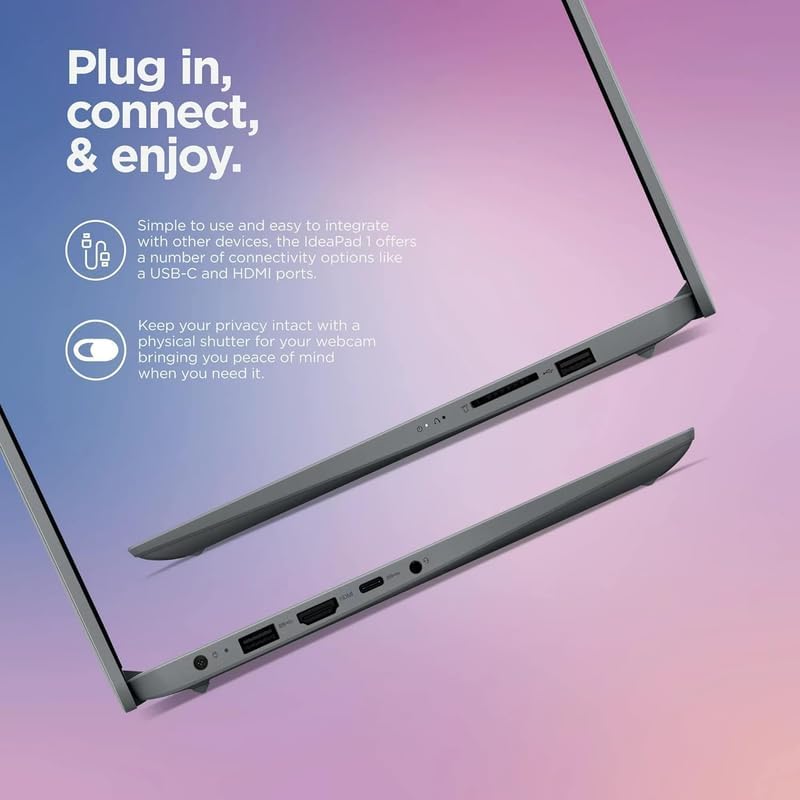
Image 3.2: A detailed view of the laptop's side profiles, showcasing the various connectivity ports available for peripherals and external displays.
3.5 Microsoft 365 Subscription
Your purchase includes a 1-year subscription to Microsoft 365. Follow the instructions provided with the software to activate your subscription and access applications like Word, Excel, and PowerPoint.
4. Maintenance
4.1 Battery Care
- The laptop features a 3-cell, 42 Wh Li-ion battery, offering up to 10 hours of usage.
- To maximize battery lifespan, avoid extreme temperatures and fully discharging the battery frequently.
- The laptop supports rapid charging, allowing for significant battery life recovery in a short period.

Image 4.1: An angled view of the Lenovo IdeaPad laptop, illustrating its slim design and highlighting features like extended battery life and the physical privacy shutter for the webcam.
4.2 General Cleaning and Care
- Use a soft, lint-free cloth to clean the screen and exterior surfaces.
- Avoid using harsh chemicals or abrasive materials.
- Keep the laptop away from liquids and extreme temperatures.
5. Troubleshooting
5.1 Performance Issues
- If the laptop feels slow, ensure all unnecessary background applications are closed.
- Regularly check for and install Windows updates.
- Perform routine disk cleanup and defragmentation (for HDD, SSDs do not require defragmentation).
5.2 Connectivity Problems
- For Wi-Fi issues, try restarting your router and the laptop. Ensure Wi-Fi is enabled in Windows settings.
- For Bluetooth issues, ensure the device is discoverable and within range. Try re-pairing the device.
5.3 Display or Audio Problems
- If the display is not working, ensure the laptop is powered on and connected to power. Try adjusting the brightness settings.
- For audio issues, check volume levels, ensure speakers are not muted, and verify audio drivers are up to date.
6. Specifications
Detailed technical specifications for the Lenovo IdeaPad 1i laptop:
| Feature | Specification |
|---|---|
| Processor | Intel Celeron N4500 (Up to 2.8 GHz, 4MB L3 Cache, 2 cores, 2 Threads) |
| Graphics | Intel UHD Graphics (Integrated) |
| Operating System | Windows 11 Home in S mode |
| Memory (RAM) | 20 GB DDR4 SDRAM |
| Storage | 512 GB PCIe NVMe M.2 SSD + 128 GB eMMC + 500GB External Drive |
| Display | 15.6" HD (1366 x 768) TN 220nits Anti-glare |
| Connectivity | Wi-Fi 6 (802.11ax) and Bluetooth 5.2 combo |
| Audio | Stereo speakers, 1.5W x2, Dolby Audio |
| Webcam | HD 720p with Privacy Shutter |
| Keyboard | Full-size, soft gray, with numeric keypad |
| Ports | 1x USB 2.0, 1x USB-A 3.2 Gen 1, 1x USB-C 3.2 Gen 1 (data transfer only), 1x HDMI 1.4b, 1x Headphone / microphone combo jack (3.5mm), 1x Card reader, 1x Power connector |
| Battery | 3-cell, 42 Wh Li-ion battery (up to 10 hours) |
| Color | Cloud Gray |
| Dimensions (W x D x H) | 14.18 x 9.29 x 0.70 inches |
| Weight | 3.42 lbs |
| Included Accessories | MarxsolAccessory (6-in-1 USB-C docking station hub, USB extension cord, HDMI cable, mouse pad, wireless mouse), 1 Year Microsoft 365 Subscription |

Image 6.1: An infographic summarizing key specifications and features of the Lenovo IdeaPad 1i, including memory, processor, storage, audio, and display details.
7. Warranty and Support
7.1 Warranty Information
Specific warranty details for your Lenovo IdeaPad 2025 Slim Laptop are typically provided with your purchase documentation. Please refer to the warranty card or visit the official Lenovo support website for comprehensive information regarding warranty coverage, terms, and conditions.
7.2 Technical Support
For technical assistance, troubleshooting beyond this manual, or service requests, please contact Lenovo customer support. You can find contact information and additional resources on the official Lenovo support website:
- Lenovo Support Website: https://support.lenovo.com
- Refer to your product's serial number when contacting support for faster service.