
Introduction
The Garmin Foretrex 801 is a rugged, wrist-mounted GPS navigator designed for outdoor enthusiasts, hikers, hunters, and military personnel. It provides precise navigation, advanced tactical features, and extended battery life to support you in diverse and challenging environments. This manual will guide you through the setup, operation, and maintenance of your Foretrex 801.
What's in the Box
- 1 x Garmin Foretrex 801 Wrist-mounted GPS Navigator with Strap
- 2 x AAA Alkaline Batteries
- 1 x Microfiber Cleaning Cloth
- 1 x Portable Charger
Setup
1. Battery Installation
The Foretrex 801 operates on two AAA batteries. To install, open the battery compartment cover located on the back of the device. Insert the batteries according to the polarity indicators, then securely close the cover.
Video: Battery installation demonstration for Garmin Foretrex 801/901 (0:59-1:05, 5:57-6:07 in video).
2. Power On/Off
To power on the device, press and hold the Power button until the Garmin logo appears. To power off, navigate to the main menu, select 'Setup', then 'Power Off'.
3. Initial Configuration
Upon first use, the device may prompt you to select a language and set basic preferences. Follow the on-screen instructions. Ensure you specify the type of batteries (Alkaline, NiMH, or Lithium) you have installed in the settings for accurate battery life estimation.
Video: Demonstrating battery type selection in settings for Garmin Foretrex 801/901 (6:26-6:33 in video).
Operating Instructions
1. Navigation Basics
The Foretrex 801 provides accurate navigation using multi-band GNSS (GPS, GLONASS, Galileo). Use the PAGE button to cycle through different data screens, including the compass, map, elevation profile, and location coordinates.

Image: Garmin Foretrex 801 displaying the main compass screen with final distance and speed information.

Image: Garmin Foretrex 801 displaying a map screen with a track log and points of interest like a pond and trail.
Video: Demonstrating navigation features including map view and track recording on Garmin Foretrex 801/901 (0:00-0:05, 0:20-0:25, 0:40-0:43, 1:15-1:19 in video).
2. Waypoints, Tracks, and Routes
- Waypoints: Mark specific locations for future reference.
- Tracks: Record your path as you travel. You can save tracks and use the 'Pan & Tracback' feature to retrace your steps.
- Routes: Create predefined paths using a series of waypoints.
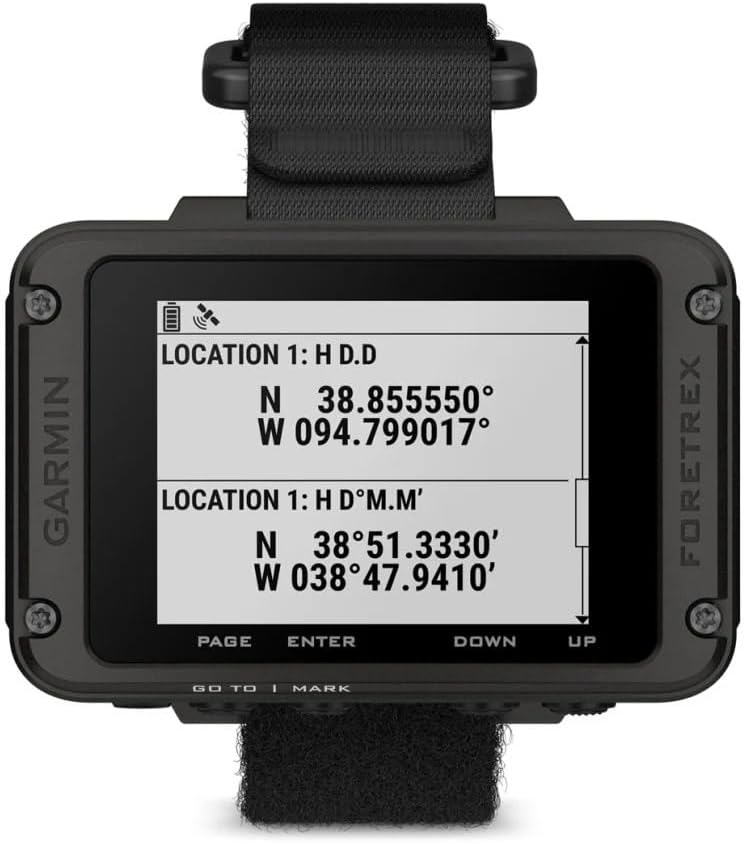
Image: Garmin Foretrex 801 displaying current location coordinates in both decimal degrees and degrees/minutes formats.
3. Tactical Features
- Stealth Mode: Disables all wireless communications and stops storing and sharing GPS data, ensuring privacy.
- Kill Switch: In security-sensitive situations, activate the kill switch to erase all user memory from the device.
- Jumpmaster Mode: Calculates high-altitude release points in accordance with military guidelines.

Image: Garmin Foretrex 801 displaying a menu with tactical options including 'ENABLE NVG MODE', 'ENTER STEALTH MODE', and 'ACTIVATE KILL SWITCH'.
Video: Demonstration of Stealth Mode, Kill Switch, and Jumpmaster Mode on Garmin Foretrex 801/901 (2:06-2:15 for Stealth, 3:10-3:24 for Kill Switch, 3:01-3:07 for Jumpmaster in video).
4. Connectivity
- Smart Notifications: Pair with your compatible smartphone to receive smart notifications directly on the Foretrex 801 screen.
- inReach Satellite Communicator: Pair with a compatible inReach device to view messages directly on the Foretrex 801 screen.
Video: Demonstrating smart notifications and inReach pairing with Garmin Foretrex 801/901 (4:09-4:30 for Smart Notifications, 4:38-4:50 for inReach in video).
Durability and Battery Life
1. Rugged Design
The Foretrex 801 is built to military standards for durability, withstanding sand, dust, vibration, and extreme conditions. Its robust construction ensures reliable performance in harsh environments.
Video: Overview of the rugged design and military standards of Garmin Foretrex 801/901 (5:09-5:13 in video).
2. Water Resistance
The device is water-resistant (IPX7 rated), meaning it can withstand immersion in water up to 1 meter for 30 minutes. This makes it suitable for use in wet conditions without concern for damage.
Video: Water resistance demonstration for Garmin Foretrex 801/901 (5:23-5:36 in video).
3. Extended Battery Life
The Foretrex 801 offers impressive battery performance:
- Up to 100 hours in standard GPS mode.
- Up to 1000 hours in expedition mode, which uses less frequent tracking intervals to conserve power.
Video: Battery life in GPS and Expedition modes for Garmin Foretrex 801/901 (6:07-6:20 in video).
Specifications
| Feature | Detail |
|---|---|
| Item Weight | 15.2 ounces |
| Product Dimensions | 2.9 x 6 x 0.9 inches |
| Display Size | 2.2 Inches |
| Model Name | Foretrex 801 Strap |
| Special Feature | Bluetooth |
| Map Type | Topographical |
| Mounting Type | Wrist Mount |
| Touch Screen Type | Capacitive |
Maintenance
To ensure the longevity and optimal performance of your Garmin Foretrex 801, follow these maintenance guidelines:
- Cleaning: Use the provided microfiber cleaning cloth to wipe the screen and device body. For stubborn dirt, use a damp cloth with a mild soap solution, then rinse thoroughly with fresh water.
- Storage: Store the device in a cool, dry place away from direct sunlight and extreme temperatures. Remove batteries if storing for extended periods to prevent leakage.
- Avoid Harsh Chemicals: Do not use harsh cleaning agents, solvents, or abrasive materials, as these can damage the device's finish and seals.
Troubleshooting
If you encounter issues with your Foretrex 801, try the following:
- Device Not Powering On: Ensure batteries are correctly installed and charged. Try replacing with fresh batteries.
- GPS Signal Loss: Move to an open area away from tall buildings, dense tree cover, or deep canyons. Allow the device sufficient time to acquire satellite signals.
- Inaccurate Readings: Calibrate the compass and altimeter as described in the device's on-screen setup menu. Ensure multi-band GNSS is enabled for improved accuracy.
- Connectivity Issues: Ensure Bluetooth is enabled on both your Foretrex 801 and smartphone. Restart both devices and attempt pairing again.
- Factory Reset: If problems persist, you can perform a factory reset from the 'Setup' menu. Note: This will erase all user data.
Warranty and Support
Your Garmin Foretrex 801 is covered by a limited warranty. For detailed warranty information, please refer to the warranty card included in your product packaging or visit the official Garmin website. For technical support, product registration, and additional resources, visit support.garmin.com.