
1. Introduction
This manual provides essential instructions for the setup, operation, maintenance, and troubleshooting of your Garmin Alpha 300 Handheld and Alpha TT25 Dog Collar System. This system is designed to enhance your dog tracking and training experience in various terrains.
2. Product Overview
The Garmin Alpha 300 Handheld is an advanced tracking and training device featuring a vivid 3.5-inch touchscreen and a user-friendly 6-button design. It allows you to monitor and manage up to 20 dogs from distances of up to 9 miles away using compatible collars. The system includes the Alpha TT25 Dog Tracking and Training Collars, which are slim, rugged, and offer universal sizing with extended battery life and user-replaceable components.
Key features include 18 levels of stimulation, audible tones, vibration commands, Channel View to avoid interference, multiple GNSS access, a 3-axis electronic compass, and a barometric altimeter. Real-time alerts notify you when a dog is 'treed' or 'on point'.
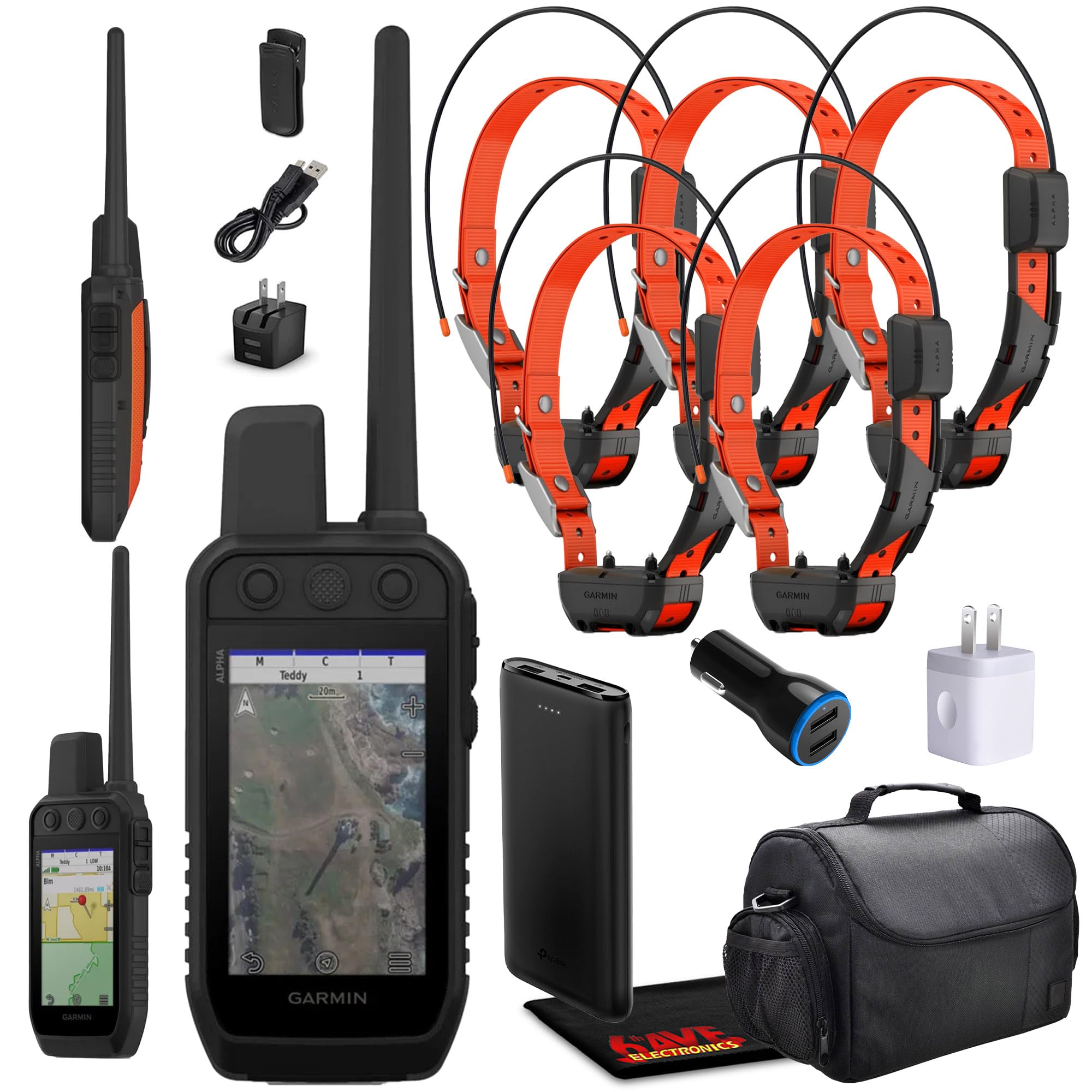
Figure 2.1: Garmin Alpha 300 Handheld displaying a topographical map with dog tracking information.

Figure 2.2: Garmin Alpha TT25 Dog Tracking and Training Collar.
3. Setup
3.1 Unboxing and Initial Inspection
Carefully unpack all components and inspect for any damage. The bundle typically includes:
- 1x Garmin Alpha 300 Handheld
- 5x Garmin Alpha TT25 Tracking and Training Collars
- 1x USB Adapter
- 1x USB Car Adapter
- 1x Microfiber Cleaning Cloth
- 1x P-Bank Battery
- 1x Field Bag
3.2 Charging the Devices
Before first use, fully charge both the Alpha 300 handheld and all Alpha TT25 collars. Use the provided USB adapters and cables. The handheld battery can last up to 55 hours on a full charge.
3.3 Powering On/Off
- To Power On: Press and hold the power button on the Alpha 300 handheld or the Alpha TT25 collar until the device turns on.
- To Power Off: Press and hold the power button until the power-off prompt appears, then confirm.
3.4 Pairing Alpha 300 Handheld with Alpha TT25 Collars
To track and train your dogs, each Alpha TT25 collar must be paired with the Alpha 300 handheld. Follow the on-screen instructions on the handheld to add new dog devices. Ensure both devices are powered on and within range during the pairing process.
3.5 Collar Fitment
Ensure the Alpha TT25 collar is fitted snugly around your dog's neck, allowing two fingers to fit comfortably between the strap and the dog's neck. Proper fit is crucial for consistent tracking and effective training stimulation.
4. Operating the Alpha 300 Handheld
4.1 Navigating the Interface
The Alpha 300 features a responsive 3.5-inch touchscreen and a 6-button design for quick adjustments. Use the touchscreen for map interaction and menu navigation, and the physical buttons for common functions like zooming or accessing specific menus.
4.2 Tracking Dogs
From the main tracking screen, you can view the real-time location of up to 20 paired dogs. The screen displays dog icons, distance, speed, and direction. Real-time alerts will notify you if a dog is 'treed' or 'on point'.

Figure 4.1: Alpha 300 Handheld showing detailed dog tracking metrics.
4.3 Channel View
The Channel View feature allows you to monitor collar concentration in your area. Select less congested channels to prevent interference and ensure a clear signal for tracking your dogs.
4.4 Maps and Navigation
The handheld comes with preloaded TOPOACTIVE maps and supports satellite imagery downloads, providing detailed terrain information. Utilize the multiple GNSS (Global Navigation Satellite Systems) access, 3-axis electronic compass, and barometric altimeter for precise navigation.

Figure 4.2: Alpha 300 Handheld displaying a compass for directional tracking.
4.5 Two-Way Messaging and SOS Alerts (Alpha 300i models only)
For Alpha 300i models, two-way messaging and SOS alerts are available. An active satellite subscription is required for these features. These functions allow communication and emergency signaling when out of cellular range.
Video 4.3: Overview of the Garmin Alpha 300 Series Multi-Dog Tracking and Training Handheld features, including its vivid touchscreen, channel view, tracking capabilities, and battery life. Note: Two-way messaging and SOS alerts are available on Alpha 300i models with an active satellite subscription.
5. Training Features
The Alpha 300 handheld, when paired with Alpha TT25 collars, offers comprehensive training capabilities:
- Stimulation: Choose from 18 levels of momentary or continuous stimulation to correct unwanted behaviors.
- Tone: Deliver an audible tone to your dog as a warning or positive reinforcement.
- Vibration: Use vibration commands for a gentler correction or as a silent cue.
Always use training features responsibly and in accordance with ethical training practices. Start with the lowest effective stimulation level.
6. Maintenance
6.1 Cleaning
Regularly clean the Alpha 300 handheld and Alpha TT25 collars with a damp cloth. For the handheld screen, use the provided microfiber cleaning cloth. Avoid harsh chemicals or abrasive materials.
6.2 Battery Care
The Alpha 300 handheld and Alpha TT25 collars feature user-replaceable batteries. Ensure batteries are charged regularly and replaced when their performance degrades. Store devices in a cool, dry place when not in use.
6.3 Software Updates
Periodically check the Garmin website for software updates for both your handheld and collars. Updates can provide new features, improve performance, and fix bugs.
7. Troubleshooting
7.1 Device Not Powering On
- Ensure the battery is fully charged.
- Verify the battery is correctly installed (for user-replaceable batteries).
- Try a different charging cable or power source.
7.2 Collar Not Tracking/Pairing
- Confirm both the handheld and collar are powered on.
- Ensure the collar is within range of the handheld (up to 9 miles).
- Check the Channel View on the handheld for interference and select a less congested channel.
- Attempt to re-pair the collar with the handheld.
7.3 Inconsistent Training Stimulation
- Check the collar fitment; it should be snug.
- Ensure the contact points are making proper contact with the dog's skin.
- Verify the collar battery level.
For more detailed troubleshooting, refer to the full user manual available on the Garmin support website.
8. Specifications
| Feature | Detail |
|---|---|
| Brand | Garmin |
| Model Name (Handheld) | 010-02807-50 |
| Model Number (Handheld) | 010-02807-50-AG2 |
| Item Dimensions (Handheld L x W x H) | 6.4 x 1.3 x 2.7 inches |
| Item Weight (Handheld) | 7.8 Ounces (approx. 0.49 lbs) |
| Material | Plastic |
| Water Resistance Level | Waterproof |
| Special Features | Bluetooth, Touchscreen, Waterproof |
| Display Size | 3.5 inches |
| Battery Life (Handheld) | Up to 55 hours |
| Tracking Range | Up to 9 miles |
| Max Dogs Tracked | 20 |
| Training Levels | 18 levels of stimulation |
9. Warranty and Support
9.1 Product Warranty
Garmin products are backed by a limited warranty. For specific warranty terms and conditions, please refer to the warranty information included with your product or visit the official Garmin website.
9.2 Customer Support
For technical assistance, product inquiries, or service, please contact Garmin Customer Support. Support contact information can typically be found on the Garmin website or in the documentation provided with your device.