
BOSGAME P4
BOSGAME P4 Mini PC User Manual
Model: P4 (R7-5700U 32+1TB)
Comprehensive Guide for Setup, Operation, and Maintenance
1. Introduction and Overview
The BOSGAME P4 Mini PC is a compact yet powerful computing solution designed for a variety of uses, including home office tasks, web browsing, light gaming, and video editing. Featuring an AMD Ryzen 7 5700U processor, 32GB DDR4 RAM, and a 1TB PCIe 3.0 SSD, this micro computer delivers desktop-level performance in a significantly smaller form factor, saving valuable desk space.
Its advanced connectivity options, including dual 2.5Gbps Ethernet LAN ports, WiFi 6E, and Bluetooth 5.2, ensure fast and stable connections. The P4 Mini PC also supports triple 4K display output, making it versatile for multi-monitor setups. This manual provides detailed instructions to help you set up, operate, and maintain your BOSGAME P4 Mini PC.

Image: Front and rear view of the BOSGAME P4 Mini PC, showcasing its compact size and various ports.
2. What's in the Box
Please verify that all items listed below are included in your package:
- 1x AMD Ryzen 7 5700U Micro Gaming PC
- 1x HDMI Cable
- 1x Power Adapter
- 1x User Guide
- 1x VESA Mount with Screws
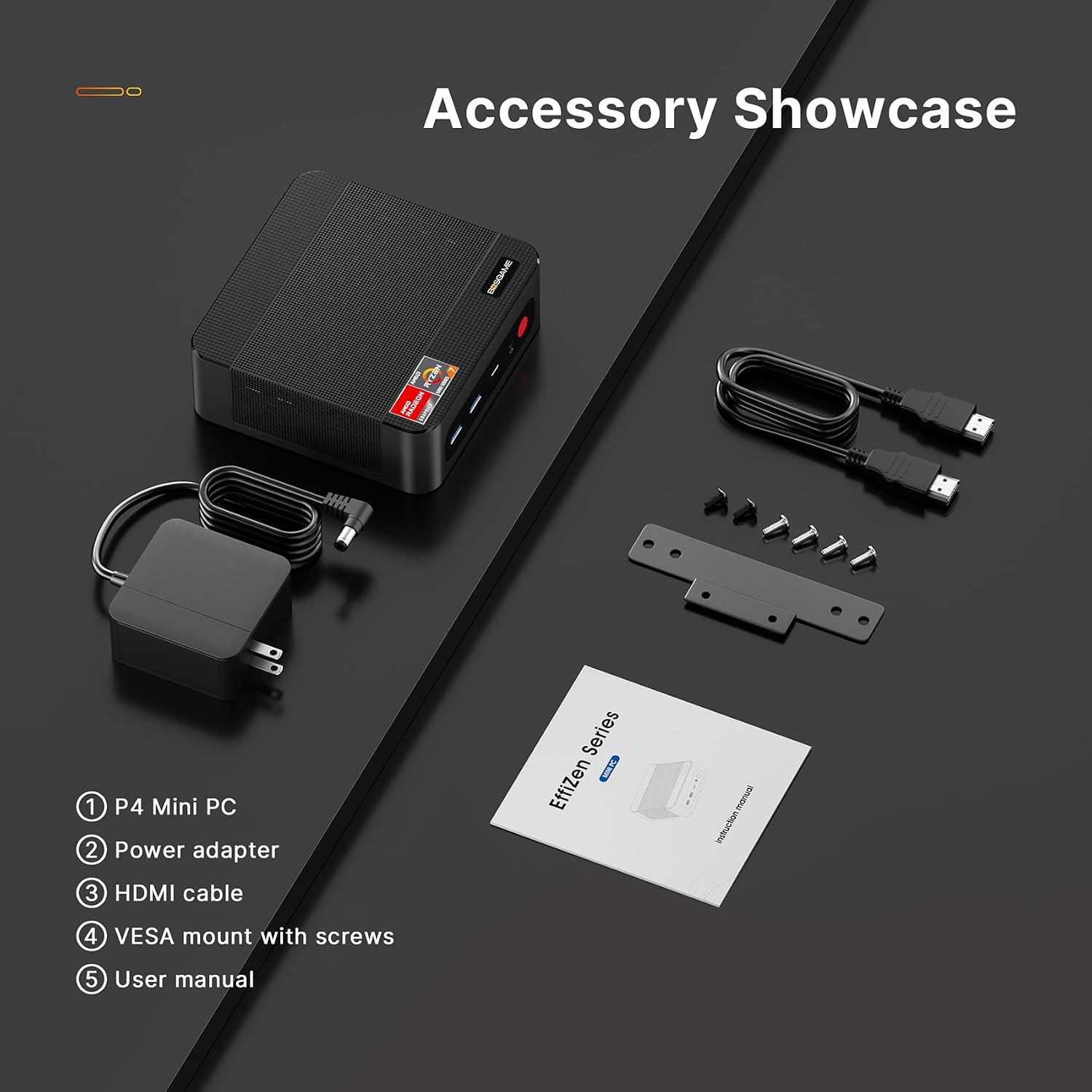
Image: All included accessories: the P4 Mini PC, power adapter, HDMI cable, VESA mount with screws, and user manual.
3. Setup Guide
- Connect Peripherals: Connect your monitor(s) to the HDMI, DisplayPort (DP), or USB-C video output ports on the Mini PC. Connect your keyboard and mouse to the available USB ports.

Image: The BOSGAME P4 Mini PC set up on a desk with a monitor, keyboard, and mouse connected, ready for use.
- Connect to Power: Plug the power adapter into the DC-in port on the Mini PC, then plug the adapter into a power outlet.
- Power On: Press the power button located on the front of the Mini PC. The power indicator light will illuminate.
- Initial Setup: Follow the on-screen instructions to complete the operating system setup (e.g., Windows 11). This may include connecting to a network, creating a user account, and installing updates.
- VESA Mount Installation (Optional): If desired, use the included VESA mount and screws to attach the Mini PC to the back of a compatible monitor or to a wall.
4. Operating Instructions
4.1. Power Management
- Power On: Press the power button once.
- Shut Down: Use the operating system's shutdown function. Alternatively, press and hold the power button for 4-5 seconds to force a shutdown (not recommended for regular use).
- Sleep Mode: Briefly press the power button while the PC is on to enter sleep mode. Press it again to wake up.
4.2. Display Configuration
The BOSGAME P4 supports up to three 4K displays simultaneously via HDMI, DisplayPort (DP), and USB-C. Connect your monitors to the respective ports. You can configure display settings (resolution, orientation, extended/duplicate desktop) within your operating system's display settings.

Image: A triple monitor setup powered by the BOSGAME P4 Mini PC, demonstrating its multi-display capability.
4.3. Network and Connectivity
- Wired Network: Connect an Ethernet cable to either of the two 2.5Gbps LAN ports for high-speed wired internet access.
- Wireless Network (WiFi 6E): The Mini PC features integrated WiFi 6E for fast and reliable wireless internet. Access network settings in your operating system to connect to available Wi-Fi networks.
- Bluetooth 5.2: Connect Bluetooth-enabled devices such as keyboards, mice, headphones, or speakers via Bluetooth 5.2. Manage Bluetooth devices through your operating system's Bluetooth settings.

Image: Close-up of the rear ports of the BOSGAME P4 Mini PC, highlighting the dual LAN ports, HDMI, DisplayPort, and USB ports.
4.4. Storage Expansion
The Mini PC comes with a 1TB NVMe PCIe 3.0 SSD. For additional storage, you can upgrade the existing SSD to 2TB or add another 2TB M.2 PCIe 3.0 SSD in the available slot. Refer to the detailed upgrade guide on the BOSGAME website for instructions on accessing the internal components.

Image: Internal view of the BOSGAME P4 Mini PC, illustrating the DDR4 SODIMM RAM modules and the M.2 NVMe PCIe 3.0 SSD slots for potential upgrades.
4.5. USB-C Functionality
The full-featured USB-C port supports PD 3.0 power supply, 4K@60Hz video output, and 10Gbps data transmission. This allows for versatile connectivity with modern devices, including external displays, portable power banks, and high-speed storage devices.

Image: The BOSGAME P4 Mini PC connected via its full-featured USB-C port, demonstrating its capability for power delivery, video output, and high-speed data transfer.
5. Key Features
- Compact Design, Powerful Performance: Measures just 5x5x1.8 inches, yet houses an AMD Ryzen 7 5700U processor (8 cores/16 threads, up to 4.3GHz) for robust performance in a small footprint.
- Triple 4K Display Support: Equipped with AMD Radeon Graphics (8 cores, up to 1900MHz), supporting simultaneous output to three 4K displays via HDMI, DisplayPort, and USB-C.
- Lightning-Fast Network: Features dual 2.5Gbps Ethernet LAN ports for high-speed wired connections, alongside WiFi 6E and Bluetooth 5.2 for stable wireless connectivity.
- Simple Expansion: Comes with 32GB DDR4 RAM (expandable to 64GB) and a 1TB NVMe PCIe 3.0 SSD, with options to upgrade storage up to 4TB (2TB per M.2 slot).
- Whisper Quiet Operation: Designed with a low-power AMD processor (TDP 15W) and a smart, auto-adjusting dual cooling fan system, ensuring quiet operation even under load.
- Versatile Applications: Ideal for home office, light gaming, media center, business presentations, online learning, and video/photo editing.

Image: Size comparison of the BOSGAME P4 Mini PC next to a smartphone and a keyboard, illustrating its compact volume.
6. Product Specifications
| Feature | Specification |
|---|---|
| Processor | AMD Ryzen 7 5700U (8 Cores, 16 Threads, up to 4.3 GHz) |
| Graphics | AMD Radeon Graphics (8 Cores, 1900MHz) |
| RAM | 32 GB DDR4 (2x16GB, 3200 MHz, expandable to 64GB) |
| Storage | 1 TB M.2 2280 NVMe PCIe 3.0 SSD (Dual Slot up to 4TB total) |
| Operating System | Windows 11 OS (Compatible with Linux and Ubuntu) |
| Video Output | HDMI, DisplayPort (DP), USB-C (Supports Triple 4K Display) |
| Network | Dual 2.5Gbps Ethernet LAN, WiFi 6E, Bluetooth 5.2 |
| USB Ports | 2x USB 3.0, 2x USB 2.0, 1x Full-featured USB-C |
| Audio | Audio Jack |
| Dimensions (LxWxH) | 5 x 5 x 1.8 inches |
| Item Weight | 1.19 pounds |
7. Troubleshooting
- No Power:
Ensure the power adapter is securely connected to both the Mini PC and a working power outlet. Test the outlet with another device. Check if the power adapter's indicator light is on.
- No Display:
Verify that the monitor is powered on and the correct input source is selected. Check the HDMI, DisplayPort, or USB-C cable connections between the Mini PC and the monitor. Try a different cable or monitor if possible.
- Network Connectivity Issues:
For wired connections, ensure the Ethernet cable is properly plugged into both the Mini PC and the router/modem. Check router status. For Wi-Fi, ensure Wi-Fi is enabled in the operating system and you are connecting to the correct network with the correct password. Restart your router/modem and the Mini PC.
- Slow Performance:
Close unnecessary applications. Check for background processes consuming high CPU or RAM. Ensure the operating system and drivers are up to date. Verify sufficient free storage space on the SSD.
- Peripheral Not Recognized:
Try connecting the peripheral to a different USB port. Ensure the peripheral's drivers are installed and up to date. Restart the Mini PC.
8. Official Product Video
Watch the official BOSGAME P4 Mini Gaming PC Ryzen 7 video for a visual overview of its features and capabilities.
Video: An official promotional video showcasing the BOSGAME P4 Mini PC's design, internal components, connectivity, and various use cases in different environments.
9. Warranty and Support
BOSGAME provides comprehensive support for your P4 Mini PC. This includes:
- Lifetime technical support.
- A full year of hassle-free service.
- 24/7 customer assistance.
For detailed warranty information, technical assistance, or to contact customer support, please refer to the official BOSGAME website or the contact information provided in your product packaging.
Ask a question about this manual
Ask about setup, troubleshooting, compatibility, parts, safety, or missing instructions. Manuals+ will review the question and use this page’s manual context to help answer it.