
SUNKTA WW-BW1846J-US-SXT-2
SUNKTA Smart Watch User Manual
Model: WW-BW1846J-US-SXT-2 | Brand: SUNKTA
1. Introduction
The SUNKTA Smart Watch is a durable, military-grade fitness watch designed for various activities. It features Bluetooth call capabilities, message notifications, comprehensive health monitoring, and multiple sports modes. This manual provides essential information for setting up, operating, and maintaining your smartwatch.
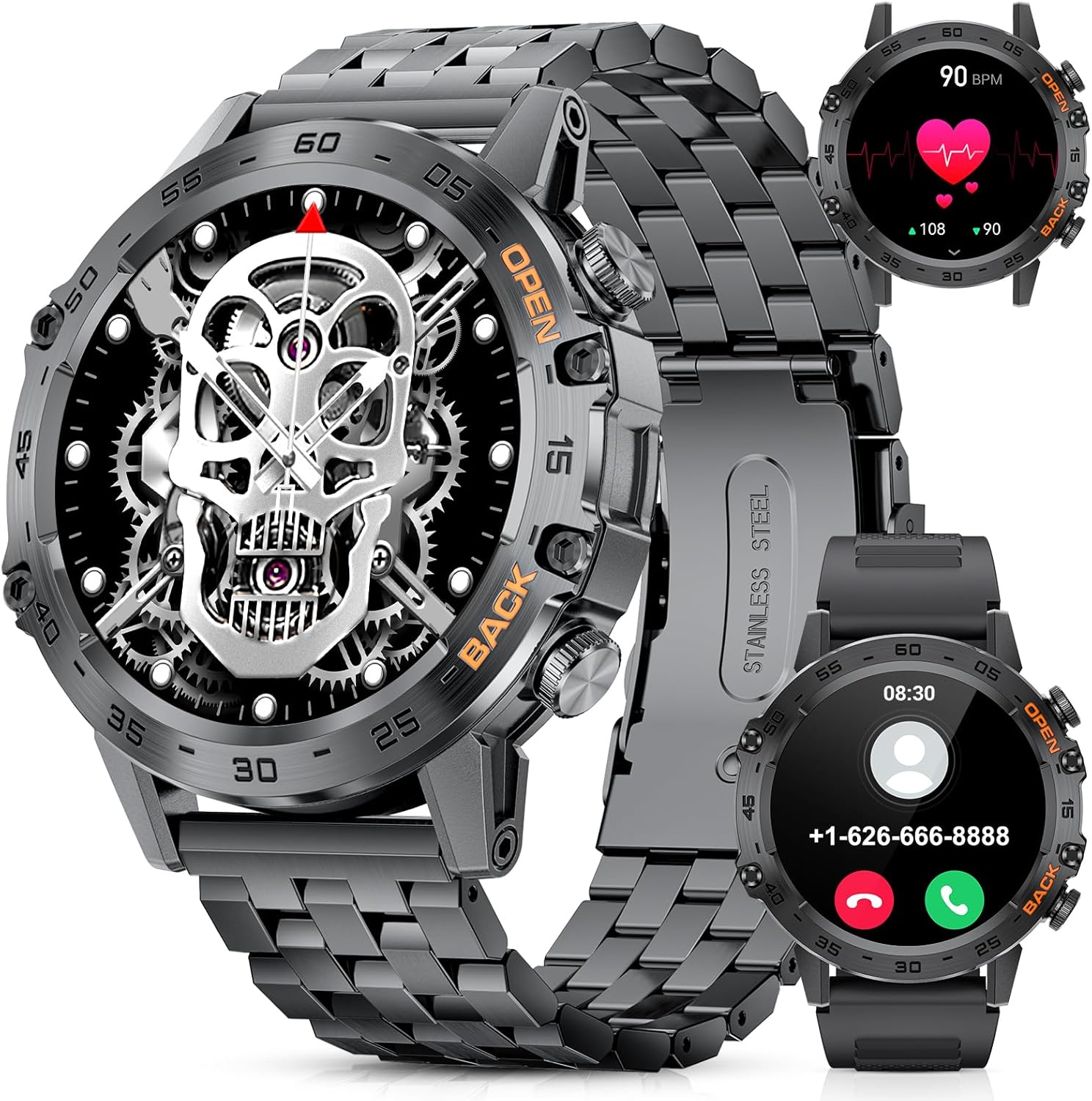
Figure 1: SUNKTA Smart Watch (Black model)
2. What's in the Box
Upon opening your SUNKTA Smart Watch package, you should find the following items:
- SUNKTA Smart Watch (K-52 model)
- User Manual
- Magnetic Charging Cable
- Strap Adjustment Tool
- Stainless Steel Strap (pre-installed or separate)
- Silicone Strap (alternative)
- Pins for strap attachment

Figure 2: Contents of the SUNKTA Smart Watch package, including the watch, charging cable, strap adjustment tool, and two types of straps.
Video 1: Unboxing the SUNKTA Smart Watch, showing all included components.
3. Setup
3.1 Initial Charging
Before first use, ensure your smartwatch is fully charged. Connect the magnetic charging cable to the charging points on the back of the watch and plug the USB end into a power source. A full charge typically takes 1-2 hours.
Figure 3: The smartwatch connected to its magnetic charging cable, displaying the charging icon.
3.2 App Download and Connection
To unlock the full features of your smartwatch, download the "FitCloudPro" app on your smartphone. It is available on both Google Play Store and Apple App Store. Alternatively, you can scan the QR code provided in the user manual.
- Turn on your phone's Bluetooth.
- Open the "FitCloudPro" app.
- Navigate to the "Devices" screen.
- Tap the "+ Bind Device" button.
- Select "K-52" from the list to pair your watch.

Figure 4: Step-by-step guide for connecting the smartwatch to the FitCloudPro app via Bluetooth.
3.3 Strap Adjustment
The stainless steel strap can be adjusted to fit your wrist using the provided strap adjustment tool. Carefully align the tool with the pins on the strap links and turn the screw to push the pin out. Remove or add links as needed to achieve a comfortable fit.
Video 2: Demonstration of adjusting the length of the watch strap using the included tool.
4. Operating Instructions
4.1 Basic Navigation
The smartwatch features a 1.39-inch HD full touchscreen display. You can navigate through menus and functions by swiping and tapping. The side buttons also provide quick access to certain features.
- Double-click the button: Quickly enter the function page.
- Slide down: Enter the accessibility page (quick settings).
- Swipe right: See common functions.
- Long press on watch face: Enter UI replacement page to change watch faces.
Video 3: Overview of various smartwatch features and navigation.
Video 4: Demonstrates how to access and adjust unit settings within the smartwatch interface.
4.2 Bluetooth Calls and Message Notifications
The smartwatch supports Bluetooth voice calls and message notifications directly on your wrist. Ensure your watch is connected to your mobile phone via Bluetooth.
- Answering/Dialing Calls: Slide the watch screen to the right and click the "Call" icon. Ensure "Call audio" is turned on in the watch settings. You can dial numbers, answer, or refuse calls. Up to 10 frequently used contacts can be added.
- Message Notifications: Receive intelligent synchronization of cell phone messages and vibration alerts from various apps like Twitter, Facebook, Instagram, SMS, WhatsApp, Email, WeChat. Note that replying to messages is not supported.

Figure 5: Illustrates the Bluetooth call and message notification features of the smartwatch.
4.3 Custom Dial Design
Personalize your smartwatch by choosing from almost 200 UI designs available in the FitCloudPro app. You can also sync your own photos (selfies, family, pets, landscapes) to use as a personalized dial.

Figure 6: Shows the variety of custom dial designs available and the option to use personal photos.
Video 5: Demonstrates how to change the watch face (UI) on the smartwatch.
4.4 Health Monitoring
The smartwatch provides comprehensive health tracking features:
- Sleep Monitor: Tracks awake, light, and deep sleep stages.
- Heart Rate Tracking: 24-hour heart rate monitoring.
- Blood Pressure/Blood Oxygen Data: Real-time data (note: not for medical use).
- Pedometer: Tracks steps.
- Breathing Exercises: Guided breathing for relaxation.
- Sedentary Reminder: Alerts you to move after periods of inactivity.
- Drinking Water Reminder: Helps you stay hydrated.

Figure 7: Visual representation of the smartwatch's health monitoring capabilities, including sleep, heart rate, blood pressure, and blood oxygen tracking.
4.5 Sports Modes and Fitness Tracking
The smartwatch offers 21 built-in exercise modes. When connected to the app, you can customize and add over 100 sports modes to track your workouts, including walking, running, hiking, cycling, basketball, and more. It tracks distance, calories burned, and steps.

Figure 8: Displays the various sports modes and fitness tracking metrics like steps, distance, calories, and heart rate.
4.6 Other Features
Your SUNKTA Smart Watch includes additional useful functions:
- Weather Forecast: Check real-time weather.
- AI Voice Assistant: For hands-free control.
- Music Player: Control music playback on your phone.
- Stopwatch/Timer: For timing activities.
- Alarm Clock: Set reminders.
- Calculator: Basic calculations.
- Passcode Lock: Secure your smartwatch.
- Find a Phone / Find a Watch: Locate your devices.
- Brightness Setting: Adjust screen brightness (5 levels).

Figure 9: Highlights features such as weather forecast, passcode lock, and other utilities like reminders and music control.
5. Maintenance
5.1 Waterproof Rating
The SUNKTA Smart Watch is 5ATM waterproof, meaning it can withstand pressures equivalent to a depth of 50 meters. This makes it suitable for swimming and showering, but it is not recommended for diving or high-pressure water activities.

Figure 10: Illustrates the 5ATM waterproof capability of the smartwatch.
5.2 General Care
- Clean the watch regularly with a soft, dry cloth.
- Avoid exposing the watch to extreme temperatures or direct sunlight for prolonged periods.
- Do not attempt to disassemble the watch, as this will void the warranty.
6. Troubleshooting
If you encounter issues with your SUNKTA Smart Watch, please refer to the following common solutions:
- Weather forecast out of sync: Ensure "weather push" is enabled in the "FitCloudPro" app. Go to "Me" page > "Units" to set your preferred unit (Fahrenheit/Celsius).
- Watch not holding a charge: Ensure the magnetic charging cable is properly connected and the power source is functional. If the issue persists, contact customer support.
- Band broken: If the watch band is damaged, contact customer support for replacement options.
- Bluetooth connection issues: Ensure Bluetooth is enabled on your phone and the watch. Restart both devices and try pairing again. Verify that "Call audio" and "Media audio" are enabled in the watch's Bluetooth settings if experiencing audio issues.
7. Specifications
| Feature | Detail |
|---|---|
| Model Number | WW-BW1846J-US-SXT-2 |
| Screen Size | 1.39 inches HD Touchscreen (360*360 pixels) |
| Battery Capacity | 400mAh |
| Usage Time | Up to 10 days (regular use) |
| Standby Time | Up to 30 days |
| Waterproof Rating | 5ATM |
| Connectivity | Bluetooth |
| Operating System Compatibility | Android/iOS |
| Health Monitoring | Heart Rate, Blood Pressure, SpO2, Sleep Monitor, Pedometer |
| Sports Modes | 100+ (21 built-in) |
| Material | High-strength metal (aluminum alloy) |
| Dimensions | 3.94 x 1.97 x 0.98 inches |
| Item Weight | 9.1 ounces |
8. Warranty and Support
SUNKTA is committed to providing quality products and customer satisfaction.
- Guarantee: Your SUNKTA Smart Watch comes with a 2-year guarantee.
- Returns Service: Enjoy a 6-month returns service.
- Online Support: 24-hour online service is available for any inquiries or assistance.
- Contact: For any questions regarding the band, charging, or other issues, please contact SUNKTA customer support.

Figure 11: SUNKTA's commitment to customer service, including guarantee and support availability.
Related documentsWW-BW1846J-US-SXT-2


Ask a question about this manual
Ask about setup, troubleshooting, compatibility, parts, safety, or missing instructions. Manuals+ will review the question and use this page’s manual context to help answer it.