
1. Introduction
This manual provides essential information for the safe and efficient operation, maintenance, and troubleshooting of your UML0 N3S Cordless Vacuum Cleaner. Please read this manual thoroughly before using the appliance and retain it for future reference.
2. Important Safety Information
Always follow basic safety precautions when using electrical appliances to reduce the risk of fire, electric shock, or injury.
- Do not use outdoors or on wet surfaces.
- Do not allow to be used as a toy. Close attention is necessary when used by or near children.
- Use only as described in this manual. Use only manufacturer's recommended attachments.
- Do not use with damaged cord or plug. If appliance is not working as it should, has been dropped, damaged, left outdoors, or dropped into water, return it to a service center.
- Do not pull or carry by cord, use cord as a handle, close a door on cord, or pull cord around sharp edges or corners. Do not run appliance over cord. Keep cord away from heated surfaces.
- Do not unplug by pulling on cord. To unplug, grasp the plug, not the cord.
- Do not handle plug or appliance with wet hands.
- Do not put any object into openings. Do not use with any opening blocked; keep free of dust, lint, hair, and anything that may reduce air flow.
- Keep hair, loose clothing, fingers, and all parts of body away from openings and moving parts.
- Do not pick up anything that is burning or smoking, such as cigarettes, matches, or hot ashes.
- Do not use to pick up flammable or combustible liquids, such as gasoline, or use in areas where they may be present.
- Do not pick up toxic material (e.g., chlorine bleach, ammonia cleaner, drain cleaner).
- Do not use without dust bag and/or filters in place.
- Turn off all controls before unplugging.
- Use extra care when cleaning on stairs.
- Do not use to pick up hard or sharp objects such as glass, nails, screws, coins, etc.
3. Package Contents
Carefully unpack your new UML0 N3S Cordless Vacuum Cleaner and ensure all items are present and in good condition. Refer to the image below for a visual guide to the included components.
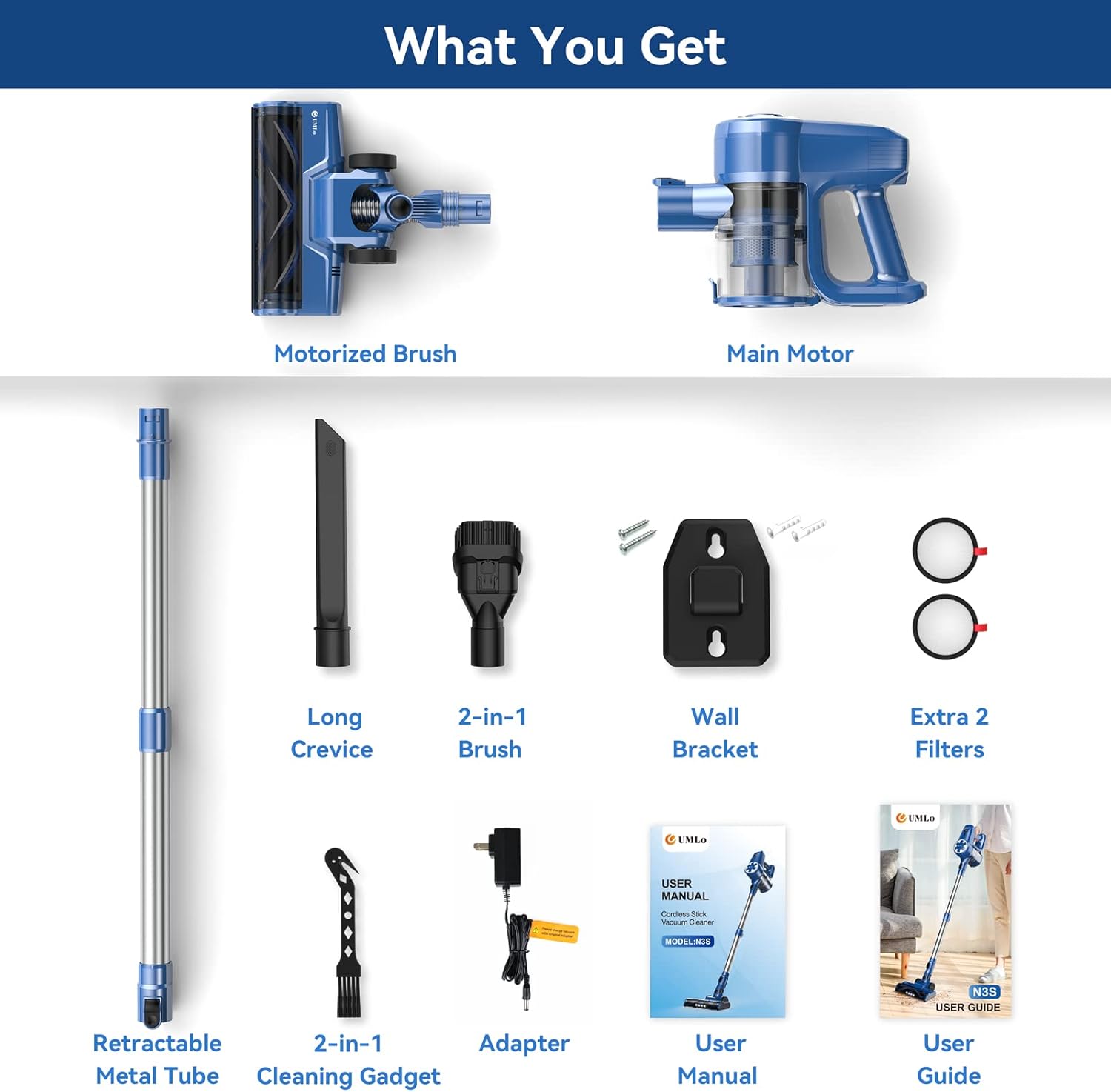
Image: All components included in the UML0 N3S Cordless Vacuum Cleaner package. This includes the main motor, motorized brush, retractable metal tube, various cleaning tools, wall bracket, adapter, user manual, and extra filters.
- Motorized Brush
- Main Motor (Handheld Unit)
- Wall Bracket + Screws
- Adjustable Metal Tube
- Long Crevice Tool
- 2-in-1 Brush Tool
- V-Shape Brush (part of motorized brush)
- Power Adapter
- 2-in-1 Cleaning Gadget
- User Manual
- User Guide (Quick Start)
- Extra 2 Filters
- Packaging Box
4. Product Overview
The UML0 N3S is a versatile 6-in-1 cordless stick vacuum cleaner designed for efficient cleaning across various surfaces. Its lightweight design allows for easy maneuverability and conversion into a handheld unit.

Image: The UML0 N3S vacuum cleaner shown as a full stick vacuum, a handheld vacuum with a crevice tool, and a handheld vacuum with a brush tool. Two washable filters are also depicted.
Key Features:
- Powerful Suction: Designed for effective removal of dust, dirt, pet hair, and crumbs.
- Lightweight Design: The main body weighs approximately 2.2 lbs, facilitating easy cleaning of high areas, stairs, and car interiors.
- Long Runtime Battery: Equipped with a 2200mAh battery providing up to 40 minutes of runtime.
- Flexible LED Brush Head: Features a brush head with LED lights for illuminating hidden debris and offers 180° swivel and 90° vertical rotation for reaching under furniture.
- High-Efficiency Filtration System: Multi-stage filtration including sponge, filter, cylinder, and cyclone filtration to capture fine particles.
- Versatile Attachments: Includes a long crevice tool and a 2-in-1 brush for various cleaning tasks.

Image: A detailed view of the motorized brush head, pointing out its LED lights, anti-tangle V-shaped brush, and its suitability for both hard floors and carpets.

Image: Demonstrates the lightweight nature of the vacuum, with a person easily carrying it up stairs and a child comfortably using it to clean, highlighting its ease of use.
5. Assembly
Follow these steps to assemble your UML0 N3S Cordless Vacuum Cleaner:
- Attach the Metal Tube: Insert the adjustable metal tube into the main motor unit until it clicks securely into place.
- Connect the Motorized Brush: Attach the motorized brush head to the other end of the metal tube, ensuring it locks firmly.
- Handheld Configuration: For handheld use, detach the metal tube and motorized brush. Directly attach the desired accessory (long crevice tool or 2-in-1 brush) to the main motor unit.

Image: This diagram illustrates the different ways to assemble the vacuum cleaner, including the full stick vacuum, handheld with crevice tool, and handheld with brush tool configurations.
6. Charging the Battery
Before first use, fully charge the vacuum cleaner's battery. The 2200mAh battery requires approximately 4.5 hours for a full charge, providing 20-40 minutes of runtime depending on the power mode.
- Connect the power adapter to the charging port on the main motor unit.
- Plug the adapter into a wall outlet.
- The indicator lights on the main unit will show the charging status. Refer to the user manual for specific light patterns.
- Once fully charged, disconnect the adapter.

Image: A cutaway view of the main motor unit highlighting the 2200mAh battery, indicating a 4.5-hour quick charge time and 20-40 minutes of long runtime.
7. Operating Instructions
Power On/Off and Mode Selection:
- Press the power button to turn the vacuum cleaner on.
- Press the mode selection button (if available, typically a touch control) to switch between power levels (e.g., standard and max suction).
- Press the power button again to turn the vacuum cleaner off.
Cleaning Different Surfaces:
The UML0 N3S is suitable for various floor types, including hardwood, carpet, tile, and marble.
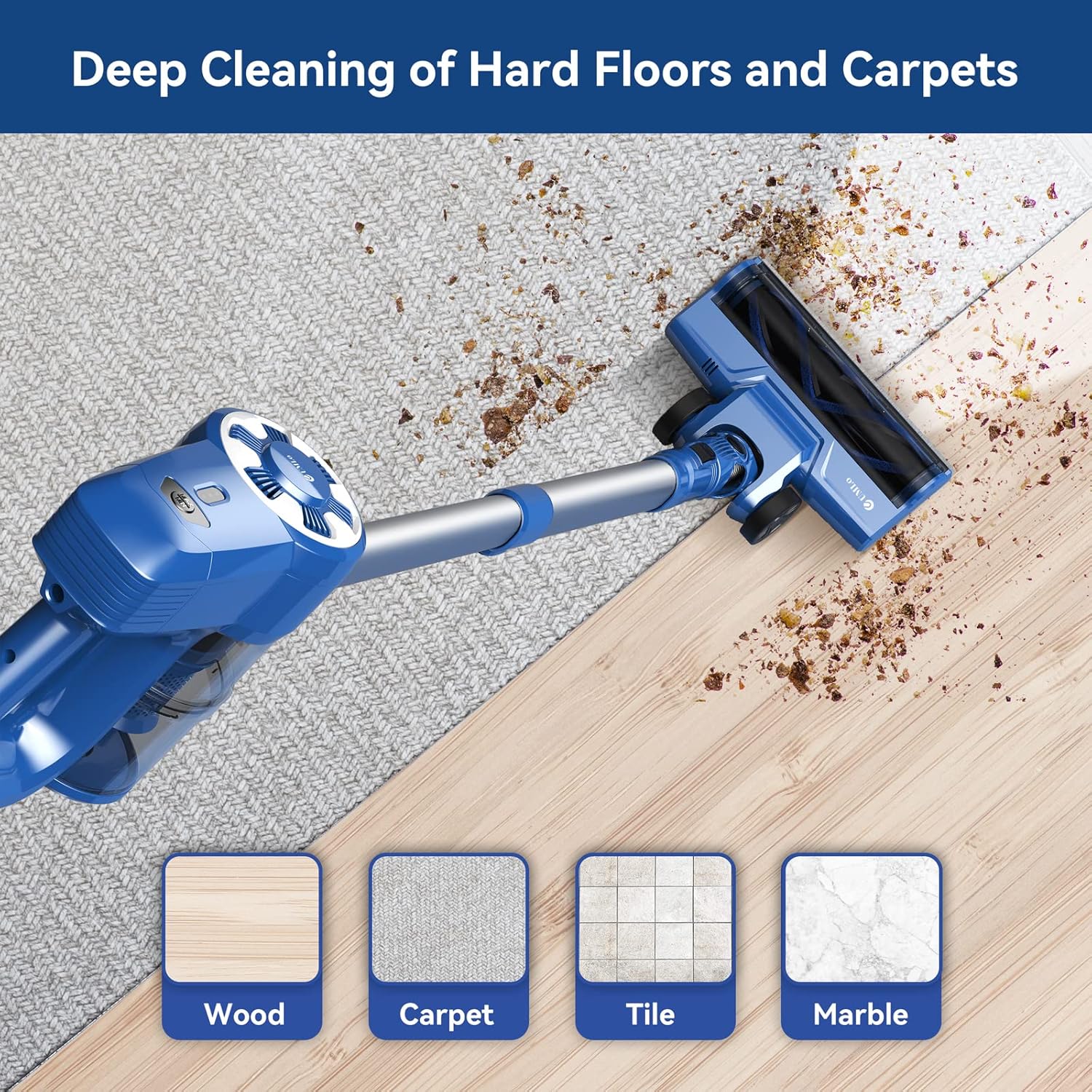
Image: The vacuum cleaner's brush head is shown effectively cleaning debris from wood, carpet, tile, and marble surfaces, demonstrating its versatility.
- Hard Floors (Wood, Tile, Marble): Use the standard power mode for everyday cleaning. The LED brush head illuminates fine dust.
- Carpets: For low-pile carpets, use the higher power mode for deeper cleaning. The motorized brush helps agitate and lift embedded dirt.
- Pet Hair: The powerful suction and specialized brush are effective at picking up pet hair from various surfaces.

Image: A person using the UML0 N3S vacuum cleaner on a hard floor, illustrating its capability to pick up various types of debris including pet hair, dust, and crumbs.
Using Attachments:

Image: The vacuum cleaner is shown in different configurations: as a stick vacuum reaching high, a handheld vacuum cleaning a car seat, a handheld with a brush tool on a sofa, and a stick vacuum cleaning stairs. The main body weight of 2.2 lbs is highlighted.
- Long Crevice Tool: Ideal for narrow spaces, corners, and edges, such as between sofa cushions or along baseboards.
- 2-in-1 Brush Tool: Use the brush for upholstery, curtains, and delicate surfaces. Retract the brush for a wider nozzle to clean larger debris.
- Flexible Brush Head: The brush head can swivel 180° horizontally and 90° vertically, allowing easy access under furniture and around obstacles.

Image: The flexible LED brush head is shown cleaning under a table, with diagrams illustrating its 180-degree horizontal swivel and 90-degree vertical rotation capabilities.
8. Maintenance
Regular maintenance ensures optimal performance and extends the lifespan of your vacuum cleaner.
Emptying the Dust Cup:
- Press the dust cup release button to detach it from the main motor unit.
- Empty the contents into a trash bin.
- Reattach the dust cup securely.
Cleaning the Filters:
The UML0 N3S features a multi-stage filtration system that requires periodic cleaning.
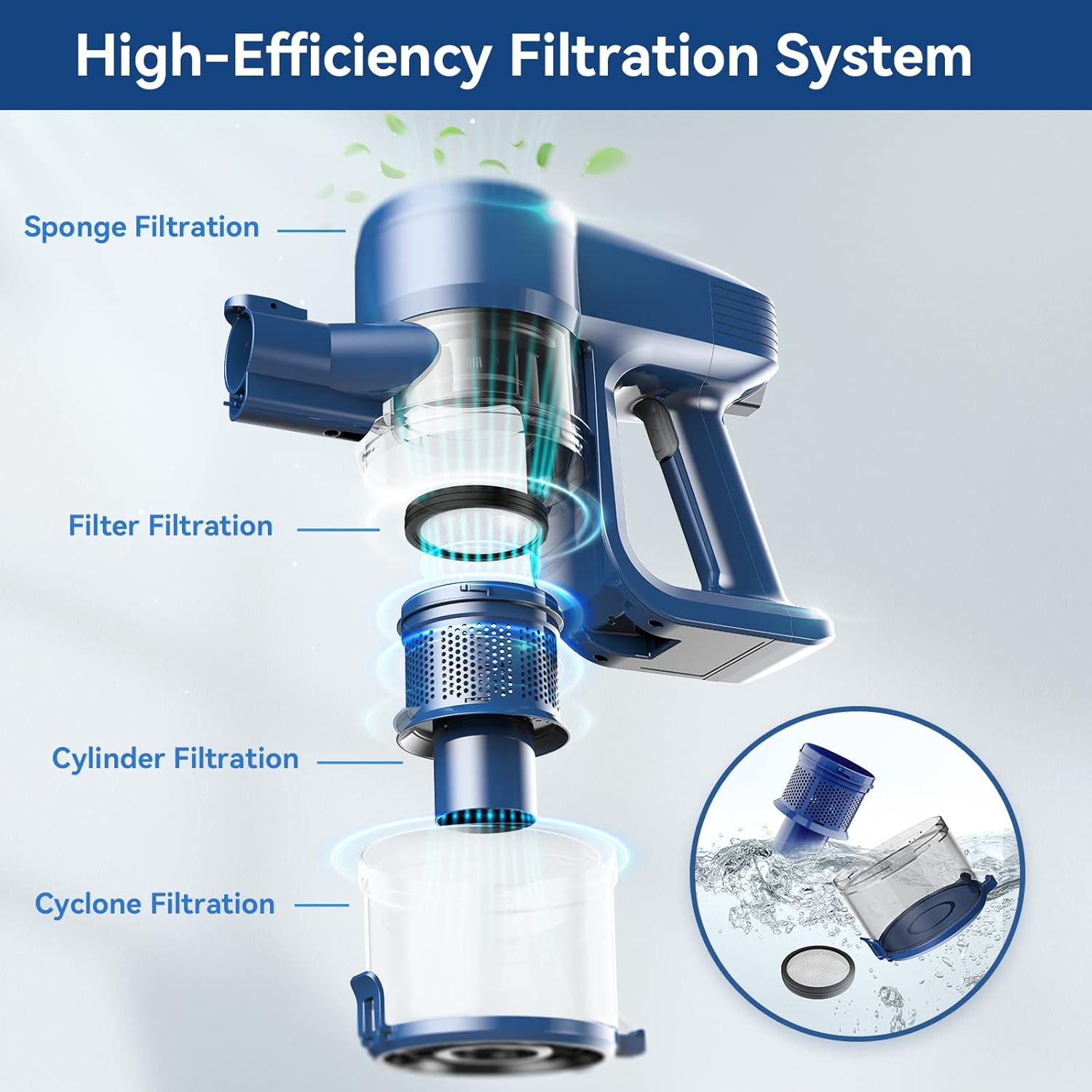
Image: An exploded view of the vacuum cleaner's main motor unit showing the Sponge Filtration, Filter Filtration, Cylinder Filtration, and Cyclone Filtration layers. An inset shows a filter being rinsed under water.
- Remove the dust cup and separate the filter components (sponge, filter, cylinder).
- Rinse the filters under running water until clean. Do not use detergent.
- Allow all filter components to air dry completely for at least 24 hours before reassembling. Do not use the vacuum with wet filters.
- Replace filters if they are damaged or excessively worn. Two extra filters are included in the package.
Cleaning the Brush Roll:
- Turn off the vacuum and detach the motorized brush head.
- Locate the brush roll release mechanism (refer to the user manual for specific instructions).
- Remove any tangled hair or debris from the brush roll using the included 2-in-1 cleaning gadget or scissors.
- Reinsert the brush roll and secure it.
9. Troubleshooting
If you encounter issues with your vacuum cleaner, refer to the following common problems and solutions:
| Problem | Possible Cause | Solution |
|---|---|---|
| Vacuum does not turn on. | Battery is depleted. | Charge the battery fully. |
| Power button not pressed correctly. | Ensure the power button is pressed firmly. | |
| Low suction power. | Dust cup is full. | Empty the dust cup. |
| Filters are clogged. | Clean or replace the filters. Ensure they are completely dry before reinstallation. | |
| Brush roll is tangled or blocked. | Remove debris from the brush roll. | |
| Hose or tube is blocked. | Check for and remove any blockages in the metal tube or brush head connection. | |
| Brush roll not spinning. | Brush roll is tangled. | Clean the brush roll of hair and debris. |
| Brush head not properly attached. | Ensure the motorized brush head is securely connected to the tube or main unit. | |
| Short runtime. | Battery not fully charged. | Charge the battery for the recommended 4.5 hours. |
| Using max power mode continuously. | Max power mode consumes more battery. Use standard mode for longer runtime. |
10. Specifications
| Feature | Detail |
|---|---|
| Brand | UML0 |
| Model Number | N3S (cordless vacuum cleaner) |
| Filter Type | HEPA Filter |
| Cordless | Yes |
| Form Factor | Stick |
| Battery Life (Max) | 40 minutes |
| Battery Capacity | 2200mAh (12V) |
| Control Method | Touch |
| Portable | Yes |
| Number of Power Levels | 2 |
| Indoor/Outdoor Usage | Indoor |
| Finish Type | Matte |
| Product Dimensions | 17.1 x 11.2 x 7.1 inches |
| Item Weight | 6.25 pounds |
11. Warranty and Support
For warranty information and customer support, please refer to the documentation included in your product packaging or contact UML0 customer service directly. Keep your purchase receipt as proof of purchase.
For additional assistance, you may visit the UML0 Store on Amazon.