1. Introduction
Thank you for choosing the Cygnett VertPWR 25000mAh Laptop Power Bank + Stand. This device is designed to provide portable power for your laptop, smartphone, tablet, and other USB-powered devices. With its high capacity and multiple charging ports, it ensures your devices stay charged on the go or at your workstation. This manual provides essential information for the safe and efficient use of your power bank.
2. Product Overview
The Cygnett VertPWR features a sleek design with a removable stand for convenient upright placement. It offers versatile charging options with its multiple USB ports and a clear digital display to monitor battery status.

Image: Cygnett VertPWR Power Bank on its stand, showing the digital display indicating 100% charge.

Image: Top view of the Cygnett VertPWR Power Bank, highlighting two USB-A ports (A1, A2) and two USB-C ports (C1, C2), along with the digital display.
Key Features:
- 25000mAh Capacity: High-capacity battery for extended use.
- 100W USB-C Output: Capable of charging most USB-C laptops.
- Four USB Charging Ports: Two USB-C (In/Out) and two USB-A ports for simultaneous charging of multiple devices.
- Pass-Through Charging: Recharge the power bank while it charges your devices.
- Digital Display: Shows precise battery percentage.
- Compact Design: Slim profile with a removable stand for desk use or portability.
- Airline Approved: Suitable for carry-on luggage on planes.
3. Setup
Initial Charging of the Power Bank:
- Before first use, fully charge your Cygnett VertPWR Power Bank.
- Connect the included 40cm USB-C to USB-C cable to one of the USB-C input/output ports (C1 or C2) on the power bank.
- Connect the other end of the cable to a compatible USB-C wall charger (not included) with a minimum output of 65W for optimal charging speed.
- The digital display will show the charging progress, indicating the battery percentage. The power bank is fully charged when the display shows 100%.
Note: A full charge may take several hours depending on the charger's output.
4. Operating Instructions
Charging Your Devices:
The VertPWR Power Bank can charge up to four devices simultaneously using its two USB-C ports and two USB-A ports.
- Connect your device's charging cable to the appropriate port on the power bank (USB-C for laptops/compatible devices, USB-A for most smartphones/tablets).
- Connect the other end of the cable to your device.
- The power bank will automatically begin charging your device. The digital display will show the remaining battery percentage of the power bank.

Image: The Cygnett VertPWR Power Bank on its stand, connected via USB-C to a laptop, illustrating laptop charging.

Image: The Cygnett VertPWR Power Bank on its stand, simultaneously charging a laptop and a smartphone, showcasing multi-device charging capability.
Understanding the Digital Display:
- The digital display shows the current battery percentage of the power bank.
- When charging the power bank, the percentage will increase.
- When charging devices, the percentage will decrease.
- Press the power button briefly to activate the display and check the battery level.
5. Maintenance
Cleaning:
- Ensure the power bank is disconnected from all devices and power sources before cleaning.
- Wipe the surface with a soft, dry, lint-free cloth.
- Do not use abrasive cleaners, solvents, or harsh chemicals.
Storage:
- Store the power bank in a cool, dry place away from direct sunlight and extreme temperatures.
- For long-term storage, it is recommended to charge the power bank to approximately 50-70% every three months to maintain battery health.
6. Troubleshooting
Power Bank Not Charging:
- Ensure the charging cable is securely connected to both the power bank and the wall charger.
- Verify that the wall charger is functioning correctly and plugged into a live power outlet.
- Try using a different USB-C cable or wall charger.
- Ensure the wall charger provides sufficient power (at least 65W for optimal charging).
Devices Not Charging:
- Check if the power bank has sufficient charge remaining (digital display).
- Ensure the charging cable is securely connected to both the power bank and your device.
- Try using a different charging cable or a different port on the power bank.
- Verify that your device is compatible with the power bank's output specifications.
- Some devices may require specific charging protocols; ensure your device's cable supports these.
Digital Display Not Working:
- Press the power button briefly to activate the display.
- If the power bank is completely depleted, the display may not light up until it receives some charge.
7. Specifications
| Feature | Specification |
|---|---|
| Model Name | CY5128PBCHE, CY5129PBCHE |
| Battery Capacity | 25000 Milliamp Hours (mAh) |
| Battery Cell Composition | Lithium Polymer |
| Voltage | 3.7 Volts |
| Item Weight | 615 g |
| Dimensions | 168 x 132 x 22mm |
| Connector Type | USB Type C |
| Max Output Power | 100W (USB-C) |
| Max Input Power | 65W (USB-C) |
| Included Cable | 40cm USB-C to USB-C |

Image: Comparison image showing the compact size of the Cygnett VertPWR Power Bank next to an A5 notebook, emphasizing its slim 22mm profile.
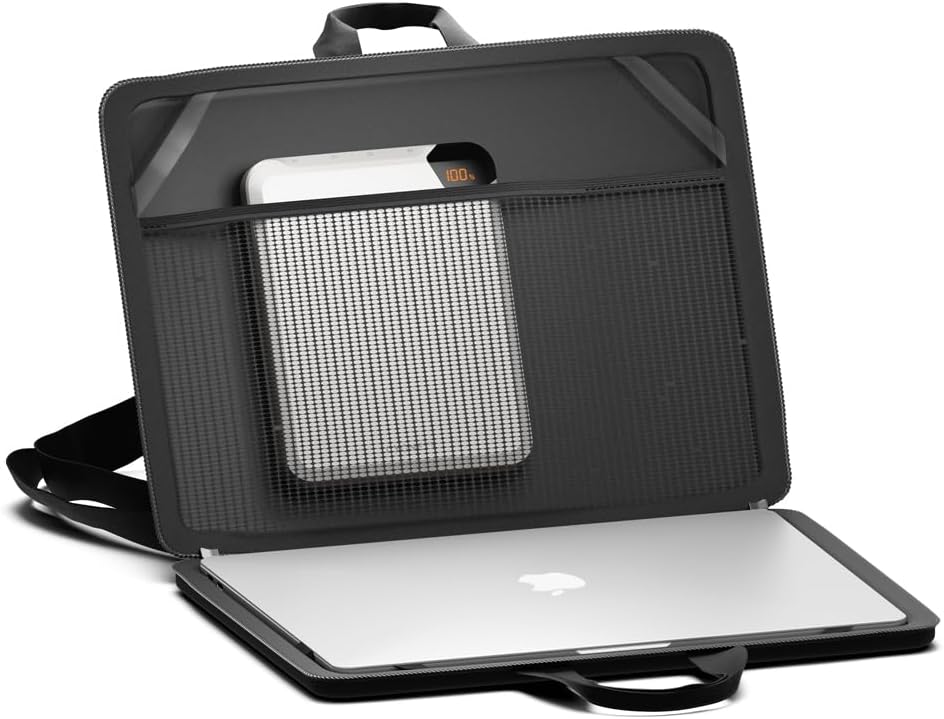
Image: The Cygnett VertPWR Power Bank stored in a laptop bag compartment, demonstrating its portability and how it fits alongside a laptop.
8. Safety Information
Please read and follow these safety instructions carefully to prevent damage to the product or injury to yourself.
- Do not expose the power bank to extreme temperatures (hot or cold), direct sunlight, or high humidity.
- Do not disassemble, modify, or attempt to repair the power bank. This may cause damage, fire, or electric shock.
- Keep the power bank away from water and other liquids.
- Do not drop, puncture, or apply excessive force to the power bank.
- Keep out of reach of children.
- Use only certified and compatible charging cables and adapters.
- If the power bank becomes excessively hot, emits an odor, or changes shape during charging or use, discontinue use immediately and contact customer support.
- Dispose of the power bank responsibly according to local regulations. Do not dispose of it in household waste.


