Introduction
Welcome to the user manual for your new Xiaomi Luggage Classic Pro & Aluminium. This manual provides essential information on how to set up, operate, and maintain your luggage to ensure its longevity and optimal performance. Please read this manual thoroughly before first use and keep it for future reference.
Safety Information
- Do not overload the luggage beyond its recommended capacity to prevent damage to the frame and zippers.
- Ensure all zippers and locks are securely fastened before transport.
- Keep the luggage away from extreme temperatures and direct sunlight for prolonged periods.
- Avoid exposing the luggage to sharp objects or abrasive surfaces that could scratch or dent the aluminium frame.
- When using the telescopic handle, ensure it is fully extended or retracted to avoid strain.
Product Overview
The Xiaomi Luggage Classic Pro & Aluminium is designed for durability and convenience, featuring a robust aluminium frame and advanced security features. Its thoughtful design ensures a stress-free travel experience.
Key Features
- Aluminium frame construction: The sturdy 6000 aluminium frame ensures high resistance and protects the contents of the case even under heavy loads.
- Dual TSA Locks: The two integrated TSA locks provide maximum protection and allow for straightforward inspection by security agencies without damaging the case.
- Low noise double wheels: Thanks to the high-quality double wheels, the case glides effortlessly over any surface for smooth, quiet movement.
- Zinc Alloy Corner Protectors: The reinforced zinc alloy corners effectively protect the case from bumps and abrasion, making it look like new even after many trips.
- WET DRY SEPARATION: With the clever wet-dry separation, the interior always stays well organized, so wet or dirty clothes can be stored separately.

This image displays the overall design of the Xiaomi Aluminium Luggage, highlighting its sleek silver finish and ribbed texture.
Initial Setup
Unpacking
- Carefully remove the luggage from its packaging.
- Inspect the luggage for any signs of damage during transit. If damaged, contact customer support immediately.
- Remove any protective films or tags.
Setting the TSA Locks
Your Xiaomi Luggage is equipped with dual TSA combination locks. The initial combination is typically 0-0-0.
- With the lock set to the current combination (factory default 0-0-0), locate the reset button. This is usually a small, recessed button that requires a pen or pointed object to press.
- Press and hold the reset button.
- While holding the reset button, set your desired 3-digit combination by rotating the dials. Choose a memorable combination.
- Release the reset button. Your new combination is now set.
- Test the new combination by scrambling the numbers and then entering your new combination to open the lock.

A side view of the luggage, clearly showing the two integrated TSA combination locks and the side handle.
Operation
Opening and Closing the Luggage
The luggage features a 4:6 opening ratio, allowing for efficient packing and organization.
- To open: Enter your combination on both TSA locks and press the release buttons. The two halves of the luggage will separate.
- To close: Align the two halves of the luggage, ensuring the latches click securely into place. Scramble the combination dials to lock the luggage.
Using the Telescopic Handle
The telescopic handle can be adjusted to multiple heights for comfortable pulling. Press the button on the handle grip and pull up or push down to extend or retract it. Ensure it clicks into place at your desired height.
Maneuvering the Luggage
Your luggage is equipped with low-noise double wheels for smooth 360-degree rotation. For optimal maneuverability, pull the luggage behind you or push it alongside you on all four wheels.
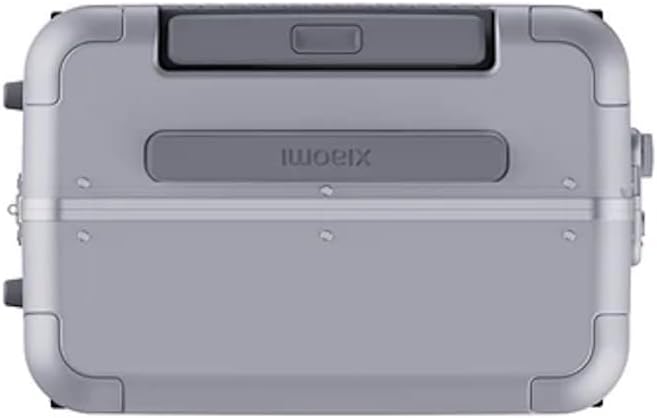
This image shows the underside of the luggage, emphasizing the durable double wheels designed for smooth movement and the protective corner guards.
Maintenance and Care
Cleaning
- Exterior: Wipe the aluminium surface with a soft, damp cloth and mild soap. Avoid abrasive cleaners or solvents that could damage the finish. Dry thoroughly with a clean cloth.
- Interior: The interior lining can be spot cleaned with a damp cloth and mild detergent. Allow to air dry completely before closing.
- Wheels: Periodically check the wheels for debris (hair, lint, etc.) and clean them to ensure smooth rolling.
Storage
Store your luggage in a cool, dry place away from direct sunlight when not in use. Ensure it is clean and dry before storing to prevent mold or mildew.
Troubleshooting
| Issue | Possible Cause | Solution |
|---|---|---|
| TSA lock not opening | Incorrect combination entered. | Ensure the correct 3-digit combination is aligned. If forgotten, contact customer support for guidance (note: TSA locks cannot be reset without the original combination or a master key). |
| Wheels not rolling smoothly | Debris caught in wheels; worn wheels. | Clean any hair or debris from the wheel axles. If wheels are worn, consider professional repair or replacement. |
| Telescopic handle stuck | Button not fully pressed; bent handle. | Ensure the release button is fully depressed. Avoid forcing the handle. If bent, seek professional repair. |
| Luggage not closing properly | Overpacked; misalignment of halves. | Reduce contents if overpacked. Ensure both halves are perfectly aligned before attempting to latch. |
Specifications
| Feature | Detail |
|---|---|
| Model | 26 Aluminium silver |
| Brand | Xiaomi |
| Frame Material | 6000 Aluminium Alloy |
| Lock Type | Dual TSA Combination Locks |
| Wheels | Low noise double wheels (360-degree rotation) |
| Opening Ratio | 4:6 |
| Protection | Zinc Alloy Corner Protectors |
| Internal Organization | Wet-dry separation compartment |
Warranty and Support
Xiaomi products are manufactured to the highest quality standards. For specific warranty terms and conditions, please refer to the warranty card included with your purchase or visit the official Xiaomi website. Keep your proof of purchase for warranty claims.
For technical support, troubleshooting assistance, or to inquire about repairs, please contact Xiaomi customer service through their official channels. You can typically find contact information on the Xiaomi website or in your product documentation.