
Introduction
The Flashfish T300pro is a versatile 230Wh LiFePO4 portable power station designed to provide reliable power for various devices. With its 300W pure sine wave AC output (600W peak), multiple DC and USB ports, and fast charging capabilities, it is suitable for camping, RV use, outdoor activities, and emergency backup power. This manual provides essential information for safe and efficient operation of your T300pro power station.
Product Features
- 230Wh LiFePO4 Battery: Equipped with an A-grade 230Wh LiFePO4 battery pack, offering 3500+ charge and discharge cycles for extended lifespan and reduced internal heat.
- 9 Output Ports: Includes 300W AC (600W peak), 100W USB-C PD, 30W USB-C, 18W USB-A1, 12W USB-A2, 120W max car port output, and DC 5521 outputs (12W max).
- 300W Powerful AC Outputs: Capable of powering devices up to 300W (Pure Sine Wave) for laptops, cameras, drones, mini-fridges, TVs, or CPAP machines.
- 1.2H Fast Charging: Utilizes 230W quick charge technology to recharge from 0-100% in approximately 1.2 hours via the included AC power cord. Optional charging via 100W Type-C adapter, solar panel, or car charger is also available.
- Emergency Power Supply (EPS) Function: Supports automatic power switching from a wall outlet to the T300pro within 30ms during a power outage, ensuring continuous power for critical devices.
- Adjustable LED Light: Features a flashlight integrated into the handle with adjustable modes (reading light, SOS) for various lighting needs.
- Lightweight Design: Weighs only 9.9 lbs (4.5 kg) for easy portability.
Setup
Unboxing and Initial Inspection
Upon receiving your Flashfish T300pro, carefully unpack all components. The package should include the T300pro portable power station, an AC charging cable, and this user manual. Inspect the unit for any visible damage. If any components are missing or damaged, contact customer support.
Initial Charging
Before first use, fully charge the power station to 100%. This helps to calibrate the battery and ensure optimal performance.
- Connect the provided AC charging cable to the AC input port on the power station.
- Plug the other end of the AC charging cable into a standard wall outlet.
- The LCD display will show the charging status. The unit will fully charge from 0% to 100% in approximately 1.2 hours.
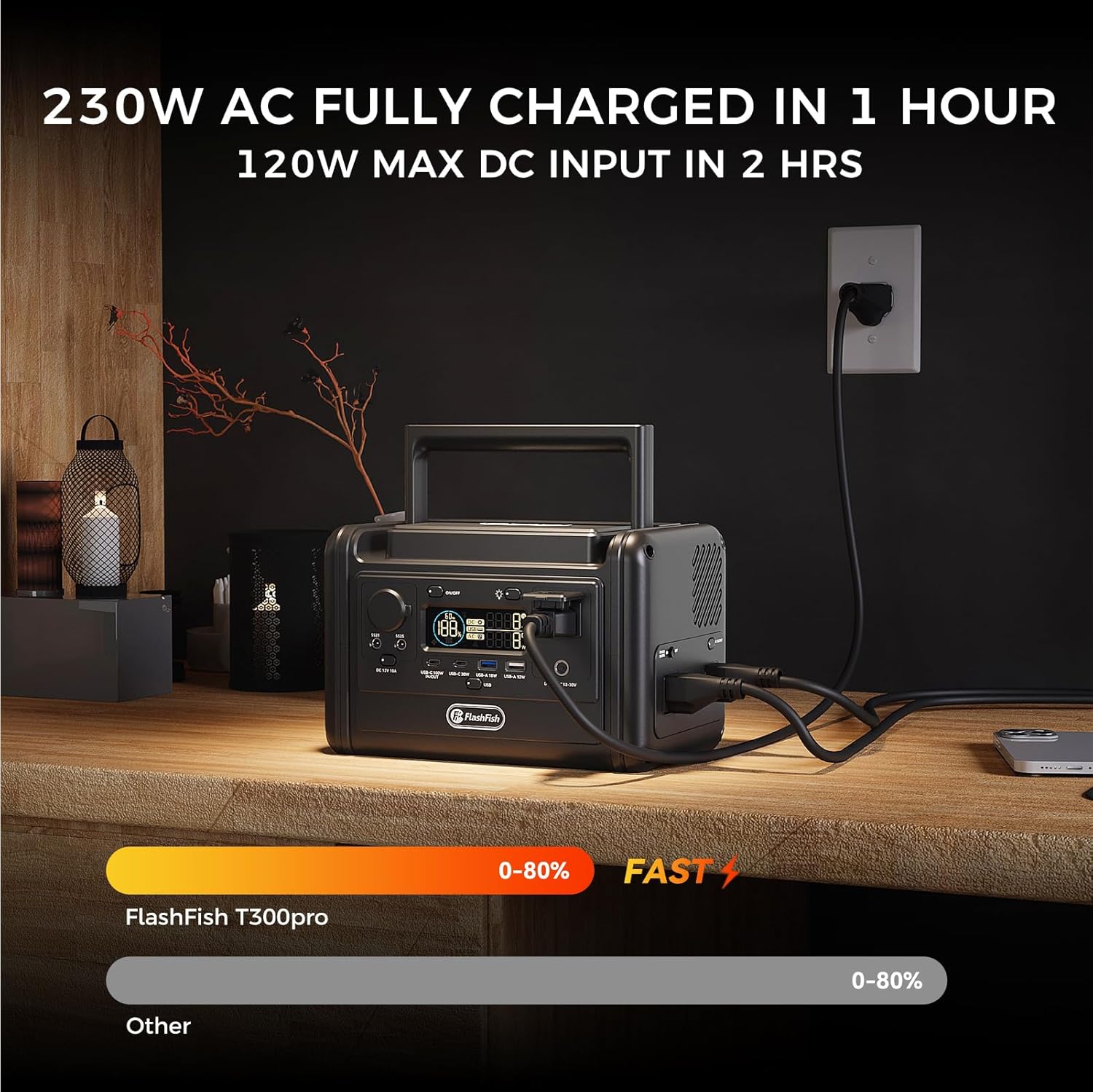
Description: This image shows the Flashfish T300pro Portable Power Station connected to a wall outlet via its AC charging cable. The unit's display indicates the charging status, highlighting its fast charging capability which can reach 80% in 1 hour.
Operating Instructions
Powering On/Off
To power on the unit, press and hold the 'ON/OFF' button for a few seconds until the LCD display illuminates. To power off, press and hold the 'ON/OFF' button again until the display turns off.
LCD Display
The LCD display provides real-time information including battery percentage, input/output wattage, and active port indicators. This allows you to monitor the power station's status at a glance.

Description: This image illustrates the Flashfish T300pro Portable Power Station on a table with various devices connected, showcasing its multiple power output options. A laptop and a coffee maker are visibly powered by the unit, demonstrating its versatility for everyday devices.
Charging the Power Station
AC Wall Charging
Use the provided AC charging cable to charge the unit from a standard wall outlet. The T300pro supports 230W fast charging, allowing it to reach full capacity quickly.
Solar Panel Charging
The T300pro can be charged using compatible solar panels (not included). Connect a solar panel with a DC output range of 12-30V and a maximum input of 120W to the DC input port (12-30V) on the power station. Ensure the solar panel is placed in direct sunlight for optimal charging efficiency.

Description: This image shows the Flashfish T300pro Portable Power Station connected to two solar panels (100W and 60W) on a sandy surface near water, illustrating its ability to be recharged using solar energy in an outdoor setting.
Car Charging
You can charge the T300pro from your vehicle's 12V/24V cigarette lighter socket using a compatible car charger (optional). The DC input supports 12V/24V 8A max.
Output Ports
The T300pro offers a variety of output ports to power different devices:
- AC Outlets: Two pure sine wave AC outlets providing 300W continuous power, with a 600W peak.
- USB-C PD Port: One 100W Power Delivery (PD) port for fast charging compatible USB-C devices.
- USB-C Port: One 30W USB-C port.
- USB-A Ports: One 18W USB-A1 port and one 12W USB-A2 port.
- DC 12V Outputs: Includes a 12V 10A cigarette lighter port and two DC 5521 outputs (12W max). Note that the total output for these DC ports is limited to 120W max.
LED Light Function
The integrated LED light on the handle provides illumination for various situations. To activate the light, ensure the main power is on, then press the light button. Repeated presses will cycle through different modes:
- Reading Light Mode: Provides steady illumination.
- SOS Mode: Flashes an SOS signal for emergencies.
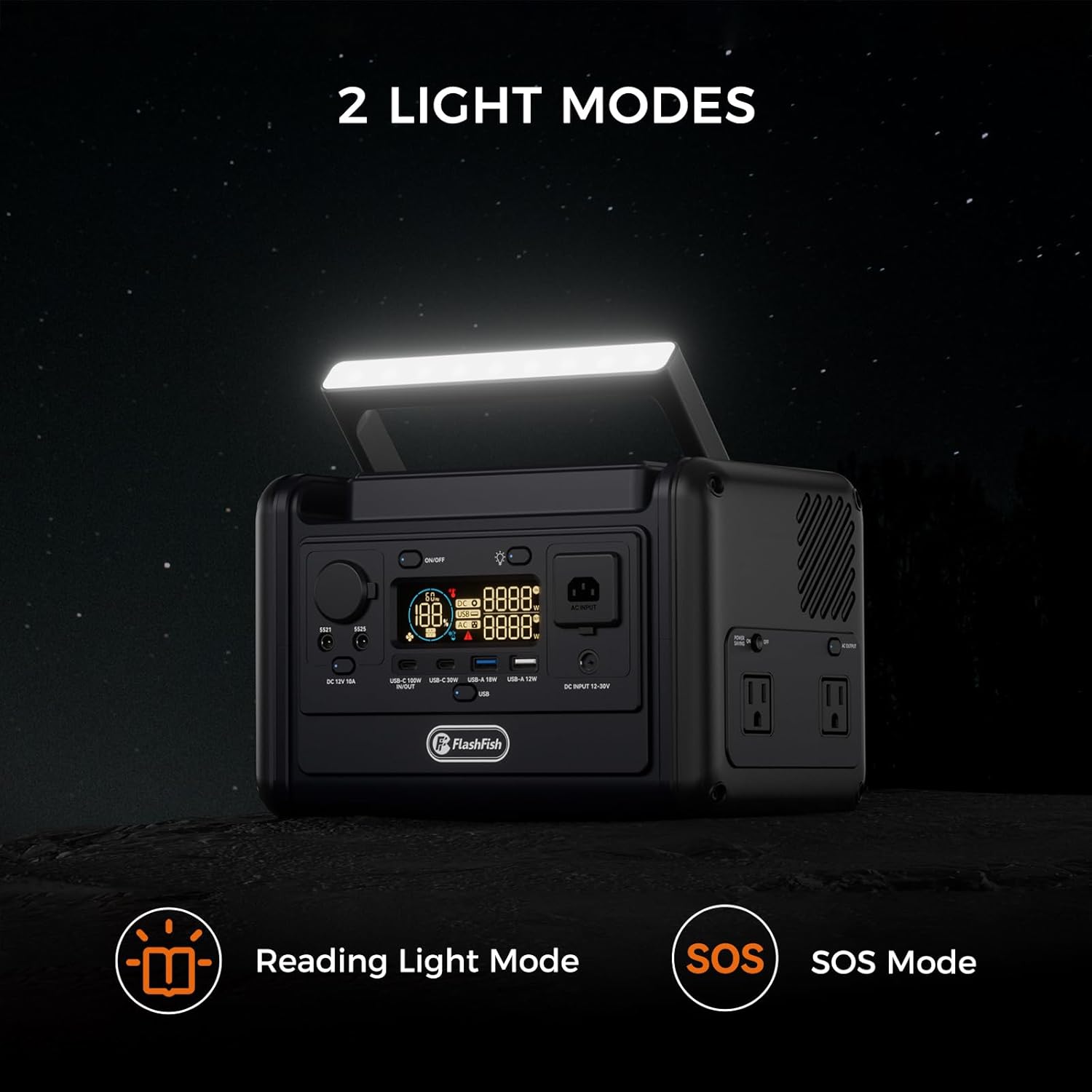
Description: This image displays the Flashfish T300pro Portable Power Station in a dark setting with its integrated LED light bar activated. The light can function as a reading light or in SOS mode, providing essential illumination during power outages or outdoor activities.
Video: Demonstration of the Flashfish T300pro Power Station's features, including its various ports and LED light functionality.
Emergency Power Supply (EPS) Function
The T300pro supports an Emergency Power Supply (EPS) function. When the power station is connected to a wall outlet and also powering devices, it acts as a pass-through. If the main power from the wall outlet is interrupted, the T300pro will automatically switch to battery power within 30 milliseconds to continue supplying power to connected devices. This ensures minimal disruption for sensitive electronics.
Important Note: The EPS function provides a switchover time of 30ms. It is not designed for devices that require a 0ms uninterrupted power supply, such as data servers or high-precision medical equipment. Always verify the power requirements of your devices before relying on the EPS function for critical applications.
Maintenance
- Storage: Store the power station in a cool, dry place away from direct sunlight and extreme temperatures. For long-term storage, charge the unit to 50-80% every 3-6 months to prolong battery life.
- Cleaning: Use a dry, soft cloth to clean the exterior of the unit. Do not use abrasive cleaners or immerse the unit in water.
- Ventilation: Ensure the ventilation openings are clear of dust and debris to prevent overheating.
Troubleshooting
- Unit Not Turning On: Ensure the battery is charged. If the battery is depleted, connect it to an AC outlet for charging.
- No Output from Ports: Verify that the specific output function (AC, DC, USB) is activated by pressing its respective button. Check if the device is properly connected and within the power station's wattage limits.
- Overload Protection: If the unit shuts down due to overload, disconnect the device causing the overload, wait a few minutes, and then restart the power station.
- Fans Running Loudly: During fast charging or high power output, the internal cooling fans may operate at a higher speed. This is normal and indicates proper heat dissipation.
Specifications
| Feature | Specification |
|---|---|
| Model Name | TELLUS-T300pro |
| Battery Type | LiFePO4 (Lithium Iron Phosphate) |
| Battery Capacity | 230Wh |
| AC Output (Pure Sine Wave) | 300W (Continuous), 600W (Peak) |
| USB-C PD Output | 100W |
| USB-C Output | 30W |
| USB-A1 Output | 18W |
| USB-A2 Output | 12W |
| DC 12V Output (Cigarette Lighter) | 12V 10A (120W Max) |
| DC 5521 Outputs | 12W Max |
| AC Input (Charging) | 230W (Fast Charging) |
| Solar Input | 12-30V, 8A Max (120W Max) |
| Item Weight | 9.9 pounds (4.5 Kilograms) |
| Product Dimensions | 11.8"L x 8.46"W x 10.24"H |
Warranty and Support
The Flashfish T300pro Portable Power Station comes with a 12-month warranty from the date of purchase. This warranty covers manufacturing defects and ensures the product meets its specified performance. For warranty claims, technical support, or any inquiries, please contact FF FLASHFISH customer service.
Please refer to the official FF FLASHFISH website or your purchase documentation for the most up-to-date contact information and detailed warranty terms.

