
Inkerma RS-525
Dual Laser Measurement Tool - User Manual
Brand: Inkerma | Model: RS-525
Introduction
This manual provides comprehensive instructions for the safe and efficient operation of your Inkerma Dual Laser Measurement Tool. Please read this manual thoroughly before use to ensure optimal performance and longevity of the device. The Inkerma RS-525 is a versatile bilateral laser distance meter designed for precise and reliable measurements in various applications, offering dual measurement capabilities, multiple modes, and user-friendly operation.
What's in the Box
- Inkerma RS-525 Laser Distance Meter (with rechargeable lithium battery)
- Hand Strap
- Type-C Charging Cable
- User Manual
- Convenient Carrying Bag

Image: All components included in the Inkerma RS-525 package, neatly arranged on a white surface.
Setup
- Initial Charge: Before first use, fully charge the device using the provided Type-C charging cable. Connect the cable to the device's charging port and a compatible USB power source. The battery indicator on the display will show charging status.
- Attach Hand Strap: Securely attach the hand strap to the designated loop on the device to prevent accidental drops.
- Power On: Press the MEAS button to power on the device. The display will illuminate.
- Understand the Display: Familiarize yourself with the LCD display, which shows measurement readings, battery status, measurement mode, and angle information.

Image: The Inkerma RS-525 device showing its illuminated display with measurement readings and angle.
Key Features
- Dual Measurement for Maximum Efficiency: The tool captures measurements in two directions simultaneously, allowing multiple points to be measured from a single position. This feature significantly saves time and minimizes movement during tasks.
- Built-in Tilt Angle Feature: Effortlessly measure angles from different orientations with the integrated tilt angle sensor.
- Precise and Reliable: With a measuring range of up to 525ft (160m) and an accuracy within 2mm, this device provides dependable results. It supports multi-benchmark measurements for stable performance.
- Rechargeable Lithium Battery: The 1000mAh Li-ion battery allows for over 5000 measurements on a single charge, ideal for extended work sessions.
- Data Storage: Store up to 100 sets of data for easy tracking and review of past measurements.

Image: A man using the Inkerma tool, highlighting its high efficiency and convenient work capabilities with dual laser and 525ft range.

Image: The device's angle sensor displaying real-time angle changes, indicating its ability to measure 0-90 degree angles.

Image: Multiple screens showing 100 sets of data storage, emphasizing the ability to keep track of work.
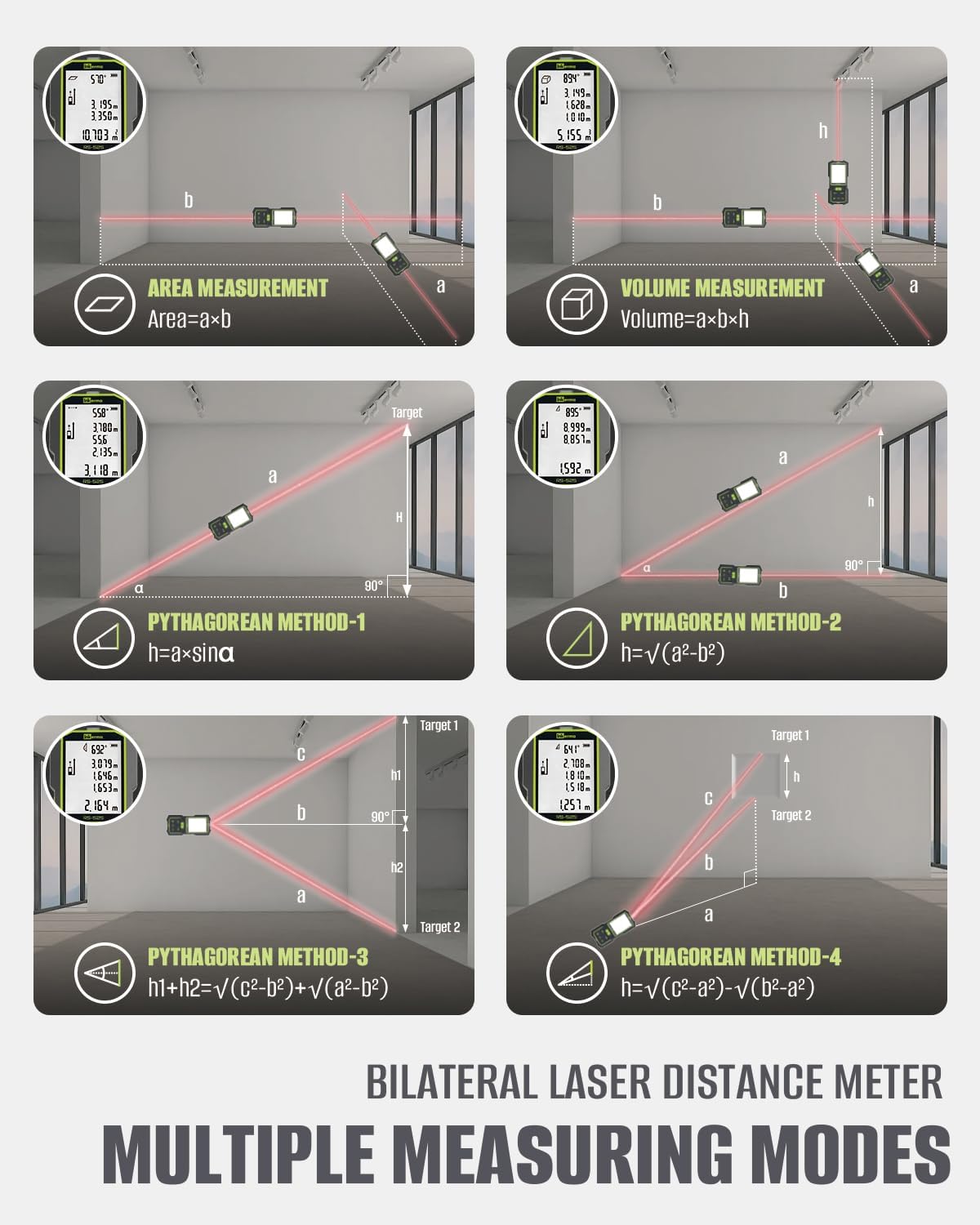
Image: The device connected to a Type-C charging cable, illustrating its rechargeable Li-ion battery and fast charging capability.
Operating Modes
The Inkerma RS-525 offers a variety of measurement modes to suit different needs. Use the mode selection button to cycle through the available options.
- Continuous Measurement: Provides real-time distance updates as you move the device, useful for tracking changes or finding minimum/maximum distances.
- Area Measurement: Calculate the area of a space by taking two measurements (length and width). The device automatically computes the area.
- Volume Measurement: Determine the volume of a room by taking three measurements (length, width, and height). The device calculates the volume automatically.
- Pythagorean Theorem (Indirect Height/Width): Use this mode for indirect measurements where direct access is not possible. The device can calculate height or width based on two or three other measurements, forming a right-angle triangle.
- Angle Measurement: Utilize the built-in angle sensor to measure angles accurately.
- Unit Conversion: Easily switch between different units of measurement (meters, feet, inches) with a dedicated button.

Image: Visual representation of Area Measurement, Volume Measurement, and four different Pythagorean methods for indirect measurements.
Specifications
| Attribute | Value |
|---|---|
| Brand | Inkerma |
| Model Number | RS-525 |
| Measuring Range | 525 feet (160m) |
| Accuracy | ±2mm |
| Laser Class | Class II (Less than 1mW power output) |
| Battery Type | Lithium-Ion (1000mAh) |
| Battery Life | >5000 measurements per charge |
| Charging Port | Type-C |
| Material | Plastic |
| Color | Green |
| Item Weight | 10.5 ounces |
| International Protection Rating | IP54 |
Maintenance
- Cleaning: Use a soft, damp cloth to clean the device. Do not use abrasive cleaners or solvents. Ensure the laser lenses are clean for accurate readings.
- Storage: Store the device in its carrying bag in a cool, dry place when not in use. Avoid extreme temperatures and direct sunlight.
- Battery Care: Recharge the battery regularly, even if the device is not used frequently, to maintain battery health. Avoid fully discharging the battery for extended periods.
Troubleshooting
- No Laser Beam:
- Check battery level and recharge if necessary.
- Ensure the device is powered on.
- Verify that the laser emission window is not obstructed.
- Inaccurate Readings:
- Ensure the target surface is flat and reflective enough.
- Clean the laser lenses.
- Avoid measuring through transparent materials like glass.
- Ensure the device is stable and not moving during measurement.
- Device Not Powering On:
- Charge the battery fully.
- Ensure the power button is pressed firmly.
Warranty Information
The Inkerma Dual Laser Measurement Tool comes with a 3-Year Manufacturer Warranty. Please retain your proof of purchase for warranty claims. For detailed warranty terms and conditions, refer to the included User Manual or contact customer support.
Customer Support
For any questions, technical assistance, or support needs, please utilize our all-day online support. Our team is always here to assist you with any inquiries regarding your Inkerma Dual Laser Measurement Tool.

Image: Graphic indicating 24/7 online support availability.
Related documentsRS-525


Ask a question about this manual
Ask about setup, troubleshooting, compatibility, parts, safety, or missing instructions. Manuals+ will review the question and use this page’s manual context to help answer it.