
1. Introduction
Thank you for choosing the GGSTOPWATER XG99 Open Ear Wireless Bluetooth 5.4 Headphones. These headphones are designed to provide a comfortable and stable audio experience with an open-ear design, making them suitable for various activities while maintaining environmental awareness. This manual provides detailed instructions for setup, operation, and maintenance to ensure optimal performance.
2. Product Overview
2.1 Package Contents
- GGSTOPWATER XG99 Open Ear Wireless Headphones (Left and Right)
- Wireless Charging Case
- USB Charging Cable
- User Manual
2.2 Key Features
- Open-Ear Design: Allows for environmental awareness while listening.
- Bluetooth 5.4: Stable and fast wireless connection up to 30 feet.
- IPX5 Water Resistance: Resistant to sweat and splashes, suitable for sports.
- Extended Playtime: Up to 8 hours per earbud, with a total of 64 hours using the charging case.
- Digital Battery Display: Real-time battery status for the charging case and earbuds.
- Touch Controls: Intuitive control for music playback, calls, and volume.
- Ergonomic Earhooks: Secure and comfortable fit for extended wear.
2.3 Product Diagram
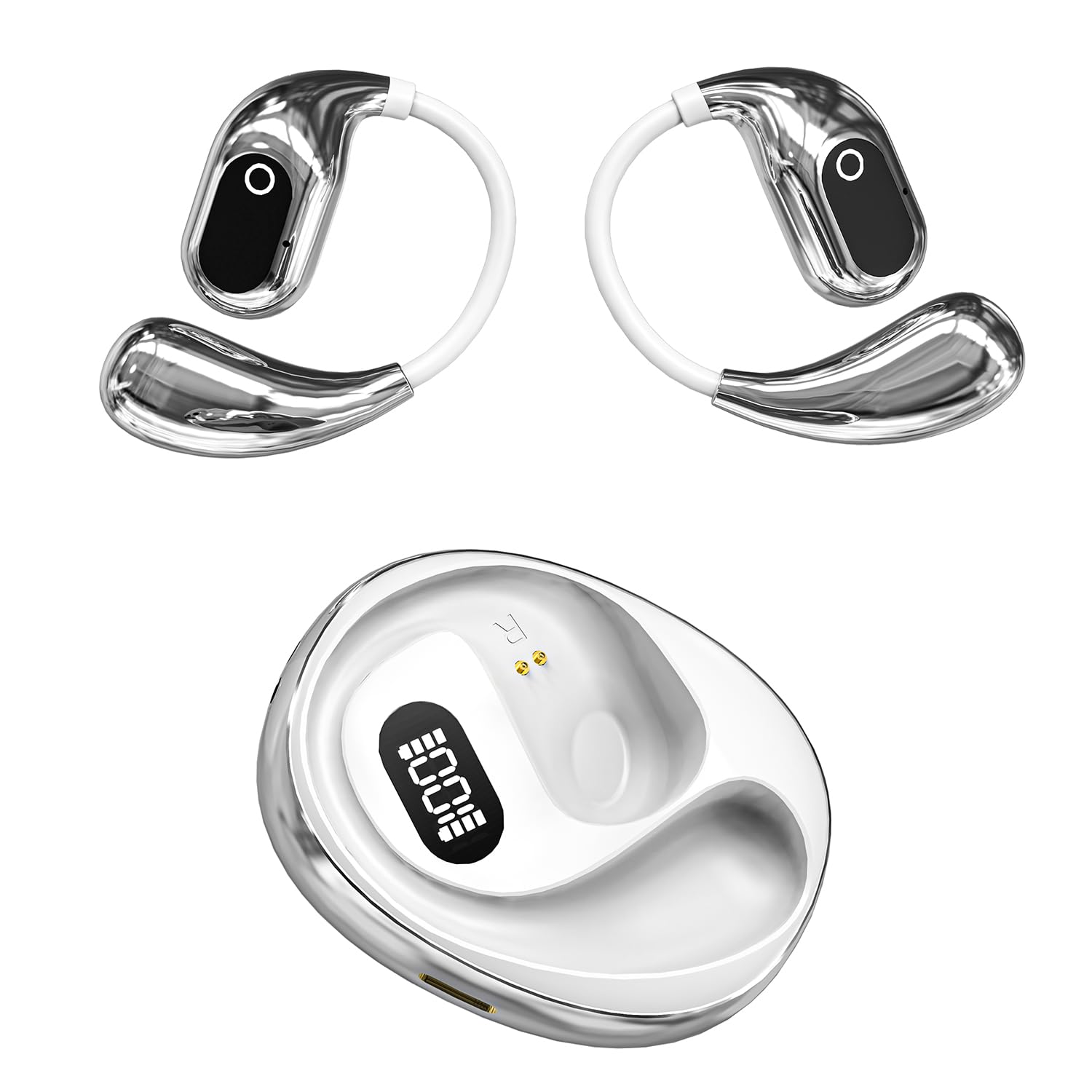
Figure 1: GGSTOPWATER XG99 Open Ear Headphones and Charging Case. The image displays both earbuds with their earhook design and the compact charging case featuring a digital battery display.

Figure 2: Close-up of a single GGSTOPWATER XG99 earbud highlighting its compact size and key audio technologies: Hi-Fi quality sound, 360-degree surround sound, and New Bluetooth 5.4 connectivity.

Figure 3: Exploded view illustrating the internal components of the GGSTOPWATER XG99 earbud, emphasizing the dynamic driver and other elements contributing to high sensitivity, low distortion, and rich sound quality.
3. Setup
3.1 Initial Charging
- Before first use, place both earbuds into the charging case.
- Connect the charging case to a USB power source using the provided USB cable.
- The digital display on the charging case will show the battery level. Allow the case and earbuds to fully charge.
- A full charge typically takes approximately 1.5-2 hours.
3.2 First-Time Pairing
- Ensure the earbuds are charged.
- Open the charging case. The earbuds will automatically power on and enter pairing mode.
- On your device (smartphone, tablet, computer), enable Bluetooth.
- Search for available Bluetooth devices and select "XG99" from the list.
- Once connected, you will hear an audio prompt, and the earbuds will be ready for use.
Note: After the initial pairing, the earbuds will automatically connect to the last paired device when removed from the charging case, provided Bluetooth is enabled on the device.
4. Operating Instructions
4.1 Power On/Off
- Power On: Open the charging case, or press and hold the touch area on both earbuds for 3 seconds.
- Power Off: Place the earbuds back into the charging case and close the lid, or press and hold the touch area on both earbuds for 5 seconds.
4.2 Touch Controls
The GGSTOPWATER XG99 headphones feature intuitive touch controls on each earbud.
| Function | Action |
|---|---|
| Play/Pause Music | Single tap on either earbud |
| Next Song | Double tap on the Right earbud |
| Previous Song | Double tap on the Left earbud |
| Volume Up | Triple tap on the Right earbud |
| Volume Down | Triple tap on the Left earbud |
| Answer/End Call | Single tap on either earbud |
| Reject Call | Press and hold on either earbud for 2 seconds |
| Activate Voice Assistant | Press and hold on either earbud for 3 seconds (when not on a call) |
4.3 Charging the Earbuds and Case
- Charging Earbuds: Place the earbuds into the charging case. They will automatically begin charging. The digital display on the case will show the charging status.
- Charging Case: Connect the charging case to a USB power adapter (5V/1A recommended) using the provided USB cable. The digital display will indicate the case's battery level during charging.
- Battery Life: The earbuds provide up to 8 hours of playback on a single charge. The charging case provides an additional 5 full charges, extending total listening time to approximately 64 hours.

Figure 4: The GGSTOPWATER XG99 charging case displaying its digital battery indicator, illustrating the extended battery life capabilities.
5. Maintenance
5.1 Cleaning
- Regularly clean the earbuds and charging case with a soft, dry, lint-free cloth.
- Do not use abrasive cleaners, alcohol, or chemical solvents.
- Ensure charging contacts on both earbuds and the case are clean and dry to prevent charging issues.
5.2 Storage
- Store the headphones in their charging case when not in use to protect them and keep them charged.
- Avoid storing in extreme temperatures (hot or cold) or high humidity.
6. Troubleshooting
6.1 Common Issues and Solutions
- Earbuds not pairing with device:
- Ensure earbuds are charged and out of the case.
- Turn off and on Bluetooth on your device.
- Forget "XG99" from your device's Bluetooth list and try pairing again.
- Restart your device.
- Only one earbud working:
- Place both earbuds back into the charging case, close the lid, wait a few seconds, then open the lid and try again.
- Ensure both earbuds are charged.
- Earbuds not charging:
- Ensure the charging case is charged.
- Check that the earbuds are correctly seated in the charging case and the charging contacts are clean.
- Try a different USB cable and power adapter.
- Low volume or poor sound quality:
- Adjust the volume on both your device and the earbuds.
- Ensure the earbuds are clean and free from debris.
- Try moving closer to your connected device to avoid interference.
7. Specifications
| Feature | Detail |
|---|---|
| Model Name | XG99 |
| Brand | GGSTOPWATER |
| Connectivity Technology | Wireless (Bluetooth 5.4) |
| Bluetooth Range | Up to 30 feet (approx. 9 meters) |
| Earpiece Shape | Open-ear |
| Water Resistance Level | IPX5 (Water Resistant, Sweatproof) |
| Battery Life (Earbuds) | Up to 8 hours per charge |
| Total Playtime (with Case) | Up to 64 hours |
| Charging Time (Case) | Approx. 1.5 - 2 hours |
| Control Method | Touch |
| Audio Driver Type | Dynamic Driver |
| Compatible Devices | Smartphones, TV, Computers, Laptops |
| Material | Plastic |
| Item Weight | 82 g |
| Batteries | 1 Lithium Polymer battery (included) |
| Country of Origin | China |
8. Warranty and Support
For warranty information and customer support, please refer to the warranty card included in your product packaging or contact the retailer where the product was purchased. Please retain your proof of purchase for warranty claims.