
Introduction
The UNISHEEN UR230A Universal VHS to Digital Converter is designed to effortlessly convert and store analog video and audio signals into digital formats up to 1080P 30Hz. This device operates independently, requiring no PC or additional software for setup. It allows direct saving of recorded videos to USB drives or TF/SD cards without capacity limitations, enabling extensive storage of your digitized content. Featuring a 3-inch preview LCD and HDMI output, it facilitates video playback on larger screens with high-quality audio through headphones or speakers. The UR230A supports a wide variety of devices, including VHS, VCR, DVD, Hi8, and retro gaming consoles, making it a versatile tool for digitizing various analog formats. Its user-friendly design includes one-click recording and a remote control for easy navigation.
What's in the Box
Please check the package contents to ensure all items are present:
- UNISHEEN UR230A Converter Unit
- Instruction Manual
- Remote Control
- RCA Cable (1.2 meters)
- 3.5mm Audio Cable (1.2 meters)
- USB Cable (0.8 meters)
- USB Power Adapter (5V1A)

Image: The UNISHEEN UR230A package contents, showing the main unit, remote control, RCA cable, 3.5mm audio cable, USB cable, and power adapter.
Setup
1. Device Overview and Connections
Familiarize yourself with the ports and buttons on the UNISHEEN UR230A converter. This will help in making the correct connections for your analog source and digital storage.
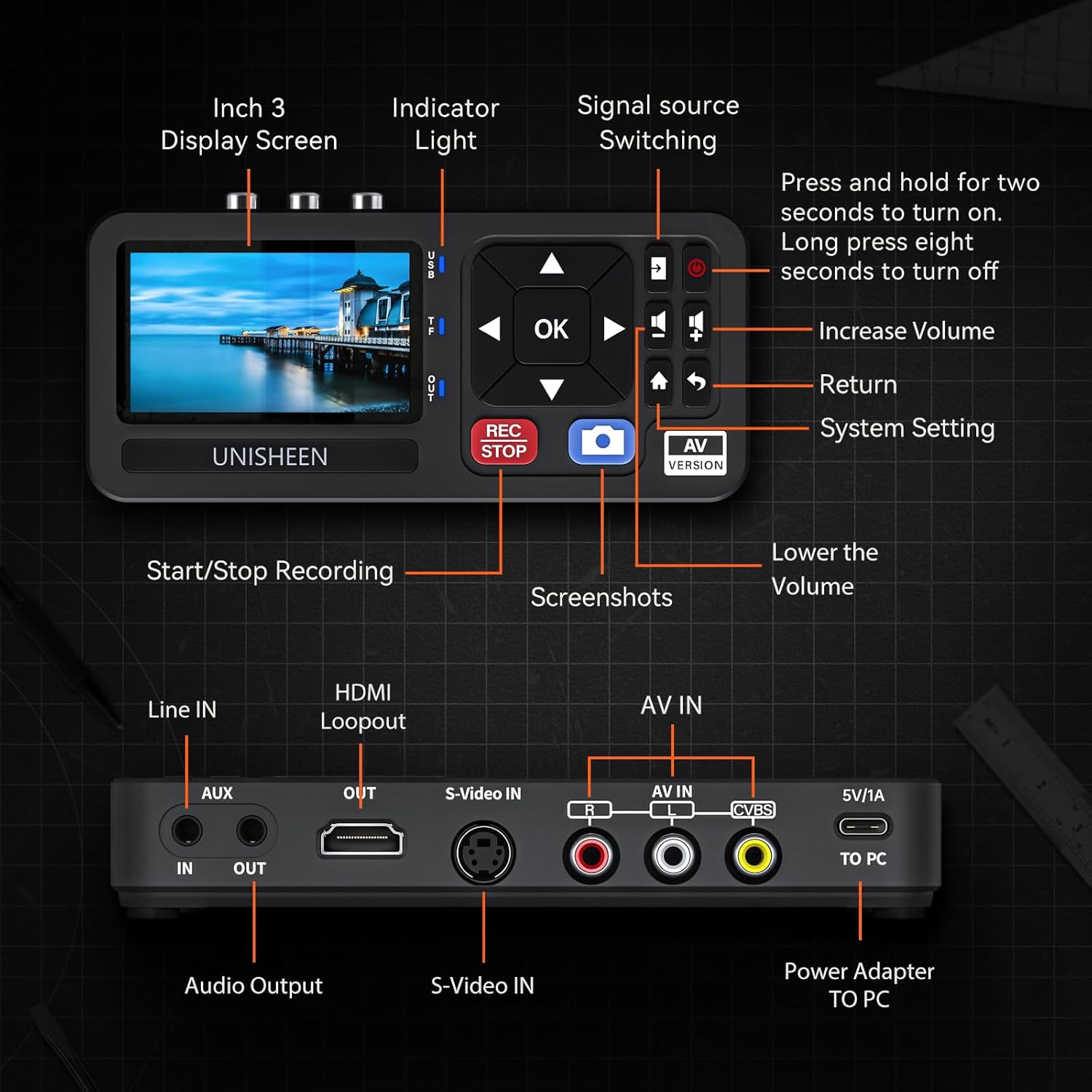
Image: A detailed diagram illustrating the various input/output ports and control buttons on the UNISHEEN UR230A device.
2. Connecting Your Analog Source
The UR230A supports various analog input sources such as VCRs, DVD players, camcorders, and gaming consoles. Connect your analog device to the converter using the appropriate cables (RCA or S-Video).
- RCA (AV) Connection: Connect the yellow (video), white (left audio), and red (right audio) RCA cables from your source device's AV OUT ports to the corresponding AV IN ports on the UR230A.
- S-Video Connection: If your source device has an S-Video output, connect an S-Video cable to the S-Video IN port on the UR230A. For audio, use the white and red RCA cables to the AV IN audio ports.

Image: The UNISHEEN UR230A converter with RCA (yellow, white, red) and S-Video cables connected, highlighting its plug-and-play functionality.
3. Powering the Device
Connect the provided USB power adapter to the 5V/1A port on the UR230A and plug it into a power outlet. The device will power on automatically or can be turned on by pressing and holding the power button for two seconds.
4. Connecting Storage Devices
Insert a USB flash drive or a TF/SD card into the designated slot on the UR230A. The device supports storage up to 512GB for both USB drives and TF cards.
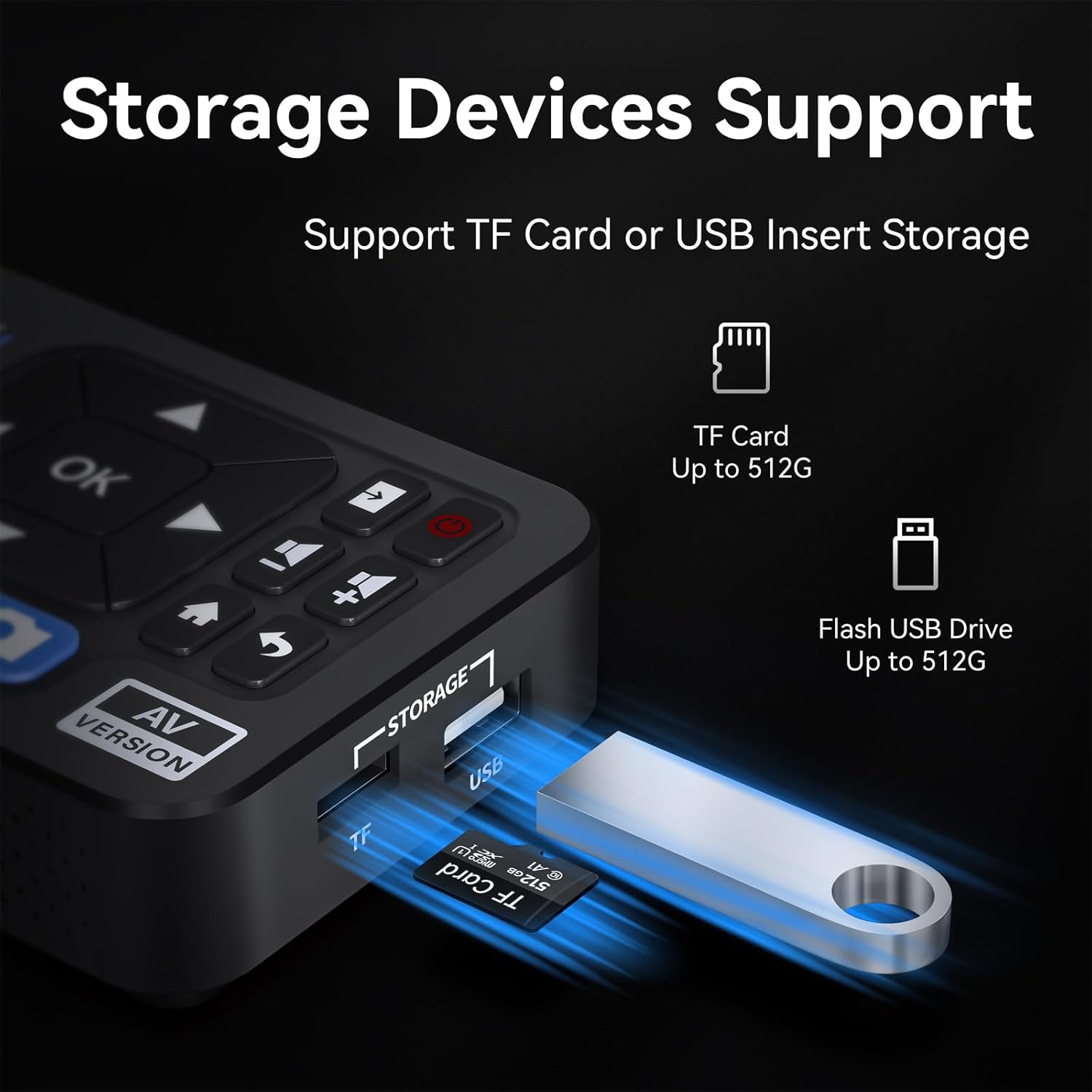
Image: The UNISHEEN UR230A converter with a TF card and USB drive inserted, demonstrating its support for external storage devices.
5. Optional: HDMI Output Connection
For real-time monitoring or playback on a larger screen, connect an HDMI cable from the HDMI Loopout port on the UR230A to an HDMI input on your TV or monitor.

Image: The UNISHEEN UR230A converter set up with a VCR, demonstrating the conversion of analog video to digital with output displayed on a TV.
6. Compatibility
The UR230A is compatible with a wide range of devices and operating systems.

Image: A visual representation of the UNISHEEN UR230A's broad compatibility with different analog video sources and computer operating systems.
Operating Instructions
1. Power On/Off
- To Power On: Press and hold the power button for two seconds.
- To Power Off: Long press the power button for eight seconds.
2. Basic Recording
Once your analog source is connected and powered on, and a storage device is inserted:
- Ensure the correct input source is selected on the UR230A (AV or S-Video). You can switch sources using the 'Signal source Switching' button.
- Press the REC/STOP button to start recording. The 'REC' indicator light will illuminate.
- Press the REC/STOP button again to stop recording. The recorded file will be saved to your USB drive or TF/SD card.
3. Multiple Recording Methods
The UR230A supports various recording formats depending on the input type:
- AV input records as MP4 (AV-MP4).
- CVBS input records as MP4 (CVBS-MP4).
- S-Video input records as MP4 (S-VIDEO-MP4).
- AUX input records as MP3 (AUX-MP3) for audio only.
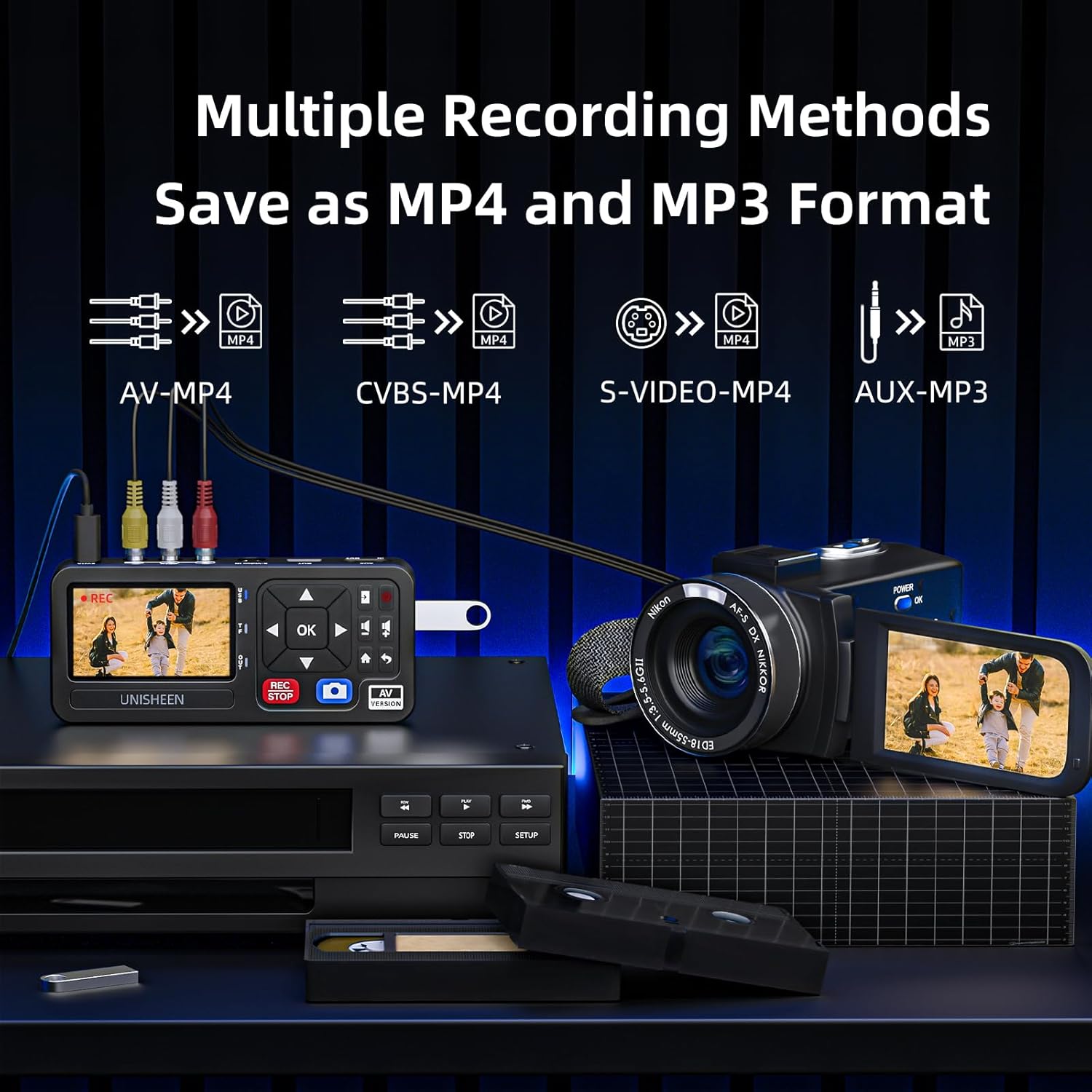
Image: The UNISHEEN UR230A converter illustrating its capability to record from various analog inputs into MP4 or MP3 digital formats.
4. Playback
To play back recorded videos:
- Navigate to the playback menu using the remote control or device buttons.
- Select the desired file from your storage device.
- Press the 'OK' button to start playback. You can view the video on the 3-inch display or via the HDMI output.
5. System Settings
Access the system settings to adjust various parameters such as language, input source, resolution, video bitrate, audio bitrate, and volume levels.

Image: Screenshots of the UNISHEEN UR230A's system settings interface, detailing options for customization.
6. Remote Control Functions
The included remote control provides convenient access to all functions, including recording, playback, menu navigation, volume control, and system settings.
Maintenance
To ensure the longevity and optimal performance of your UNISHEEN UR230A converter, follow these maintenance guidelines:
- Cleaning: Use a soft, dry cloth to clean the exterior of the device. Avoid using liquid cleaners or abrasive materials, as they may damage the surface.
- Storage: Store the device in a cool, dry place away from direct sunlight, extreme temperatures, and high humidity.
- Handling: Handle the device with care to prevent physical damage. Avoid dropping or subjecting it to strong impacts.
- Cable Management: Ensure cables are not bent sharply or tangled, which can lead to damage over time.
Troubleshooting
If you encounter issues with your UNISHEEN UR230A converter, refer to the following common troubleshooting steps:
- No Power: Ensure the power adapter is securely connected to the device and a working power outlet. Try a different USB power adapter if available.
- No Video Signal: Check all RCA or S-Video connections from your source device to the converter. Ensure the source device is powered on and playing content. Verify the correct input source is selected on the UR230A.
- No Audio: Check the white and red RCA audio connections. Ensure the volume on the UR230A and any connected display/speakers is not muted or set too low.
- Recording Fails: Ensure a compatible USB drive or TF/SD card is properly inserted and has sufficient free space. Check the file system format of the storage device (FAT32/exFAT/NTFS).
- Poor Video Quality: Ensure your analog source is providing a clear signal. Check cable quality and connections. Adjust resolution settings in the UR230A's system menu if applicable.
- Remote Control Not Working: Check the battery in the remote control. Ensure there are no obstructions between the remote and the device's IR receiver.
Specifications
Detailed technical specifications for the UNISHEEN UR230A Universal VHS to Digital Converter:
| Feature | Detail |
|---|---|
| Brand | UNISHEEN |
| Model Number | UR230A |
| Color | Black |
| Video Input | CVBS/S-Video (Switchable) |
| Audio Interface | RCA Audio, External Line In |
| Input Resolution | 720x576/720x480 (NTSC/PAL) |
| Record Resolution | 1080P/576P/480P |
| Record Format | MP4 (H.264 Codec) |
| Video Bitrate | 4MB/6MB/8MB |
| Storage File System | FAT32/exFAT/NTFS |
| Storage Capacity | TF Card up to 512G, USB Flash Drive up to 512G |
| Display Screen | 3 Inch LCD |
| Loop Out | HDMI (1080p) |
| Compatible Operating Systems | Windows 10, Linux, macOS |
| Dimensions (L x W x H) | 15.8 x 7 x 2.5 cm |
| Net Weight | 0.18 kg |
| Power Input | 5 Volts (DC) |
| Power Consumption | 3 W |
| Number of Ports | 2 (Input) |
| Specific Product Uses | Conversion and digitization of content from VHS, VCR, DVD, Hi8, and retro game consoles |

Image: A comprehensive table detailing the technical specifications of the UNISHEEN UR230A converter.
Warranty Information
The UNISHEEN UR230A Universal VHS to Digital Converter comes with a Third-Year Manufacturer's Warranty. Please retain your proof of purchase for warranty claims. For specific terms and conditions, refer to the warranty documentation included with your product or contact UNISHEEN customer support.
Customer Support
For any questions, technical assistance, or support regarding your UNISHEEN UR230A converter, please refer to the contact information provided in your product packaging or visit the official UNISHEEN website. Our customer support team is available to assist you with setup, operation, and troubleshooting.