
1. Introduction
Thank you for choosing the EZVALO 16.5-inch Under Cabinet Lighting. This product is designed to provide versatile and convenient illumination for various indoor spaces such as kitchens, closets, pantries, and stairs. Featuring smart motion sensing, adjustable color temperatures, dimmable brightness, and a rechargeable battery, this LED light bar offers a modern and efficient lighting solution.
2. Safety Information
- Do not expose the device to water or excessive moisture. This product is Not Water Resistant.
- Avoid disassembling or modifying the device, as this may void the warranty and pose safety risks.
- Keep out of reach of children.
- Use only the provided USB-C charging cord for recharging.
- Do not stare directly into the LED light for extended periods, as it may cause eye strain.
- Ensure the installation surface is clean and dry before applying adhesive.
3. Package Contents
The EZVALO 16.5-inch Under Cabinet Lighting package includes:
- 2 x EZVALO 16.5-inch Cabinet Lights
- 1 x USB-C Charging Cord
- 4 x Adhesive Iron Plates
- 1 x Instruction Manual (this document)
4. Product Features
Smart Motion Sensor
The integrated PIR motion sensor detects movement within a 120° wide angle and up to 10 feet. In Night Mode, the light activates only in darkness and turns off after 20 seconds of no activity.

Image: Motion sensor detection range in a kitchen environment.
Adjustable Color Temperatures & Dimmable
Choose from 3 color temperatures: Warm White (3500K), Natural (4200K), and Cool White (5700K). Long press the control button to adjust brightness from 10% to 100%.

Image: Examples of 3 color temperatures in different settings.
Rechargeable & Wireless
Equipped with a 4000mAh battery, providing up to 30 days of use in Auto Mode or 9.5 hours at 100% brightness in Always-On Mode. The wireless design allows for flexible placement without cords.

Image: Wireless under cabinet lights installed on a staircase.
Easy Tool-Free Installation
Two installation methods: built-in strong magnets for metal surfaces or 3M adhesive tape for any flat surface. No screws or complex wiring required.

Image: Magnetic and adhesive installation steps.
5. Setup & Installation
Before installation, ensure the light is fully charged. A red indicator light will turn green when charging is complete.
Installation Methods:
- Magnetic Attachment: If installing on a metal surface, simply use the built-in magnets on the back of the light bar to attach it directly.
- Adhesive Attachment: For non-metal or flat surfaces, peel off the protective film from the 3M adhesive tape on the provided iron plates. Stick the iron plates to your desired surface. Then, attach the light bar to the iron plates using its built-in magnets. This allows for easy removal for charging.
Ensure the installation surface is clean and dry for optimal adhesion.
Video: Demonstrates the magnetic installation of the EZVALO under cabinet light in a closet setting. This video shows the light being attached to a metal strip, which is then adhered to the cabinet, highlighting the ease of installation and removal for charging.
6. Operating Instructions
The EZVALO light bar features a touch button for control. A light touch is required to activate the light.
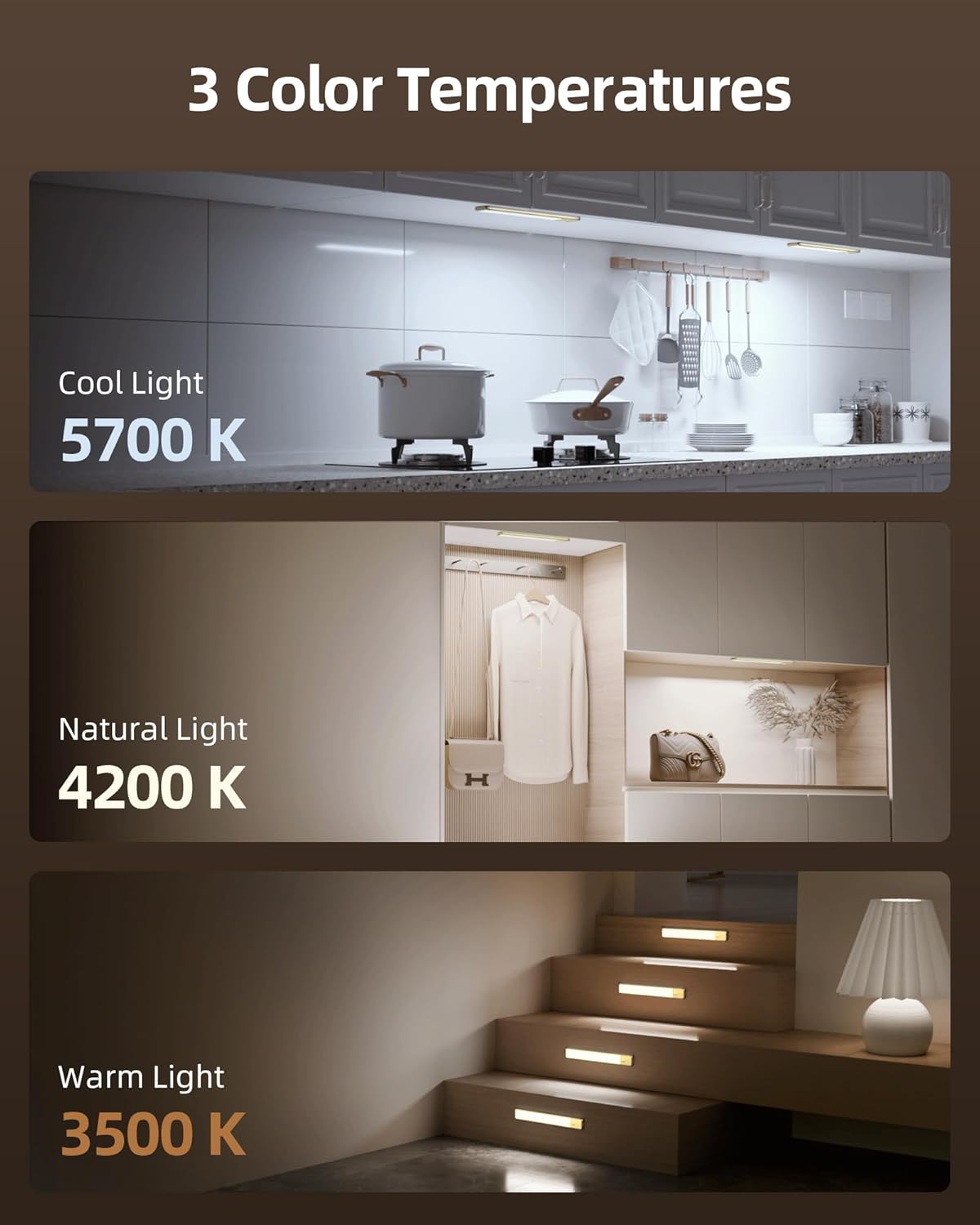
Image: Touch button guide for operating the light.
Touch Button Functions:
- Single Tap:
- Switches between AUTO Mode and different Color Temperatures.
- In AUTO Mode, the light will turn ON/OFF based on motion and ambient light.
- Double Tap: Activates "Always On Mode" for a continuous 30-minute lighting period.
- Triple Tap: Activates "Always OFF Mode" to keep the light off regardless of motion.
- Long Press: Adjusts brightness from 10% to 100%. Release and long press again to adjust in the opposite direction.
Understanding Modes:
- Night Mode (Motion Sensor): The sensor detects motion within 120° and 10 ft, turning the light ON only in darkness. It turns OFF after 20 seconds of no activity.
- Always On Mode: The light stays continuously lit for 30 minutes after a double tap.
- Always Off Mode: The light remains off, overriding motion detection.
7. Charging
The EZVALO light bar is equipped with a rechargeable 4000mAh battery. To charge the device:
- Locate the USB-C charging port on the side of the light bar.
- Connect the provided USB-C charging cord to the port and plug the other end into a compatible USB power source (e.g., wall adapter, computer USB port).
- A red indicator light will illuminate during charging.
- The indicator light will turn green when the battery is fully charged.
It is recommended to fully charge the light before its first use to ensure optimal battery performance.
Video: Shows the EZVALO light being charged via its USB-C port, demonstrating the ease of recharging the device.
8. Maintenance
- Cleaning: Wipe the light bar with a soft, dry cloth. Do not use abrasive cleaners or solvents.
- Battery Care: To prolong battery life, avoid completely draining the battery frequently. Recharge when the light output noticeably diminishes.
- Storage: If storing the device for an extended period, charge it fully and store it in a cool, dry place. Recharge every 3-6 months to maintain battery health.
9. Troubleshooting
| Problem | Possible Cause | Solution |
|---|---|---|
| Light does not turn on. | Battery is low or depleted. Incorrect mode selected. | Charge the light fully. Ensure the light is not in "Always OFF Mode" (triple tap to cycle modes). |
| Motion sensor not working. | Light is in "Always On" or "Always OFF" mode. Sufficient ambient light. Sensor obstructed. | Ensure the light is in "AUTO Mode" (single tap). Test in a darker environment. Clear any obstructions from the sensor. |
| Light turns off too quickly. | No continuous motion detected in AUTO Mode. | In AUTO Mode, the light turns off after 20 seconds of no motion. For continuous light, double tap to activate "Always On Mode". |
| Light does not dim or change color. | Incorrect operation. | Long press the touch button to adjust brightness. Single tap to cycle through color temperatures. |
10. Specifications
| Feature | Detail |
|---|---|
| Brand | EZVALO |
| Model Number | LYB-42 |
| Color | Silver |
| Material | Aluminum |
| Light Source | LED (74 pcs) |
| Color Temperature | 3500K (Warm White), 4200K (Natural), 5700K (Cool White) |
| Brightness | 10%-100% Dimmable, 120 Lumen Max |
| Battery Capacity | 4000mAh |
| Power Source | Battery Powered (Rechargeable via USB-C) |
| Motion Sensor Range | 120° angle, 10 ft distance |
| Dimensions (L x W x H) | 16.5"L x 1.56"W x 0.35"H |
| Weight | 0.48 Kilograms |
| Water Resistance Level | Not Water Resistant |
| Installation Type | Magnetic and Adhesive Mount |
11. Warranty & Support
For warranty information or technical support, please refer to the contact details provided with your purchase or visit the official EZVALO website. Keep your purchase receipt for warranty claims.