
1. Introduction
The Mujocooker Dual Front Wheels Mobility Scooter is designed to provide enhanced stability, comfort, and ease of use for individuals requiring mobility assistance. This ultra-lightweight, folding electric scooter features a unique dual front wheel design for improved safety and maneuverability across various terrains. It is equipped with an 8AH lithium battery, offering a range of up to 20 miles and a top speed of 9.3 mph. Its compact, foldable design makes it suitable for travel, including airline approval.

Figure 1.1: Mujocooker Dual Front Wheels Mobility Scooter with included accessories.
2. Safety Information
Before operating your Mujocooker Mobility Scooter, please read and understand all safety instructions. Failure to follow these guidelines may result in injury or damage to the scooter.
- Weight Capacity: Do not exceed the maximum weight capacity of 300 lbs (136 kg).
- Terrain: Avoid steep inclines (greater than 9 degrees), extremely uneven terrain, and wet or slippery conditions. While designed for various terrains, optimal performance and safety are on paved surfaces.
- Speed Control: Always operate the scooter at a safe speed appropriate for the environment and your skill level.
- Braking: Familiarize yourself with the electromagnetic braking system. Always apply the brake smoothly.
- Battery Safety: Use only the provided charger. Do not expose the battery to extreme temperatures or puncture it. Ensure the battery is securely locked in place during operation.
- Folding/Unfolding: Exercise caution when folding or unfolding the scooter to prevent pinching or injury. Ensure all locking mechanisms are engaged before use.
- Visibility: Utilize the bright front LED light when operating in low-light conditions.

Figure 2.1: The scooter supports a maximum weight capacity of 300 lbs and reaches a top speed of 9.3 mph.
3. Product Overview
3.1 Key Features
- Enhanced Stability: Dual front wheels improve stability and safety compared to traditional designs.
- Comfortable Seating: Features a fully-padded, faux-leather seat widened to 17 inches with two padded armrests for reduced driving fatigue.
- Easy Operation: Includes reverse gear, adjustable speed control via the handle, a horn, and grooved footrests.
- Portable Design: Lightweight (55 lbs net weight) and folds quickly into a compact size, similar to a suitcase, for easy transport and storage. Airline approved.
- Long Range Battery: Equipped with an 8AH lithium battery providing up to 20 miles of travel on a single charge.
- Powerful Motor: 300W motor capable of climbing inclines up to 9 degrees.
- Additional Features: Detachable front basket, cup holder, and bright front LED light.
3.2 Components and Dimensions
The scooter's design prioritizes both comfort and compact storage. Key components include the adjustable handlebar, comfortable seat, and durable solid rubber tires.

Figure 3.1: Scooter dimensions and adjustable handlebar range (up to 13.8"-21.7" from seat, fits users from 5ft to 6.5ft).

Figure 3.2: Key components such as the 300W motor and solid tires for durability.
4. Setup
4.1 Unpacking and Initial Inspection
Carefully remove all components from the packaging. Inspect the scooter for any signs of damage during transit. Ensure all listed parts are present:
- Mobility Scooter Unit
- Lithium Battery (8AH)
- Battery Charger
- Detachable Front Basket
- Water Cup Holder
- Dust-proof Bag
- Tools (if applicable)

Figure 4.1: Steps for battery removal and charging.
4.2 Battery Installation and Initial Charge
- Locate the battery compartment, typically under the seat.
- If the battery is separate, insert it into the compartment, ensuring it clicks securely into place.
- Rotate the key to "Unlock" to remove the battery. Grip the black handle tightly and pull it outward to successfully remove the battery.
- Locate the charging port on the battery (small round charging port).
- Connect the charger to the battery and then to a standard power outlet.
- Allow the battery to fully charge before first use (approximately 4-5 hours). The charger indicator light will change when charging is complete.
4.3 Unfolding the Scooter
The scooter is designed for quick and easy unfolding without disassembly.
- Place the folded scooter on a flat, stable surface.
- Release any locking mechanisms securing the folded position.
- Gently unfold the main frame, handlebar, and seat until they lock into their upright positions.
- Ensure all parts are securely locked before attempting to sit on or operate the scooter.
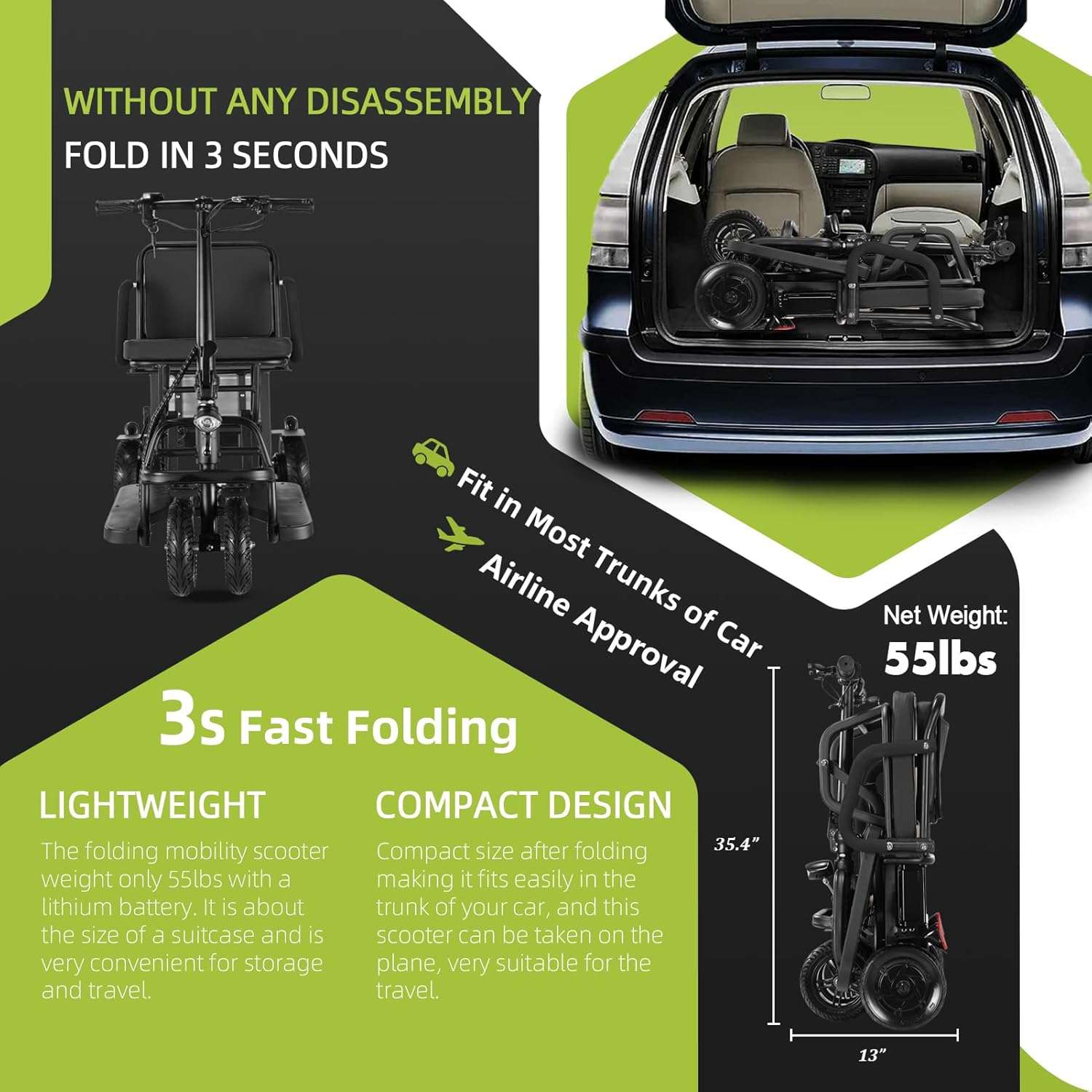
Figure 4.2: The scooter folds compactly in approximately 3 seconds for easy storage and transport.
5. Operation
5.1 Controls Overview
Familiarize yourself with the scooter's controls located on the handlebars.

Figure 5.1: Handlebar controls including the starting key, speed adjustment, battery level display, horn, reverse, and brake buttons.
- Starting Key: Insert and turn the key to power on/off the scooter.
- Speed Adjustment (Right Handle): Turn the right handle (throttle) to control the scooter's speed.
- Battery Level Display: Indicates the current battery charge level.
- Horn Button: Press to activate the horn.
- Reverse Button (D/R): Press to engage reverse gear for easy maneuvering in tight spaces.
- Brake Button (Left Handle): Squeeze the left handle to apply the electromagnetic brake and stop the scooter.
5.2 Driving Instructions
- Power On: Insert the key into the ignition and turn it to the 'ON' position. The battery level display will illuminate.
- Starting: Gently turn the right handle (throttle) forward to begin moving. Increase the turn to accelerate.
- Steering: Use the handlebars to steer the scooter. The dual front wheels provide enhanced stability during turns.
- Braking: To slow down or stop, release the throttle and gently squeeze the left brake lever. The electromagnetic brake will engage.
- Reverse: To move backward, press the 'D/R' button and then gently apply the throttle.
- Parking Brake: To prevent the scooter from rolling when the key is out, hold the brake lever and fasten the brake buckle onto the brake lever.

Figure 5.2: Steps to engage the parking brake for secure storage or when stationary.
6. Maintenance
Regular maintenance ensures the longevity and optimal performance of your mobility scooter.
- Cleaning: Keep the scooter clean by wiping it with a damp cloth. Avoid using harsh chemicals or excessive water, especially near electrical components.
- Tires: The scooter is equipped with solid explosion-proof rubber tires, which do not require air pressure checks. Periodically inspect them for wear or damage.
- Battery Care: Charge the battery regularly, even if the scooter is not in frequent use, to maintain battery health. Avoid completely draining the battery. Store the battery in a cool, dry place.
- Storage: When not in use, fold the scooter and store it in a secure, dry location, away from direct sunlight and extreme temperatures. Use the provided dust-proof bag for protection.
- Motor: The 300W brushless motor is designed for low maintenance.

Figure 6.1: Using the dust-proof bag to protect the scooter from light and dust during storage.
7. Troubleshooting
This section provides guidance for common issues you might encounter with your Mujocooker Mobility Scooter. If the problem persists after attempting these solutions, please contact customer support.
- Scooter does not power on:
- Ensure the battery is fully charged and properly installed.
- Check that the key is fully inserted and turned to the 'ON' position.
- Scooter does not move when throttle is applied:
- Verify the scooter is powered on and the battery has sufficient charge.
- Ensure the brake lever is not engaged.
- Reduced range or speed:
- The battery may not be fully charged or may be nearing the end of its lifespan.
- Operating on inclines or rough terrain will consume more power and reduce range.
- Ensure the scooter is not overloaded beyond its maximum weight capacity.
- Unusual noises during operation:
- Stop the scooter immediately and inspect for any loose parts or obstructions.
- If the noise persists, contact customer support.
8. Specifications
| Feature | Specification |
|---|---|
| Model Name | MUP1-C09B |
| Style | 4 wheels (8AH) |
| Item Weight | 49 Pounds (22.2 kg) |
| Color | Black |
| Brand | Mujocooker |
| Maximum Weight Capacity | 300 lbs (136 kg) |
| Maximum Speed | 9.3 mph (15 km/h) |
| Range per Charge | Up to 20 miles (32 km) |
| Battery Type | 8AH Lithium Battery (36V) |
| Motor Power | 300W |
| Climbing Angle | Up to 9 degrees |
| Tire Type | Solid Explosion-Proof Rubber Tires |
| Folded Dimensions (Approx.) | 35.4 x 13 x 18.11 inches (L x W x H) |
| Package Dimensions | 33.85 x 22.4 x 18.11 inches |
| Date First Available | March 1, 2021 |

Figure 8.1: Metric dimensions of the scooter, unfolded and folded.
9. Warranty and Support
Mujocooker is committed to providing quality products and customer satisfaction.
9.1 Warranty Information
- Product Warranty: All products purchased from Mujocooker are guaranteed to be in good repair for one year from the date of purchase.
- Parts Warranty: 1-Year warranty for parts.
- Battery Warranty: 3-Months warranty for the battery.
9.2 Customer Support
If you encounter any problems or have questions regarding your Mujocooker Mobility Scooter, please do not hesitate to contact us.
- Email Support: We offer email support within 24 hours, every day.
- Returns: We provide free returns and a return label if needed.
- Contact Email: mujocooker@163.com

Figure 9.1: Mujolife customer service information, including warranty details and contact email.