
TECKNET TK-KB008
Contents
TECKNET TK-KB008 Wireless Bluetooth Keyboard User Manual
Model: TK-KB008
Introduction
This manual provides detailed instructions for the setup, operation, and maintenance of your TECKNET TK-KB008 Wireless Bluetooth Keyboard. Please read this manual thoroughly before using the product to ensure optimal performance and longevity.
Package Contents
- TECKNET TK-KB008 Wireless Bluetooth Keyboard
- USB Receiver (stored in the keyboard's back compartment)
- USB-C Charging Cable
- User Manual
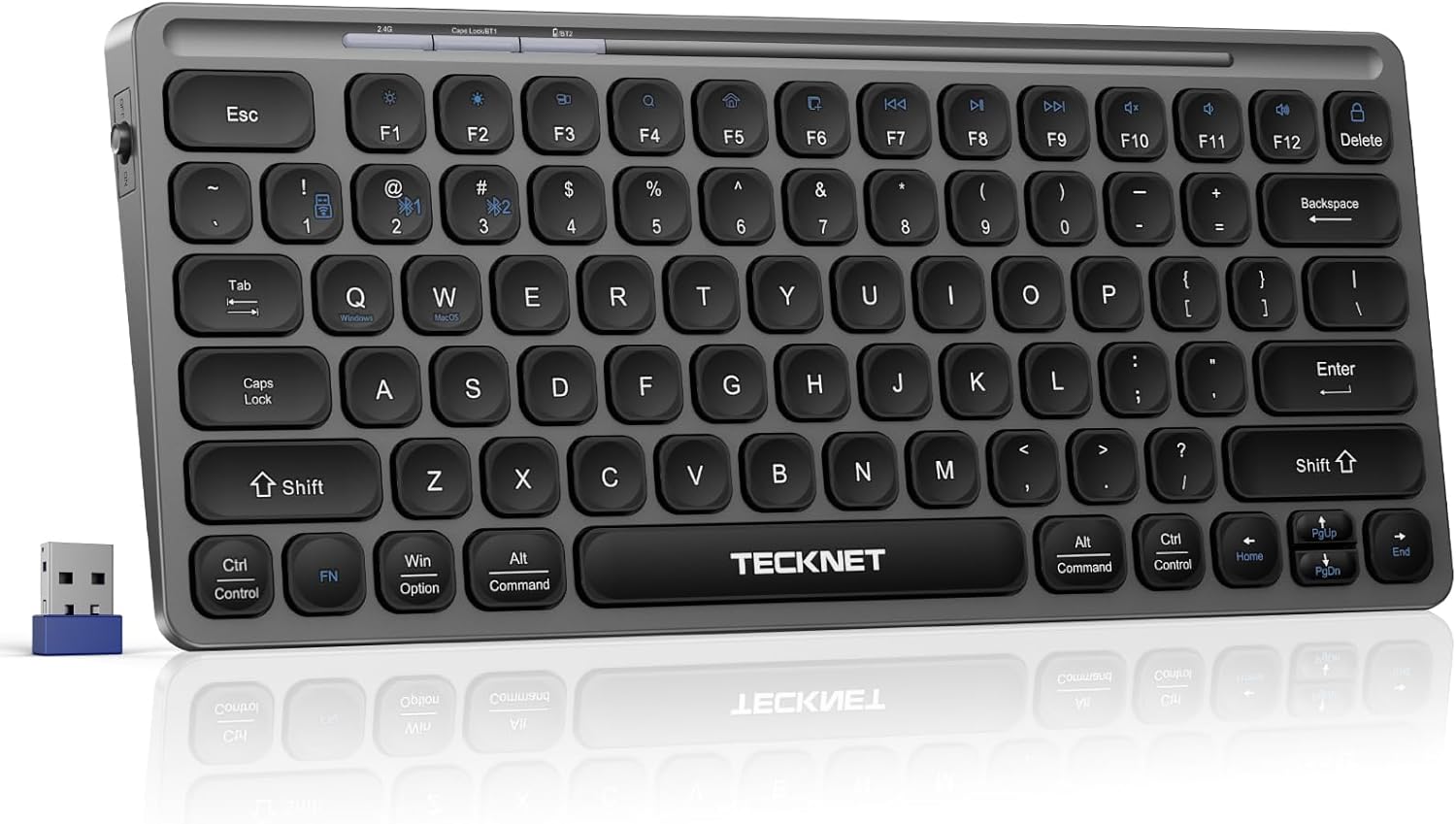
Image: The TECKNET TK-KB008 Wireless Bluetooth Keyboard shown with its accompanying USB receiver.
Product Overview
The TECKNET TK-KB008 is a slim, rechargeable wireless keyboard designed for multi-device compatibility and quiet typing. It supports both 2.4G wireless and Bluetooth 5.0 connections, allowing seamless switching between up to three devices.
Key Features:
- Multi-Device Connectivity: Connects to up to 3 devices via Bluetooth 5.0 or 2.4G USB receiver.
- USB-C Rechargeable: Built-in 500mAh battery provides up to 90 days of use on a 2-hour charge.
- Compact & Portable: Measures 29x13x1.5cm and weighs 340g, ideal for travel and small workspaces.
- Quiet Typing: Features an upgraded scissor-key structure for silent and responsive keystrokes.
- Multimedia Hotkeys: 14 dedicated keys for quick access to media controls and system functions.
- Ergonomic Design: 8° tilt for comfortable typing during extended use.

Image: Overview of the keyboard's 14 multimedia hotkeys for enhanced productivity.
Setup & Connection
1. 2.4G Wireless Connection
- Locate the USB receiver stored in the back compartment of the keyboard.
- Turn on the keyboard using the power switch located on the side.
- Press and hold the Fn + 1 keys for 3 seconds until the first indicator light (2.4G) flashes green.
- Insert the USB receiver into an available USB-A port on your computer.
- The indicator light will turn solid green for 3 seconds and then turn off, indicating a successful connection.
2. Bluetooth Connection (BT1/BT2)
- Turn on the keyboard using the power switch.
- For BT1, press and hold Fn + 2 for 3 seconds until the second indicator light (BT1) flashes.
- For BT2, press and hold Fn + 3 for 3 seconds until the third indicator light (BT2) flashes.
- On your device (laptop, tablet, phone), enable Bluetooth and search for "TK-KB008" in the list of available devices.
- Select "TK-KB008" to pair. The indicator light will turn solid for 3 seconds and then turn off upon successful connection.
Note: The keyboard is compatible with Bluetooth versions 4.0 and above.

Image: The keyboard demonstrating its ability to connect to multiple devices via 2.4G USB-A and Bluetooth.
3. System Switching (2.4G Mode Only)
To optimize key functions for different operating systems when using 2.4G mode:
- Press Fn + Q to switch to Windows mode.
- Press Fn + W to switch to macOS mode.
In Bluetooth mode, the keyboard automatically detects the system, and no manual switching is required.
To check the current channel, press Fn + Space. The corresponding indicator light will flash 4 times.
Video: Demonstrates how to connect the TECKNET TK-KB008 keyboard via 2.4G USB receiver and Bluetooth, including system switching.
Operation
Multimedia Hotkeys
The keyboard features 14 dedicated multimedia shortcut keys for quick access to various functions. These keys are activated by pressing the Fn key in combination with the corresponding F-key.
| Key Combination | Function |
|---|---|
| Fn + F1 | Decrease Brightness |
| Fn + F2 | Increase Brightness |
| Fn + F3 | Task View |
| Fn + F4 | Search |
| Fn + F5 | Show Desktop |
| Fn + F6 | Print Screen |
| Fn + F7 | Previous Track |
| Fn + F8 | Play/Pause |
| Fn + F9 | Next Track |
| Fn + F10 | Mute/Unmute |
| Fn + F11 | Volume Down |
| Fn + F12 | Volume Up |
| Fn + Delete | Lock Screen |
| Fn + Q/W | Switching System (Windows/Mac) |
Note: Limited shortcut compatibility - iPhone: FN+F3&F5/Delete not supported; Samsung S22: FN+F3 not supported.
Charging & Battery
The keyboard is equipped with a 500mAh rechargeable battery and a USB-C charging port. A full charge takes approximately 2 hours and provides up to 90 days of use.
- Connect the provided USB-C charging cable to the keyboard's charging port and a power source.
- The charging indicator light will be red while charging and turn green when fully charged.
- The keyboard features an energy-saving mode, automatically entering sleep after 30 minutes of inactivity. Press any key to wake it up (1-2 seconds).

Image: The keyboard connected via USB-C for charging, highlighting its long battery life.
Maintenance
- Clean the keyboard regularly with a soft, dry cloth.
- Avoid exposing the keyboard to extreme temperatures, humidity, or direct sunlight.
- Do not disassemble the keyboard, as this may void the warranty.
- Store the USB receiver in its designated compartment on the back of the keyboard when not in use to prevent loss.
Troubleshooting
Keyboard not connecting:
- Ensure the keyboard is powered on.
- Check if the USB receiver is properly inserted into your computer for 2.4G connection.
- For Bluetooth connection, ensure Bluetooth is enabled on your device and the keyboard is in pairing mode (indicator light flashing).
- Try restarting both the keyboard and your device.
- Ensure your device's Bluetooth version is 4.0 or higher.
Keys not responding:
- Check the battery level and charge the keyboard if necessary.
- Ensure the keyboard is within the operating range of your device (up to 10 meters).
- Verify that the correct system mode (Windows/macOS) is selected if using 2.4G.
Lag or delayed response:
- Reduce interference by moving closer to your device or away from other wireless devices.
- Ensure the keyboard is fully charged.
Specifications
| Feature | Detail |
|---|---|
| Brand | TECKNET |
| Model | TK-KB008 |
| Connectivity Technology | Bluetooth 5.0, 2.4G USB-A |
| Keyboard Description | Membrane, Scissor-key structure |
| Special Features | Lightweight, Portable, Rechargeable, Silent, 8° tilt design |
| Color | Gray |
| Material | Plastic |
| Power Source | Battery Powered (Rechargeable with USB-C) |
| Battery Capacity | 500mAh |
| Battery Life | Up to 90 days (on 2-hour charge) |
| Item Weight | 14.4 ounces (approx. 340g) |
| Package Dimensions | 12.71 x 5.24 x 0.87 inches (approx. 29x13x1.5cm) |
| Compatible Devices | Laptop, PC, Tablet, Phone (Windows, macOS) |
Warranty & Support
TECKNET provides a 36-month warranty for this product (registration may be required). If you encounter any problems or have questions regarding your TECKNET TK-KB008 Wireless Bluetooth Keyboard, please contact our professional customer service team for assistance.
For more information and support, visit the official TECKNET Store.
Documents and downloads
Ask a question about this manual
Ask about setup, troubleshooting, compatibility, parts, safety, or missing instructions. Manuals+ will review the question and use this page’s manual context to help answer it.