
1. Important Safety Instructions
Please read this manual carefully before operating the device. Keep it for future reference. Always follow basic safety precautions to reduce the risk of fire, electric shock, and personal injury.
- Ensure the power supply voltage matches the device's requirements (AC100V-240V).
- Do not expose the device to rain or moisture.
- Do not open the housing; there are no user-serviceable parts inside. Refer all servicing to qualified personnel.
- Avoid direct eye exposure to the light source.
- Ensure proper ventilation around the unit. Do not block ventilation openings.
- Disconnect from power before cleaning or maintenance.
2. Package Contents
Verify that all components are present and in good condition upon unpacking:
- Stage Light Bar (1 unit)
- Power Cord (1 unit)
- Mounting Brackets (2 units)
- Screws (2 units)
- Instruction Manual (1 unit)
3. Product Features
The U`King Stage Light Bar is a versatile lighting fixture designed for various applications, offering dynamic color and control options.
- Powerful Color Combination: Utilizes RGB LEDs (24x3W, 3-IN-1) to produce a wide washing effect and a spectrum of colors including red, green, blue, yellow, purple, cyan, and white.
- Wide Beam Angle: Features a 40-degree beam angle for broad light distribution, suitable for stage, wall, and dance floor illumination.
- Daisy Chain Connection: Supports standard NEMA and 3-pin DMX connectors for easy power and DMX signal linking between multiple units.
- Multiple Control Modes: Includes DMX-512, automatic operation, color change, sound activation, fade, static color, and master-slave modes.
- User-Friendly Interface: Equipped with a 4-button menu and digital display for easy navigation and setting adjustments, including sound sensitivity and variable speed programming.
- Silent Operation: Designed with a fan-less, flicker-free constant current LED driver for quiet performance.
4. Product Overview & Dimensions
The image below illustrates the U`King Stage Light Bar, highlighting its design and various color outputs.
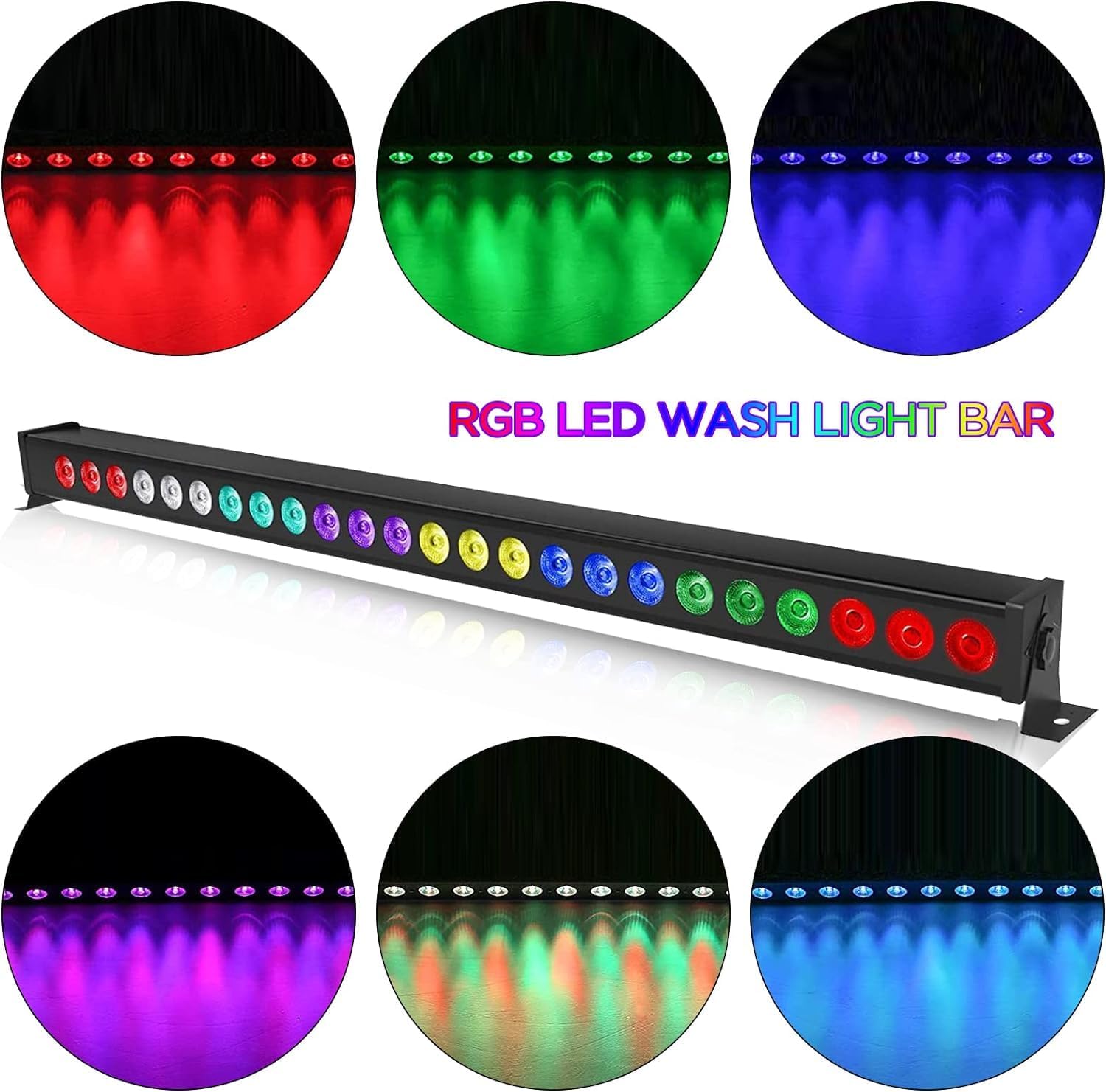
This image shows the U`King RGB LED Wash Light Bar from a front perspective, with six circular insets demonstrating the light bar emitting different colors: red, green, blue, purple, orange, and light blue. The main light bar is black and features 24 individual LED lights arranged in a row. The text 'RGB LED WASH LIGHT BAR' is prominently displayed above the light bar in colorful letters.
The following diagram provides detailed dimensions and connection points for the light bar.
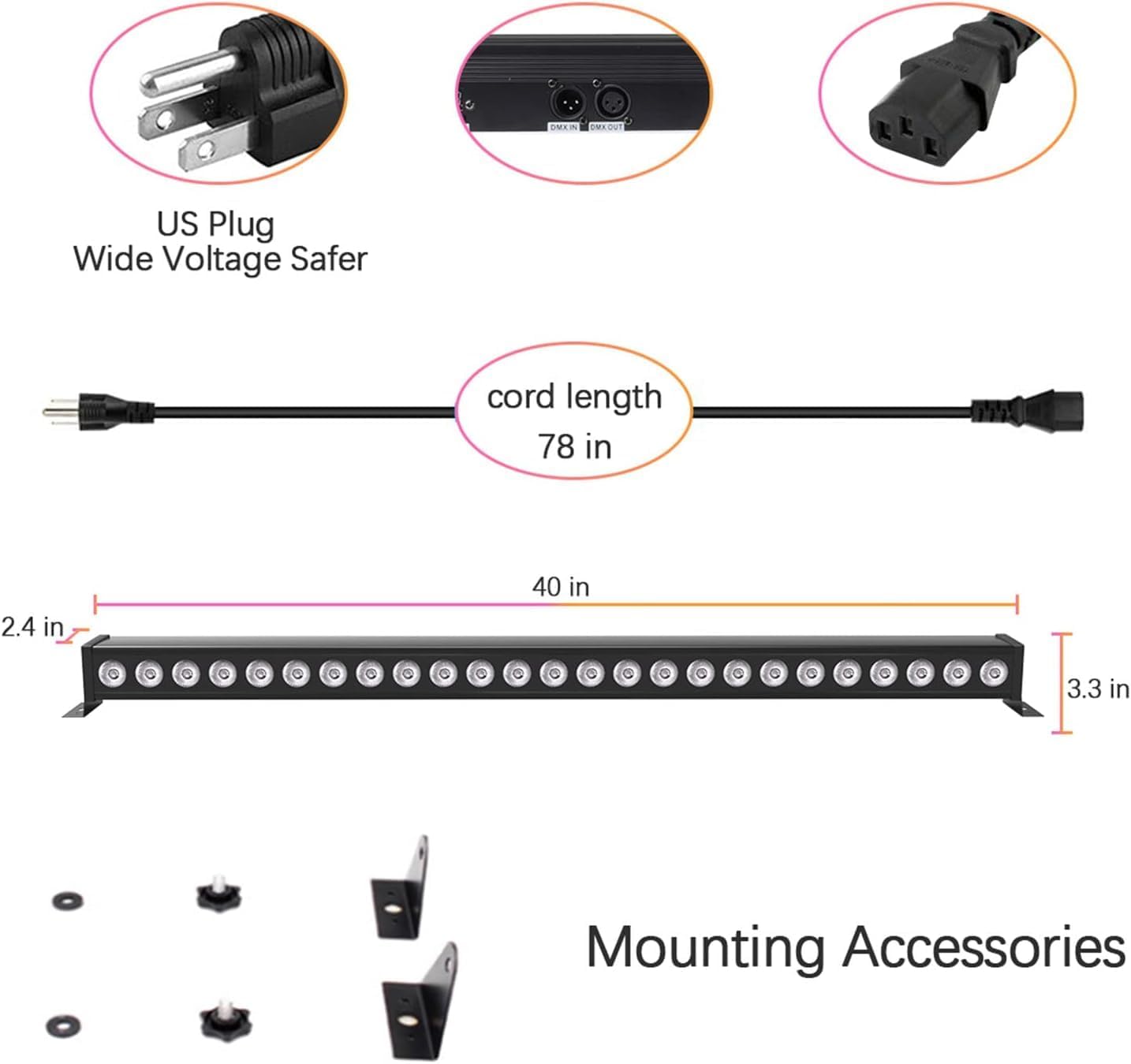
This diagram illustrates the physical characteristics and connectivity of the U`King Stage Light Bar. It shows the light bar's length of 40 inches, width of 2.5 inches, and height of 3.3 inches. Details include a US plug for power input, a 78-inch power cord, DMX IN and DMX OUT ports, and the included mounting accessories (two brackets and screws).
5. Installation
The U`King Stage Light Bar can be mounted in various positions using the included brackets.
- Attach Brackets: Secure the two mounting brackets to the ends of the light bar using the provided screws.
- Mounting Surface: Choose a stable surface (wall, truss, floor) for mounting. Ensure the surface can support the weight of the light fixture.
- Secure Fixture: Use appropriate hardware (not included) to securely fasten the brackets to your chosen mounting surface. Ensure the light bar is stable and will not vibrate or fall.
- Power Connection: Connect the power cord to the light bar's power input and then to a suitable power outlet (AC100V-240V).
- DMX Connection (Optional): If using DMX control, connect a DMX cable from your DMX controller to the DMX IN port of the light bar. For daisy-chaining multiple units, connect a DMX cable from the DMX OUT of the first unit to the DMX IN of the next unit.
6. Operating Modes
The light bar offers several operating modes, selectable via the 4-button menu and digital display on the unit.
- Automatic Operation (AutoPlay): The light bar cycles through pre-programmed color changes and effects automatically.
- Sound Activated Mode: The light bar reacts to ambient sound or music, changing colors and patterns in sync with the audio. Sensitivity can be adjusted via the menu.
- DMX512 Control Mode: Allows external control of the light bar's functions (color, dimming, effects) using a DMX controller. Refer to the DMX Channel Chart for specific channel assignments.
- Master-Slave Mode: Connect multiple light bars via DMX cables. Set one unit as the 'Master' and others as 'Slave' units. The slave units will mirror the master's operation.
- Static Color Mode: Select and display a single, constant color from the available RGB spectrum.
- Fade Mode: The light bar smoothly transitions between different colors.
- Dimming (0-100%): Adjust the overall brightness of the light output.
7. DMX Control
The U`King Stage Light Bar supports DMX512 protocol, allowing for precise control over its functions. It offers multiple channel modes (2CH/3CH/4CH/6CH/7CH/12CH/24CH) to suit different control needs. Consult the specific DMX channel map provided in the full technical documentation for detailed assignments of each channel in your chosen mode.
8. Maintenance
Regular maintenance ensures optimal performance and longevity of your light bar.
- Cleaning: Periodically clean the lens and housing with a soft, lint-free cloth. Do not use abrasive cleaners or solvents. Ensure the unit is unplugged before cleaning.
- Inspection: Regularly check power cords and DMX cables for any signs of damage. Replace damaged cables immediately.
- Storage: When not in use for extended periods, store the light bar in a dry, dust-free environment.
9. Troubleshooting
If you encounter issues with your U`King Stage Light Bar, refer to the following common problems and solutions:
| Problem | Possible Cause | Solution |
|---|---|---|
| Light not turning on | No power supply; faulty power cord; unit malfunction. | Check power connection and outlet. Try a different power cord. If issue persists, contact support. |
| No DMX control | Incorrect DMX cable connection; wrong DMX address; faulty DMX controller. | Ensure DMX cables are correctly connected (IN to OUT). Verify DMX address setting on the light bar. Test with a different DMX controller if possible. |
| Sound control not responsive | Low sound sensitivity setting; insufficient ambient sound; microphone obstruction. | Increase sound sensitivity via the menu. Ensure sufficient sound volume near the unit. Check for any obstructions covering the microphone. |
| Colors not changing correctly | Incorrect operating mode selected; DMX signal interference. | Verify the correct operating mode (e.g., AutoPlay, DMX) is selected. Check DMX connections and signal quality. |
10. Specifications
| Feature | Detail |
|---|---|
| Model Number | ZQ06016 |
| Shell Color | Black |
| LED Light Source | RGB LED (3-IN-1) |
| Number of LEDs | 24 |
| LED Wattage | 24 * 3W (Total 72W) |
| Frequency | 50~60Hz |
| Power Source | Corded Electric |
| Voltage Range | AC100V to 240V |
| Beam Angle | 40-degree |
| Control Modes | Self-propelled (AutoPlay), Sound Control, DMX512, Gradient, Master-Slave, Static Color, Fade, Dimming |
| Control Channels | 2CH/3CH/4CH/6CH/7CH/12CH/24CH |
| Dimensions (L x W x H) | 40" x 2.5" x 3.3" (101.6cm x 6.35cm x 8.38cm) |
| Material | Metal |
11. Warranty Information
This U`King Stage Light Bar is covered by a 3-month manufacturer's warranty from the date of purchase. This warranty covers defects in materials and workmanship under normal use. It does not cover damage caused by misuse, accidents, unauthorized modifications, or improper installation. Please retain your proof of purchase for warranty claims.
12. Applications
The U`King Stage Light Bar is suitable for a wide range of lighting applications, as demonstrated in the examples below.

This image displays a collage of four different scenarios where the U`King Stage Light Bar can be used. These include washing a brick wall with vibrant colors, illuminating an indoor party or lounge area, providing ambient lighting for an outdoor patio, and enhancing the atmosphere of a formal event space. The light bar's versatility makes it ideal for various venues such as bars, stages, KTVs, birthday parties, family reunions, weddings, churches, restaurants, hotels, and galleries.


