
1. Introduction
The ROBOTIME M1906 Browning 3D Wooden Puzzle (Model RBT-LQ502) is a detailed mechanical wooden puzzle inspired by the 19th-century Browning design. This kit allows for the assembly of a miniature replica featuring a pan trigger, a cross escapement wheel, and a removable clip. Once assembled, the model can load and fire up to 8 rubber bands, providing an interactive experience. This product is designed for individuals aged 14 and above.

Image: The fully assembled ROBOTIME M1906 Browning 3D Wooden Puzzle, showcasing its intricate design and wooden texture.
2. Safety Information
- Age Recommendation: This puzzle is suitable for individuals aged 14 years and older. Keep small parts away from younger children.
- Material Safety: The puzzle pieces are made from premium basswood, processed with advanced laser cutting technology to ensure smooth edges and prevent burrs.
- Rubber Band Operation: The model uses rubber bands as projectiles. The range is approximately 3-5 meters. Do not aim at eyes or faces. Use only the provided rubber bands or similar safe alternatives.
- Assembly Precautions: Handle pieces carefully to avoid breakage. Do not force pieces together.
3. Setup and Assembly
The ROBOTIME M1906 Browning 3D Wooden Puzzle comes with pre-cut wooden sheets and a detailed instruction book. Follow the steps below for successful assembly:
- Unpack Components: Carefully open the package and lay out all the wooden sheets and the instruction book. Verify that all sheets are present and undamaged.
- Identify Parts: Refer to the instruction book to identify each piece. Pieces are precision cut and labeled on the sheets.
- Remove Pieces: Gently push out each piece from its wooden frame. If a piece is difficult to remove, use a small tool (like a craft knife or sandpaper, not included) to carefully detach it, avoiding damage.
- Follow Instructions: Assemble the puzzle step-by-step according to the visual diagrams and written instructions in the included manual. Pay close attention to the orientation of each piece.
- Interlocking Mechanism: The puzzle uses mortise and tenon joints for a secure fit. Ensure pieces are fully inserted without excessive force. A small amount of wood glue (not included) can be used for added stability on non-moving parts if desired, but is generally not required.
- Moving Parts: For mechanical components like the trigger and escapement wheel, ensure they move freely after assembly. Do not apply glue to moving parts.

Image: The ROBOTIME M1906 Browning 3D Puzzle kit, showing the laser-cut wooden sheets, rubber bands, and the instruction manual, ready for assembly.
4. Operating Instructions
Once the ROBOTIME M1906 Browning 3D Wooden Puzzle is fully assembled, it can be operated as follows:
- Load Rubber Bands: The model is designed to hold up to 8 rubber bands. Carefully stretch and place each rubber band onto the designated loading points on the mechanism.
- Prepare for Firing: Ensure the trigger mechanism is reset.
- Aim: Point the model in a safe direction, away from people, animals, or fragile objects. The effective range is approximately 3-5 meters.
- Fire: Gently pull the trigger to release a rubber band. The cross escapement wheel mechanism will allow for sequential firing.
- Reload: After firing all rubber bands, reload as needed.
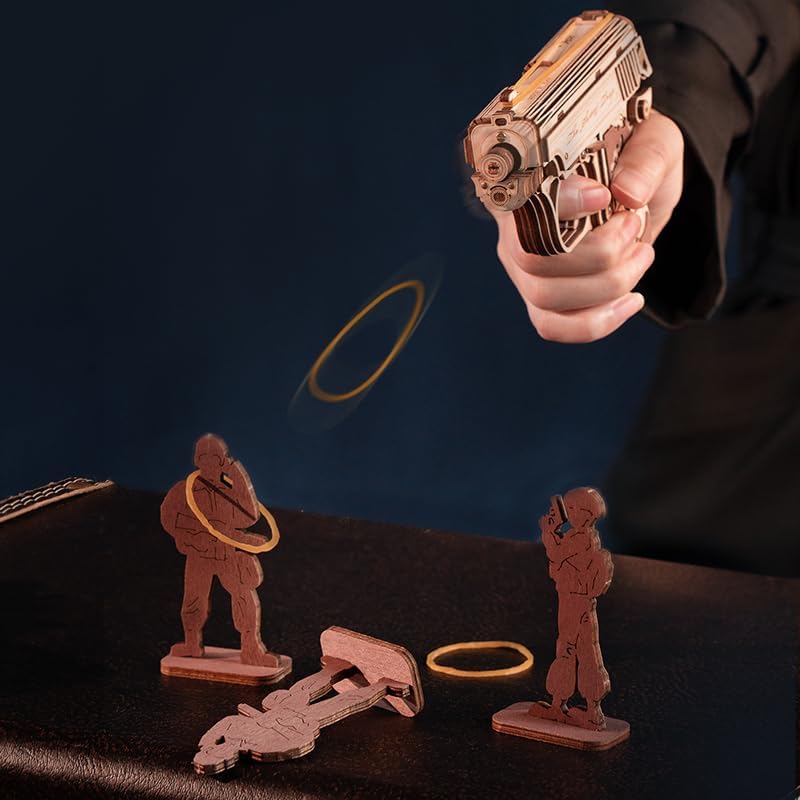
Image: A hand holding the assembled wooden puzzle, demonstrating the firing of a rubber band towards small wooden target figures.
Video: An official ROBOTIME video demonstrating the assembly and firing action of the M1906 Browning Mini Gun 3D Puzzle.
5. Maintenance
- Cleaning: Wipe the wooden surface with a dry, soft cloth to remove dust. Avoid using water or chemical cleaners, as they may damage the wood.
- Storage: Store the assembled puzzle in a dry environment, away from direct sunlight and extreme temperatures, to prevent warping or damage to the wood.
- Moving Parts: Periodically check that all mechanical parts move smoothly. If any part becomes stiff, ensure no debris is obstructing its movement. Do not apply lubricants unless specifically recommended by the manufacturer.
- Rubber Bands: Replace worn or stretched rubber bands to maintain optimal firing performance.
6. Troubleshooting
- Pieces Not Fitting: Ensure you are using the correct pieces for each step. Refer to the instruction manual's diagrams. Do not force pieces; gently sand edges if necessary for a snug fit.
- Mechanism Not Functioning: Check that all moving parts are correctly assembled and are not obstructed by other pieces or excess glue. Ensure rubber bands are loaded correctly.
- Missing or Damaged Pieces: If you encounter missing or damaged pieces, please contact ROBOTIME customer support for assistance.
7. Specifications
| Feature | Detail |
|---|---|
| Brand | ROBOTIME |
| Model Number | RBT-LQ502 |
| Material Type | Basswood |
| Number of Pieces | 113 |
| Assembled Dimensions (L x W) | Approximately 14.5" x 10.8" (Actual model length is 145mm) |
| Recommended Age | 14 years and above |
| Operation Mode | Manual |
| Educational Objective | Creative Thinking, Dexterity, Hand-Eye Coordination, Patience Skill, Problem Solving Skill |
| Included Components | Instruction Book, Wood Laser Pieces |

Image: A diagram illustrating the dimensions of the assembled ROBOTIME M1906 Browning 3D Puzzle, showing its length and height.
8. Warranty and Support
ROBOTIME offers worry-free assembly support for this 3D puzzle. If you encounter any problems during assembly or operation, please feel free to contact ROBOTIME customer support for assistance.
Return Policy: This product is eligible for a refund or replacement within 30 days of purchase, subject to the retailer's return policy.
For further support, please visit the official ROBOTIME store or contact their customer service directly.
