1. Introduction and Overview
The TELESIN Wireless Lavalier Microphone P5-MCP-01 is designed for high-quality audio recording across various devices. It features a 48KHz 24-bit sampling rate and one-touch noise cancellation, ensuring clear and distortion-free sound. With an impressive 650ft (200m) audio range and extended battery life, it is suitable for diverse recording environments.

Image: TELESIN Wireless Lavalier Microphone system including the charging case and two microphones.
2. What's in the Box
- Charging Case ×1
- Receiver ×1
- Microphones ×2
- Magnetic Buckles ×2
- Magnetic Clips ×2
- Charging Cable ×1
- Windshields ×2
- Storage Bag ×1

Image: All components included in the TELESIN Wireless Lavalier Microphone package.
3. Key Features
- Pure Sound Quality with One-Click Noise Reduction: Features a 48KHz 24-bit sampling rate and one-touch noise cancellation. A 70dB signal-to-noise ratio reduces interference, and a 110dB sound pressure level ensures distortion-free audio.
- Exceptional Battery Life: Up to 18 hours of extended use. Each microphone provides 6 hours on a single charge, with the charging case adding an extra 12 hours. The charging case fully recharges in 1.5 hours.
- Broad Compatibility: Universally compatible with USB-C devices, including iPhone 15/16 series, cameras, Android smartphones, tablets, and PCs.
- 200M (656ft) Audio Range: Offers an impressive pickup range for clear audio capture over long distances, supported by a precision laser-engraved antenna for stable transmission.
- Versatile Wearing Methods: Includes magnetic clips and magnetic buckles for various wearing options to suit different scenarios.

Image: Overview of the microphone's comprehensive features and sound quality.
4. Setup Guide
- Charge the Device: Ensure the charging case and microphones are fully charged before first use. Connect the Type-C charging cable to the charging case. The LED indicators on the case will show charging status.
- Connect the Receiver: Plug the receiver directly into the USB-C port of your recording device (smartphone, camera, PC, or laptop). The receiver does not require separate charging as it draws power from the connected device.
- Power On Microphones: Take the microphones out of the charging case. They should automatically power on and attempt to pair with the receiver. A green indicator light on the microphone signifies it is powered on and ready.
- Pairing: The microphones are designed for automatic pairing with the receiver. If pairing does not occur automatically, long-press the button on the side of the microphone to initiate pairing mode. The indicator light will flash during pairing and become solid green once connected.
- Attach Microphones: Use the provided magnetic buckles or clips to attach the microphones to your clothing. The magnetic system allows for flexible and discreet placement.
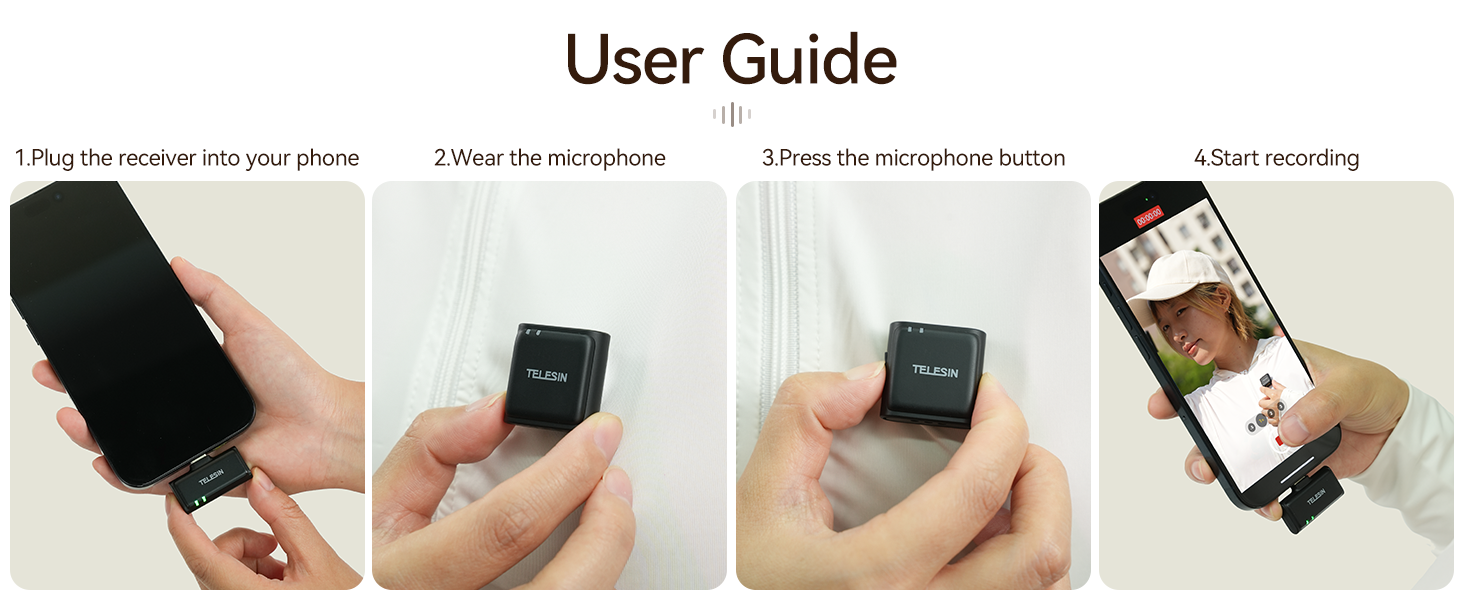
Image: Visual guide for quick setup of the TELESIN Wireless Lavalier Microphone.
5. Operating Instructions
- Starting Recording: Once the receiver is plugged in and microphones are paired (indicated by solid green lights), open your device's camera or recording application and begin recording. The audio will be captured directly from the TELESIN microphones.
- One-Click Noise Reduction: To activate or deactivate the noise reduction feature, short-press the power button on the microphone. A blue indicator light will appear when noise reduction is active. This feature helps to filter out environmental noise for clearer audio.
- Monitoring Audio: Some devices may allow real-time audio monitoring through headphones connected to the device's audio jack (if available) or through the receiver's pass-through port (if applicable).
- Using Windshields: For outdoor recording or in windy conditions, attach the provided furry windshields over the microphone capsules to minimize wind noise interference.
Video: Official TELESIN product video demonstrating the wireless lavalier microphone in use, highlighting its features and ease of operation.
6. Wearing Options
The compact design and magnetic attachments offer multiple ways to wear the microphone, ensuring optimal sound capture and discretion.
- Magnetic Buckle: Attach the magnetic buckle to the back of the microphone, then place the microphone on your clothing. The separate magnetic piece can be placed inside your clothing to secure it.
- Magnetic Clip: For quick attachment, use the magnetic clip to directly clip the microphone onto collars, lapels, or other fabric edges.
- Hat Clip: The microphone can be clipped onto the brim of a hat for head-level audio capture.
- Backpack Strap: Secure the microphone to a backpack strap for hands-free recording during outdoor activities.

Image: Demonstrating the versatility of wearing the microphone in different scenarios.
7. Sound Quality and Noise Reduction
The TELESIN P5-MCP-01 is engineered for superior audio performance, featuring a 48KHz 24-bit sampling rate for high-fidelity, lossless sound. Its 70dB signal-to-noise ratio effectively enhances sound clarity by suppressing interference, while the 110dB sound pressure level prevents audio distortion even at high volumes.

Image: Detailed specifications of the microphone's audio capabilities.
The one-click noise reduction feature is crucial for maintaining audio clarity in challenging environments. Below is a demonstration of its effectiveness:
Video: A review demonstrating the sound quality and noise reduction feature of the TELESIN microphone, including a comparison with and without noise cancellation.
8. Compatibility
The TELESIN Wireless Lavalier Microphone is designed for broad compatibility with a variety of devices:
- Smartphones: Compatible with iPhone 15/16 series and Android smartphones featuring a USB-C port.
- Tablets: Works with most tablets equipped with a USB-C port.
- Computers: Connects to PCs and laptops via USB-C.
- Cameras: Compatible with various cameras that support USB-C audio input.

Image: Illustrating the wide range of devices compatible with the microphone.
9. Battery Life and Charging
The system offers extended battery life for prolonged recording sessions:
- Microphone Battery: Each microphone provides up to 6 hours of continuous use on a single charge.
- Charging Case: The fully charged case provides an additional 12 hours of runtime, allowing you to recharge the microphones multiple times.
- Charging Case Recharge Time: Approx. 1.5 hours.
Image: Visual representation of the microphone system's battery life and charging times.
10. Maintenance
- Cleaning: Use a soft, dry cloth to clean the microphones and charging case. Avoid using liquids or abrasive cleaners.
- Storage: Store the device in the provided storage bag when not in use to protect it from dust and damage.
- Battery Care: If not used for an extended period, recharge the battery every three months to maintain optimal battery health.
- Avoid Impacts: Protect the device from heavy impacts and water exposure. If wet, turn off immediately and seek professional assistance.
11. Troubleshooting
| Problem | Possible Cause | Solution |
|---|---|---|
| No audio recording | Microphones not paired or powered on. Receiver not properly connected. | Ensure microphones are powered on and indicator lights are solid green. Re-insert the receiver firmly into the device's USB-C port. |
| Poor sound quality/static | Interference or excessive background noise. Microphone too far from source. | Activate one-click noise reduction. Ensure a direct line of sight between microphone and receiver. Use windshields in windy conditions. Move closer to the microphone. |
| Microphones not charging | Charging case battery low. Microphones not correctly seated in case. | Charge the charging case using the provided Type-C cable. Ensure microphones are properly placed in their slots within the case. |
| Limited range | Obstructions between microphone and receiver. Environmental interference. | Maintain a direct line of sight between the microphone and receiver. Avoid using in areas with high electromagnetic interference. |
12. Specifications
- Model Number: P5-MCP-01
- Brand: TELESIN
- Sampling Rate: 48KHz 24-bit
- Signal-to-Noise Ratio: 70dB
- Sound Pressure Level (SPL): 110dB
- Wireless Range: 200 meters (656 feet)
- Microphone Battery Life: Up to 6 hours per microphone
- Charging Case Additional Runtime: 12 hours.
- Charging Case Recharge Time: Approx. 1.5 hours.
- Compatibility: USB-C devices (iPhone 15/16 series, Android, PC, Laptop, Camera)
- Item Weight: 6 ounces
- Package Dimensions: 4.53 x 3.58 x 2.64 inches
13. Important Notes
- Avoid water exposure and heavy impacts. If wet, turn off and dry, then seek professional help.
- Recharge the battery every three months if not in use.
- Keep the battery away from direct sunlight and high temperatures.
- Maintain a direct line of sight between the microphone and receiver to prevent signal dropouts.
14. Warranty and Support
For warranty information and customer support, please refer to the official TELESIN website or contact their customer service directly. Keep your purchase receipt for warranty claims.
Manufacturer: TELESIN
Date First Available: October 12, 2024
Return Policy: Refer to your retailer's return policy for specific details. (Amazon.com offers a refund/replacement duration of 2026 days for this product).


