
1. Product Overview
The PANDAAR T-1880 Wireless Intercom Doorbell System provides reliable two-way communication for homes, offices, and other properties. This system operates without Wi-Fi, offering a long-range signal and multiple channels to minimize interference. It includes an outdoor doorbell unit and an indoor intercom unit, both designed for ease of use and durability.

Image: The PANDAAR T-1880 Wireless Intercom Doorbell System, featuring both the indoor and outdoor units. The indoor unit is labeled 'Intercom' and the outdoor unit is labeled 'Ring the Bell'.
2. Safety Information
- Do not expose units to extreme temperatures or direct sunlight for prolonged periods.
- Keep units away from water and moisture, except for the outdoor unit which is IP44 rated.
- Use only the provided charging cables and adapters.
- Do not attempt to disassemble or repair the units yourself. Contact customer support for assistance.
- Keep out of reach of children.
3. Package Contents
Verify that all items are present in your package:
- Outdoor Doorbell Unit
- Indoor Intercom Unit
- Charging Base for Indoor Unit
- USB Charging Cable
- Power Adapter
- Mounting Screws and Wall Anchors
- Adhesive Patch for Mounting
- User Manual
4. Setup and Installation
4.1 Charging the Units
Before first use, fully charge both the indoor and outdoor units. The indoor unit charges via its base, while the outdoor unit charges directly via a Micro-USB port.

Image: The indoor intercom unit is shown correctly placed on its charging base, indicating proper charging setup.
4.2 Powering On/Off
- Indoor Unit: Long press the power button (red circle) to turn on/off. You will hear a "beep" and the current channel number announced.
- Outdoor Unit: Press the front bell button to start the outdoor unit. If there is no operation within 25 seconds, it will automatically enter shutdown state.
4.3 Channel Setting and Pairing
Both units must be on the same channel for communication. The system is pre-configured, but you can adjust channels if needed.
- Indoor Unit: Long press the "SET" button for 3 seconds until you hear a "beep" sound and the red light flashes, indicating pairing mode. Use the up/down arrow buttons to select the desired channel. If the channel number is not reported, long press the bell button for 3 seconds to unlock, then select the channel, and long press the bell button again to lock.
- Outdoor Unit: Press the front bell button. Long press the bell button on the right side for 3 seconds until you hear a "beep" sound. Use the up/down arrow buttons to adjust to the same channel as the indoor unit. Long press the bell button on the right to lock. Press the front bell button; you will hear a "beep" sound from the indoor unit, indicating successful pairing.
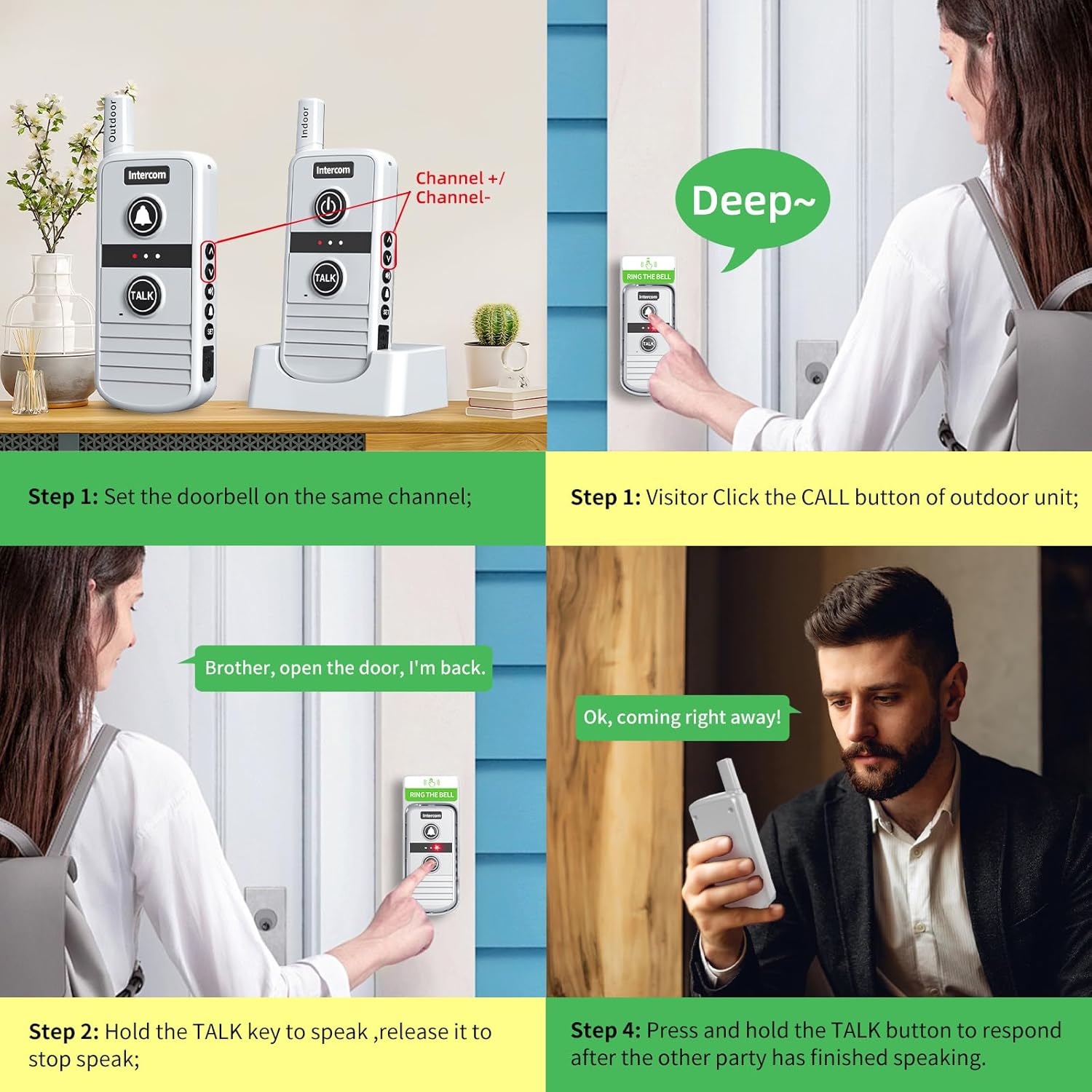
Image: A visual guide demonstrating how to set the doorbell units to the same channel and the process of a visitor initiating a call and two-way communication.
4.4 Mounting the Outdoor Unit
The outdoor unit can be mounted using either adhesive patches or screws for a more secure installation.
- Adhesive Patch Mounting: Clean the desired surface thoroughly. Peel off the protective film from the adhesive patch and firmly press the outdoor unit onto the surface.
- Screw Fixation: Mark the desired drilling points on the wall using the unit as a template. Drill holes, insert wall anchors, and secure the outdoor unit with the provided screws.

Image: A close-up of the outdoor intercom unit being securely mounted to a wall using screws, illustrating the installation method.
5. Operating Instructions
5.1 Two-Way Communication
The system supports clear two-way voice communication between units.
- From Outdoor Unit: A visitor presses the "CALL" button on the outdoor unit. All paired indoor units will ring.
- To Speak: On either unit, press and hold the "TALK" button to speak. Release the button to listen.
- To End Call: Press the power button on the indoor unit to hang up.
5.2 Room-to-Room Intercom
Indoor units can communicate with each other directly, acting as both doorbells and intercoms, provided they are on the same channel. No additional pairing is required for indoor unit communication.

Image: An illustration showing several indoor intercom units positioned throughout a home, demonstrating their ability to communicate with each other for room-to-room convenience.
5.3 Adjusting Ringtones and Volume
- Ringtones: Press the bell button on the indoor unit to cycle through 21 available ringtones.
- Volume: Use the volume up/down buttons on the side of the indoor unit to adjust the volume (4 levels).
5.4 System Expansion
The PANDAAR T-1880 system is expandable. One internal unit can be configured with multiple external units, and one external unit can be configured with multiple internal units, allowing for comprehensive coverage.

Image: A diagram illustrating the flexibility of the intercom system, showing how one internal unit can connect to multiple external units, and vice-versa, for expanded coverage.
5.5 Long Range Communication
The system offers a reliable long-range wireless signal, up to 4900 feet (1500 meters) in open areas. When the outdoor unit calls, all indoor units on the same channel will ring.

Image: A depiction of a modern home environment with several intercom units, highlighting the system's impressive 4900ft long-range communication capability.
6. Maintenance
6.1 Battery Life
The outdoor doorbell boasts a 6-month battery life on a full charge, ensuring you don't miss visitors. The indoor unit, when placed on its charging base, is always ready for use.

Image: A graphic representation of the battery life for both the indoor and outdoor units, showing the outdoor unit lasts 6 months and the indoor unit lasts 1 week on a single charge, with the indoor unit typically kept on its charging base.
6.2 Weather Durability
The outdoor unit is IP44-rated, making it waterproof and suitable for outdoor use in various weather conditions, including rain, snow, and sun. The operating temperature range is -4°F to 140°F (-20°C to 60°C).

Image: The outdoor intercom unit is depicted in a rainy setting, emphasizing its IP44 waterproof rating and suitability for use in various weather conditions.
6.3 Anti-Interference
The system is designed with 16 channels to minimize interference, ensuring clear and consistent communication.

Image: A visual representation of two intercom units with lines indicating an anti-interference feature, ensuring clear communication.
7. Troubleshooting
- No Power: Ensure units are fully charged. Check charging cables and power adapter connections.
- No Communication: Verify both indoor and outdoor units are powered on and set to the same channel. Ensure units are within range.
- Poor Audio Quality: Check for obstructions between units. Ensure units are not too far apart. Adjust volume levels.
- Outdoor Unit Not Responding: Press the front bell button to activate the outdoor unit. If it still doesn't respond, check its battery level.
- Interference: Try changing the channel on both units to avoid potential interference from other devices.
8. Specifications
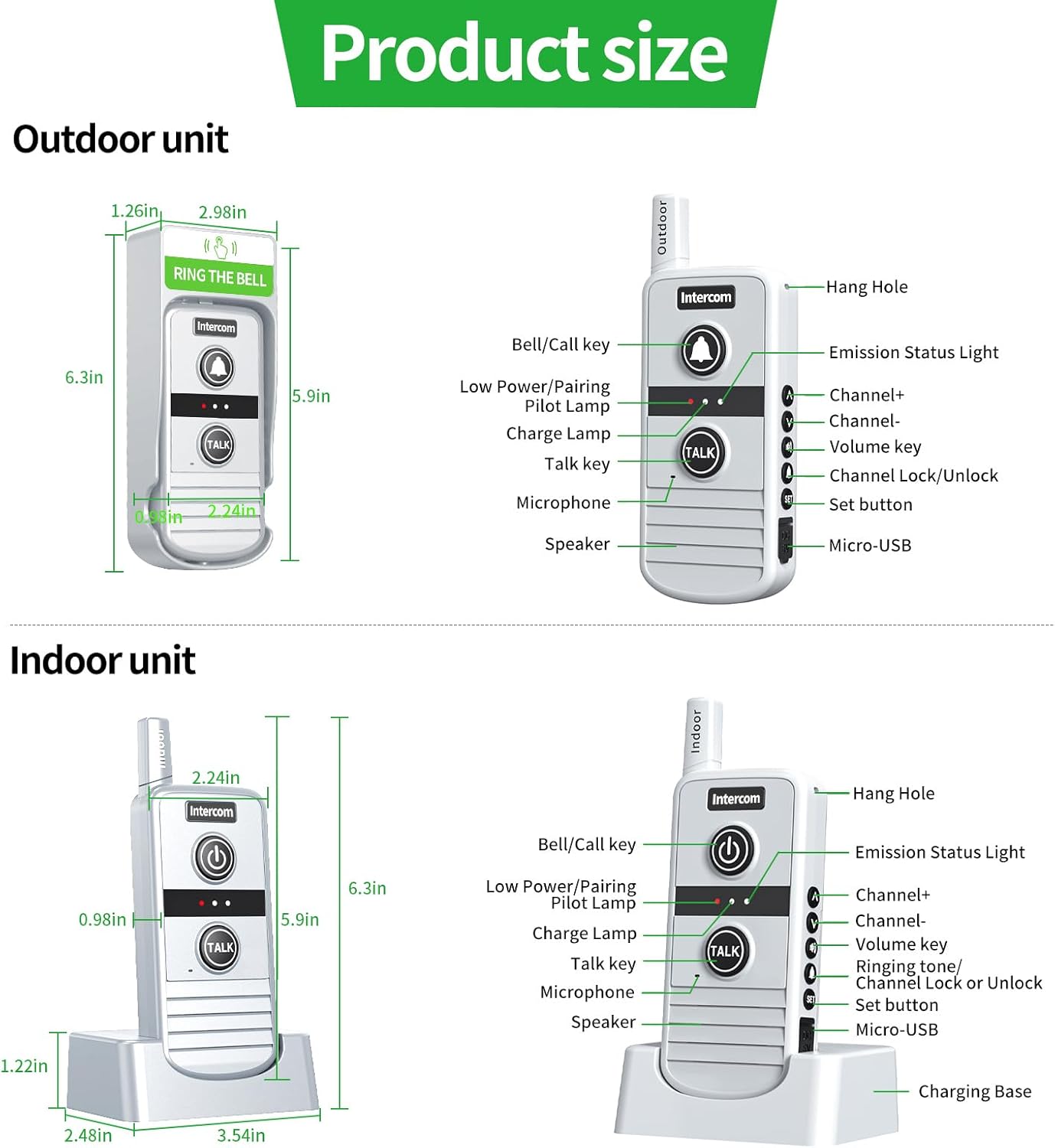
Image: A comprehensive diagram detailing the physical dimensions and labeled components of both the outdoor and indoor intercom units, providing a clear visual guide to their structure.
| Feature | Detail |
|---|---|
| Model Number | T-1880 |
| Brand | PANDAAR |
| Range | Up to 4900ft (1500m) in open areas |
| Channels | 16 |
| Ringtones | 21 |
| Volume Levels | 4 |
| Outdoor Unit Battery Life | Up to 6 months (on full charge) |
| Waterproof Rating | IP44 (Outdoor Unit) |
| Operating Temperature | -4°F to 140°F (-20°C to 60°C) |
| Item Weight | 1.01 pounds |
| Product Dimensions | 7 x 4 x 2.7 inches |
| Battery Type | Lithium Ion (included) |
9. Product Demonstration Video
Watch this video for a visual guide on setting up and operating your PANDAAR Wireless Intercom Doorbell System.
Video: A detailed demonstration of the PANDAAR T-1880 Wireless Intercom Doorbell, covering power on/off, channel pairing, ringtone selection, volume adjustment, and two-way communication features.
10. Warranty and Support
PANDAAR products come with a standard manufacturer's warranty. For specific warranty details, please refer to the product packaging or contact our customer support.
Customer Support:
If you encounter any issues or have questions regarding your PANDAAR Wireless Intercom Doorbell System, please contact our support team through the retailer's platform or visit the official PANDAAR website for contact information.