
1. Introduction
The PANDAAR T-1880 Wireless Intercom Doorbell system provides convenient two-way communication between an outdoor unit and one or more indoor units. Designed for ease of use, it features a long communication range, waterproof outdoor unit, and multiple ringtones. This manual will guide you through the setup, operation, and maintenance of your intercom system.
2. Product Components
The PANDAAR T-1880 system includes an outdoor unit and an indoor unit, along with necessary accessories for installation and charging. Familiarize yourself with the components and their functions.

Figure 2.1: Detailed view of the outdoor and indoor units, highlighting buttons such as Bell/Call key, Talk key, Channel +/- buttons, Volume key, Set button, Micro-USB port, and indicator lights.
Outdoor Unit Features:
- Bell/Call Key: Initiates a call to the indoor unit(s).
- Talk Key: Used for two-way communication.
- Emission Status Light: Indicates transmission activity.
- Low Power/Pairing Pilot Lamp: Shows battery status and pairing mode.
- Microphone: For voice input.
- Speaker: For audio output.
- Micro-USB: Charging port.
Indoor Unit Features:
- Power Button: Turns the unit on/off.
- Talk Key: Used for two-way communication.
- Channel +/-: Adjusts the communication channel.
- Volume Key: Adjusts the speaker volume.
- Ringing Tone/Channel Lock/Unlock: Selects ringtones and locks/unlocks the channel.
- Set Button: Used for pairing and settings.
- Charge Lamp: Indicates charging status.
- Microphone: For voice input.
- Speaker: For audio output.
- Charging Base: For convenient charging.
3. Setup
3.1 Initial Charging
Before first use, fully charge both the outdoor and indoor units. The outdoor unit has a built-in 1800 mAh battery, providing approximately 6 months of use on a full charge. The indoor unit comes with a charging base; it is recommended to keep it charged to ensure continuous operation.
3.2 Power On/Off
- Indoor Unit: Long press the power button to turn on. You will hear a "beep" and the channel number will be announced. Long press again to turn off.
- Outdoor Unit: Press the front bell button to activate. If there is no operation within 25 seconds, it will automatically enter shutdown state to conserve power.
Video 3.1: Demonstration of powering on the indoor unit and activating the outdoor unit.
3.3 Pairing (Pre-paired at factory)
Your PANDAAR T-1880 units are pre-paired at the factory. No manual pairing is typically required for initial use. If you need to re-pair or add new units, follow these steps:
- Indoor Unit: Long press the "SET" button for 3 seconds. You will hear a "beep" sound, and the red light will flash, indicating pairing mode. Use the "Up" / "Down" arrows to select the desired channel. If the channel number is not reported after pressing the arrows, long press the bell button for 3 seconds to unlock, then select the channel.
- Outdoor Unit: Press the front bell button. Long press the bell button on the right side for 3 seconds; you will hear a "beep" sound. Use the "Up" / "Down" arrows to adjust to the same channel as the indoor unit. Long press the bell button on the right to lock the channel. Finally, press the front bell button; you will hear a "beep" sound from the indoor unit, indicating successful pairing.
Video 3.2: Demonstration of the pairing process for indoor and outdoor units.
3.4 Installation
The outdoor unit can be mounted using either adhesive patches or screw fixation. Choose the method suitable for your surface.
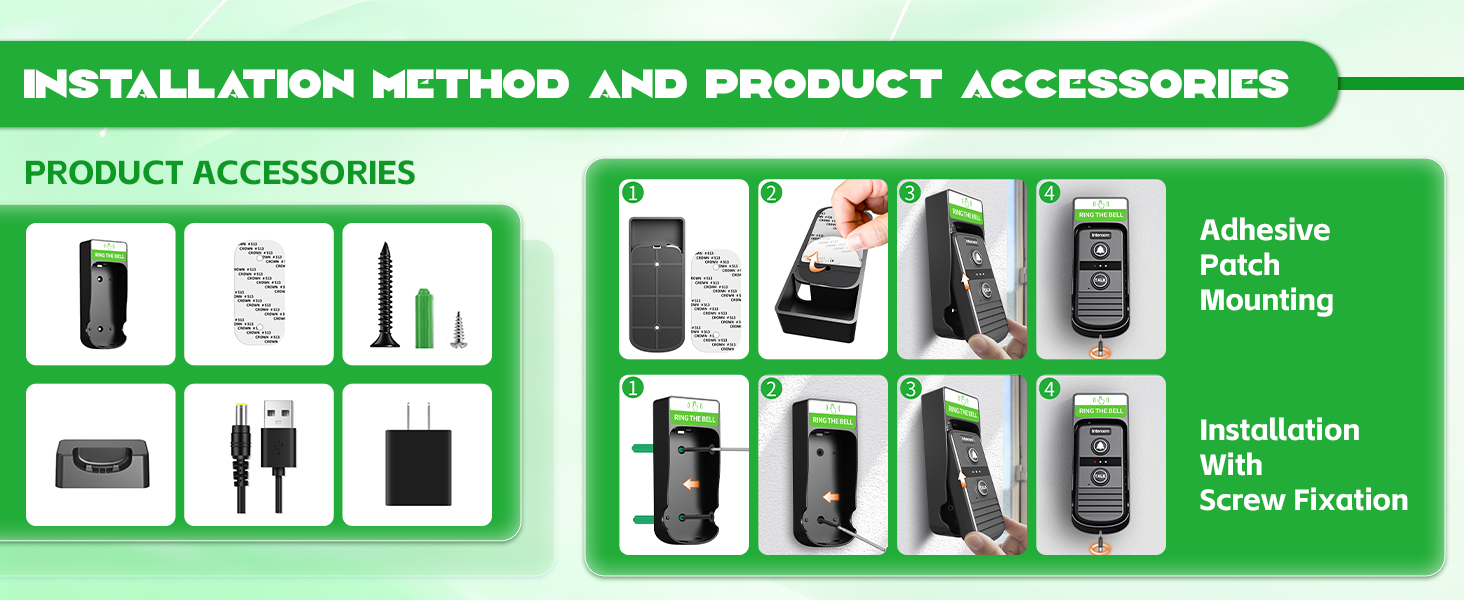
Figure 3.1: Installation methods for the outdoor unit, showing both adhesive and screw options.
4. Operation
4.1 Basic Communication
The system is designed for simple two-way communication.
- Visitor Calls: A visitor presses the bell button on the outdoor unit.
- Indoor Unit Rings: The indoor unit(s) will ring.
- Talk: To speak, long press the "TALK" button on the indoor unit. Release to listen.
- Reply: To reply from the outdoor unit, long press the "TALK" button. Release to listen.

Figure 4.1: Step-by-step guide for initiating and responding to a call.
Video 4.1: Demonstration of a visitor calling and the indoor unit user responding.
4.2 Adjusting Ringtones and Volume
- Ringtones: Press the bell button on the indoor unit to cycle through 21 available ringtones.
- Volume: Use the volume up/down buttons on the side of the indoor unit to adjust the sound level (3 volume levels available).
Video 4.2: How to switch ringtones and adjust volume on the indoor unit.
4.3 Multi-Unit Communication
- Indoor Unit to Indoor Unit: Indoor units can communicate with each other if they are on the same channel. Press the call button on one indoor unit to call all other indoor units on the same channel.
- Outdoor Unit to Multiple Indoor Units: One outdoor unit can be connected to an unlimited number of indoor units. When the outdoor unit calls, all paired indoor units will ring.
- Indoor Unit to Multiple Outdoor Units: One indoor unit can be connected to an unlimited number of outdoor units.

Figure 4.2: Indoor units can communicate with each other when on the same channel.

Figure 4.3: Flexible expansion allows one indoor unit to connect to multiple outdoor units, and one outdoor unit to multiple indoor units.
5. Features
- Easy to Use: Pre-paired for immediate use after charging. No Wi-Fi, Bluetooth, or mobile phone pairing required.
- Ultra-long Distance: Communication range up to 4900ft (1500m) in open areas. Actual distance may vary based on environmental obstructions.
- Anti-Interference: Utilizes special key matching technology and 16 switchable channels to minimize signal interference.
- Ultra-long Battery Life: Outdoor unit features an 1800 mAh battery, lasting approximately 6 months on a full charge. Indoor unit includes a charging base for continuous power.
- IP44 Waterproof: The outdoor unit is waterproof, suitable for use in various weather conditions (sunny, rainy, snowy).
- Wide Operating Temperature: Functions reliably from -4°F to 140°F (-20℃ to 60℃).
- Customizable Ringtones & Volume: Offers 21 ringtones and 3 adjustable volume levels.
- Flexible Expansion: Supports connecting multiple indoor units to one outdoor unit, and multiple outdoor units to one indoor unit. Indoor units can also communicate with each other.
6. Maintenance
- Cleaning: Wipe units with a soft, dry cloth. Avoid abrasive cleaners or solvents.
- Battery Care: Ensure units are fully charged before extended periods of non-use. For the indoor unit, keep it on its charging base when not in active use to maintain charge.
- Environmental Conditions: While the outdoor unit is IP44 waterproof, avoid prolonged exposure to extreme weather conditions if possible to maximize lifespan.
7. Troubleshooting
| Problem | Possible Cause | Solution |
|---|---|---|
| Indoor unit not ringing when outdoor unit calls. | Units are not paired or on different channels. Low battery. Out of range. | Ensure both units are on the same channel and paired (refer to Section 3.3). Charge both units. Reduce distance between units or clear obstructions. |
| Poor audio quality or no sound during communication. | Low battery. Units too far apart or obstructions. Volume too low. | Charge both units. Move units closer or clear obstructions. Adjust volume on the indoor unit (refer to Section 4.2). |
| Outdoor unit not turning on. | Low battery. | Charge the outdoor unit. |
| Indoor units cannot call outdoor unit. | This is normal operation. | The indoor unit cannot actively call the outdoor unit. The outdoor unit must initiate the call before an intercom conversation can be made. Indoor units can call each other. |
8. Specifications
| Specification | Detail |
|---|---|
| Model Number | T-1880 |
| Manufacturer | PANDAAR |
| Item Weight | 1.04 pounds |
| Product Dimensions | 7 x 4 x 2.7 inches |
| Batteries | 1 Lithium Ion battery required (included) |
| Battery Cell Type | Lithium Ion |
| Color | Black |
| Communication Range | Up to 4900ft (1500m) in open areas |
| Ringtones | 21 options |
| Volume Levels | 3 options |
| Waterproof Rating (Outdoor Unit) | IP44 |
| Operating Temperature | -4°F to 140°F (-20℃ to 60℃) |
9. Warranty and Support
For warranty information or technical support, please refer to the product packaging or contact PANDAAR customer service directly. Contact details are typically provided with your purchase documentation or on the manufacturer's official website.