
Introduction
This manual provides essential instructions for the safe and effective operation, maintenance, and troubleshooting of your LQHUE W07 Portable Carpet and Upholstery Cleaner. Please read this manual thoroughly before first use and retain it for future reference.
Important Safety Instructions
When using an electrical appliance, basic precautions should always be followed, including the following:
- Read all instructions before using the appliance.
- Do not immerse the appliance in water or other liquids.
- Do not use with a damaged cord or plug. If the appliance is not working as it should, has been dropped, damaged, left outdoors, or dropped into water, return it to a service center.
- Do not pull or carry by cord, use cord as a handle, close a door on cord, or pull cord around sharp edges or corners. Keep cord away from heated surfaces.
- Do not allow children to operate the cleaner. Close supervision is necessary when any appliance is used by or near children.
- Use only as described in this manual. Use only manufacturer's recommended attachments.
- Always unplug the appliance before cleaning or servicing.
- Do not use flammable or combustible liquids to clean surfaces.
- Ensure the dirty water tank does not exceed the MAX line to prevent suction issues.
Package Contents
Verify that all items are present and in good condition:
- LQHUE W07 Main Unit
- Flexible Hose with Integrated Spray and Suction Nozzle
- Power Cord (attached)
- Stiff Brush Head (for deep cleaning)
- T-shape Brush Head (for gap cleaning)
- Instruction Manual
Product Components
Familiarize yourself with the parts of your carpet cleaner:
- Clean Water Tank: Holds fresh water or cleaning solution (1.50 L capacity).
- Dirty Water Tank: Collects extracted dirty water (0.80 L capacity).
- Handle: For carrying and maneuvering the unit.
- Flexible Hose: Connects the main unit to the cleaning nozzle.
- Cleaning Nozzle: Sprays water and suctions liquid.
- Brush Heads: Interchangeable heads for different cleaning tasks.
- Power Cord: For electrical connection.

Image: The LQHUE W07 cleaner showing its separate 1.50L clean water tank and 0.80L waste water tank.

Image: Close-up view of the two included brush heads: a stiff brush for deep cleaning and a T-shape brush for gap cleaning.
Setup and Preparation
- Unpack the Unit: Carefully remove all components from the packaging.
- Attach Hose and Nozzle: Ensure the flexible hose is securely connected to the main unit and the cleaning nozzle is attached to the end of the hose.
- Select Brush Head: Choose the appropriate brush head (Stiff Brush for general cleaning, T-shape Brush for crevices) and attach it to the cleaning nozzle.
- Fill Clean Water Tank: Remove the clean water tank (1.50 L capacity) from the unit. Fill it with clean water. For enhanced cleaning, a small amount of carpet cleaning solution (follow solution manufacturer's instructions) can be added. Do not overfill. Reattach the tank securely.
- Position Dirty Water Tank: Ensure the dirty water tank (0.80 L capacity) is correctly seated in its compartment. Do not fill this tank before use.
- Power Connection: Unwind the power cord (17.06 ft) and plug the unit into a grounded electrical outlet.
Operating Instructions
The LQHUE W07 is designed for spot cleaning carpets, upholstery, car seats, and other fabric surfaces.
- Prepare the Area: Remove any loose debris or solid particles from the area to be cleaned.
- Power On: Turn on the cleaner using the power switch.
- Spray Solution: Hold the cleaning nozzle over the stained area. Press the trigger on the nozzle to spray cleaning solution onto the stain. Allow the solution to penetrate for a few seconds.
- Scrub the Stain: Gently scrub the stained area with the brush head attached to the nozzle. For stubborn stains, repeat spraying and scrubbing.
- Extract Dirty Water: Release the spray trigger and press the nozzle firmly against the surface. Pull the nozzle slowly over the treated area to suction up the dirty water. Repeat this step until no more dirty water is being extracted and the area feels as dry as possible. The powerful 18Kpa suction ensures quick drying.
- Rinse (Optional): For best results, especially after using cleaning solutions, you may rinse the area by spraying clean water (without solution) and then extracting it.
- Monitor Dirty Water Tank: Periodically check the dirty water tank. Do not allow the water level to exceed the MAX line to maintain optimal suction.
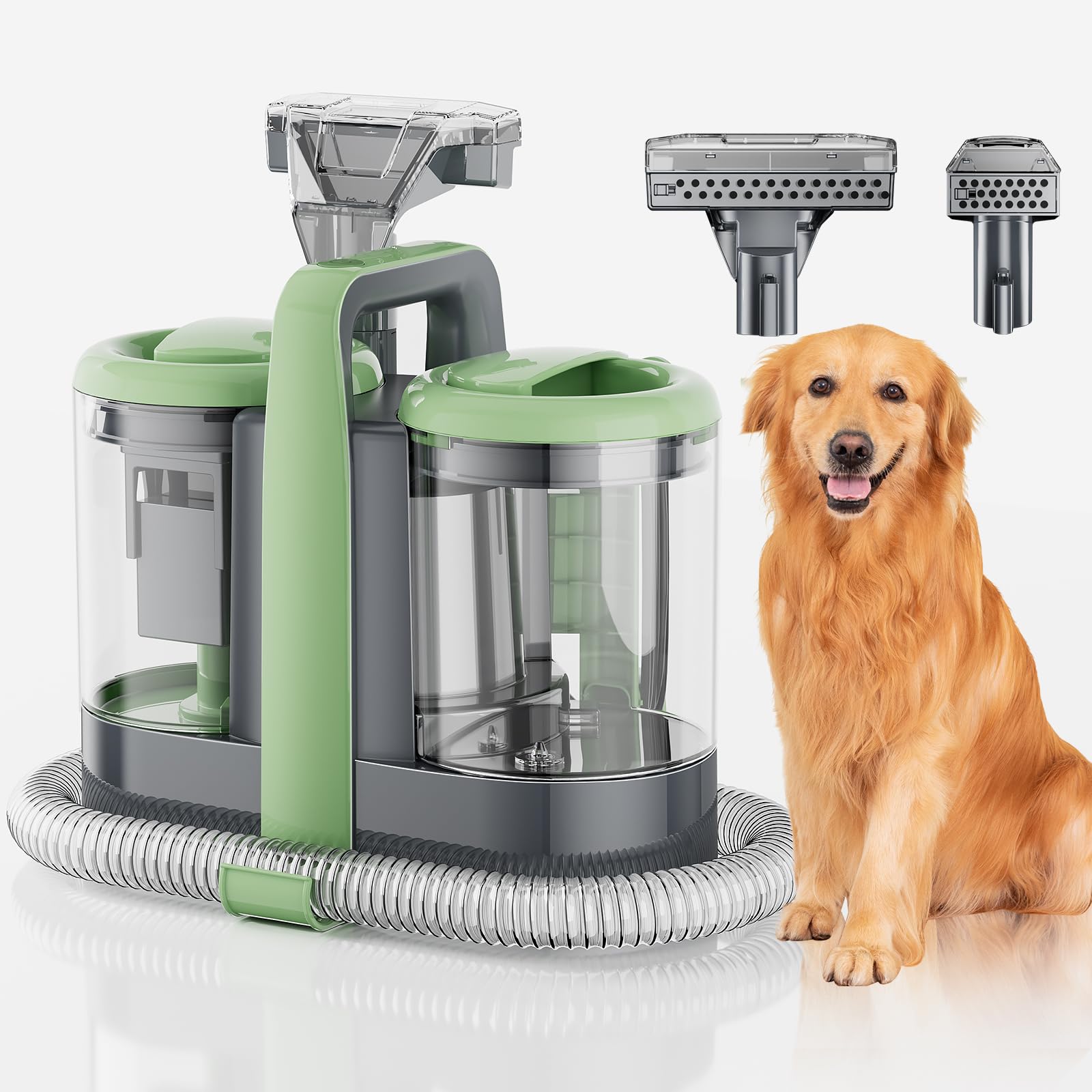
Image: Illustration of the three-step cleaning process: spray clean water, thoroughly scrub with the brush, and suck waste water under booster pressure.

Image: Demonstrates the cleaner effectively removing spilled coffee from a light-colored surface, highlighting its quick stain removal capability.

Image: A user cleaning a carpet with the LQHUE W07, suitable for pet messes on mattresses, fabric sofas, chairs, and carpets.
Maintenance and Storage
Proper maintenance ensures the longevity and performance of your cleaner.
- Empty and Clean Dirty Water Tank: After each use, remove the dirty water tank, empty its contents, and rinse it thoroughly with clean water. Allow it to air dry before reattaching.
- Empty Clean Water Tank: If any solution remains in the clean water tank, empty it and rinse.
- Clean Nozzle and Brush Heads: Remove the brush head and rinse it under running water. Clean the cleaning nozzle to remove any debris or residue.
- Wipe Down Unit: Wipe the exterior of the main unit with a damp cloth. Do not use harsh chemicals.
- Store Hose and Power Cord: Wrap the flexible hose and power cord neatly. The brush and power cord can be stored on the machine's integrated hook to save space.
- Storage: Store the cleaner in a dry, cool place, away from direct sunlight and extreme temperatures.

Image: The compact design of the LQHUE W07 allows for easy storage in small spaces, and its slim handle makes it portable and light.
Troubleshooting
Refer to this section for common issues and their solutions.
| Problem | Possible Cause | Solution |
|---|---|---|
| No suction or weak suction. | Dirty water tank is full or exceeds MAX line. | Empty the dirty water tank and ensure it is below the MAX line. |
| No suction or weak suction. | Hose or nozzle is clogged. | Check and clear any blockages in the hose or nozzle. |
| No spray or weak spray. | Clean water tank is empty. | Refill the clean water tank. |
| No spray or weak spray. | Spray nozzle is clogged. | Clean the spray nozzle opening. |
| Unit does not turn on. | Power cord is not properly plugged in. | Ensure the power cord is securely plugged into a working electrical outlet. |
| Unit does not turn on. | Circuit breaker tripped. | Check your household circuit breaker. |
Specifications
| Brand | LQHUE |
| Model | W07 |
| Power | 500W |
| Suction Power | 18Kpa |
| Clean Water Tank Capacity | 1.50 Liters |
| Dirty Water Tank Capacity | 0.80 Liters |
| Item Weight | 4.78 kg |
| Parcel Dimensions | 38.8 x 35.1 x 19.7 cm |
| Power Source | Electric Cable |
| Hose Length | 5.57 ft (approx. 1.7 m) |
| Power Cord Length | 17.06 ft (approx. 5.2 m) |
| UPC | 722898063256 |

Image: Diagram illustrating the lengths of the hose (approx. 3.94 ft) and power cord (approx. 9.85 ft) for extended reach, useful for cleaning stairs.
Note: The image indicates hose length as 3.94ft and power cord as 9.85ft, while feature bullets state 5.57ft and 17.06ft respectively. The specifications table uses the feature bullet values as they are more detailed text descriptions.
Warranty and Customer Support
For any questions, concerns, or assistance with your LQHUE W07 Portable Carpet and Upholstery Cleaner, please contact our customer service team. We offer 7x24 hour customer service to address your needs promptly.
Please refer to your purchase documentation for specific warranty details. In case of product damage or dissatisfaction, contact us directly for support.