
1. Introduction
The GOLDCHAMP GC-9000B is a professional ammonia gas detector designed for continuous quantitative analysis of ammonia concentration. This instrument utilizes an imported high-precision electrochemical sensor, ensuring sensitive response, high accuracy, and good stability. It also measures temperature and humidity, making it a versatile tool for various environments.
This manual provides detailed instructions for the safe and effective operation of your GC-9000B detector. Please read it thoroughly before use and keep it for future reference.

Image: The GOLDCHAMP GC-9000B detector highlighting its high-precision electrochemical sensor and display of NH3 concentration, resolution, and range.
2. Product Features
- Professional Ammonia Detection: Continuous quantitative analysis of ammonia concentration (0-100 PPM) with 0.1 PPM resolution, utilizing a high-precision electrochemical sensor.
- 3-in-1 Monitoring: Measures ammonia (NH3), temperature (-10℃ to 50℃), and humidity (0-95% RH).
- Multiple Alarm Modes: Features indicator light, vibration, and sound alarms. Users can set high and low alarm thresholds.
- Rechargeable Battery: Built-in large capacity rechargeable battery with a low battery indicator, charged via USB cable.
- Multifunctional Back Clip: Allows for easy carrying in a pocket or attachment to a fixed position for convenient measurement.
- Wide Application: Suitable for metallurgy, power plants, farms, mines, chemical industry, healthcare, environmental protection, and more.
3. Package Contents
Verify that all items are present and in good condition upon unpacking.
- 1 x GOLDCHAMP GC-9000B Ammonia Gas Detector
- 1 x USB Charging Cable
- 1 x User Manual
- 1 x Packaging Box

Image: Contents of the GOLDCHAMP GC-9000B package, including the detector, USB cable, and user manual.
4. Device Overview
The GC-9000B features a clear LCD display and intuitive controls for easy operation.
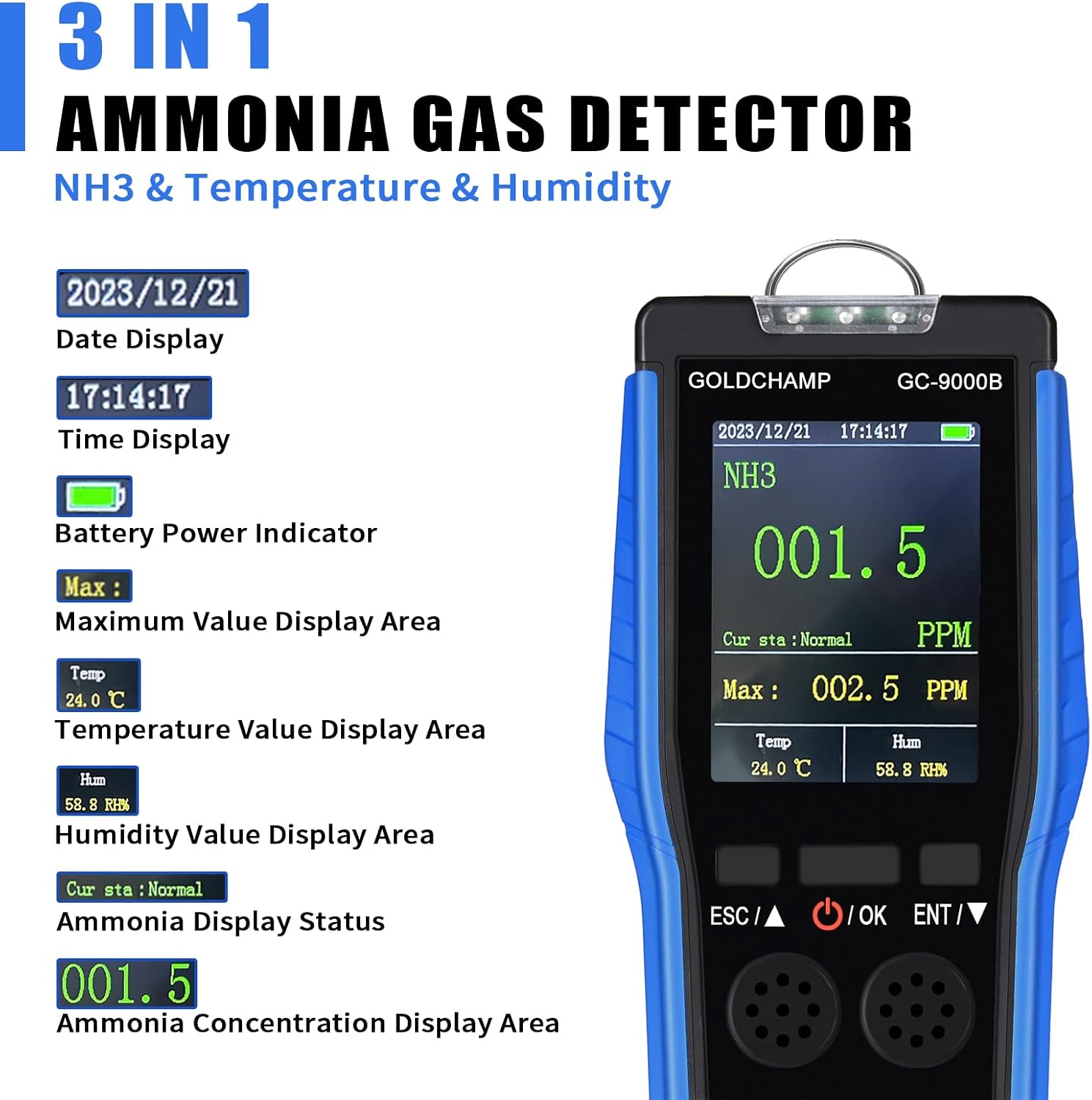
Image: Front view of the GC-9000B detector showing the LCD display with date, time, battery indicator, maximum value display, temperature, humidity, current ammonia status, and ammonia concentration display area.
Display Elements:
- Date Display: Shows the current date.
- Time Display: Shows the current time.
- Battery Power Indicator: Displays the remaining battery level.
- Maximum Value Display Area: Shows the peak ammonia concentration detected.
- Temperature Value Display Area: Shows the current ambient temperature.
- Humidity Value Display Area: Shows the current ambient humidity.
- Ammonia Display Status: Indicates the current state of ammonia detection (e.g., Normal).
- Ammonia Concentration Display Area: Shows the real-time ammonia concentration in PPM.
Buttons:
- ESC/▲ Key: Used to exit menus or navigate upwards in settings.
- OK/Power Key: Press and hold to power on/off the device. Short press to confirm selections in menus.
- ENT/▼ Key: Used to enter menus or navigate downwards in settings.
5. Setup and Basic Operation
5.1 Charging the Device
The GC-9000B is equipped with a rechargeable battery. When the low battery indicator appears, connect the device to a power source using the provided USB cable.

Image: The GC-9000B detector being charged via a USB cable connected to its side port.
5.2 Power On/Off
- To Power On: Press and hold the OK button until the device screen illuminates.
- To Power Off: Press and hold the OK button until the device powers down.
Video: Demonstration of powering on the GOLDCHAMP GC-9000B Ammonia Gas Detector and navigating its basic settings. The video also shows connecting the USB cable for charging.
6. Operating Instructions
6.1 Navigating Settings
The settings interface allows customization of various device functions. To access the settings menu, long press the ENT/▼ key. Use the ESC/▲ and ENT/▼ keys to navigate through options, and the OK key to confirm a selection.
Available Settings:
- SET DISP: Display settings.
- SET ALARM: Configure alarm thresholds.
- TIM SHUT: Scheduled shutdown timer.
- ALA MODE: Select alarm modes (Light, Vibration, Sound).
- SYS TIME: Adjust system date and time.
- HIS DATA: View historical measurement data.

Image: The historical data query screen on the GC-9000B, showing past ammonia concentration readings with corresponding dates and times.
7. Alarm Modes
The GC-9000B features three distinct alarm modes to alert users when measured ammonia values exceed predefined thresholds. Users can set both high and low alarm values.
- Indicator Light Alarm: A visual alert using an LED light.
- Vibration Alarm: The device vibrates to provide a tactile alert.
- Sound Alarm: An audible alert to draw attention.

Image: The alarm setting interface showing options for high and low alarm values, and visual representations of the indicator light, vibration, and audible alarm modes.
8. Applications
The GOLDCHAMP GC-9000B Ammonia Gas Detector is suitable for a wide range of applications where ammonia concentration, temperature, and humidity monitoring are critical.
- Industrial Settings: Metallurgy, chemical industry, power plants, mining operations.
- Agricultural Environments: Farms, poultry houses, animal husbandry.
- Environmental Monitoring: Air quality assessment, environmental protection.
- Healthcare: Specific medical applications requiring ammonia detection.
- Research: Scientific research laboratories.

Image: Collage showing various application scenarios for the GC-9000B, including dyeing factories, animal husbandry, chemical facilities, and scientific research environments.
9. Specifications
| Feature | Specification |
|---|---|
| Model Number | GC-9000B (also referred to as GC-5800-535) |
| Gas Detected | Ammonia (NH3) |
| Measurement Range (NH3) | 0-100 PPM |
| Resolution (NH3) | 0.1 PPM |
| Temperature Range | -10℃ to 50℃ (14℉ to 122℉) |
| Humidity Range | 0-95% RH |
| Measurement Accuracy | +/-0.5% |
| Sensor Type | Electrochemical |
| Power Source | Rechargeable 9V battery (included) |
| Product Dimensions | 1.97 x 3.94 x 7.87 inches |
| Item Weight | 8 ounces |
10. Troubleshooting
If you encounter issues with your GC-9000B detector, please refer to the following common troubleshooting steps:
- Device not powering on: Ensure the battery is charged. Connect the device to a USB power source and try again.
- Inaccurate readings: Ensure the sensor area is clean and unobstructed. Avoid using the device in extreme temperatures or humidity outside its specified range. Allow the device to stabilize in the environment for a few minutes before taking readings.
- Alarm not sounding/vibrating: Check the alarm settings in the menu (ALA MODE) to ensure the desired alarm types are enabled. Verify alarm thresholds (SET ALARM) are correctly configured.
- Screen not responding: Try restarting the device by holding the power button. If the issue persists, contact customer support.
11. Maintenance
Proper maintenance ensures the longevity and accuracy of your GOLDCHAMP GC-9000B detector.
- Cleaning: Wipe the device exterior with a soft, dry cloth. Do not use abrasive cleaners or solvents.
- Storage: Store the device in a cool, dry place away from direct sunlight and extreme temperatures.
- Battery Care: For long-term storage, charge the battery periodically to maintain its health.
- Sensor Care: Avoid exposing the sensor to harsh chemicals or physical impact.
12. Warranty and Support
For warranty information, technical support, or service inquiries, please refer to the contact details provided with your purchase or visit the official GOLDCHAMP website. Keep your purchase receipt as proof of purchase for warranty claims.