
Kuulaa B0DJVHG284
Kuulaa 2 Pack 10000 mAh 22.5W Ultra Slim Power Bank User Manual
Model: B0DJVHG284
1. Introduction
Thank you for choosing the Kuulaa 2 Pack 10000 mAh 22.5W Ultra Slim Power Bank. This portable charger is designed to provide reliable and fast charging for your mobile devices on the go. Its compact and lightweight design makes it an ideal companion for travel, business trips, or daily use.
Key features include:
- 22.5W Fast Charging: Capable of charging compatible devices rapidly, reaching up to 60% in 30 minutes for new iPhones.
- 10000 mAh Capacity: Sufficient power to charge most smartphones multiple times.
- Ultra Slim Design: At just 0.6 inches thin, it's highly portable.
- Innovative LCD Screen: Displays precise battery level, indicating when recharging is needed.
- Multi-Port Design: Features both USB-C (input/output) and USB-A (output) ports, allowing simultaneous charging of two devices.
- Safety Certified: Complies with EU safety tests and international air transport standards.
2. Safety Information
Please read all safety warnings and instructions before using this product to ensure safe and proper operation. Keep this manual for future reference.
- Do not expose the power bank to extreme temperatures (hot or cold), direct sunlight, or high humidity.
- Avoid dropping, hitting, or disassembling the device.
- Keep away from water and flammable liquids.
- Do not use if the power bank is damaged, swollen, or leaking.
- Keep out of reach of children.
- Dispose of the power bank responsibly according to local regulations.
- The power bank is certified for international air transport, making it safe for travel.

Figure 2.1: The Kuulaa power bank is designed for safe and convenient use during travel, adhering to international safety standards.
3. Package Contents
Verify that all items are present in your package:
- 2 x Kuulaa 10000 mAh Portable Charger
- 1 x USB-C Cable
- 1 x User Manual
4. Product Overview and Setup
Familiarize yourself with the components of your Kuulaa Power Bank:
- LED Digital Display: Shows the remaining battery percentage.
- USB-C Port (IN/OUT): Used for both charging the power bank and charging compatible devices.
- USB-A Port (OUT): Used for charging devices.

Figure 4.1: Front view of the Kuulaa power bank highlighting the 10000mAh capacity, LED digital display, and durable metal casing.

Figure 4.2: An angled view of two Kuulaa power banks, illustrating their compact form factor and the integrated LED display.
5. Operating Instructions
5.1 Charging the Power Bank
Before first use, fully charge your Kuulaa Power Bank. To recharge:
- Connect the provided USB-C cable to the USB-C port (IN/OUT) on the power bank.
- Plug the other end of the USB-C cable into a compatible USB wall charger (not included).
- The LED display will show the charging progress. It is fully charged when the display reads 100%.

Figure 5.1: The power bank can be recharged efficiently using an 18W max power adapter, ensuring it's ready for use.
5.2 Charging Your Devices
The Kuulaa Power Bank can charge a wide range of devices, including smartphones, tablets, and other USB-powered gadgets.
- Connect your device's charging cable to either the USB-C port (IN/OUT) or the USB-A port (OUT) on the power bank.
- Connect the other end of the cable to your device.
- The power bank will automatically begin charging your device. The LED display will show the power bank's remaining charge.
- You can charge two devices simultaneously using both output ports.

Figure 5.2: The power bank supports simultaneous charging of two devices, such as a smartphone and a tablet, for convenience.

Figure 5.3: Experience rapid charging with 22.5W output, significantly faster than standard 2.1A chargers.
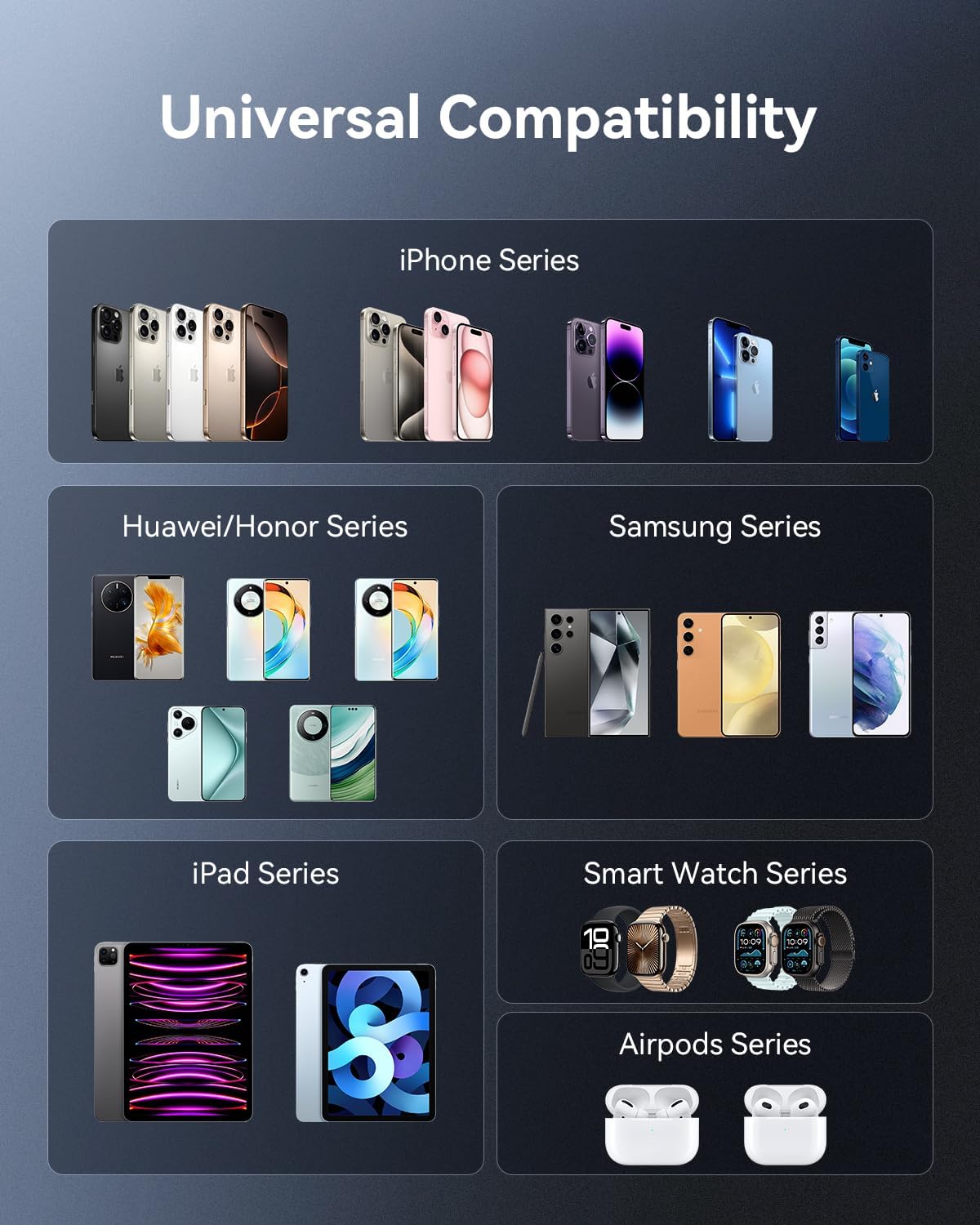
Figure 5.4: The power bank offers broad compatibility with a wide range of mobile devices from different brands and series.
6. Maintenance
To ensure the longevity and optimal performance of your power bank, follow these maintenance guidelines:
- Cleaning: Use a soft, dry cloth to clean the power bank. Do not use harsh chemicals or abrasive materials.
- Storage: Store the power bank in a cool, dry place away from direct sunlight and extreme temperatures.
- Battery Care: For best battery health, fully charge the power bank at least once every three months if not in regular use. Avoid completely draining the battery frequently.
- Handling: Handle the power bank with care. Avoid dropping it or subjecting it to strong impacts.
7. Troubleshooting
If you encounter issues with your Kuulaa Power Bank, refer to the following common problems and solutions:
| Problem | Possible Cause | Solution |
|---|---|---|
| Power bank not charging | Charging cable is faulty or not properly connected. Wall adapter is not working or insufficient. | Try a different USB-C cable and a different wall adapter. Ensure connections are secure. |
| Device not charging from power bank | Power bank battery is depleted. Device cable is faulty or not properly connected. Device is incompatible. | Recharge the power bank. Try a different charging cable for your device. Ensure your device is compatible with USB charging. |
| Slow charging | Cable or device does not support fast charging. Multiple devices are connected. | Ensure you are using a fast-charging compatible cable and device. Disconnect one device if charging two simultaneously. |
| LED display not working | Power bank is completely discharged. Internal malfunction. | Attempt to charge the power bank for an extended period. If the issue persists, contact customer support. |
If the problem persists after trying these solutions, please contact Kuulaa customer support for assistance.
8. Specifications
| Feature | Specification |
|---|---|
| Brand | Kuulaa |
| Model | B0DJVHG284 |
| Color | Gray (2 pieces) |
| Battery Capacity | 10000 mAh |
| Max Output Power | 22.5 W |
| Battery Composition | Lithium-ion |
| Product Dimensions | 11.5L x 6.9W x 1.6H centimeters (approx. 4.5L x 2.7W x 0.6H inches) |
| Number of Ports | 2 (1x USB-C IN/OUT, 1x USB-A OUT) |
| Compatible Devices | Smartphones, Tablets, and other USB-C/USB-A powered devices |
9. Warranty and Support
Kuulaa products are manufactured to the highest quality standards. For any questions or concerns regarding your Kuulaa Power Bank, please do not hesitate to contact our customer support team.
We are committed to providing a satisfactory solution and will respond to your inquiries within 24 hours.
For support, please refer to the contact information provided on the product packaging or the retailer's website where you purchased the item.
Related documentsB0DJVHG284


Ask a question about this manual
Ask about setup, troubleshooting, compatibility, parts, safety, or missing instructions. Manuals+ will review the question and use this page’s manual context to help answer it.