
Introduction
This manual provides detailed instructions for the installation, operation, and maintenance of your Fortdows Audio Adapter. This adapter is specifically engineered to integrate seamlessly with the factory audio systems of Chevy Silverado and GMC Sierra models manufactured between 2014 and 2018. It ensures superior sound quality and retains full functionality of your vehicle's original controls, enhancing your in-car audio experience.

Image: The Fortdows Audio Adapter module, a compact blue box, with a single wiring harness extending from it. This component is central to integrating aftermarket audio systems.
Package Contents
Please verify that all the following components are included in your package:
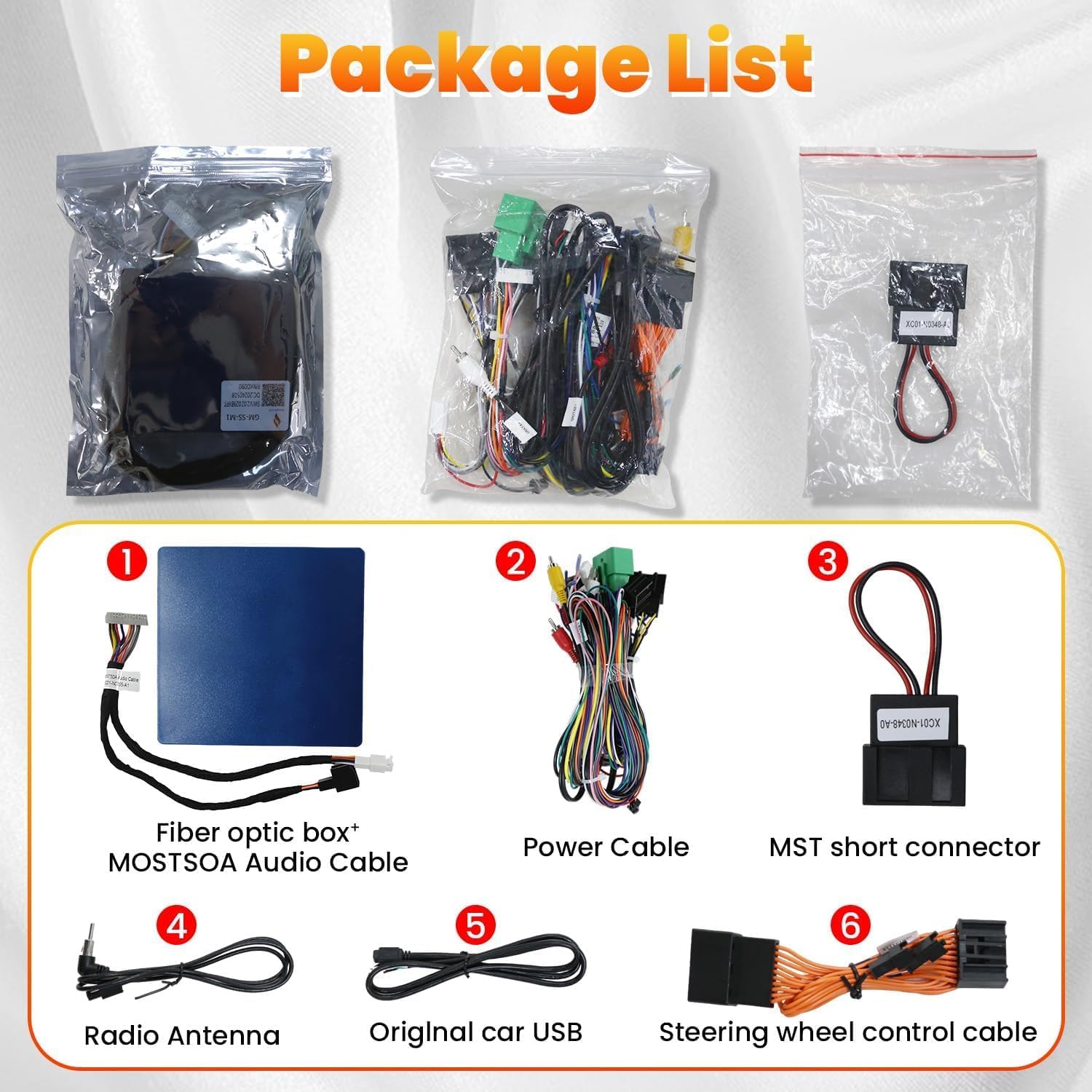
Image: A visual representation of the Fortdows Audio Adapter package contents, including the main fiber optic box, various cables, and connectors.
- Fiber Optic Box + MOSTSOA Audio Cable: The main adapter unit and its primary audio connection cable.
- Power Cable: For supplying power to the adapter unit.
- MST Short Connector: A specialized connector for specific wiring configurations.
- Radio Antenna: For maintaining radio signal reception.
- Original Car USB: Cable for integrating the vehicle's existing USB port.
- Steering Wheel Control Cable: For retaining steering wheel control functionality.
Installation Guide
The Fortdows Audio Adapter is designed for straightforward installation without the need for complex modifications. Follow these steps carefully:

Image: A comprehensive wiring diagram showing the connections between the Fortdows Audio Adapter, the vehicle's existing wiring harness, and the car stereo unit. Red lines indicate specific connection points.
- Prepare the Vehicle: Ensure the vehicle's ignition is off and the battery is disconnected before beginning installation to prevent electrical damage.
- Remove Factory Radio: Carefully remove your vehicle's factory radio unit to access the wiring harnesses. Refer to your vehicle's service manual for specific instructions on radio removal.
- Connect Fiber Optic Box: Connect the main MOSTSOA Audio Cable from the fiber optic box to the corresponding port on your car stereo or vehicle harness. This connection is crucial for audio signal transmission.
- Connect Power Cable: Attach the provided Power Cable to the adapter unit and then to the vehicle's power source, typically found within the radio harness. Ensure a secure connection.
- Integrate Steering Wheel Controls: Connect the Steering Wheel Control Cable to the adapter and the vehicle's steering wheel control interface. This maintains the functionality of your steering wheel buttons.
- Connect Radio Antenna and USB: Attach the Radio Antenna and Original Car USB cables as required to maintain their respective functions.
- Secure Connections: Double-check all connections to ensure they are firm and properly seated. Avoid loose wiring.
- Test System: Before fully reassembling the dashboard, reconnect the battery and test the audio system and steering wheel controls to confirm proper functionality.
- Reassemble: Once confirmed, carefully reassemble the factory radio and dashboard components.
This adapter is designed for seamless integration, preserving the integrity of your vehicle's original audio system while enhancing overall sound quality.
Operating Instructions
Once correctly installed, the Fortdows Audio Adapter operates automatically. It acts as a bridge between your vehicle's factory system and any connected aftermarket audio components, ensuring that all signals are processed correctly.
- Factory Controls: The adapter is designed to retain full functionality of your vehicle's factory controls, including steering wheel controls and the infotainment system. No additional setup is typically required for these features.
- Enhanced Connectivity: The adapter supports various connectivity options, allowing you to integrate additional audio components or aftermarket systems. Refer to the specific instructions for your aftermarket devices for their operation.
The primary function of this adapter is to provide a stable and high-quality audio signal path, allowing your existing car stereo and any connected devices to perform optimally.
Maintenance
The Fortdows Audio Adapter is constructed with high-quality, durable materials designed for longevity and reliable performance. Minimal maintenance is required.
- Environmental Conditions: Ensure the adapter is installed in a dry environment, away from direct moisture or extreme temperatures, which can affect electronic components.
- Connection Integrity: Periodically, if accessible, check the wiring connections to ensure they remain secure and free from corrosion.
- Cleaning: If necessary, gently wipe the exterior of the adapter module with a dry, soft cloth. Do not use liquid cleaners or solvents.
Troubleshooting
If you encounter issues with your Fortdows Audio Adapter, please refer to the following common problems and solutions:
| Problem | Possible Cause | Solution |
|---|---|---|
| No audio output | Loose or incorrect wiring connection; adapter not receiving power; incompatible aftermarket unit. | Verify all wiring connections are secure and correctly matched according to the installation diagram. Check power supply to the adapter. Ensure your aftermarket audio unit is compatible with the adapter. |
| Intermittent audio or static | Loose connection; interference; damaged cable. | Inspect all cables and connectors for looseness or damage. Ensure proper grounding. Relocate any potential sources of electrical interference. |
| Steering wheel controls not functioning | Steering wheel control cable not connected or incorrectly wired; adapter not recognized by vehicle. | Confirm the steering wheel control cable is properly connected to both the adapter and the vehicle's interface. Some aftermarket units may require programming for steering wheel controls. |
| Adapter not powering on | No power supply to the adapter. | Check the power cable connection and ensure the vehicle's power source is active. Verify fuses if applicable. |
If these solutions do not resolve the issue, please contact customer support for further assistance.
Specifications
| Feature | Detail |
|---|---|
| Compatibility | Chevy Silverado, GMC Sierra (2014-2018) |
| Package Dimensions | 11.97 x 9.21 x 2.36 inches |
| Item Weight | 1 pound (16 ounces) |
| Connector Type | Cable |
Warranty and Customer Support
Fortdows is committed to providing high-quality products and excellent customer service.
- Warranty: This product comes with a 1-Year Warranty from the date of purchase, covering manufacturing defects.
- Return Policy: A 7-Day Return Policy is available for products with defects. Please contact customer support for return authorization.
- Returns on Defects: Returns are accepted for products exhibiting defects.
For any inquiries, technical assistance, or warranty claims, please contact our customer support:
- Email: fortdows.cam@gmail.com
- Website: www.fancygod.com