
Tribesigns J0313
Tribesigns Modern Console Table Instruction Manual
Brand: Tribesigns | Model: J0313
1. Introduction
Thank you for choosing the Tribesigns Modern Console Table. This 55-inch wood entryway table with storage is designed to enhance your living space with its sleek modern charm and versatile functionality. It can serve as a sofa table, accent table, or hallway table, providing ample storage and display space.
This manual provides detailed instructions for assembly, operation, and maintenance to ensure safe and proper use of your new furniture. Please read all instructions carefully before beginning assembly and retain this manual for future reference.
2. Important Safety Information
- Always follow the assembly instructions carefully.
- Do not place heavy objects on the table that exceed the maximum weight recommendation of 300 lb to prevent tipping or damage.
- Ensure all screws and fasteners are securely tightened before use. Periodically check and re-tighten as needed.
- Keep small parts and packaging materials away from children and pets to prevent choking hazards.
- Assemble the table on a soft, clean surface to prevent scratches or damage to the product or your floor.
- If any parts are missing or damaged, do not proceed with assembly. Contact customer support immediately.
3. Package Contents
Before assembly, please verify that all components listed below are present and undamaged. If anything is missing or broken, contact customer service.
- Tabletop Panel (1)
- Side Panels (2)
- Bottom Shelf Panel (1)
- Back Support Panel (1)
- All necessary hardware kits (screws, dowels, cam locks, etc.)
- Assembly Guide (1)
- Installation Tool (1) - typically an Allen wrench or screwdriver
Note: The exact number and type of fasteners may vary. Refer to the included assembly guide for precise details.
4. Assembly Instructions
Assembly of the Tribesigns Modern Console Table is designed to be straightforward. It is recommended that two people assemble this product for ease and safety. Please follow the numbered steps carefully.
Assembly Overview Video
This video provides a brief overview of the assembly process for the console table.
Step 1: Identify and Prepare Parts
Unpack all components and lay them out on a clean, soft surface. Identify each part by its label (if provided) and compare with the parts list in your included assembly guide. Ensure all hardware is present.
Step 2: Attach Side Panels to Bottom Shelf
Using the provided screws and dowels, attach the two side panels to the bottom shelf panel. Ensure the fluted design faces outwards and the pre-drilled holes align correctly. Tighten fasteners securely but do not overtighten.
Step 3: Install Back Support Panel
Carefully slide or attach the back support panel into the designated grooves or attach it to the rear of the side panels and bottom shelf using the appropriate hardware. This panel adds stability to the structure.
Step 4: Secure the Tabletop
Place the tabletop panel onto the assembled base, aligning the pre-drilled holes. Secure the tabletop to the side panels and back support using the remaining screws or cam locks. Ensure the walnut-finished top is facing upwards.
Step 5: Final Tightening and Placement
Once all components are assembled, gently lift and move the table to its desired location. Double-check all screws and fasteners to ensure they are fully tightened for maximum stability. The table is now ready for use.
Assembled Product Views

The Tribesigns Modern Console Table, showcasing its sleek black fluted body and contrasting walnut top, ideal for an entryway.

The console table positioned by a staircase, highlighting its versatility as a decorative and functional piece.
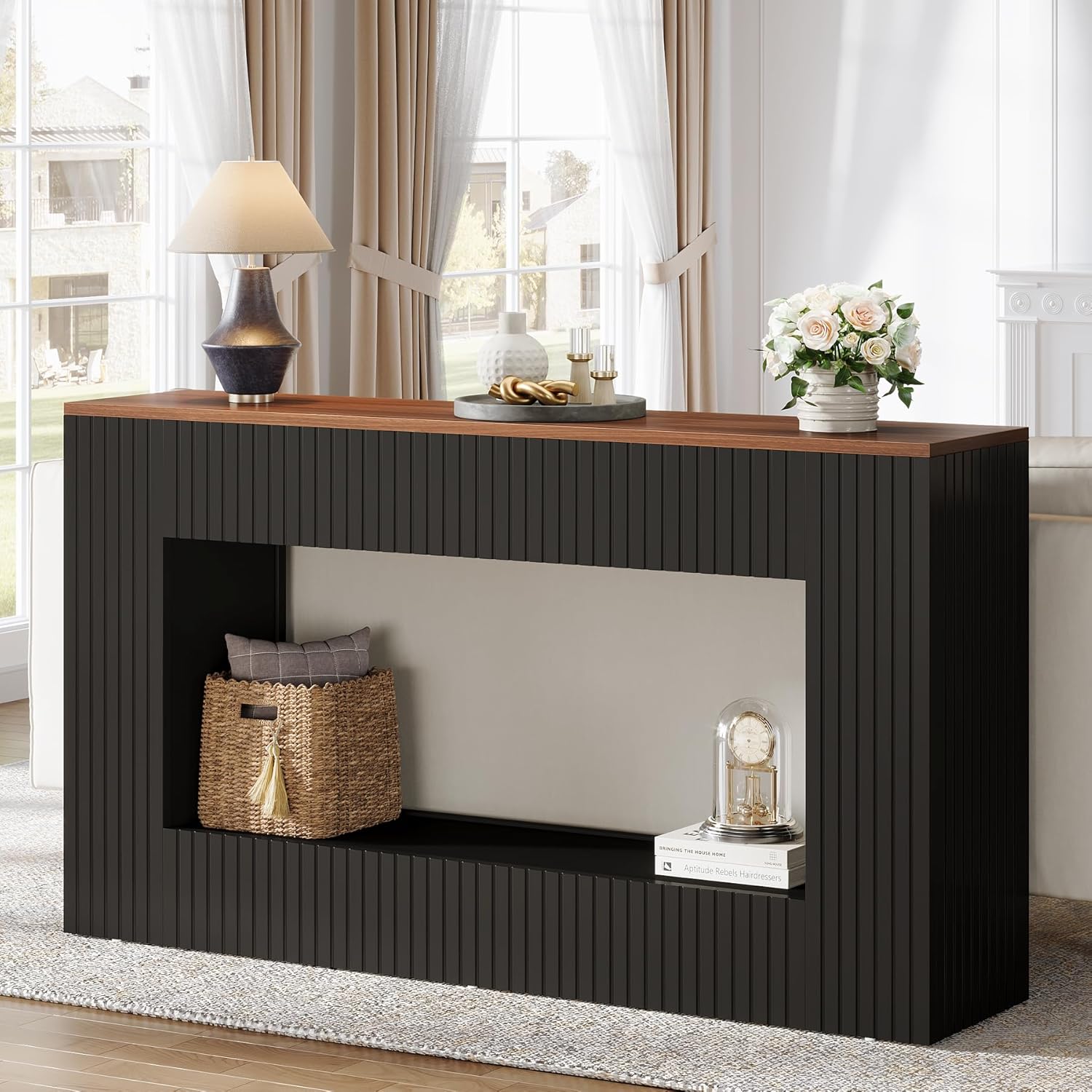
The console table serving as a sofa table, demonstrating its narrow profile and ample display space for living room decor.

Detail of the two-tier storage space, illustrating how the open design provides room for baskets, books, and decorative items.
5. Operating Instructions
The Tribesigns Modern Console Table is designed for versatile use in various areas of your home. Its primary function is to provide a stylish surface for display and additional storage.
- Placement: Position the table against a wall in an entryway, hallway, living room (behind a sofa), or foyer. Ensure it is on a level surface to prevent wobbling.
- Display: Utilize the spacious tabletop for decorative items such as lamps, vases, photo frames, or art pieces.
- Storage: The lower shelf provides additional space for books, storage baskets, or other items you wish to keep organized and accessible.
- Weight Capacity: Adhere to the maximum weight recommendation of 300 lb for the entire table to ensure stability and longevity. Distribute weight evenly.
6. Care and Maintenance
Proper care will help maintain the appearance and extend the lifespan of your console table.
- Cleaning: For general cleaning, wipe the surface with a damp cloth. For a dry finish, follow up with a dry cloth immediately. Avoid abrasive cleaners or harsh chemicals that could damage the finish.
- Spills: Wipe up spills immediately to prevent staining or water damage, especially on the wood-finished top.
- Sunlight Exposure: Avoid prolonged exposure to direct sunlight, which can cause fading or discoloration of the wood and black finishes.
- Heat and Moisture: Do not place hot items directly on the tabletop. Use coasters or protective pads under hot or wet objects.
- Fastener Check: Periodically check all screws and connections to ensure they remain tight. Re-tighten as necessary to maintain structural integrity.
7. Troubleshooting
If you encounter any issues with your Tribesigns Modern Console Table, refer to the common problems and solutions below.
| Problem | Possible Cause | Solution |
|---|---|---|
| Table is wobbly. | Uneven floor; loose fasteners. | Ensure the table is on a level surface. Check and tighten all screws and connections. |
| Parts do not align during assembly. | Incorrect orientation of panels; misaligned holes. | Review the assembly guide to ensure panels are oriented correctly. Do not force parts; gently adjust until holes align. |
| Missing hardware or damaged parts. | Packaging error; transit damage. | Do not proceed with assembly. Contact Tribesigns customer support with your purchase details for replacement parts. |
If you experience issues not covered here, please contact Tribesigns customer support for assistance.
8. Product Specifications
| Feature | Detail |
|---|---|
| Brand | Tribesigns |
| Model Name | Black Console Table |
| Model Number | J0313 |
| Product Dimensions (D x W x H) | 11.81"D x 55.12"W x 33.46"H |
| Maximum Weight Recommendation | 300 Pounds |
| Color | Walnut & Black |
| Material Type | Engineered Wood |
| Number of Racks | 2 (top surface and lower shelf) |
| Recommended Uses | Console table, entry table, hallway table, foyer table, sofa table, behind couch table, displaying |
| Recommended People for Assembly | 2 |

Detailed dimensions of the console table, including overall length, width, height, and internal shelf dimensions.
9. Warranty and Customer Support
Tribesigns offers a Limited Warranty for this product. Please refer to the specific warranty terms provided with your purchase documentation for details on coverage and duration.
For any questions, concerns, or assistance with assembly, missing parts, or product issues, please contact Tribesigns customer support. Have your model number (J0313) and purchase information ready when contacting support.
Customer Support: For assistance, please visit the Tribesigns Store on Amazon or refer to the contact information provided in your purchase documentation.
Related documentsJ0313


Ask a question about this manual
Ask about setup, troubleshooting, compatibility, parts, safety, or missing instructions. Manuals+ will review the question and use this page’s manual context to help answer it.