1. Introduction
This section provides an overview of the VTSYIQI AITS-800P Surface Tension Meter, its intended use, and key functionalities.
1.1. Product Overview
The VTSYIQI AITS-800P is an advanced instrument designed for precise measurement of surface and interfacial tension in liquids. It utilizes the Wilhelmy plate method to ensure high accuracy and repeatability, making it suitable for various scientific and industrial applications.
1.2. Key Features
- 4.3-inch touch screen for intuitive operation and data display.
- Automatic measurement capabilities for consistent results.
- High-precision electromagnetic force sensor.
- Supports Wilhelmy plate method for surface and interfacial tension.
- Manual testing of Critical Micelle Concentration (CMC).
- Test Range: 0-1000 mN/m with 0.1 mN/m precision.
- Automatic lifting and lowering of the sample stage.
- Direct data readout, eliminating manual calculations.
- USB communication for data transmission and storage (up to 48 sets).
1.3. Applications
The VTSYIQI AITS-800P is widely used in quality control processes and research across various fields, including:
- Oil aging tests, particularly for transformer oil (ASTM D-971).
- Determination of surfactant effectiveness in wetting agents and cleaners.
- Canning approval and cleaning validation in the food industry.
- Interfacial tension measurements for quality control and optimization of emulsifiers.
- Cooling lubricant surface tension testing.

Figure 1: VTSYIQI AITS-800P Surface Tension Meter and included accessories. The image shows the main unit, power cable, alcohol lamp, platinum plate, and various sample containers.
2. Safety Information
Adhere to all safety guidelines to prevent injury and damage to the instrument. Read this section carefully before operating the device.
2.1. General Safety Precautions
- Operate the instrument on a stable, level, and vibration-free surface.
- Ensure the power supply voltage and frequency match the instrument's requirements.
- Avoid exposing the instrument to extreme temperatures, high humidity, or corrosive chemical environments.
- Do not attempt to disassemble or repair the instrument yourself. Contact qualified service personnel for any maintenance or repair needs.
- Keep the instrument away from direct sunlight and strong electromagnetic fields.
2.2. Handling Samples and Reagents
- Always use appropriate personal protective equipment (PPE) such as safety goggles and chemical-resistant gloves when handling liquid samples and reagents.
- Dispose of chemical waste and used samples according to local environmental regulations.
- Ensure adequate ventilation when working with volatile or hazardous substances.
3. Unpacking and Setup
3.1. Unpacking the Instrument
Carefully remove all components from the packaging. Inspect each item for any signs of damage during transit. Verify that all items listed in the packing list are present.

Figure 2: The VTSYIQI AITS-800P Surface Tension Meter and its various accessories, still in their protective packaging, laid out on a table.
3.2. Component Identification
Familiarize yourself with the main components of your new surface tension meter:
- Main Unit with 4.3-inch Touch Screen
- Sample Stage
- Platinum Plate
- Power Adapter
- Alcohol Lamp (for cleaning platinum plate)
- Tweezers
- Calibration Weights

Figure 3: A detailed view of the VTSYIQI AITS-800P's 4.3-inch touch screen, displaying various measurement options and settings.
3.3. Instrument Placement and Leveling
Place the instrument on a stable, vibration-free, and level workbench. Use the adjustable feet at the base of the instrument and the built-in bubble level to ensure the instrument is perfectly horizontal. Proper leveling is crucial for accurate measurements.
Video 1: This video demonstrates the initial setup and leveling of the VTSYIQI AITS-800P Surface Tension Meter, showing how to adjust the instrument for a stable and level measurement platform.
4. Calibration
Regular calibration ensures the accuracy and reliability of your measurements. It is recommended to perform calibration at least once a day or if the instrument has been moved.
4.1. Weight Correction Procedure
- Power on the instrument and allow it to preheat for at least 30 minutes to ensure thermal stability.
- From the main menu on the touch screen, select the "Standard Weight CAL" (Calibration) option.
- Ensure the display value is 0.0. If it is not, press the "Peel" button (often indicated by a '0' with an arrow) to tare the sensor.
- Gently hang the provided calibration weight onto the scale hook using tweezers. Ensure the weight is stable and not shaking.
- Wait for approximately 10-20 seconds for the reading to stabilize. The instrument will automatically prompt that the correction is complete.
- Carefully remove the calibration weight. The display should return to 0.0, indicating successful calibration.
Video 2: This video demonstrates the weight correction process for the VTSYIQI AITS-800P, including taring the sensor, carefully applying calibration weights, and confirming successful calibration.
5. Operating Instructions
5.1. Preparing the Platinum Plate
The platinum plate must be thoroughly cleaned before each measurement to remove any contaminants that could affect accuracy. This process involves burning the plate in an alcohol flame.
- Hold the platinum plate securely with tweezers.
- Ignite the alcohol lamp.
- Place the platinum plate in the flame of the alcohol lamp until it glows red. This process burns off any organic contaminants and moisture.
- Allow the platinum plate to cool to room temperature (approximately 15 seconds) before use. Avoid touching the plate with bare hands after cleaning.
Video 3: This segment demonstrates the essential step of cleaning the platinum plate using an alcohol lamp, ensuring it is free from contaminants for accurate surface tension measurements.
5.2. Wilhelmy Plate Method Measurement
Follow these steps to perform a surface tension measurement using the Wilhelmy plate method:
- Carefully place the cleaned platinum plate onto the instrument's hook.
- Place your liquid sample in a clean petri dish or suitable container on the sample stage. Ensure the sample volume is sufficient for the plate to immerse without touching the bottom.
- Close the glass door of the instrument to prevent air currents and external disturbances from affecting the measurement.
- Press the "Peel" button on the touch screen to tare the sensor, setting the initial reading to 0.0.
- Press the "Start Test" button. The sample stage will slowly rise, bringing the liquid surface into contact with the platinum plate.
- The instrument will automatically detect contact between the platinum plate and the liquid surface. The machine sensor will then sense the surface tension in real-time.
- The surface tension value will be displayed in real-time on the screen, often accompanied by a dynamic curve.
- Once the data stabilizes, press the "Stop Test" button to conclude the measurement.
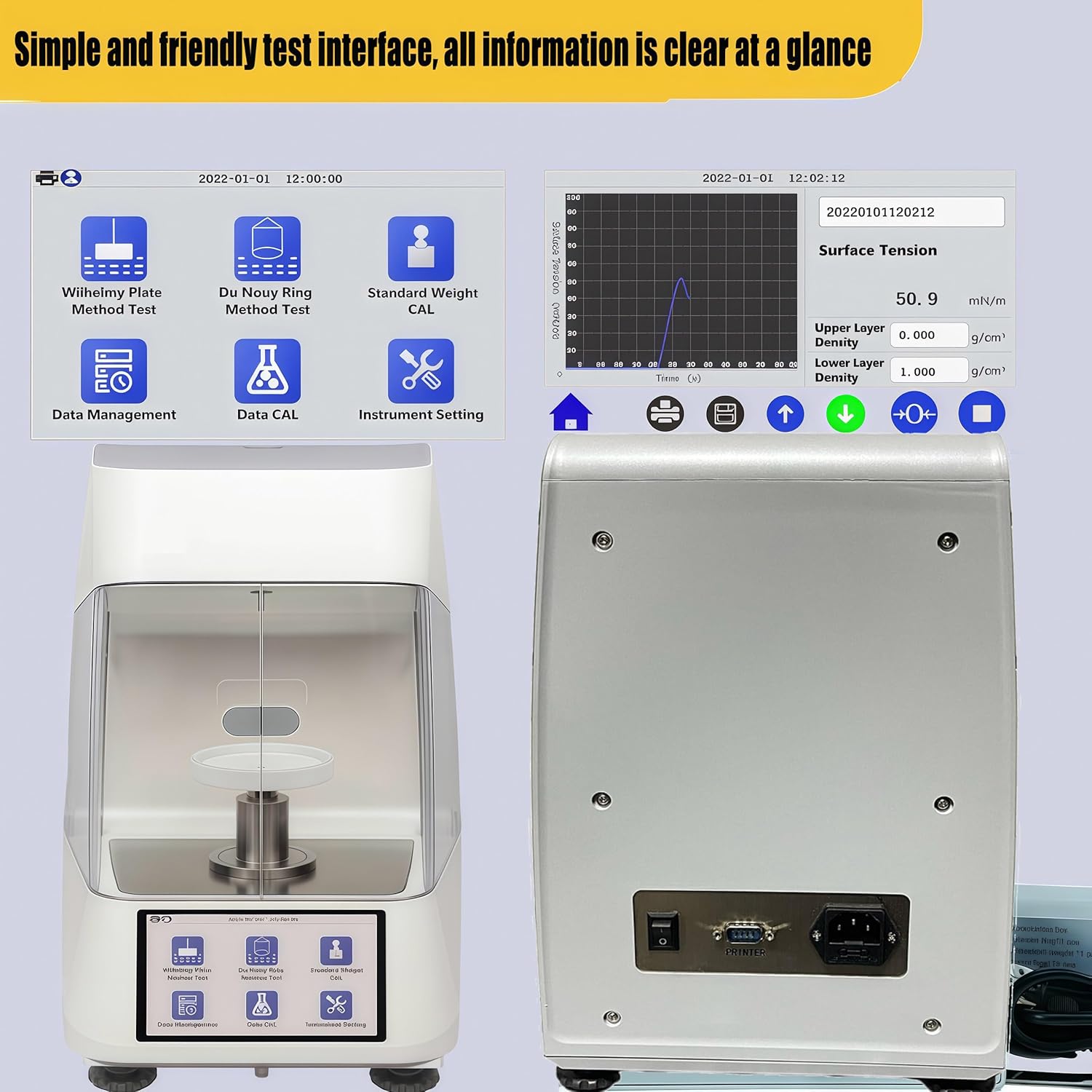
Figure 4: The user-friendly test interface of the VTSYIQI AITS-800P, displaying real-time surface tension values and a dynamic measurement curve.
Video 4: This video shows the automatic measurement process using the Wilhelmy plate method, from sample placement to real-time data display on the touch screen.
6. Data Management
The AITS-800P allows for saving and managing measurement data directly on the device.
6.1. Saving Measurement Data
After a test is completed and the data is stable, you can save the results directly from the display. The instrument can store up to 48 sets of data. When the memory is full, the oldest data set will be automatically overwritten.

Figure 5: The USB communication port on the VTSYIQI AITS-800P, enabling data transfer and management with external devices.
6.2. Retrieving Stored Data
Navigate to the "Data Management" section on the touch screen to view previously saved measurement results. You can browse through the stored data sets as needed.
7. Maintenance
Proper maintenance ensures the longevity and continued accuracy of your VTSYIQI AITS-800P.
7.1. Cleaning Procedures
- Platinum Plate: Always clean the platinum plate thoroughly before each measurement as described in Section 5.1.
- Instrument Exterior: Wipe the instrument's exterior with a soft, damp cloth. Avoid using abrasive cleaners, strong solvents, or harsh chemicals, as these can damage the surface.
- Sample Stage: Keep the sample stage and surrounding area free from spills, dust, and debris. Clean immediately after any spills.
7.2. Storage
- Store the instrument in a clean, dry, and temperature-controlled environment when not in use.
- When storing for extended periods, cover the instrument with a dust cover to protect it from dust and environmental contaminants.
8. Troubleshooting
This section addresses common issues you might encounter and provides solutions. For problems not listed here, please contact customer support.
8.1. Common Issues and Solutions
- Inaccurate Readings:
- Ensure the instrument is perfectly level.
- Verify the platinum plate is thoroughly cleaned and free of contaminants.
- Perform a weight correction (calibration) as described in Section 4.1.
- Check for any external vibrations or air currents that might affect the measurement.
- Instrument Not Powering On:
- Verify that the power cable is securely connected to both the instrument and a functional power outlet.
- Check the power switch on the back of the unit.
- Touch Screen Unresponsive:
- Try restarting the instrument by cycling the power.
- If the issue persists, contact technical support.
- Sample Stage Not Moving:
- Check for any physical obstructions around the sample stage.
- Ensure the instrument is powered on and not displaying any error messages.
8.2. Contact Support
For issues not covered in this section or for further technical assistance, please contact VTSYIQI customer support. Provide your model number (AITS-800P) and a detailed description of the problem.
9. Specifications
| Feature | Specification |
|---|---|
| Model | AITS-800P |
| Brand | VTSYIQI |
| Test Range | 0 - 1000 mN/m |
| Precision | 0.1 mN/m |
| Display | 4.3-inch Touch Screen |
| Measurement Method | Wilhelmy Plate Method |
| Data Storage | Up to 48 sets |
| Item Weight | 33 pounds |
| Package Dimensions | 15.75 x 7.87 x 3.94 inches |
| Material | Plastic |
| Power Source | AC/DC |
| Included Components | Main Host |
10. Warranty and Support
For detailed warranty information and technical support, please refer to the documentation included with your VTSYIQI AITS-800P Surface Tension Meter or visit the official VTSYIQI website.
Manufacturer: VTSYIQI
Contact Information: Please refer to the contact details provided in your product packaging or on the official VTSYIQI website for the most up-to-date support information.


