
Introduction
This instruction manual provides essential information for the proper setup, operation, and maintenance of your BenQ Zowie Wireless Mouse DW Series (FK | 3950 Sensor | Symmetrical). Please read this manual thoroughly before using the device to ensure optimal performance and longevity.
The BenQ Zowie FK2-DW is a high-performance wireless gaming mouse designed for precision and reliability, featuring a symmetrical design and the advanced 3950 sensor.

Image: Angled view of the BenQ Zowie FK2-DW Wireless Mouse, showcasing its sleek black design and ergonomic shape.
Package Contents
Verify that all items are present in the package:
- BenQ Zowie Wireless Mouse (FK2-DW)
- Wireless Receiver / Charging Dock
- USB-C to USB-A Cable
- Additional Mouse Skates (3 pairs)
- Quick Start Guide (if applicable)
Setup
- Charging the Mouse: Connect the USB-C cable to the charging dock and the USB-A end to an available USB port on your computer or a USB power adapter. Place the mouse onto the charging dock. The mouse will begin charging. Ensure the mouse is fully charged before first use for optimal battery life.
- Connecting the Receiver: Plug the wireless receiver (which also functions as the charging dock) into an available USB port on your computer. For best performance, place the receiver as close to the mouse as possible and away from other wireless devices that may cause interference.
- Powering On: Locate the power switch on the bottom of the mouse. Slide the switch to the 'On' position. The mouse should automatically connect to the receiver.
- Driver Installation: The BenQ Zowie FK2-DW mouse is designed for plug-and-play functionality and does not require any additional software or drivers for basic operation.

Image: Diagram illustrating the bottom panel of the FK2-DW mouse, highlighting the DPI, polling rate, and power switches for easy adjustment without software.
Operating Instructions
DPI Adjustment
The mouse features a dedicated DPI (Dots Per Inch) button on its bottom panel, allowing you to switch sensitivity settings without software. The available DPI settings are typically 400, 800, 1600, and 3200. Press the DPI button to cycle through these settings. An indicator light (if present) may change color or blink to indicate the current DPI level.
Polling Rate Adjustment
Similar to DPI, the polling rate can be adjusted via a switch on the bottom of the mouse. Polling rate determines how often the mouse reports its position to the computer. Common settings include 125 Hz, 500 Hz, and 1000 Hz. A higher polling rate generally provides smoother tracking but may consume more battery. Select the polling rate that best suits your needs.
Ergonomic Design Features
The FK2-DW mouse incorporates specific design elements to enhance user experience:
- Lower Hump Design: This design allows for more flexible micro-adjustments, providing enhanced control during precise movements.
- Sharper Angle: The mouse's sharper angle facilitates faster mouse lifting, which can be beneficial in competitive gaming scenarios.
- Right-side Curved Design: This curvature is engineered to promote more accurate aiming and shooting, particularly for right-handed users.
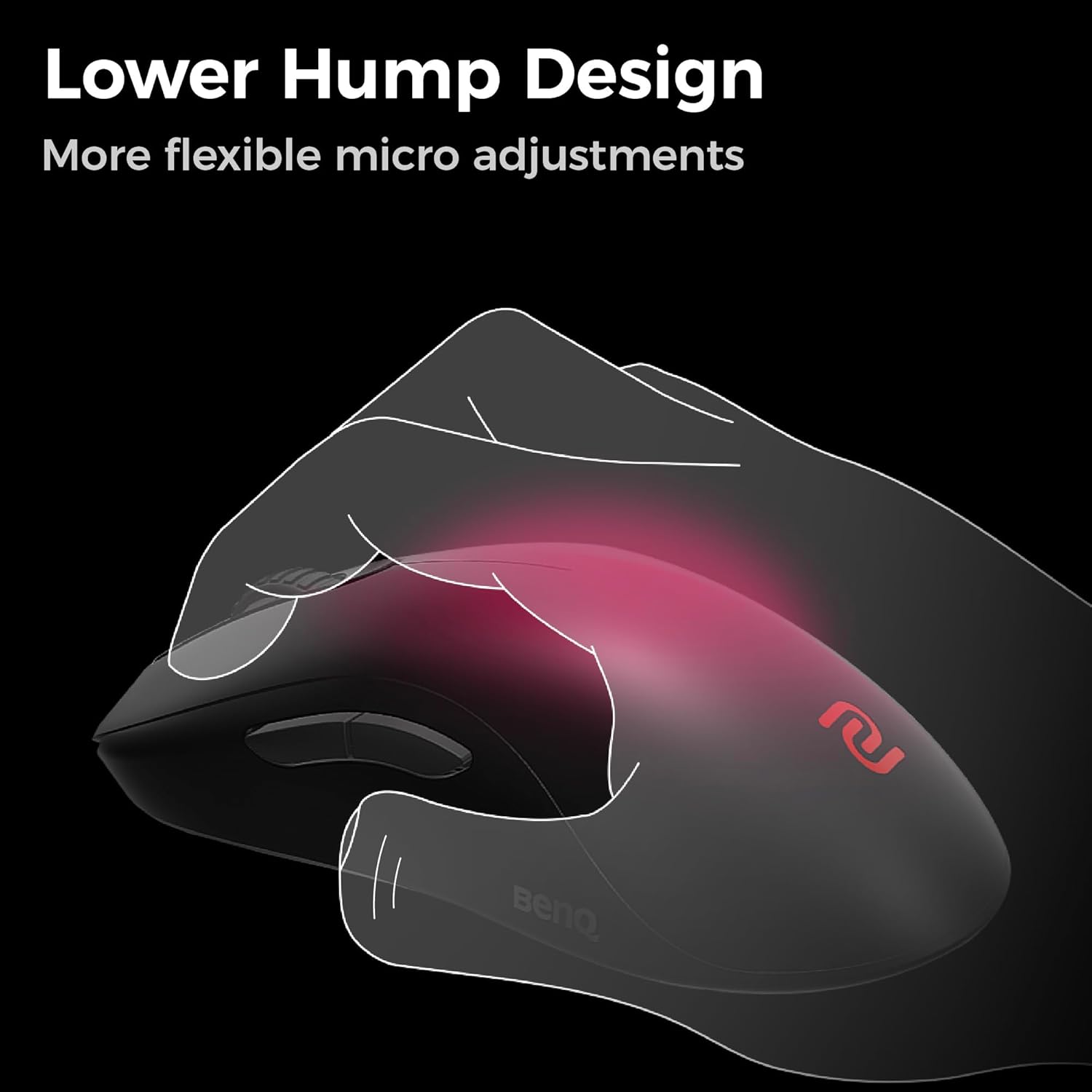
Image: An illustrative diagram demonstrating how the lower hump design of the mouse provides space for micro-adjustments during use.

Image: A visual representation of the mouse's sharper angle, designed to facilitate quicker and more efficient mouse lifting.

Image: An illustration highlighting the right-side curved design of the mouse, intended to improve aiming accuracy.
Charging and Battery Life
The BenQ Zowie FK2-DW mouse is equipped with a rechargeable battery. When the battery level is low, an indicator light on the mouse may signal this condition. To charge, simply place the mouse on its charging dock. The dock also functions as the wireless receiver, offering a convenient all-in-one solution.
Battery life can vary based on usage patterns, especially the selected polling rate. Higher polling rates (e.g., 1000 Hz) consume more power than lower ones (e.g., 125 Hz).
Maintenance
- Cleaning: Use a soft, dry cloth to clean the mouse surface. For stubborn dirt, a slightly damp cloth can be used, but ensure no moisture enters the mouse's internal components. Avoid using harsh chemicals or abrasive materials.
- Sensor Maintenance: Periodically inspect the optical sensor on the bottom of the mouse for dust or debris. Use a can of compressed air to gently clear any obstructions. Do not touch the sensor directly.
- Mouse Skates: The mouse comes with replacement skates. If the existing skates show significant wear, affecting glide performance, they can be replaced. Carefully peel off the old skates and apply the new ones, ensuring they are clean and properly aligned.
- Storage: When not in use for extended periods, store the mouse in a cool, dry place. It is recommended to turn off the mouse to conserve battery life.
Troubleshooting
| Problem | Possible Cause | Solution |
|---|---|---|
| Mouse not responding | Low battery; Receiver disconnected; Mouse powered off; Interference. | Charge the mouse; Reconnect the receiver; Turn on the mouse; Move receiver closer or away from other wireless devices. |
| Erratic cursor movement | Dirty sensor; Unsuitable surface; Interference. | Clean the sensor; Use on a clean, uniform mouse pad; Reduce wireless interference. |
| Mouse not charging | Cable not connected properly; Faulty USB port; Mouse not seated correctly on dock. | Check cable connections; Try a different USB port; Ensure mouse is properly aligned on the charging dock. |
| Buttons or scroll wheel unresponsive | Software conflict; Physical obstruction. | Restart computer; Check for physical debris around buttons/scroll wheel. |
If the problem persists after attempting these solutions, please contact BenQ Zowie customer support for further assistance.
Specifications
| Feature | Detail |
|---|---|
| Brand | BenQ |
| Model Number | FK2-DW |
| Connectivity Technology | Wireless (USB Receiver) |
| Movement Detection Technology | Optical (3950 Sensor) |
| Color | Black |
| Special Feature | Wireless, Symmetrical Design |
| Product Dimensions | 8 x 8 x 4 inches |
| Item Weight | 1.19 pounds |
| Manufacturer | BenQ |
| Date First Available | October 10, 2024 |

Image: Detailed diagram illustrating the dimensions (length, width, height) and weight of the FK2-DW mouse.
Warranty and Support
For warranty information and technical support, please refer to the official BenQ Zowie website or the warranty card included with your product. Keep your proof of purchase for warranty claims.
No official product videos were available for embedding based on the provided data.