
1. Introduction
This manual provides detailed instructions for the Briidea Sump Pump Alarm with Dual Power Supply, Model LD-150. This device is designed to monitor water levels in sump pits, septic tanks, and other water systems, alerting you to high water conditions to prevent potential flooding and property damage. It features a dual power supply for continuous operation and a loud alarm with a visual indicator.
2. Product Overview
The Briidea Sump Pump Alarm system includes the main alarm unit, a 10 ft float switch, and a 12V power adapter. Key features include:
- Dual Power Supply: Operates via a 12V AC power adapter with a built-in rechargeable lithium battery for backup during power outages.
- High Water Detection: Utilizes a float switch to detect elevated water levels.
- Audible Alarm: Produces a 110 dB alarm sound to ensure alerts are heard.
- Visual Indicator: Features a large LED warning light for clear visual alerts.
- Test Button: Allows for easy verification of system functionality.
- Weatherproof Enclosure: IP67-rated components suitable for both indoor and outdoor installations.
- Adjustable Detection Range: 10 ft float switch and 6 ft power cord provide flexibility in installation.
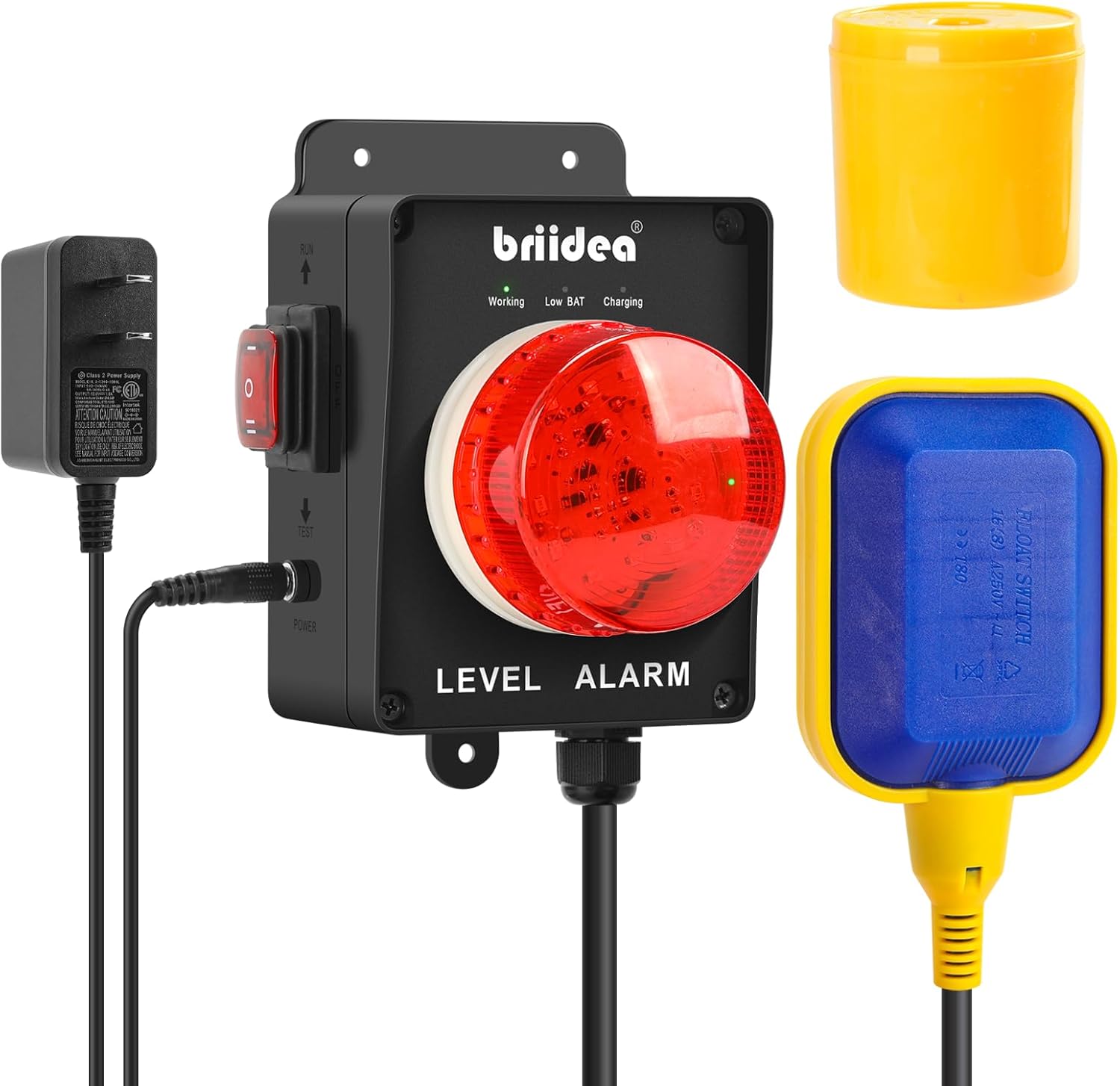
Figure 2.1: Main components of the Briidea Sump Pump Alarm system, including the alarm unit, power adapter, and float switch.

Figure 2.2: Visual representation of the alarm's key features, including dual power, 110dB alarm, LED warning light, and weatherproof design.
3. Safety Information
WARNING: Read all instructions before installation and operation.
- Ensure the power supply is disconnected before performing any installation or maintenance.
- Do not immerse the main alarm unit in water. Only the float switch is designed for water immersion.
- Verify that the power adapter is compatible with your local electrical standards (12V DC output).
- Keep the alarm unit and wiring away from moving parts or extreme heat sources.
- This device is an alarm system and does not prevent flooding directly. It provides an alert to allow for timely intervention.
4. Setup and Installation
Proper installation is crucial for the reliable operation of your Briidea Sump Pump Alarm.
- Choose a Location: Select a suitable location for the main alarm unit. It should be easily accessible for testing and visible for the LED indicator. For outdoor use, ensure the unit is securely mounted and the IP67 rating is maintained.
- Mount the Alarm Unit: Securely mount the alarm unit to a wall or post using appropriate fasteners. Ensure it is mounted vertically.
- Install the Float Switch:
- Position the float switch in the sump pit, septic tank, or water tank at the desired high-water alarm level.
- Ensure the float switch has free movement and will not be obstructed by pipes, wires, or debris.
- Use a cable tie or clamp to secure the float switch cable to a pipe or other stable structure, allowing the float to rise and fall freely. The 10 ft cable provides flexibility for various depths.
- Connect Power:
- Plug the 12V AC power adapter into a standard electrical outlet.
- Connect the adapter's output plug to the "POWER" input jack on the alarm unit.
- The unit will begin charging its internal backup battery. The "Charging" indicator light will illuminate.
- Initial Test: After installation, perform a test by manually lifting the float switch to simulate a high water level. The alarm should sound (110 dB) and the LED warning light should activate. Press the "TEST" button on the unit to verify the alarm and light functionality.

Figure 4.1: Example installation diagram for a sump pump application. The alarm unit is wall-mounted, and the float switch is positioned within the pit.

Figure 4.2: The alarm unit connected to a power outlet, highlighting the dual power supply feature with AC power and backup battery.
5. Operating Instructions
The Briidea Sump Pump Alarm is designed for straightforward operation.
- Power On/Off: Use the red toggle switch on the side of the unit to turn the alarm system on or off. Ensure it is in the "ON" position for continuous monitoring.
- Status Indicators:
- "Working" LED: Illuminates green when the unit is powered and operating normally.
- "Low BAT" LED: Illuminates red when the internal backup battery is low and requires charging.
- "Charging" LED: Illuminates when the unit is connected to AC power and the internal battery is charging.
- Alarm Activation: When the water level rises and lifts the float switch, the 110 dB audible alarm will sound, and the large red LED warning light will flash.
- Alarm Deactivation: The alarm will cease once the water level drops below the float switch's activation point, or if the unit is manually turned off. Address the cause of the high water immediately.
- Test Function: Periodically press the "TEST" button on the unit to confirm the alarm sound and LED light are functioning correctly. This is recommended monthly.

Figure 5.1: The alarm unit demonstrating its 110 dB sound output and bright LED warning light.
6. Maintenance
Regular maintenance ensures the longevity and reliability of your alarm system.
- Monthly Test: Press the "TEST" button monthly to ensure the alarm and LED light are operational.
- Float Switch Inspection: Periodically check the float switch for any obstructions, debris, or damage that might prevent its free movement. Clean if necessary.
- Power Connection: Ensure the power adapter is securely plugged into the outlet and the alarm unit.
- Battery Check: Monitor the "Low BAT" indicator. If it illuminates, ensure the unit is connected to AC power to recharge the backup battery.
- Clean Enclosure: Wipe the alarm unit's exterior with a damp cloth as needed. Do not use harsh chemicals.
7. Troubleshooting
| Problem | Possible Cause | Solution |
|---|---|---|
| Alarm does not sound during test or high water. |
|
|
| "Low BAT" indicator is on. |
|
|
| Alarm sounds continuously or falsely. |
|
|
8. Specifications
| Feature | Detail |
|---|---|
| Model Number | LD-150 |
| Voltage | 12 Volts (DC) |
| Control Method | Touch (Test Button) |
| Mounting Type | Wall Mount |
| Sensor Technology | Float Sensor |
| Item Weight | 2.46 pounds |
| Product Dimensions (Alarm Unit) | Approximately 3.7 inches (W) x 5.5 inches (H) (excluding mounting bracket and cables) |
| Style | with Dual Power Supply |
| Power Source | Corded Electric, Battery Powered |
| Battery Type | Rechargeable Lithium (backup) |
| Float Switch Cable Length | 10 ft |
| Power Cord Length | 6 ft |
| Alarm Loudness | 110 dB |
| Weatherproof Rating | IP67 |

Figure 8.1: Product dimensions for the alarm unit and its components.
9. Warranty and Support
For warranty information or technical support, please contact Briidea customer service. Refer to the product packaging or the official Briidea website for the most current contact details.
Manufacturer: briidea
ASIN: B0DJV3ZGGN